
In a recent survey of 700 finance and business leaders, 31% named reconciling accounts between entities as their biggest monthly pain point, with another 26% pointing to the month-end close itself.
The gap between fast and slow closes is linked to how the month-end close process is designed: which reconciliations happen weekly, which reports are pulled in what order, and how cleanly different systems hand data to the general ledger.
This guide walks business owners, controllers, CFOs, and accounting teams in retail, ecommerce, and SaaS through the full month-end close process step by step, the reports to produce, the common pitfalls, and the tooling decisions that decide whether the close lands fast and clean.
TL;DR
- Month-end close ensures complete and accurate financials: It finalizes all transactions, reconciles accounts, and locks the period so reports can be trusted.
- It directly impacts decision-making: Clean closes help catch issues early, ensure correct revenue and expense recognition, and prevent problems from compounding over time.
- The process is structured and repeatable: Categorize transactions, reconcile accounts, and generate reports, supported by a consistent checklist across balance sheet and P&L.
- Speed comes from process, not effort: Top teams close in 3–5 days by reconciling continuously, standardizing entries, and automating data flows.
- Accurate transaction recording is critical: Revenue must be recorded at gross, with fees, tax, and refunds separated; using net deposits leads to misstatements.
What is the month-end close?
The month-end close is the set of accounting tasks that finalize a company’s books for a calendar or fiscal month, so that financial statements can be issued with confidence. It covers:
- Reconciling balance-sheet accounts
- Recording accruals and adjusting journal entries
- Reviewing the income statement for completeness
- Locking the period in the accounting software so no further changes slip in
Closing the books, in plain terms, means the records in the accounting software are complete and ready to produce financial statements. The emphasis lies on completeness and accuracy: every transaction the business actually entered into is captured, classified, and reconciled before any reports leave the finance team’s hands. Locking the period is the last button you press; the work is making sure nothing is missing or wrong before you press it.
Why the month-end close matters
A clean monthly close is the heartbeat of financial reporting. Without it, leadership decisions are made on stale or incomplete data, lenders and investors get conflicting numbers, and audit cycles balloon because every quarter inherits the prior quarter’s mistakes.
Beyond the obvious – accurate financials – the close is also where you catch business problems early. A revenue dip you spot on day six of the month is fixable, but the same dip identified 45 days later usually isn’t.
The close is also the moment when accruals, deferred revenue, and inventory write-downs get recognized, which means the income statement actually reflects the period’s economic activity rather than just its cash movements.
For ecommerce and retail businesses with thousands of daily transactions across Shopify, Amazon, Square, and other channels, a working close process is the difference between trusting your numbers and re-running them every time someone asks a question. SaaS companies face their own version of the problem: deferred revenue waterfalls, multi-element arrangements under ASC 606, and prepayments that have to be amortized correctly each month.
How the month-end close works
In practice, the month-end close starts the moment the calendar flips. Most finance teams target days 1–7 of the new month for the close of the previous month, with the CFO checking in around day five or six to ask whether the financials are ready for review.
The four steps in the closing process
The textbook closing process, which is the one accountants learn above all else, has four steps that move temporary accounts to permanent ones at the end of the period:
- Close revenue accounts to income summary. All revenue accounts get debited, and the total is credited to a clearing account called income summary.
- Close expense accounts to income summary. Every expense account is credited, and the income summary is debited for the total.
- Close income summary to retained earnings. The net income (or loss) sitting in the income summary moves into retained earnings, which is a permanent equity account.
- Close dividends or owner withdrawals to retained earnings. Any distributions are zeroed out against retained earnings.
In modern accounting software, these closing entries happen automatically when you lock the period, but the logic still drives why the income statement starts each month at zero while the balance sheet rolls forward.
Most of what finance teams call “the month-end close” is the operational work that happens before these textbook entries: the reconciliations, accruals, and reviews that make sure the revenue and expense balances are right in the first place.
Note: For smaller businesses working with an outsourced bookkeeper, the close is also the handoff point between bookkeeping and tax. The bookkeeper’s deliverable is a clean set of monthly financial reports, which become the tax accountant’s input at year-end. For a high-volume bookkeeping practice, a clean close every month is the product the client is paying for. And for a venture-backed SaaS controller, the close is the input to a board package. The mechanics are the same, only the audience differs.
A simpler way to think about it: three buckets
For anyone new to the process, the close collapses into three repeating steps every month:
- Categorize transactions
- Reconcile accounts
- Generate financial reports
The longer 13-task checklist further down maps cleanly onto those three buckets. Categorization handles every transaction that hits the bank feed, reconciliation makes sure the books match the world (bank, credit card, sub-ledger, warehouse), and reports translate the closed books into something leadership or the tax accountant can act on.
Month-end close checklist: 13 tasks worth doing every month
A working month-end close checklist runs top to bottom of the balance sheet, then through the income statement, then ends with two sanity-check reviews (discussed a bit later). The list below covers the 13 tasks worth running every month for any retail, ecommerce, or SaaS business. Each task answers a different question about completeness and accuracy.
| # | Account / area | What you’re checking | Common pitfall |
| 1 | Cash and bank accounts | Bank reconciliation: ending balance per bank ties to ledger | Unrecorded fees, stale checks, duplicate deposits |
| 2 | Accounts receivable | Invoices match shipments/contracts; aging ties to GL | Missing invoices, wrong cutoff dates |
| 3 | Prepaid expenses | Amortization schedule matches GL balance | Expired prepaids never amortized |
| 4 | Inventory | SKU counts tie to warehouse report; obsolescence reviewed | Variance between system and warehouse, expired stock |
| 5 | Property, plant & equipment (PP&E) | Capitalize qualifying purchases; run depreciation; review for obsolete assets | Capex booked as expense, missed depreciation |
| 6 | Accounts payable | All vendor invoices logged; sub-ledger ties to GL; aging healthy | Invoices stuck in inboxes, double-recorded bills |
| 7 | Credit cards | Statement balance ties to GL; expenses categorized correctly | Personal vs. business categorization errors |
| 8 | Accrued expenses | Schedule reviewed for reasonableness; reverse anything now invoiced | Double-counting between accruals and AP |
| 9 | Deferred revenue | Schedule by customer; recognize earned portion | Recognizing revenue too early or too late |
| 10 | Long-term debt | Loan balance ties to lender statement; interest accrued | Missing interest accruals, wrong principal/interest split |
| 11 | Revenue (P&L) | Recognized per ASC 606; problematic contracts flagged | Cash-basis recognition on accrual books |
| 12 | Operating expenses (P&L) | Accruals booked for incurred-but-unpaid expenses (e.g., payroll) | Payroll cutoff missed, missing service accruals |
| 13 | Open purchase orders | Open POs reviewed; accruals booked where service rendered | Accruals missed for completed-but-uninvoiced work |
Soft close and hard close
The month-end close is often described as a single event at month-end, but in practice, most disciplined finance teams operate two parallel cadences: a soft close that runs weekly or daily through the month, and a hard close that locks the period.
The soft close produces preliminary numbers without formal completion. Reconciliations are partial, accruals may use prior-month estimates, and the period stays open to adjustments. Its purpose is management reporting in flight:
- A Monday morning P&L
- A mid-month cash position
- A sales-channel reconciliation against the prior week.
Numbers are directional but adjustable, and leadership reviews them, knowing the final figures will be different.
The hard close is the formal version:
- Every balance-sheet account is reconciled
- Every accrual is booked against incurred-but-unpaid activity
- The trial balance is finalised
- The period is locked
The output is the audit-ready report package: financial statements that can support a board meeting, a tax return, a lender review, or a 409A valuation. Once the period is locked, no further entries post to it; corrections move to the next period as prior-period adjustments.
Where each one applies
| Soft close | Hard close | |
| Cadence | Weekly or daily | Monthly, quarterly, annually |
| Reconciliations | Partial, in progress | Complete and signed off |
| Accruals | Estimated where data is missing | Booked against actual activity |
| Period | Open | Locked, no further entries |
| Audience | Internal management, in-period decisions | Board, auditors, lenders, tax |
| Auditable | No | Yes |
| Trade-off | Speed over precision | Precision over speed |
Although both cadences serve operational purposes within finance, only the hard close produces output that meets external standards, which is what makes the report package the natural endpoint of the close cycle. And the next section turns to that package.
What reports to generate during the month-end close
The standard reporting package leaving the close should include, at a minimum:
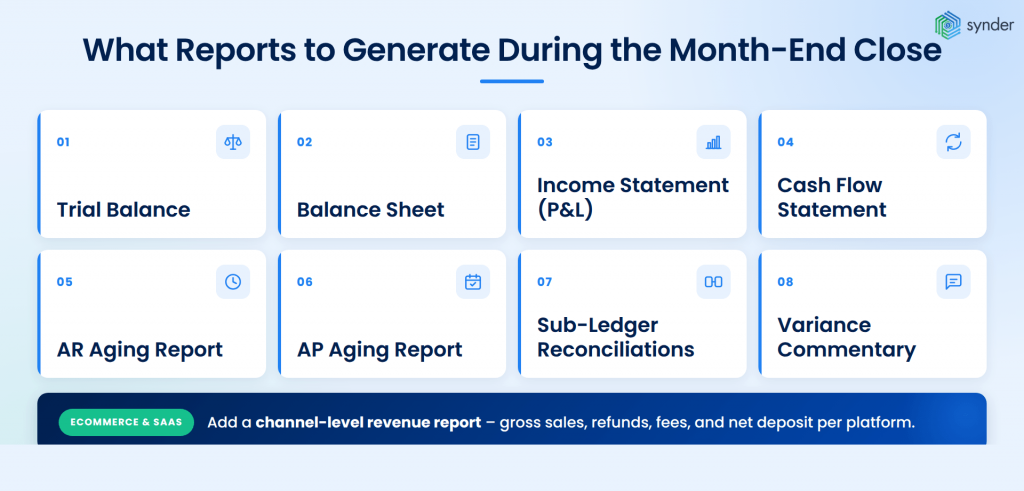
- Trial balance (pre-close and post-close) to confirm debits equal credits and to spot accounts that look off.
- Balance sheet with comparative columns vs. prior month and prior year.
- Income statement (or P&L) with comparative columns and budget-to-actual variance.
- Cash flow statement, ideally produced from the indirect method using the comparative balance sheets and income statement.
- AR aging and AP aging reports for working-capital visibility.
- Sub-ledger reconciliations for AR, AP, inventory, and fixed assets, each tied back to the GL.
- Variance commentary explaining month-over-month and budget-to-actual swings above a defined threshold.
For ecommerce and SaaS businesses, add a channel-level revenue report showing gross sales, refunds, fees, and net deposits per platform.
Two sanity checks before sending any reports out:
- Confirm cash vs. accrual basis. Reports run on the wrong basis make revenue and expenses look wildly off, and clients or executives can lose trust in the whole package over a single misset toggle. If a business files taxes on an accrual basis, the management package should match.
- Check the balance sheet before the P&L. Every line item on the balance sheet should make sense at a glance. Old payroll liabilities, a stuck Undeposited Funds balance, and prepaid expenses that should have amortized away are common warning signs that something on the income statement is wrong, too. Don’t ship the P&L until the balance sheet ties.
How long should the month-end close take?
There is no single right answer, but the benchmarks are clear. According to Ledge’s 2025 finance benchmarks, 18% of finance teams close in 1–3 business days, 32% in 4–5 days, 23% in 6–7 days, and 27% take more than seven days every month. The APQC benchmark for the median close cycle is around six business days overall.
What separates the fast 18% from the rest isn’t headcount or budget, but process design. Top performers run reconciliations weekly, so month-end is a review exercise, not a recovery exercise. They standardize their journal entries, automate transaction-level data feeds from sales and payment platforms, and treat the close calendar as a real deliverable with named owners for each task.
| For ecommerce and SaaS businesses specifically, three to five days is a realistic target once data flows are connected. The teams stuck at seven-plus days are usually the ones still pulling raw transaction exports from each sales channel and re-keying them into QuickBooks or NetSuite by hand. |
What experts say
Set interim goals to shave a day off the process each month or two and foster an expectation of continuous improvement.
Sean Drolet, CPA, Controller at Boulder Care
Drolet’s framing matters because most close-process improvements fail when they’re scoped as a single “rebuild the close” project. A six-day close doesn’t usually become a three-day close in one quarter – it becomes a five-day close, then four, then three, with each cycle removing one specific bottleneck.
For retail, ecommerce, and SaaS finance teams, that means picking one weak point per close cycle and fixing it before the next. In month one, that might be moving bank reconciliation from monthly to weekly. In month two, automating the data feed from Stripe or Shopify into the general ledger. In month three, standardizing the prepaid-expense schedule. None of these changes alone is dramatic, but together over a year, they make the close much faster.
Companies that automate the recurring pieces of the close can cut month-end reconciliation time by as much as 95%. One SaaS finance team we work with went from two days of work each month down to about 40 minutes, recovering roughly 180 hours of finance time a year.
It now takes me about 40 minutes to finish and review a month’s data, whereas manually, it would have taken at least two days.
Olena Svoiak, Financial Manager
Tools that can compress the close
Three categories of tools tend to be included in faster-close stacks:
- Close management platforms like FloQast, BlackLine, and Numeric, which provide structured checklists, task assignments, and reconciliation workflows.
- Reconciliation and data-sync tools that move transaction data from sales, payment, and bank platforms into the accounting system without manual exports.
- AP automation tools that capture vendor invoices automatically and reduce the inbox-hunting problem at month-end.
For retail, ecommerce, and SaaS teams using QuickBooks, Xero, NetSuite, or Sage Intacct, the data-sync layer is usually the first place to look. Synder is an accounting automation tool that helps businesses sync their ecommerce and financial data across 30+ platforms, including Stripe, Shopify, Amazon, PayPal, and Square, so multi-channel sales, fees, and refunds land in the accounting system in a clean, reconcilable shape. That doesn’t replace the close, but it removes one of the bigger sources of close-week friction.
If you want to see how this works, you can book a walkthrough with Synder.
Getting payment processor revenue and fees right at the close
For any business taking card payments through Stripe, Square, PayPal, Shopify Payments, or similar, the easiest way to misstate revenue at the close is to book what reaches the bank instead of what the customer actually paid. A single deposit covers revenue, fees, sales tax, and refunds at once, so one wrong entry pulls four general ledger accounts off in the same move. The error catches up at month-end, when the revenue line, the fee line, and the sales-tax liability need to reconcile and they don’t.
Mechanically, the processor deposit is the net amount: gross sale, minus the processor fee, minus sales tax held on your behalf, sometimes minus refunds and chargebacks from earlier transactions. So a $129.50 charge on a $120 item with $9.50 sales tax arrives in the bank as roughly $116.50 after a $3.50 Stripe fee.
By month-end, hundreds or thousands of such deposits have to be unpicked back into their components – one bank credit, four general-ledger accounts.
Why the net deposit isn’t your revenue
Recording that $116.50 as revenue at the close undercounts the top line, hides the processor cost from the P&L, treats sales tax you owe the state as income, and makes margin analysis impossible. Every component has to be split out before the books can close cleanly:
- Debit cash $116.50 (the deposit)
- Debit processor fees $3.50 (an expense)
- Credit revenue $120.00 (the gross sale, net of tax)
- Credit sales tax payable $9.50 (a liability, not revenue)
Refunds, chargebacks, and FX gains or losses on international sales get their own line when they appear in a settlement. If you skip any of them, the close either runs late or runs wrong.
Low volume vs high volume: same principle, opposite workflows
At low volume, transaction-level sync works: every Stripe charge, Shopify order, or PayPal payment posts to the books with fees, tax, and refunds broken out, and reconciliation at the close runs against the same line-level detail.
At higher volumes, transaction-level sync overloads the GL. Tools like QuickBooks Online slow down under thousands of daily entries, and line-by-line review at the close becomes impractical. Higher-volume businesses move to summary journal entries per day or per payout: totals for sales, fees, refunds, tax, and net cash captured in one entry, with the line-level detail held in source systems or a reconciliation tool. The close pulls from the summaries, and the granular data is available in the source platforms (Stripe, Shopify, Square, Amazon Seller Central) or the reconciliation tool, if a question comes up later.
One rule holds at any volume: month-end entries have to be built from actual transaction-level data, not bank deposits. Closing from bank totals papers over errors instead of finding them.
Marketplace and platform fees aren’t one line item
Marketplace and platform-specific fee structures make the close harder. An Amazon settlement isn’t one fee: it’s referral fees, FBA fulfilment fees, storage fees, advertising charges, reserves held back, and marketplace facilitator tax that Amazon collects and remits on your behalf but still flows through your settlement gross.
Shopify Payments is recorded differently from a third-party gateway used on Shopify. Each fee type needs to be mapped to the right GL account during the close, otherwise COGS, operating expenses, and tax all end up mixed together under something like “Stripe fees”, which makes the margin numbers in the close package effectively meaningless.
| The takeaway: when transactions are recorded correctly through the month, the close produces a clean view of gross sales, fees, refunds, sales tax, and net cash by channel. When they’re not, even simple margin questions force the team back through the raw data to reconstruct what happened, and the close drags on while finance does it. |
How to close a month in QuickBooks, NetSuite, and other systems
Different ERPs and accounting software handle the closing entries automatically, but the operational close still depends on the team’s checklist. Here’s how the workflow shifts by platform:
NetSuite
NetSuite’s Period Close Checklist is built into the platform under Setup > Accounting > Manage Accounting Periods.
The standard sequence runs through:
- Reviewing transactions
- Resolving exceptions
- Eliminating intercompany balances
- Posting GL adjustments
- Running revaluation for foreign currencies
- Locking the period
Each step has a sign-off, so multiple users can split the work, and the system tracks completion. NetSuite also runs depreciation through the Fixed Assets Management module, which removes the most common manual journal entry.
QuickBooks Online and Desktop
QuickBooks doesn’t have a built-in close checklist as structured as NetSuite’s, but it does support setting a closing date with a password to prevent edits to prior periods.
Most teams running QuickBooks pair it with an external checklist (a shared sheet or a third-party tool) and book depreciation, deferred revenue amortization, and major accruals as manual journal entries.
Workday Financial Management
For larger enterprises running Workday, the close lives inside Workday’s Period Close business process, which sequences the operational steps:
- Sub-ledger close (revenue, payables, expenses, assets)
- Period-end accounting
- Allocations
- Eliminations
- Journal posting before the period is locked
Workday tracks the close on a built-in dashboard with task ownership, status, and timing, so the controller can see exactly where the bottleneck sits each month. Because Workday is a single ledger across HR, finance, and operations, much of the data feeding the close is already in the system, which is what allows mature Workday customers to run a continuous.
Xero, Sage Intacct, and others
Xero supports lock dates similar to QuickBooks, plus advisor-only edits for adjusting entries. Sage Intacct, for example, includes period-close workflows with multi-entity consolidation, useful for groups with several subsidiaries. The pattern across all platforms is the same: the system handles the mechanical close, but the operational close, including reconciliations, accruals, reviews, depends on the team.
| The point is to make sure that when day one of the new month arrives, the data is already in the system and reconciled, not waiting in a CSV download. That’s the design brief behind automation platforms like Synder: continuous, structured feeds from payment, ecommerce, and POS systems into the general ledger, so the close becomes a review step. |
Common pitfalls that delay the close
In our experience across over 1000 businesses we’ve onboarded since late 2024, there isn’t a single biggest pain point for the close. There are several, and which one bites depends almost entirely on what kind of business you run.
Manual data entry shows up everywhere (41.5% of the sample), but it’s a symptom. The diagnosis changes by industry.
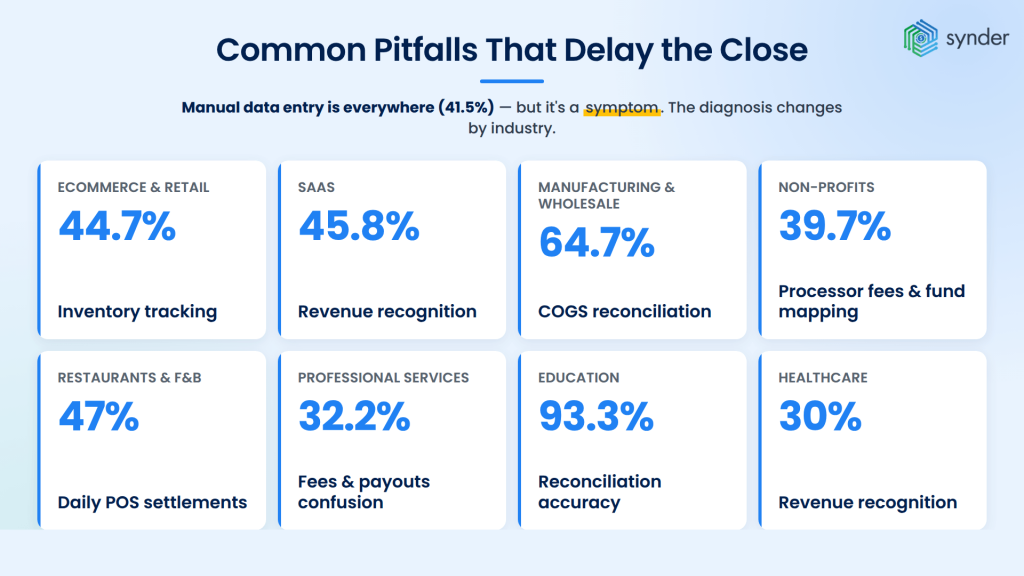
For ecommerce and retail, the close drags on COGS. Inventory tracking appears in 44.7% – tied mainly with manual entry. Shopify and Amazon push sales data, but neither pushes cost data into the GL. And margin stays unreliable until someone fixes it by hand at month-end.
For SaaS, it’s revenue recognition. 45.8% of SaaS teams flag it, which is three times the cross-industry rate. Stripe sits in 91.5% of stacks, and its payout netting makes gross revenue hard to reconstruct from bank deposits. Reported revenue ends up wrong in two ways at once: understated at the gross level, and misallocated between earned and deferred.
For manufacturing and wholesale, it’s COGS again, but harder. 64.7% of operators flag it, the sharpest single-sector signal we’ve found. B2B net-30 invoicing runs alongside Shopify and Amazon settlements, and no single tool reconciles that mix cleanly.
For non-profits, it’s fund attribution. Donations arrive net of processor fees (39.7% flag this), and every dollar has to be tied back to the correct fund, program, or grant (24.1% flag mapping issues – third-highest in any segment). Auditors and funders catch the discrepancies every time.
For restaurants and food & beverage, the close runs daily, not monthly. Square and Clover (the only segment where Clover hits 47%) batch tips, voids, discounts, and fees into one end-of-day settlement that doesn’t map onto any standard accounting entry. Multi-site operators carry that workload across every location, every day.
For professional services, the volume is lower, but the precision required is higher. Fees and payouts confusion surfaces in 32.2% of the segment: Stripe payments arrive net of processor fees, and tying each one back to the right open invoice across a few dozen clients is where the close stalls. A single mismatch creates material month-end discrepancies that don’t resolve themselves.
For education and healthcare, the picture is different again. Education teams (Stripe in 93.3% of stacks) struggle with reconciliation more than data entry, which is accuracy and audit-readiness, not throughput. Healthcare flags revenue recognition at 30% – almost double the average – and has the highest tool-replacement rate in the dataset (30%), meaning these teams have already tried automating and walked away.
| The through-line: The symptoms differ by industry, but the fix is the same shape. Accounting automation feeds payment, ecommerce, and POS data into the general ledger continuously, with fee, refund, payout, and classification logic built in, so the inventory, revenue-recognition, fund-attribution, and reconciliation gaps don’t need closing by hand at month end. The close becomes a review step, not a rebuild. |
Best practices for a faster, cleaner monthly close
A few practices show up consistently across the finance teams that close fast:
- Reconcile weekly, not monthly. Cash and credit cards, in particular, are easier to handle in small batches than as a single 30-day pile.
- Keep a written close calendar with named owners. Each task on the checklist needs an owner, a due day, and a reviewer.
- Standardize recurring journal entries. Depreciation, prepaid amortization, and accruals that repeat every month should be templates, not from-scratch builds.
- Build a hard cutoff for invoice and expense submission. Day one or day two of the new month is realistic; later than that, and the close timeline slips.
- Document the process. A close that lives in one person’s head breaks the moment that person takes vacation. Write the checklist, the journal entry templates, and the report definitions down.
- Review variances before the CFO does. A variance commentary written by the team is far more useful than one written under pressure when leadership asks why marketing spend is up 18%.
Conclusion: building a month-end close process you can rely on
A reliable month-end close produces financial statements leadership, lenders, and auditors can trust, on a consistent timeline every month, without burning out the team during close week. In a three-day close, most of the work is finished before month-end arrives; reconciliation and accrual work run in weekly cycles.
The mechanics in this guide – reconciling each balance-sheet account, booking accruals, running variance analysis, and locking the period – form the universal core of the close across retail, ecommerce, and SaaS. The accelerators are weekly reconciliation cadence, automated data feeds from sales and payment platforms, and a written checklist with named owners. Get those right, and the close stops being a monthly emergency.
FAQ
How is a month-end close different from a year-end close?
A month-end close finalizes the books for one month and produces interim financials. A year-end close adds annual adjusting entries (final depreciation, tax provisions, reclassifications) and prepares the books for audit and tax filing. The year-end close is more rigorous and usually takes longer than a typical month-end.
Should I use a soft close or a hard close every month?
A soft close skips some less-material adjustments (immaterial accruals, certain reclassifications) to produce faster preliminary financials, then hard-closes at quarter-end. Many high-volume ecommerce and SaaS teams soft-close in months one and two of each quarter and hard-close in month three. Public companies typically hard-close every month.
What’s the role of the controller versus the CFO during the close?
The controller owns the operational close: running the checklist, reviewing journal entries, signing off on reconciliations, and producing the financials. The CFO reviews the output, signs off on variance commentary, and uses the financials for board reporting and decision-making. The controller’s job is accuracy; the CFO’s job is interpretation.
How do you handle inter-company transactions during close?
Inter-company balances need to net to zero at the consolidated level. Each entity records its side of the transaction, and the parent company eliminates the matching pair during consolidation. Sage Intacct, NetSuite OneWorld, and other multi-entity ERPs automate the elimination; smaller groups often handle it with a consolidation worksheet in Excel.
Can the month-end close ever be fully automated?
Not entirely – judgment calls (revenue recognition under ASC 606, asset write-downs, accrual estimates) still require human review. What can be automated is the data-collection and reconciliation layer: pulling transactions from sales and payment platforms, matching them to bank deposits, and flagging exceptions. That alone typically removes 30–50% of close-week hours.