| Short answer: Balance sheet reconciliation compares each general ledger balance with independent supporting documentation, like a bank statement or aging report, and explains every difference. It’s usually done monthly as part of the close, and a reviewer who didn’t prepare the work signs off. |
Reconciliation proves the balance sheet reflects the company’s actual financial position on a given date. That matters more as sales move online: ecommerce made up 17.1% of US retail sales in Q2 2026, according to the U.S. Census Bureau. Those sales reach the bank as net payouts, so cash can tie out while a Stripe or Shopify clearing account never reaches zero.
This guide shows how to reconcile every account and prove each balance before you close the books. In it, you can:
- Follow 7 steps, from trial balance to reviewer sign-off.
- Check which accounts to reconcile monthly or quarterly in one table.
- Copy worked examples with journal entries, plus a month-end checklist for QuickBooks and Xero.
What is balance sheet reconciliation?
In balance sheet account reconciliation, the independent source is a document produced outside the ledger and dated the same day as the ledger balance, such as a bank statement or a schedule you maintain.
Think of a store owner whose books show $40,000 in cash while the bank shows $38,600. The reconciliation either explains the $1,400 with documents or finds the entry that caused it.
Each account you reconcile is part of the accounting equation that the balance sheet follows:
Assets = Liabilities + Shareholders’ Equity
For checks on individual transactions instead of period-end balances, see our guide to account reconciliation.
Regular reconciliation of balance sheet accounts protects you in four ways:
- Compliance: your GAAP financial statements need supported balances. Public companies also assess internal control under SOX Section 404, where a reconciliation failure can become a material weakness.
- Credibility: audit-ready books shorten audits and make lender reviews faster, because every figure comes with evidence.
- Early detection: duplicates and unauthorized transactions appear as reconciling items while they’re still easy to trace.
- Clean carry-forward: balance sheet accounts roll into the next period, so an error you correct this month doesn’t stay in every later balance.
The need is widespread: in onboarding data from Synder, an accounting automation platform, reconciliation problems showed up in 285 of the 884 businesses with an identified industry (32.2%) between September 2024 and March 2026.
How to reconcile balance sheet accounts step by step
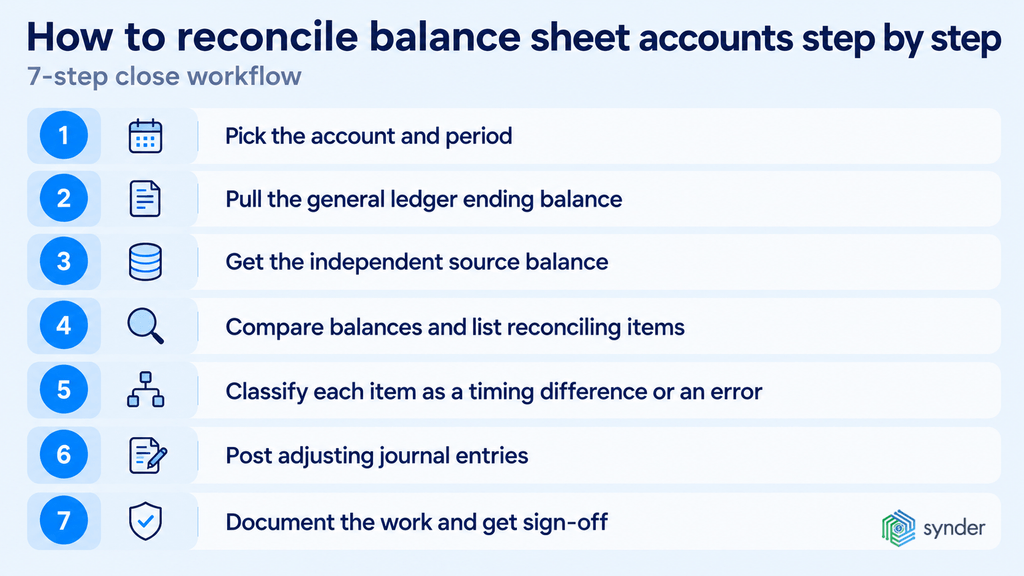
To reconcile balance sheet accounts, you need to compare each ledger figure with an independent source and explain every difference before a reviewer signs off. Say you run a Shopify store and close March on April 5: you’d work through the same seven steps for every account, starting with cash and the processor clearing balance.
Step 1: Pick the account and period
Start with one account and a fixed period end, such as cash at March 31. Work from your trial balance so you don’t skip a balance sheet line, and handle your riskiest items first.
Step 2: Pull the general ledger ending balance
Run the trial balance or Balance Sheet report as of the last day of the period and note the closing figure. Roll forward from last period’s approved reconciliation: start from its signed-off balance, so you only have to explain this period’s activity and open items. If the opening number doesn’t match last month’s signed-off result, an entry was posted to or changed in a closed period, and you fix that first.
Step 3: Get the independent source balance
Get the supporting figure for the same date from one of these sources:
- A bank statement
- A subledger, such as the AR aging list
- A payout report
- A prepaid amortization schedule
The source has to come from outside the ledger; otherwise you’re comparing the books with themselves.
Step 4: Compare balances and list reconciling items
Compare your two figures and list every reconciling item with its amount and the reason behind it. Typical items include:
- Deposits in transit
- Outstanding checks
- Unrecorded fees
- Entries posted to the wrong period
Step 5: Classify each item as a timing difference or an error
Timing differences, like a payout initiated March 31 that reaches the bank April 2, clear on their own next period. Errors, like a duplicated sale or a missing refund, won’t clear and need a correction.
Step 6: Post adjusting journal entries
Post an adjusting journal entry for every error, with a debit and credit that move your ledger to the supported amount. Never plug the gap to force it to zero; correct the transaction that caused it.
Step 7: Document the work and get sign-off
Attach your evidence and record who prepared the work and when. Then send it to a reviewer. The balance sheet reconciliation process is complete when the unexplained difference is $0 and the reviewer has signed off.
What makes a good balance sheet reconciliation?
A good balance sheet reconciliation shows the ledger balance, the supporting balance, each reconciling item with its date, the attached evidence, and a reviewer’s sign-off. Auditors expect that evidence instead of a tick mark, and they usually request these files on a PBC (provided by client) list.
Build each workpaper on a reconciliation cover sheet with these fields:
- Account name and number
- Period end date
- General ledger balance
- Source balance, with its supporting document attached
- Tie-out between the two figures
- Reconciling items, with dates and aging
- Explanation for each item
- Adjusting entries posted
- Unexplained difference, either zero or below your threshold
- Preparer name and date
- Reviewer name and date
Which balance sheet accounts to reconcile and how often
Reconcile each balance sheet account on a cadence that matches its risk:
- High-volume or high-risk accounts: monthly or even weekly
- Low-activity accounts: quarterly
- All accounts: at year-end
If you sell through several payment platforms, such as Stripe and PayPal, you’ll need at least a monthly reconciliation for each processor clearing account. A fixed asset register with two purchases a year can wait for the quarter.
| Account | Compare against | Frequency | Typical risk |
| Cash and cash equivalents | Bank statement | Monthly | Unrecorded fees, outstanding checks |
| Processor clearing accounts, such as Stripe or PayPal | Processor payout and balance reports | Monthly or weekly | Net deposits and payouts in transit |
| Undeposited Funds (QuickBooks Online) | Bank deposits | Monthly | Payments never grouped into deposits |
| Accounts receivable | AR aging report | Monthly | Unapplied payments inflating AR |
| Inventory | Stock system or Amazon FBA inventory report | Monthly | COGS not adjusted to counts |
| Prepaid expenses | Prepaid amortization schedule | Monthly | Amortization not posted |
| Fixed assets and accumulated depreciation | Fixed asset register | Quarterly | Disposals not recorded |
| Accounts payable | AP aging report | Monthly | Bills entered twice |
| Accrued liabilities | Accrual schedule | Monthly | Accruals never reversed |
| Sales tax payable | Filed sales tax returns | Monthly or per filing period | Marketplace-collected tax booked as a liability |
| Payroll liabilities | Payroll register and tax filings | Monthly | Withholdings not remitted |
| Deferred revenue and gift card liabilities | Deferred revenue schedule or liability report | Monthly | Revenue released too early |
| Loans, such as Shopify Capital or Stripe Capital | Lender statement | Monthly | Repayments taken from payouts left unrecorded |
| Equity and retained earnings | Prior-year closing equity, net income, and owner contribution and distribution records | Year-end | Leftover amount in Opening Balance Equity |
Intercompany balances, if you run more than one entity, follow the monthly rule and should match the other entity’s books to the cent.
Balance sheet reconciliation examples
The three balance sheet reconciliation examples below use one format:
- Ledger figure
- Reconciling items
- Adjusted amount
- Source document total
- Difference of $0
A journal entry follows each one, and all amounts are hypothetical.
Example 1: Stripe clearing account at month-end
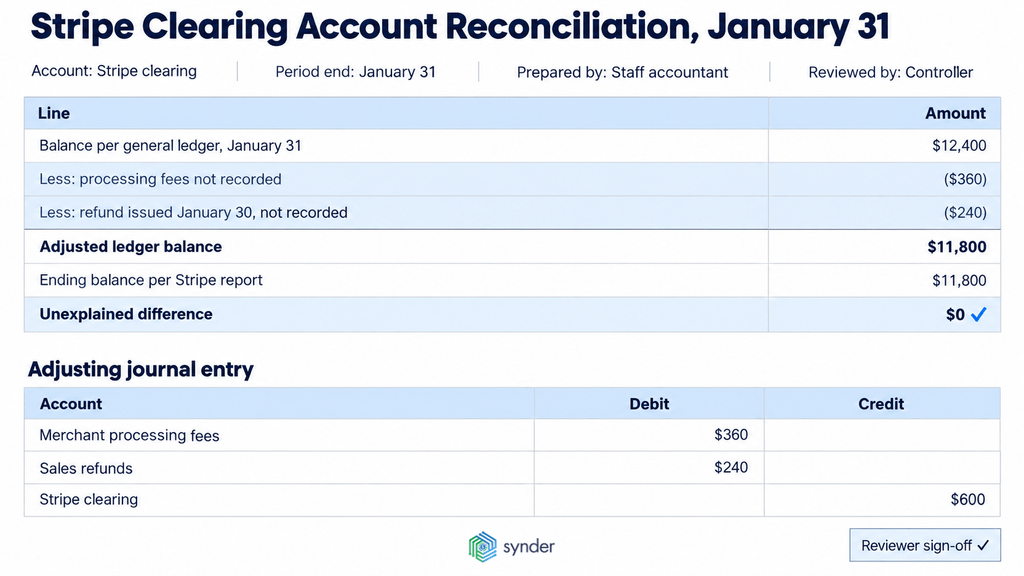
A subscription business closes January with $12,400 in its Stripe clearing account. Stripe’s payout reconciliation report shows an ending balance of $11,800 not yet paid out, so $600 needs explaining.
| Line | Amount |
| Balance per general ledger, January 31 | $12,400 |
| Less: processing fees not recorded | ($360) |
| Less: refund issued January 30, not recorded | ($240) |
| Adjusted ledger balance | $11,800 |
| Ending balance per Stripe report | $11,800 |
| Unexplained difference | $0 |
| Journal entry | Debit | Credit |
| Merchant processing fees | $360 | |
| Sales refunds | $240 | |
| Stripe clearing | $600 |
The remaining $11,800 is cash in transit for the next Stripe payout, so it stays in clearing as a legitimate balance.
Example 2: Sales tax payable against the filed return
An Amazon and Shopify seller shows $8,250 of sales tax payable at March 31, while the first-quarter return, filed in April,lists $7,000 due. The $1,250 gap is tax Amazon collected and remitted under marketplace facilitator laws, which the books recorded as the seller’s own liability.
| Line | Amount |
| Balance per general ledger, March 31 | $8,250 |
| Less: tax collected and remitted by Amazon | ($1,250) |
| Adjusted ledger balance | $7,000 |
| Amount due per filed return | $7,000 |
| Unexplained difference | $0 |
| Journal entry | Debit | Credit |
| Sales tax payable | $1,250 | |
| Amazon clearing | $1,250 |
Example 3: Prepaid insurance against the amortization schedule
A business pays $12,000 on January 1 for a 12-month policy and records it as prepaid insurance. At January 31, the ledger still shows $12,000, but the amortization schedule leaves $11,000 because one month of coverage has been used.
| Line | Amount |
| Balance per general ledger, January 31 | $12,000 |
| Less: January amortization not posted | ($1,000) |
| Adjusted ledger balance | $11,000 |
| Balance per amortization schedule (11 months × $1,000) | $11,000 |
| Unexplained difference | $0 |
| Journal entry | Debit | Credit |
| Insurance expense | $1,000 | |
| Prepaid insurance | $1,000 |
Balance sheet account reconciliation for ecommerce accounts
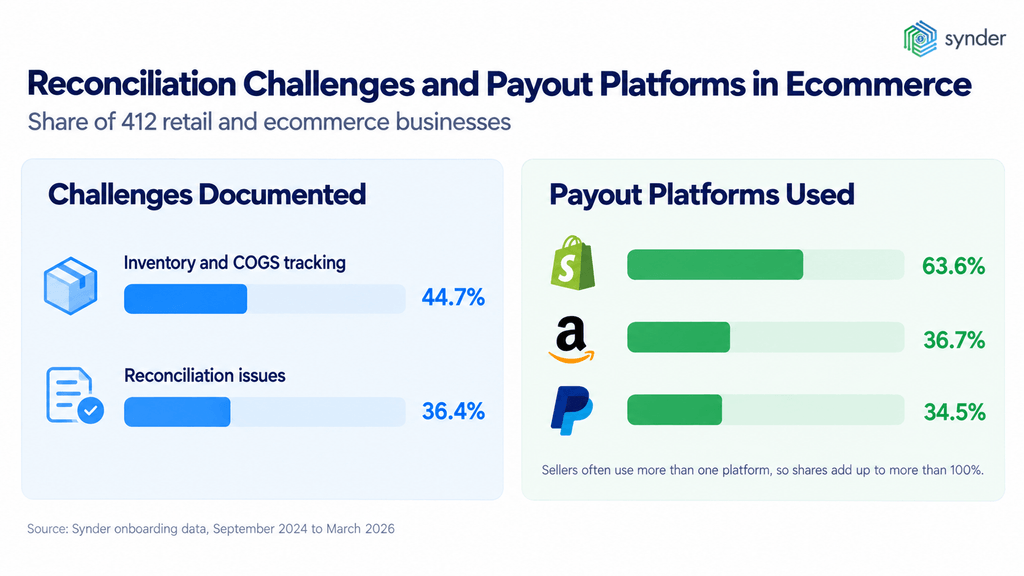
For ecommerce, balance sheet account reconciliation means tying each platform-driven balance to the platform’s own report as well as to the bank. In Synder’s onboarding data on 412 retail and ecommerce businesses (September 2024 to March 2026), 36.4% documented reconciliation issues and 44.7% struggled with inventory and COGS tracking.
Payout sources add to the work. Among those sellers:
- Shopify: 63.6%
- Amazon: 36.7%
- PayPal: 34.5%
Each of these platforms pays out on its own schedule.
Clearing accounts and Undeposited Funds
A processor clearing account should hold only money the processor still owes you: charges not yet paid out and any reserve it holds back. Anything else is a missing or duplicated entry. Done correctly, a balance equal to the processor’s unpaid amount on the same date, with no customer payments left ungrouped in Undeposited Funds.
Why a payment processor clearing account won’t zero out in QuickBooks Online
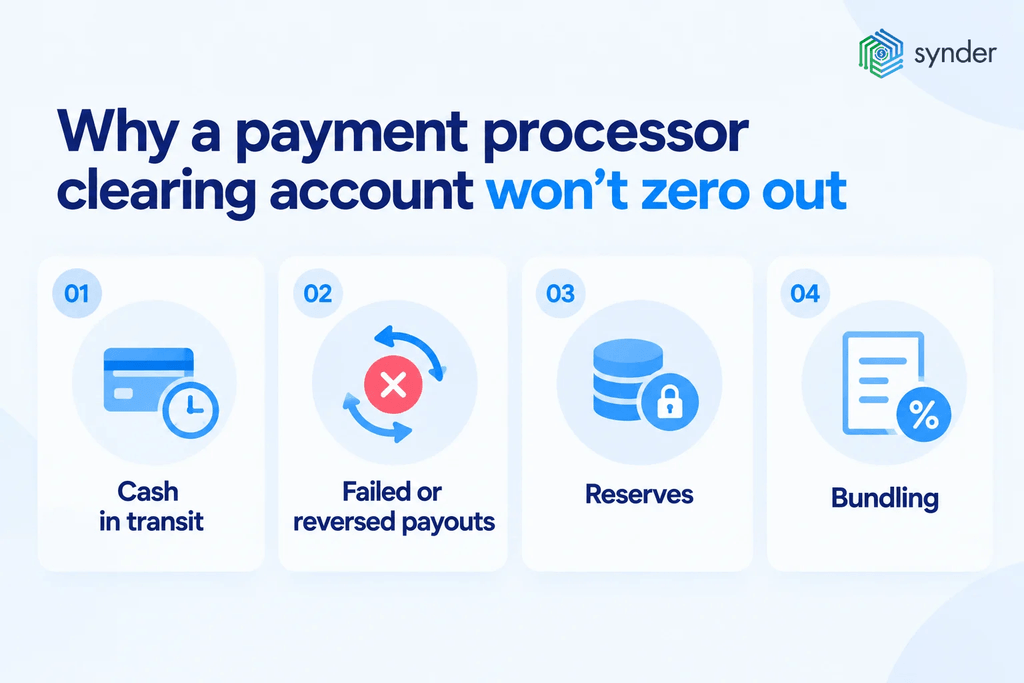
Four drivers keep a processor clearing balance above zero:
- Cash in transit: charges not yet included in a payout, which is normal.
- Failed or reversed payouts: a returned transfer that sends money back to the processor balance.
- Reserves: money the processor holds back**, for example a rolling reserve of 5% of sales held for 90 days.**
- Bundling: one net deposit that combines gross sales with deductions such as fees and chargebacks.
| Cause | Timing or error | Fix |
| Payout initiated but not yet in the bank | Timing | Leave it open and confirm it clears next period |
| Failed or reversed payout returned to the processor balance | Timing | Match it to the payout that retries it |
| Fees, refunds, or chargebacks not recorded | Error | Record each item from the payout report |
| Sales imported by both the bank feed and an integration | Error | Delete the duplicates and keep one source |
| Payout recorded as income instead of a transfer | Error | Reclassify it as a transfer from clearing to the bank |
| Reserve held by the processor | Timing | Track it as a receivable until release |
| Currency conversion on a foreign payout | Error | Post the exchange difference to a gain or loss account |
| Old unmatched items from earlier periods | Error | Trace each one to its source, or write it off with approval |
Synder records each sale, fee, and refund in the clearing account and posts each payout as a transfer from clearing to the bank, so the transfer matches the bank deposit. Our guide to the clearing account explains the setup. The working rule: walk every clearing account to zero, or to a documented timing difference, before you sign the close.
Handling timing differences at month-end
Treat a timing difference as a legitimate reconciling item when it clears next period and a document proves it. Each platform moves money on its own schedule:
- Shopify Payments: payouts on a schedule the merchant chooses, from daily to monthly.
- Amazon: seller accounts settled every two weeks, with a reserve sometimes held back.
- PayPal: standard transfers to a linked bank account typically complete in 1 to 3 business days. Holidays and weekends delay arrival by at least 1 business day.
Each deposit arrives net of deductions such as fees and refunds, so the bank never shows the gross sales figure. Three timing cases need specific treatment at month-end:
- Payouts initiated on the last day: keep them in clearing as cash in transit until the bank shows them.
- Settlement periods that cross month-end: record sales and fees in the month they occur under accrual accounting.
- Reserves and holdbacks: record them as a receivable from the marketplace, not as missing cash.
For example, an Amazon settlement from March 25 to April 8 splits across two closes. Your March books carry the March 25–31 sales as a receivable until that settlement pays out.
Accounts receivable
Your accounts receivable should equal the open invoices on your AR aging report.
- Compare against: the AR aging report as of the period end.
- Common reconciling items: payments received but not yet applied.
- Common mistakes: invoices settled through a processor and also marked paid by hand.
- Done correctly: a ledger figure equal to the aging total, with credits applied to invoices.
Inventory
Stock on the balance sheet should match your inventory system or the Amazon FBA report at cost.
- Compare against: a physical count or the FBA report.
- Common reconciling items: goods in transit and units at a fulfillment center.
- Common mistakes: COGS booked at an estimate and never adjusted to actual counts.
- Done correctly: a ledger value equal to units on hand multiplied by cost, with shrinkage written off.
Sales tax payable
Sales tax payable should equal what you owe on your next returns, excluding amounts a marketplace already handled. Marketplace facilitator laws require marketplaces such as Amazon and Etsy to collect and remit sales tax on the sales they facilitate.
- Compare against: filed or draft returns for each state.
- Common reconciling items: tax collected this month but due next period.
- Common mistakes: marketplace-remitted tax recorded as the seller’s liability.
- Done correctly: a liability equal to the returns for each state.
Customer deposits, gift cards and deferred revenue
Reconciling these balance sheet accounts proves that each liability equals what you still owe buyers in goods or services.
- Compare against: the deferred revenue schedule or a gift card liability report.
- Common reconciling items: redemptions and subscription periods that cross month-end.
- Common mistakes: annual subscriptions recognized as revenue in full on the payment date.
- Done correctly: a liability that matches the schedule, with revenue released as you deliver.
Loans
A loan’s balance sheet reconciliation compares the ledger balance with the lender’s statement, including repayments that never touch your bank account. Your loan balance should match the lender’s statement, including repayments that never touch your bank account. Shopify Capital, for instance, collects loan repayments as a daily percentage of your sales.
- Compare against: the lender’s statement or loan dashboard.
- Common reconciling items: repayments deducted from payouts at period end.
- Common mistakes: payouts recorded net of repayments, which leaves the loan overstated.
- Done correctly: a liability equal to the lender’s balance, with fees expensed.
Bank reconciliation vs balance sheet reconciliation
A bank reconciliation is one type of balance sheet reconciliation: it covers only cash and credit card accounts against their statements. Balance sheet reconciliation applies the same check to every other account, each against its own source.
| Point of comparison | Bank reconciliation | Balance sheet reconciliation |
| Scope | Cash and credit card accounts | Every balance sheet account |
| Source document | Bank or card statement | Any independent source, from subledgers to platform reports |
| Typical frequency | Monthly or more often | Monthly for high-risk accounts, quarterly or yearly for the rest |
| Who prepares it | Bookkeeper or staff accountant | Staff accountant, reviewed by a controller |
| Main output | Matched cash balance | Supported balance sheet |
Banks often process transactions with a delay, leading to timing differences between the bank statement and the company’s records. Bank reconciliation also serves as a potent tool for fraud detection and financial control.
If your balance sheet doesn’t match your bank reconciliation, look for these causes:
- Uncleared items
- A report date that differs from the statement
- Entries posted after that work was done
Here’s a two-sided example, with hypothetical amounts.
| Bank side | Amount | Book side | Amount |
| Balance per bank statement | $25,000 | Balance per books | $26,525 |
| Add: deposit in transit | $3,200 | Less: bank service fee | ($35) |
| Less: outstanding check #1042 | ($1,700) | Add: interest earned | $10 |
| Adjusted bank balance | $26,500 | Adjusted book balance | $26,500 |
| Journal entry | Debit | Credit |
| Bank service charges | $35 | |
| Cash | $35 | |
| Cash | $10 | |
| Interest income | $10 |
Common balance sheet reconciliation errors and how to fix them
To trace a balance sheet reconciliation error, start with the size of the difference: an amount that divides evenly by 9 points to a transposed number, and half the amount points to an entry posted on the wrong side. If neither check fits, match what you see in the account to the symptoms in the table below.
The table below lists common balance sheet reconciliation errors, how each one shows up, and its fix.
| Error | How it shows up | Fix |
| Plugging the gap to Reconciliation Discrepancies in QuickBooks Online | An expense account full of unexplained entries | Undo the reconciliation and find the real cause |
| Deposits booked net | Fees missing from the P&L and revenue understated | Record gross sales and fees separately |
| Duplicates from a bank feed plus an integration | Revenue or expenses counted twice | Choose one source per transaction type |
| Cutoff errors | Items posted a month early or late | Reverse and repost them in the right period |
| Unapplied payments | AR inflated by customer credits | Apply each payment to its invoice |
| Stale reconciling items | The same items open for months | Investigate after 60 days, then correct or write off with approval |
| Reconciling to orders instead of payouts | Totals that never match deposits | Use the processor’s payout report |
| Balance-only checks | Matching totals with wrong detail | Compare transaction detail as well as totals |
| Roll-forward treated as a reconciliation | No independent evidence behind the figure | Prove it with independent evidence, such as a statement or schedule |
The fixes in the table above correct an error once. When the same correction comes back every month, the cause is in the process that creates the entry, such as account mapping or source data.
For example, a Stripe or PayPal clearing account that’s off by a fee amount at every close points to fees that aren’t mapped to an expense account. Trace that gap to the mapping and fix it there instead of posting another adjustment.
Month-end balance sheet reconciliation checklist
A month-end balance sheet reconciliation checklist goes from cash to equity in a fixed order, then locks the period. Speed matters too: in Consero’s 2026 CFO Survey of 102 PE- and VC-backed finance leaders, 65% close the month in under 10 days, up from 8% in 2024.
| # | Task | Owner |
| 1 | Reconcile bank and credit card accounts | Staff accountant |
| 2 | Reconcile processor clearing accounts and Undeposited Funds | Staff accountant |
| 3 | Tie accounts receivable to the AR aging report | Staff accountant |
| 4 | Match inventory to counts or the stock report | Staff accountant |
| 5 | Post prepaid amortization | Staff accountant |
| 6 | Update the fixed asset register and depreciation | Staff accountant |
| 7 | Tie accounts payable to the AP aging report | Staff accountant |
| 8 | Record and review accruals | Senior accountant |
| 9 | Reconcile sales tax payable to returns | Senior accountant |
| 10 | Reconcile payroll liabilities | Senior accountant |
| 11 | Update deferred revenue and customer deposits | Senior accountant |
| 12 | Match loans to lender statements | Senior accountant |
| 13 | Review equity for owner contributions, distributions, and Opening Balance Equity | Controller |
| 14 | Check the trial balance index for completeness | Controller |
| 15 | Review differences above the materiality threshold and lock the period | Controller |
In QuickBooks Online, use these tools:
- Reconcile tool: match each bank and card statement until the difference is $0.00.
- Balance Sheet report: run it as of the period end to pull ledger figures.
- Undeposited Funds: group customer payments into the deposits that reached the bank.
- Closing date: set it under Account and settings to stop edits to a closed period.
In Xero, use these tools:
- Bank reconciliation: match each statement line on the Reconcile tab.
- Account Transactions report: list every entry in a ledger line to trace a difference.
- Lock dates: stop anyone from editing transactions in a closed period.
Balance sheet reconciliation best practices
The best balance sheet reconciliation practices are firm, written rules, so mistakes get fixed before reporting:
- Risk-based frequency: give each account a risk rating and reconcile the highest-risk ones monthly.
- Written balance sheet reconciliation policy: document who reconciles each account and against which source.
- Materiality threshold: investigate any difference above a set limit, such as $500 or 1% of the balance.
- Aging rule: escalate any reconciling item older than 60 days.
- One template: use the same cover sheet for every account.
- No plugs: reconcile before reporting and never force a difference to zero.
- Attached evidence: keep the supporting document with each reconciliation as an audit trail.
- Continuous processor checks: reconcile clearing accounts weekly instead of waiting for month-end.
- Review deadline: have reconciliations ready for the reviewer by business day 8 to 10.
- Auto-certification: certify zero-balance and no-activity low-risk accounts under written rules.
- Segregation of duties: never let the preparer review their own work.
Weak reviews show up in audits. KPMG’s 2026 analysis of material weaknesses counted 238 companies reporting them for fiscal 2025 in SEC filings and found more problems in the financial close, including poor review of journal entries and account reconciliations.
How to clean up balance sheet accounts that haven’t been reconciled for months
To clean up long-unreconciled accounts, find the last reconciled date and rebuild forward one month at a time. Backlogs are common: in Synder’s internal data, 21.8% of 412 retail and ecommerce sellers and 23.5% of 153 SaaS companies needed cleanup work before they could automate.
- Find the last reconciled date for each account.
- Reconcile each month forward from there, or rebuild from a verified opening figure.
- Clear Undeposited Funds and any suspense account by matching each item to a real deposit or transaction.
- Bring in past payouts instead of keying them by hand, for example with Synder’s historical data import, which lets you review the transactions before they post.
- Record material errors as a prior period adjustment, and write off immaterial residue only with documented approval.
In QuickBooks Online, a leftover amount in Opening Balance Equity is a red flag that starting entries were never cleared, so investigate it during cleanup.
How to automate balance sheet reconciliation
To automate balance sheet reconciliation, hand repetitive matching and checks to software and keep judgment calls and sign-off with people. A bookkeeper with 20 Stripe and Shopify clients, for example, can’t tick thousands of payout lines by hand every month.
| Task | Manual | Automated |
| Payout breakdown | Split each deposit into sales and deductions by hand | Payouts broken into transactions and deductions on import |
| Clearing account matching | Tick lines against a processor CSV | Lines matched to the platform’s records by auto-matching rules, with mismatches flagged |
| Balance verification | Compare ending figures in a spreadsheet | Period starting and ending balances checked against the platform’s report |
| Recurring entries | Typed in every month | Scheduled as recurring journal entries in the ledger |
| Judgment calls and sign-off | Done by an accountant | Still done by an accountant |
Synder covers the processor side of that table. Its Transaction Reconciliation matches each line in the clearing account to the platform’s own records and flags anything that doesn’t tie 100%, so you review only the transactions that need attention. Balance Reconciliation checks, before summaries post to your books, that the period matches the platform’s reported starting and ending balances, and keeps a full audit trail. Synder reports that Auto Reconciliation saves 50% of the time spent on month-end close.
Accounting firm Decimal automated that processor-side work for 20 clients with Synder and now saves 140 hours a month. Kristin Miller, Team Lead at Decimal, describes the change:
Since integrating Synder, Decimal has streamlined workflows, reduced reconciliation time by over 50%, and saved 6-8 hours per client each month, enabling the team to focus on strategic advisory services and client growth.
Kristin Miller, Team Lead at Decimal
If your clearing accounts take days to tie out, book a Synder demo to see payout matching on your own data.
Balance sheet reconciliation tools: spreadsheets vs software
Finance teams use four kinds of balance sheet reconciliation tools, compared in the table below. Spreadsheets still dominate: in the Sixthfin and Odoxa 2026 study of 303 CFOs at UK companies with 250 or more employees, 67% use Excel for account analysis and reconciliation.
| Tool type | Best for | Examples | Limits |
| Spreadsheet templates | Small teams with few accounts | Microsoft Excel, Google Sheets | Manual work and no built-in audit trail |
| Built-in ledger tools | Bank and card accounts | QuickBooks Online, Xero, NetSuite | Focused mainly on cash |
| Close management software | Controllers running a multi-entity close | BlackLine, FloQast, Numeric | Depends on clean data from sales channels |
| Payout reconciliation software | Ecommerce and SaaS clearing accounts | Synder | Covers processor-driven accounts, not the full close |
Choose balance sheet reconciliation software by where your differences come from. If most start in processor or marketplace deposits, fix the payout data first, because every other tool reconciles what it receives.
Balance sheet reconciliation FAQ
What are the 5 steps to reconcile an account?
The 5 steps to reconcile an account are to pull the ledger balance, obtain the source figure, compare the two, correct errors and get sign-off. This guide expands them to 7 steps by adding period selection and sorting differences into timing items and errors.
How often should balance sheet accounts be reconciled?
Balance sheet accounts should be reconciled monthly or even weekly if they’re high-risk or high-volume, quarterly if they see little activity, and all together at year-end.
Is balance sheet reconciliation the same as account reconciliation or GL reconciliation?
Balance sheet reconciliation isn’t exactly the same as account reconciliation or GL reconciliation. It covers every account on the balance sheet, while the other two terms can describe checking one ledger line, or individual transactions, against a source.
Why do you reconcile balance sheet accounts but not income statement accounts?
You reconcile balance sheet accounts but not income statement accounts because balance sheet figures carry forward from the first day of the business. Income statement accounts reset to zero each year, so an unreconciled balance sheet error carries into every later balance until someone finds it.
Who performs balance sheet reconciliations?
Balance sheet reconciliations are usually prepared by a staff accountant and reviewed by a controller or finance manager. In a small business, the owner or an outside bookkeeper may prepare them, but the preparer and the reviewer should be different people.
Can balance sheet reconciliation be automated?
Balance sheet reconciliation can be automated for repetitive work, such as transaction matching and payout breakdowns. Judgment calls and final sign-off stay manual, because someone has to be accountable for the numbers. Automation works best on high-volume accounts like processor clearing.
What should you do if a balance sheet account doesn’t reconcile?
If a balance sheet account doesn’t reconcile, decide whether each difference is a timing item or an error. Leave timing items open with evidence and correct errors with a journal entry. Then document the explanation before the reviewer signs off.
How long can a reconciling item stay open?
A reconciling item can stay open for 30 to 60 days under a typical reconciliation policy, and anything older should be escalated. Track open items on an aging schedule and review that list at every close. Never carry one forward without a written explanation.
Summing up: make balance sheet reconciliation a monthly routine
Monthly balance sheet reconciliation finds errors in the month they happen, while a year-end-only review leaves twelve months of entries to trace. This month, pick the three accounts that raise the most questions at your close, such as a processor clearing account, sales tax payable, and accounts receivable. Run each one through the seven steps above.
Then go deeper with our guides to bank reconciliation for cash, the month-end close process for other period-end tasks, and payout reconciliation for processor deposits.