
The amount eBay pays into your bank account isn’t your revenue. Before that payout reaches you, eBay has already taken out fees, shipping costs, refunds, and any sales tax it collected on your behalf. In QuickBooks, you record each of those separately, then match the remaining amount to the deposit in your bank feed. Most eBay bookkeeping problems start when those two numbers are treated as the same.
It’s an easy mistake to make, especially as eBay volume grows. US GMV reached $11.5B in Q1 2026, up 27% year over year, the fastest US growth the marketplace has posted in years. More volume means more payouts making their way into QuickBooks. QuickBooks will record a $9,412 eBay deposit as income unless you tell it otherwise. You usually don’t notice the problem until month-end, when the balance in your books doesn’t match what eBay says it paid you. If you’ve ever taken over an eBay client halfway through the year, you’ve probably seen exactly this. The fix starts with eBay’s own reports.
TL;DR
- To record eBay sales in QuickBooks, post the gross sales, fees, refunds, shipping costs, and withheld tax through a clearing account, then record the net payout as a transfer to your bank.
- To reconcile eBay sales in QuickBooks, compare the activity in the clearing account with eBay’s reports, then match each payout to the corresponding bank deposit.
- You can bring eBay data into QuickBooks manually, through Intuit’s eBay connector, or with third-party automation. The right option depends on your transaction volume and how much detail you need.
- Automation can compare eBay records with your clearing account and leave only the transactions that don’t match for review.
Why your eBay sales figure doesn’t match your payout
If you use eBay Managed Payments, your customers pay eBay first. eBay deducts its fees, shipping costs, refunds, and any other adjustments, then sends the remaining balance to your bank. That means the deposit you see in QuickBooks already combines six or seven different accounting events into one number.
The details matter more than they might seem. Even a two-percentage-point error in a fee line can distort your gross margin and affect inventory pricing decisions.
What eBay deducts before it pays you
The final value fee is a percentage of the total sale amount, plus $0.40 per order, or $0.30 if the order is $10 or less. That total includes the item price, handling charges, shipping paid by the buyer, and sales tax. So even though eBay collects and remits the sales tax for you, it still includes that amount when calculating its commission.
A typical eBay payout includes:
- Gross sales before any deductions
- Final value fees, plus the per-order fee charged on every transaction
- Charges that aren’t tied to a specific sale, including promoted listings, insertion fees, and store subscriptions
- Shipping label costs charged back to your account
- Refunds, dispute deductions, and marketplace sales tax withheld by eBay
Those amounts don’t belong in the same account. When everything is recorded as a single bank deposit, your profit and loss statement understates both revenue and cost of sales. The bottom line may still be correct, but your revenue, expenses, gross margin, and other financial metrics will be inaccurate.
Related read: eBay Seller Fees to Know About: A Simple Guide to eBay Fee Types Structure
Payout timing can split one month’s sales into the next
eBay initiates daily payouts Monday through Sunday for funds that became available in the previous 24 hours. Weekly payouts go out on Tuesdays for the prior Monday-to-Sunday period, biweekly payouts are sent every second Tuesday, and monthly payouts are issued on the first Tuesday of the month. Once you add bank processing time, a sale made on 29 March may not reach your bank until April. That’s why a clearing account shouldn’t necessarily be zero at month-end. If it is, it’s worth checking whether transactions in transit were recorded correctly.
That timing also explains a question eBay sellers ask all the time: what accounting method does eBay use? eBay doesn’t require one. Transaction reports are dated by the order event, which supports accrual accounting, while payouts reflect cash movement. Sellers who carry inventory generally need accrual accounting, but it’s best to confirm the right approach with your tax advisor.
The Seller Hub reports you’ll use for every payout
You’ll find everything you need to support your bookkeeping entries under the Payments tab in Reports.
| Document | What you’ll find | When you’ll use it |
| Transaction report* | A CSV with all account activity for the selected period, including the date, order number, buyer, payout date, and fees | When you need to rebuild sales, fees, and refunds line by line |
| Payout report | The net amounts eBay sent to your bank and when each payout was issued | When you’re matching deposits to the bank feed |
| Financial statement | A monthly PDF summary of your account activity | When the detailed records and the bank don’t agree |
| Tax invoice | The eBay fees you were charged and the tax applied to those fees | When you’re recording tax on eBay fees |
| Form 1099-K | The total gross payments eBay processed during the year | When you’re cross-checking year-end totals, not recording your books |
*Sort by transaction date for revenue recognition, and by payout date for bank reconciliation.
| The One, Big, Beautiful Bill reinstated the 1099-K reporting threshold at $20,000 in gross payments and 200 transactions. That threshold doesn’t determine whether your income is taxable, and the amount on the form won’t match the revenue line in QuickBooks unless you’ve recorded your sales at the gross amount. |
Build your QuickBooks account structure before you import anything
Set up the accounts that will hold your eBay activity before you bring any data into QuickBooks. The key account is a clearing account, sometimes called Undeposited Funds, which represents your eBay balance in QuickBooks Online.
As sales come in, gross sales, fees, refunds, shipping label charges, and withheld tax all post to that clearing account. When eBay sends a payout, record the net amount as a transfer from the clearing account to your checking account. Any balance left behind represents money eBay has collected but hasn’t paid out yet.
You’ll also want to create:
- Separate income accounts for eBay sales and buyer-paid shipping.
- Expense accounts for each fee type, so promoted listings stay separate from final value fees.
- A cost of goods sold account that updates with every sale and refund.
- A liability account for marketplace tax that eBay withheld.
- Class or location tags for each sales channel. Once you’re selling somewhere besides eBay, they make multi-channel bookkeeping much easier to follow.
Three ways to get eBay sales into QuickBooks Online
There are three common ways to bring eBay sales into QuickBooks, and the right one depends on how many orders you process and how much transaction detail you need to keep.
Manual entry from eBay reports
Start by downloading the transaction report, summarizing it by category, and posting one journal entry for each payout period. Debit your bank account for the net deposit along with the relevant fee expense accounts, then credit gross sales, buyer-paid shipping, and the tax liability account.
If you’re processing thirty or forty orders a month, this approach doesn’t cost anything. The trade-off is that it doesn’t track inventory movement, preserve a per-order audit trail, or protect you when a refund from a previous period appears halfway through the file and throws the numbers off.
At some point, manual entry simply takes too much time. For many businesses, that happens once it reaches somewhere between two and four hours a month. In Synder’s conversations with our clients, one health products retailer, about a year after starting to sell on eBay, was processing roughly 1,000 transactions each month. That translated into around 3,000 entries in QuickBooks Online, with the CFO handling reconciliation alone while the backlog kept growing. The real problem starts once the backlog begins to grow. Beyond a certain volume, entries stop getting recorded on time, and each month leaves more work to catch up on later.
The native QuickBooks connector for eBay
Yes, QuickBooks can sync with eBay. Intuit’s own integration, eBay Connector by Intuit, is built on the QuickBooks Connector platform (formerly OneSaas) and can be installed from the apps directory.
The connector offers two sync options. Orders imports individual orders, while Payouts creates deposits in QuickBooks Online for the payouts eBay sends. Intuit recommends turning off Orders if you use Payouts, because running both at the same time can duplicate revenue. In practice, you have to choose between order-level detail and payout-level reconciliation. If both workflows are enabled, your revenue figures can end up overstated.
There are a few more limits to be aware of. Intuit’s support documentation describes the eBay integration as a legacy app with a replacement on the way, directs US-based QuickBooks users to QuickBooks Commerce Accounting, and notes that eBay shipping label costs aren’t included in the sync. Historical imports are limited to one year of orders, and the connector doesn’t work with QuickBooks Desktop, Enterprise, or Self-Employed. Besides, if shipping labels are a meaningful expense for your business, you’ll still need to record those costs manually every reporting period.
Third-party automation tools
The third option is to use a dedicated eBay QuickBooks integration that connects the two systems and automatically breaks each payout into the transactions behind it. Synder is one example. It’s an accounting automation tool that syncs ecommerce and financial data from more than 30 platforms into QuickBooks Online, QuickBooks Desktop, Xero, Sage Intacct, and NetSuite.
For eBay, Synder records each sale, final value fee, non-transaction fee, shipping label charge, refund, and withheld marketplace tax as its own line in the clearing account. It then records the net payout as a transfer that matches the deposit in your bank account. You can also map eBay listings to QuickBooks products by title, SKU, or item number, and inventory updates automatically as orders sync, which the native connector doesn’t handle the same way.
The eBay integration also includes:
- Sync modes: Choose Per Transaction if you want every order posted as an invoice or sales receipt, or Summary Sync if you’d rather combine a reporting period into a single journal entry.
- Refunds and disputes: Refunds sync as Refund Receipts and return the original items to stock. Disputes post to a separate expense category.
- Multi-store and multi-currency: Connect regional eBay sites in one workspace, with currency conversion applied to each payout.
- Automation rules: Choose which income accounts, classes, or tax codes different product families should use.
Synder’s 2025 survey of 424 senior finance leaders in ecommerce and SaaS found that 56.78% of ecommerce respondents had automated bank reconciliation. Respondents also reported saving an average of 8.36 hours per team member each month across automated accounting tasks.
| If you’d like to see how this works with your own fee structure and payout schedule, you can book a Synder demo and walk through the process using your own data. |
| Manual entry | Native connector | Third-party automation | |
| Best for | Under 50 orders/month | Low to moderate volume | Moderate to high volume |
| Inventory | Not handled | Optional stock sync | SKU-mapped, adjusts on refund |
| How data is recorded | Order or payout detail | Not both safely | Per Transaction or Summary Sync |
| Main limitation | Becomes impractical as volume grows | Revenue can double if both workflows run | Initial setup and mapping required |
No matter which approach you choose, the same accounting components end up in the clearing account. What changes is how much work is left for you when it’s time to reconcile everything at month-end.
Closing the eBay clearing account at month-end
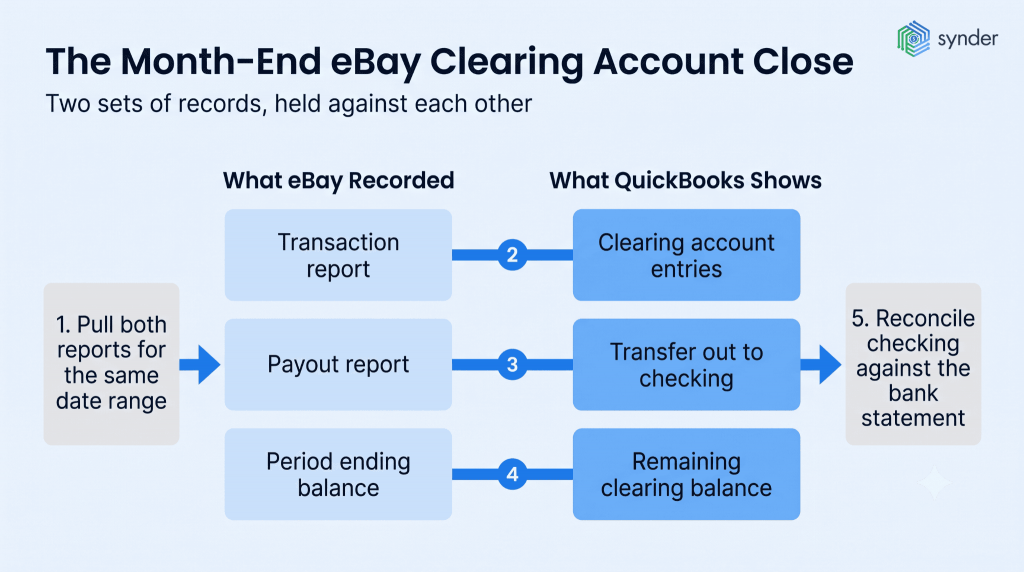
By the end of the reconciliation, you should be able to answer two questions: did everything eBay recorded for the period make it into QuickBooks, and does the money that reached your bank match what eBay says it paid?
- Pull the transaction report and payout report from Seller Hub for the same date range.
- Check that every eBay payout appears in QuickBooks as a transfer out of the clearing account and is matched to the bank feed.
- Compare gross sales, each fee category, refunds, and withheld tax with the corresponding accounts in QuickBooks.
- Look into any remaining clearing account balance that can’t be explained by unsettled sales or payment holds.
- Reconcile your checking account against the bank statement.
Automating the matching process
Doing the fourth step by hand can easily take an afternoon if you’re reconciling a few thousand transactions. Synder, for example, has built-in Auto Reconciliation.
Its Transaction Reconciliation compares every line in the clearing account with eBay’s own records and flags anything that doesn’t match 100% for review. For eBay, the comparison starts from an export file that you map once, and every future reconciliation uses that same mapping.
If you prefer the summary approach, Balance Reconciliation checks that the opening and closing balances for the period match what eBay reported before summary entries are posted to your books. It also keeps a complete audit trail for every period, so you can download it or come back to it later.
Because only unmatched lines need attention, you can skip the line-by-line review that usually takes up most of the time. TJAYZ, a retailer selling handcrafted Mexican goods across eBay, Amazon, Shopify, and Etsy into QuickBooks Desktop, had built up a backlog of data waiting to be imported. After switching to Synder, refunds return items to inventory automatically, keeping stock available.
I don’t have to come back and babysit Synder; there’s nothing I need to worry about. Reflecting on it now, with our business expanding, I estimate that the time saved amounts to over 40 hours per month.
Tony Jamal, CEO of TJAYZ
The eBay edge cases that break a clean reconciliation
Most reconciliation problems usually come from transaction types that weren’t accounted for when the process was set up.
Marketplace tax eBay withheld on your behalf
For items shipped to certain states and territories, eBay calculates, collects, and remits sales tax automatically. Sellers don’t have to take any action, and there’s no option to opt out. That money isn’t yours, but you still need to record it because it’s included in gross sales and affects the amount eBay uses to calculate fees.
eBay sending the tax to the state doesn’t necessarily end your own tax obligations. In most states, marketplace sales still count toward your economic nexus threshold. That means eBay sales alone may be enough to require you to register and collect sales tax on orders from your own storefront. Some states exclude marketplace sales from that calculation, and others don’t require registration if you sell only through marketplaces. Record marketplace tax that eBay withheld in its own account so it stays separate from the sales tax you collect yourself.
Learn more about marketplace facilitator tax.
Refunds, disputes, and returned shipping labels
A refund issued in April for a sale made in March will appear in the April transaction report and reduce an April payout. If you record it as negative April revenue, both reporting periods end up wrong. Instead, post the refund against the original revenue account and return the item to inventory at cost.
eBay Money Back Guarantee claims and dispute deductions are different from sales returns, so they shouldn’t be recorded in the same account. Keeping them separate makes it much easier to track how much you’re losing to disputes. Shipping label credits should reduce your shipping expense account, not be recorded as income.
Multiple eBay sites and multiple currencies
If you sell through more than one regional eBay site, such as eBay.com, eBay.co.uk, and eBay.com.au, you’ll receive separate payouts in different currencies. Each marketplace should have its own clearing account in the transaction currency, with exchange-rate differences posted to a foreign exchange gain or loss account. If you combine those balances into a single clearing account, it won’t reconcile back to zero.
How automation handles these cases
All of these situations have one thing in common: you need to know what each line item represented before it became part of a single bank deposit. Automation solutions like Synder keep that information intact when it splits each payout into its underlying transactions. Marketplace tax that eBay withheld posts to its own account, refunds sync as Refund Receipts that return the original items to inventory, and eBay disputes are sent to a configurable expense category in Fees settings, keeping them separate from your returns. If you sell through multiple regional eBay sites, Synder connects these accounts in one workspace and converts each payout using the applicable exchange rate.
Recording and reconciling eBay sales in QuickBooks: key takeaways
A reliable eBay bookkeeping process follows the same basic flow. Record gross activity in a clearing account, transfer each net payout out of that account, and use the remaining balance to show what eBay still owes you.
From there, the right approach depends on your transaction volume and the level of detail you need in your books. However you record eBay activity, every line in the clearing account should match something eBay recorded.
FAQ
Is QuickBooks good for eBay sellers?
Yes, although it depends on how much you sell. QuickBooks Online gives you access to the largest US accountant network, built-in sales tax tools, and class tracking. What it doesn’t do is explain what’s inside an eBay payout. Once you’re processing more than a few thousand orders a month, period summaries are generally more practical than recording every order individually.
Can I reconcile eBay sales in QuickBooks Desktop the same way?
The clearing account works the same way in QuickBooks Desktop. The difference is that QuickBooks Desktop doesn’t support the summary approach offered by most integrations, so entries are recorded at the per-transaction level. It’s worth confirming any transaction limits with your integration provider before you begin.
Should eBay sales be recorded as invoices or sales receipts?
In most cases, sales receipts are the right choice. By the time the order reaches your books, the buyer has already paid eBay, so there isn’t an accounts receivable balance to track. Invoices are generally reserved for situations where you bill the customer separately and collect payment later.
Can I import past eBay sales into QuickBooks?
Yes. eBay keeps transaction report data in Seller Hub for a limited period, and most integrations include a historical import option. If you’re working through a backlog, download those reports before the retention window expires, even if you’ll import the entries later.
What should I do about eBay funds placed on hold?
Keep held funds in the clearing account balance. The sale has already happened, even though the cash hasn’t been released yet. Payment holds are a normal reason for a month-end clearing balance, so it’s good practice to note which orders they relate to.