
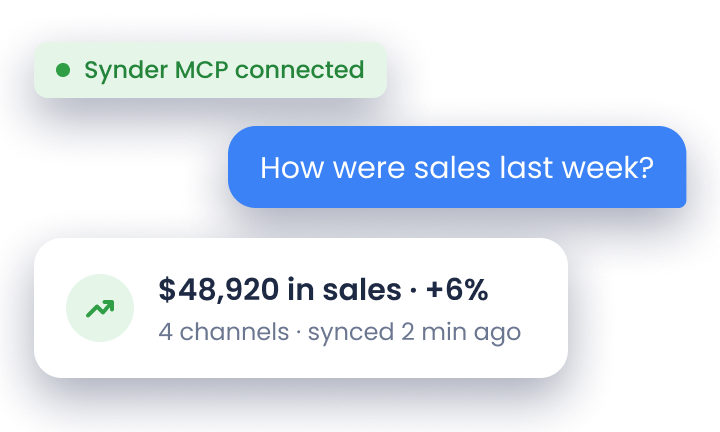

Transaction reconciliation is the process of comparing internal financial records against external data – bank statements, payment processor reports, or vendor invoices – to confirm every transaction is recorded accurately. For ecommerce sellers on Stripe, PayPal, Shopify, and Amazon, it’s what catches mismatches before they reach the financial statements.
Someone transposes two digits, an order syncs twice, a fee never reaches the ledger, and none of it moves the bank balance enough to look wrong. But unreconciled records still distort financial statements, weaken audit readiness, and lead to decisions based on incomplete data.
That cost is why the reconciliation software market is projected to grow from $2.8 billion in 2024 to $5.45 billion by 2029, a 13.2% compound annual growth rate, according to ResearchAndMarkets. The sections below cover the five steps of the reconciliation workflow, where it fails once you’re matching thousands of transactions a month, and what changes when a matching engine flags only the exceptions.
TL;DR
- Transaction reconciliation defined: It’s the process of matching internal records against external data to catch errors, fraud, and discrepancies before they compound into bigger problems.
- A five-step workflow: Collect data, compare records, identify discrepancies, investigate and adjust, then document and sign off.
- There are multiple reconciliation types: Bank, credit card, accounts payable, accounts receivable, and intercompany reconciliation. Each addresses a different part of your financial picture.
- Manual reconciliation doesn’t scale: As transaction volume grows, spreadsheet-based processes become a bottleneck as companies still rely on manual methods.
- Synder automates it: Synder’s transaction reconciliation feature compares payment platform data against accounting system records automatically, flagging mismatches for fast resolution.
What is transaction reconciliation?
Imagine a mid-size ecommerce company processing thousands of orders across Shopify, Amazon, and its own website. Payments arrive through Stripe and PayPal, each deducting fees before sending net payouts on their own schedules. When the controller compares QuickBooks Online records to the bank statement at month-end, a $4,300 gap appears – that’s exactly the kind of discrepancy transaction reconciliation is meant to catch.
At its core, transaction reconciliation is the process of comparing two sets of financial records to confirm that every transaction is accurately captured and any differences are identified and explained. These typically include:
- Your internal accounting records
- A bank statement
- A payment processor report
- A vendor invoice or external financial document
In the scenario above, the $4,300 could be platform fees that weren’t mapped to the right account, a payout that landed in January instead of December, a duplicate order entry, or some combination of all three. Reconciliation is what finds out which.
What gets matched during transaction reconciliation?
Transaction reconciliation matches seven data elements: gross sales, processing fees, refunds and returns, chargebacks, sales tax collected, net payouts, and bank deposits.
Gross sales are revenue before any deductions are applied, and processing fees come straight out of that number into their own expense account. Refunds and returns reverse an earlier sale, so trace each one back to the original order. Chargebacks do the same, except the processor starts them and adds a dispute fee. Sales tax collected is money held on behalf of a jurisdiction, never revenue. What’s left after all of it is the net payout, and the bank deposit that follows confirms the other six were calculated correctly.
Why transaction reconciliation matters
Beyond catching errors, reconciliation supports several critical parts of financial management:
- Reliable financial records – ensures financial statements reflect the company’s true position for management, investors, and lenders.
- Fraud detection – helps surface unusual patterns like duplicate payments, unauthorized charges, or payouts to unfamiliar accounts.
- Audit readiness and compliance – creates clear records and audit trails required by most financial reporting frameworks.
- Accurate cash flow visibility – ensures decisions are based on the company’s real cash position, not unreconciled data.
Types of transaction reconciliation
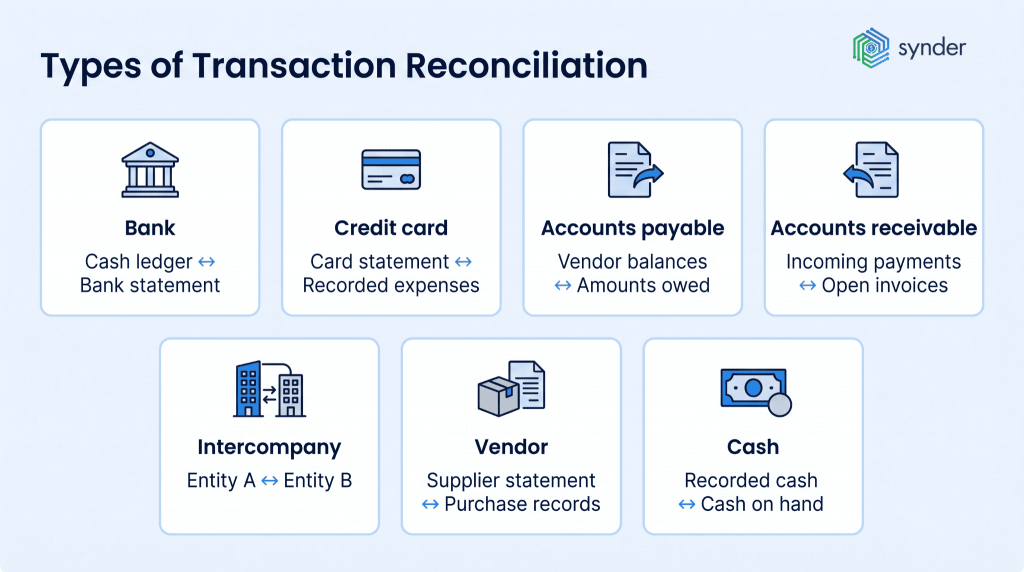
Not all reconciliation covers the same ground, and most businesses deal with several types regularly. Common examples include:
- Bank reconciliation – matching the company’s cash ledger to the bank statement, usually monthly or more often for high-volume businesses.
- Credit card reconciliation – comparing card statements with recorded expenses to detect unauthorized charges or billing errors.
- Accounts payable reconciliation – confirming that vendor balances in your ledger match what you actually owe, helping catch duplicate payments or missing invoices.
- Accounts receivable reconciliation – verifying that incoming payments are recorded correctly and applied to the right invoices, especially important for subscription or high-volume sales.
- Intercompany reconciliation – ensuring transactions between related entities cancel out correctly in consolidated reports.
- Vendor reconciliation – matching supplier statements against your own purchase and payment records to confirm both sides agree on what has been billed and settled.
- Cash reconciliation – comparing recorded cash receipts and disbursements against actual cash on hand or in the bank, most relevant for businesses handling physical payments.
For ecommerce businesses using platforms like Stripe, PayPal, Shopify, or Amazon, there’s an additional layer: reconciling payment processor payouts with the accounting system. Each platform has its own payout schedules, fees, and reporting formats, which rarely map neatly to the general ledger without additional processing.
Reconciling across multiple sales channels and processors
Reconciling across multiple sales channels depends on four decisions, each made once per channel and reused every period after that.
How do you normalize export formats across channels?
The columns have to be mapped to a common shape before anything can be compared, because each channel names its fields differently – an order ID in Shopify isn’t the same field as a Stripe charge ID or a line on an Amazon settlement report. Save that mapping as a template so it carries into the next period. Redoing the mapping every month is where most of the wasted time goes.
How do you handle payout cycles that differ by channel?
Different payout cycles are handled by reconciling against the sales date, not the deposit date, with a clearing account holding the difference until the money arrives. Stripe might pay on a rolling two-day basis while Amazon settles every two weeks, so a sale and its payout routinely fall in different periods.
Does each channel need its own clearing account?
Give each channel its own clearing account instead of pooling them. A single combined account will still balance at year-end, but when it doesn’t balance in March you’ll have no way to tell which channel caused it. Separate accounts turn one unexplained variance into one channel’s variance.
Where do platform fees map in the chart of accounts?
Map Shopify’s transaction fee, Amazon’s referral and FBA fees, and Stripe’s per-charge percentage each to a named expense account inside a single chart of accounts, so a monthly fee total can be checked directly against the platform’s own report.
How the transaction reconciliation process works
The process follows a consistent workflow regardless of business size or the accounts being reconciled. This is how it typically unfolds:
- Collect and organize data. Gather all relevant financial documents for the period: bank statements, general ledger reports, payment processor exports, invoices, and receipts. Organizing by date and transaction type before starting saves significant time later, since hunting for a missing document mid-reconciliation is one of the most common sources of delay.
- Compare records across sources. Match transactions in your internal records against the external data. Every line item should appear in both places. Discrepancies – amounts that don’t match, transactions present in only one source, or entries recorded in the wrong period – get flagged.
- Identify and investigate discrepancies. Once mismatches are flagged, the investigation begins. Common causes include timing differences (a check issued before month-end that clears in the following period), data entry errors such as transposed digits, bank fees not recorded internally, or duplicate entries from a system import.
- Make adjustments. After identifying the root cause, correct the records. This usually means creating journal entries to bring the books in line with reality, voiding duplicates, or requesting corrections from a bank.
- Document and sign off. Compile the final reconciliation report along with supporting documentation for each adjustment, and route it for appropriate approval. A clean, consistent audit trail makes future reconciliations easier and keeps the business prepared for external audits.
The table below summarizes each step:
| Step | What you do | Key inputs | Output |
| 1. Collect data | Gather all records for the period | Bank statements, GL and sub-ledger reports, processor exports, invoices | Organized document set ready for comparison |
| 2. Compare records | Match internal entries to external data | Internal ledger, external statements | List of matched and unmatched transactions |
| 3. Identify discrepancies | Flag everything that doesn’t agree | Mismatch list from step 2 | Discrepancy log with details per item |
| 4. Investigate & adjust | Find root causes, post adjusting journal entries | Discrepancy log, source documents | Corrected, accurate financial records |
| 5. Document & approve | Compile the final report and sign off | Adjusted records, investigation notes | Signed reconciliation report with audit trail |
How automation changes the reconciliation equation
At small volumes, reconciliation can be handled with spreadsheets and a careful eye. But once a business starts processing thousands of transactions across multiple channels, that approach quickly becomes difficult to sustain. Multichannel ecommerce, subscription billing, and high payment volumes generate far more data than manual matching can reliably handle.
NetSuite reports that automated reconciliation can reduce data entry errors during month-end by around 70%, while also saving hours that would otherwise go into manually matching thousands of transactions. IMARC Group’s 2026 analysis puts the wider account reconciliation category on a 9.99% CAGR through 2034, with electronic transaction volume that manual processes can no longer handle reliably as the driver.
Automated reconciliation tools work by pulling transaction data directly from payment processors, banks, and accounting systems, then matching records based on configurable rules.
How Synder automated transaction reconciliation
Synder is an accounting automation tool that helps ecommerce and SaaS businesses sync financial data from 30+ platforms like Stripe, PayPal, Amazon, and Shopify into accounting systems such as QuickBooks Online, Xero, NetSuite, Sage Intacct, and Puzzle.
Its transaction reconciliation feature is available for QuickBooks Online, Xero, and NetSuite when using the Per Transaction sync mode. In this mode, Synder syncs each transaction individually into your accounting system, which means the reconciliation engine can match records one-to-one.
Its transaction reconciliation feature works as a matching engine: it compares what’s recorded in your clearing account against the transaction data from your payment platform, then surfaces any inconsistencies. The feature supports three modes for pulling that data, depending on your setup:
- Automated mode – Synder fetches data directly via API from both the accounting system and the integration. No file uploads required; just select your date range and run the match.
- Standard mode – For platforms where Synder knows exactly which export file to expect, it provides step-by-step instructions on what to download and upload. Synder then handles all column matching and data normalization.
- Manual mode – You upload any file containing your transaction data and map the columns yourself, for example, which column is the primary ID, which is the amount. Once you save the mapping as a template, it’s reused every time you reconcile that platform, so the column mapping is a one-time setup.
Once the match runs, the results are organized into four tabs:
- Matched – transactions confirmed on both sides
- Discrepancy – the transaction ID matches, but the amounts differ
- Not matched – the transaction exists on one side only
- Ignored – items you’ve manually set aside
Only a 100% match rate returns a reconciled status. Anything below that prompts further investigation.
| Note: For transactions flagged as missing in accounting, you can copy the transaction ID directly from the results screen and look it up in Synder’s transaction list to see exactly what happened to it, whether it was deleted, rolled back, or never synced. For transactions missing in the integration, the likely cause is a manually added entry in accounting, which can be safely ignored if confirmed. |
What you get with Synder’s capabilities
The time difference is tangible. Stape, a server-side tracking platform, used to spend two full working days on each reconciliation cycle. After switching to Synder’s automated sync and reconciliation, that same process now takes 40 minutes. Similarly, Dermeleve, a consumer healthcare brand reconciling over 170,000 transactions across four sales channels maintains 99.5%+ reconciliation accuracy through Synder’s automated transaction matching – a result that would be very difficult to achieve at that volume manually.
If your team spends meaningful time each month on manual reconciliation, that time is worth quantifying. The case for automation tends to become fairly clear once the real cost of the status quo is on the table.
Ready to stop reconciling transactions manually? Try Synder free or book a demo to see how automated reconciliation fits your workflow.
Transaction reconciliation for accounting firms
Accounting firms reconcile transactions across many clients at once, each with its own sales platforms, payment processors, and chart of accounts.
Each client arrives with a different mix: one on Shopify and Stripe, another on Amazon and PayPal, a third running Square in a physical store, and each has a chart of accounts built by someone else. Before any matching can start, you have to establish where that client’s fees post and which clearing account is mapped to each processor.
Standardization is what makes the volume manageable:
- Build the reconciliation template around the platform instead of the client. One Stripe template then serves every Stripe client you take on.
- Keep chart-of-accounts mapping rules consistent. A Stripe processing fee posts to the same-named account across the whole book of business.
- Write an SOP per platform. Cover which report to pull, the date range, and what a clean result looks like, so new staff are trained on the platform instead of on a different setup for every client.
Synder serves 200+ accounting firms. Each client’s QuickBooks or Xero company occupies a separate Organization with its own integrations, settings, and Platform transactions tab, switched from the dropdown in the top-left corner. Nothing carries over between clients by accident, and the configuration you build for one Stripe client can be repeated on the next.
LedgerZ Bookkeeping saves 10 hours per client each month on reconciliation and 120 hours a year on month-end close with Synder Sync.
Synder saves me at least 10 hours a month on manual data entry and reconciliation. It gives me the ability to manage multiple income streams and separate clearing accounts for different locations, making month-end close so much easier and more accurate. It’s 100% worth the money.
Christina Testolin, Founder and CEO of LedgerZ Bookkeeping
| Synder’s accounting firms page has the firm-level features, including Firm Workspace for managing clients and staff in one interface. |
Common challenges in transaction reconciliation
Understanding what makes reconciliation hard is useful because most difficulties are predictable and addressable once you know what to look for.
- Volume and complexity are the primary scaling problems. A business selling across multiple ecommerce channels with several payment processors is dealing with different data formats, payout schedules, and fee structures simultaneously. 84% of companies still depend heavily on manual tasks and spreadsheets for reconciliation, and at scale, that approach creates a growing backlog. With US ecommerce sales reaching $340.2 billion in the second quarter of 2026, 17.1% of all retail sales, per the Census Bureau, every dollar of that volume passes through at least one settlement layer – bundling orders, refunds, fees, and taxes into a single net payout – before it becomes usable cash.
- Timing differences create reconciliation breaks that aren’t errors, but are the result of transactions landing in two systems at slightly different times. A payment processed on the last day of the month might not clear the bank until the next period. These items still need to be documented and tracked so they don’t get confused with genuine discrepancies.
- Data format mismatches are a particular challenge for ecommerce businesses. Stripe exports look different from PayPal exports, which look different from Amazon settlement reports. Getting all of them to map cleanly to your chart of accounts takes either careful manual work or software that handles the translation automatically.
- Human error is the everyday cost of manual data processing. Such mistakes are the expected outcome of asking people to process large volumes of repetitive data without systematic checks. A Gartner survey of 497 accountants found that 59% make a mistake several times a month and 18% do so at least once a day, with capacity pressure the common thread. The solution isn’t to hire more careful people, but to build automated processes that catch the inevitable slips before they cascade.
Gross vs. net transaction differences
Payment processors often report transactions as net amounts after fees, while accounting systems require those same transactions to be recorded as separate components: gross revenue and associated fees. A single $93 Stripe charge, for example, may need to be reflected as a $100 payment and a $7 expense. This isn’t an error, but it breaks the one-to-one matching logic that reconciliation relies on. As a result, teams have to manually trace and match one processor transaction to multiple accounting entries, which slows down the process and increases the likelihood of inconsistencies at scale.
Reconciling batch payouts
Payout reconciliation unpacks a single bank deposit into the orders, fees, refunds, and chargebacks netted inside it. Pull the settlement report, match each line to a ledger entry, and confirm the deductions are as expected. Each platform files it differently: in Stripe you can find it under Dashboard → Payouts → Settlement report, in Amazon under Reports → Payments → Settlement, and in PayPal under Reports → Statements.
This is many-to-one matching: one deposit against several hundred underlying records, each of which has to already exist in the books at the right amount and the right date. If even a handful synced late, the payout won’t tie.
The number to watch is how far the unmatched remainder is from zero. A variance equal to a known fee percentage points at a mapping problem. A variance equal to one order’s value points at a missing record.
Handling refunds, chargebacks, and adjustments
Refunds, chargebacks, and adjustments all reverse money that has already been recorded, and each reverses it differently.
Match every refund to its original sale. A refund matched as a standalone negative amount will balance the payout while leaving the original sale overstated and the revenue figure wrong. Partial refunds match only on the order reference, since the amounts differ.
A chargeback reverses a sale the same way, but the processor starts it and attaches a dispute fee as a separate line. Record both, and a third entry if the dispute is later won. Booking the reversal without the fee leaves the payout short by the fee amount.
Adjustments never reach the bank at all. Coupons, store credits, promotional discounts, and processor-side corrections each need their own matching rule, because no deposit will ever confirm them.
Best practices for consistent reconciliation
The teams that make reconciliation work well tend to operate by a few consistent principles.
- Reconcile frequently. Monthly is the minimum. High-volume businesses, or those with complex payment flows, should reconcile weekly or daily. The longer the gap between reconciliation runs, the harder it becomes to trace the source of a mismatch, and the more items pile up in the queue.
- Separate duties. The person recording transactions shouldn’t be the same person reconciling the accounts. Segregation of duties is both a best practice and a fraud-prevention control that most audit frameworks expect to see.
- Standardize the workflow. Document who does what, by when, and what approval is required. This matters most under deadline pressure – a clear, written process is harder to shortcut than an informal one.
- Maintain documentation for every adjustment. Every correction should have a documented reason. This creates an audit trail that supports internal reviews, external audits, and any future investigation into why a particular entry was changed.
- Use automation where it makes sense. Automation removes the repetitive matching work that makes manual reconciliation slow and error-prone, so your team can focus on investigating exceptions that actually need human attention.
Transaction reconciliation in the month-end close
Transaction reconciliation runs after sub-ledger posting and before financial statement preparation. Nothing downstream moves until it’s signed off, which is why it sets the close timeline.
The Hackett Group’s 2026 AI World Class finance benchmarks model an 89% increase in payments matched and applied automatically once the process is redesigned around AI, with account-to-report among the finance processes covered.
Automated matching rarely clears everything on the first run, so three habits raise the match rate over the closes that follow:
- Track the auto-match rate per account. A channel lagging well behind the others points at a mapping problem in that channel, not at rules that need more time.
- Staff the first close as though little has changed. Whatever doesn’t auto-match still needs human review, and early on that share is at its highest.
- Turn repeating exceptions into rules. Write up the fee type that never maps and the payout that always falls a day outside the period, then apply both before the next close.
Key takeaways
Transaction reconciliation is one of those processes that’s easy to overlook when it’s working smoothly and impossible to ignore when it isn’t. Accurate, timely reconciliation keeps your financial records trustworthy, your audit exposure manageable, and your team’s time focused on work that moves the business forward.
The fundamentals remain constant: collect the data, compare the records, investigate mismatches, adjust the books, and document everything. What’s changed is how much of that work software can now handle automatically and how significantly that changes the time, accuracy, and scalability of the process for businesses that make the shift.
FAQ
What does it mean if a payment has been reconciled?
A reconciled payment has been confirmed in both your records and an external source. The amount, date, and status agree, with no unexplained difference between them. It was matched to a bank deposit or a processor record, which closes it out – nothing about that payment needs further investigation.
What are the three types of reconciliation?
The three main types are bank reconciliation (matching the cash ledger to the bank statement), balance sheet reconciliation (verifying that balance sheet accounts are accurate and supportable), and intercompany reconciliation (matching transactions between related entities so they cancel out in consolidated reporting). Accounts payable and accounts receivable reconciliation are also standard practices.
What’s the easiest way to reconcile business transactions?
The easiest way to reconcile business transactions is to automate the matching and reconcile often. Connect your bank, payment processors, and accounting system to a tool that matches records by transaction ID, then review only what it flags. Start with bank reconciliation, the simplest type, before adding processor payouts. Weekly runs keep discrepancies small enough to trace quickly.
What are the four steps of a transaction?
A financial transaction typically moves through authorization (the payment is approved), authentication (the parties are verified), clearing (the transaction is matched and processed), and settlement (funds are transferred). Reconciliation happens after settlement to confirm that all records across systems agree.
What are the four common reconciliation adjustments?
The four most common adjustments are outstanding checks (issued but not yet cleared), deposits in transit (recorded internally but not yet on the bank statement), bank errors, and errors in the company’s own records, such as duplicate entries or transactions recorded at the wrong amount.
How do you find reconciliation discrepancies without reviewing every transaction?
Finding reconciliation discrepancies without reviewing every transaction relies on exception-based matching. The software compares both data sets, confirms the records that agree, and flags only the ones that don’t. Your team then works the exception list instead of the full ledger. On a clean month, that turns thousands of transactions into a few dozen items worth opening.
What should I check when automated reconciliation flags a mismatch?
When automated reconciliation flags a mismatch, check the period cutoff first. A transaction dated near month-end may have landed in the next period. Then ask whether the difference equals a known processing fee or tax amount, which points to a mapping problem. After that, look for a duplicate entry, a posting to the wrong account, and finally an error in the source data itself.
How do you reconcile missing or incomplete transaction data?
To reconcile missing or incomplete transaction data, cross-reference the processor’s settlement report against your ledger. That separates genuinely absent records from ones that are only mis-sorted. Check for failed syncs and pending items first, since a gap explained by a pending settlement isn’t a discrepancy. Where transaction IDs are unavailable, match on amount and date together. If the record still can’t be found, request transaction-level detail from the processor.
How often should transaction reconciliation be done?
Monthly is the standard for most accounts. Businesses with high transaction volumes, multichannel ecommerce sales, or tight compliance requirements should reconcile weekly or daily. More frequent reconciliation means smaller discrepancies and faster resolution.
What’s the difference between transaction reconciliation and bank reconciliation?
Bank reconciliation is a specific subset focused on matching the cash ledger to the bank statement. Transaction reconciliation is the broader concept that applies to any financial data set, like accounts payable, accounts receivable, payment processor data, and intercompany accounts, not just cash.