
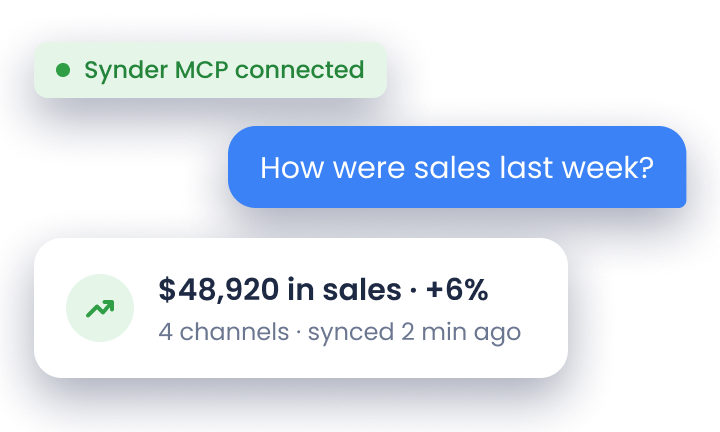

Multi-channel ecommerce accounting brings sales, fees, refunds, taxes, and payouts from every channel into one general ledger, then matches each net deposit back to the activity behind it.
That matters more as ecommerce volume grows. U.S. retail ecommerce sales reached $340.2 billion in Q2 2026, up 12.2% year over year, while platforms such as Shopify, Amazon, and eBay each use different fees, settlement reports, and payout schedules.
This guide explains how to account for that activity across multiple channels, use clearing accounts, record platform fees and taxes, set up QuickBooks Online or Xero, and automate the process.
TL;DR
- Accounting automation syncs sales, fees, refunds, and payouts from every channel and matches each payout to the bank feed, replacing manual entry as channels and volume grow.
- Multi-channel ecommerce accounting keeps every channel in one general ledger, separated by tags instead of separate books.
- A clearing account per channel ties each net payout to its gross sales, and any balance left after the payout signals a missing or duplicated transaction.
- Revenue posts at gross value on the sale date, so P&L revenue and bank deposits differ until payouts clear.
What is multichannel ecommerce accounting?
Multichannel ecommerce accounting is the process of recording sales, fees, refunds, taxes, and payouts from every sales channel and payment processor in one general ledger under accrual accounting. A clearing account for each channel helps match every net payout to the gross sales behind it and keeps all platform activity in one consistent financial record: Shopify, Amazon, Etsy, your own site – it all needs to land in one clean, coherent set of books. Instead of running separate ledgers for each channel (and slowly losing your mind in the process), you pull everything into a single source of truth inside your accounting system, whether that’s QuickBooks Online, Xero, QuickBooks Desktop, or Puzzle.
Here’s what makes it different from single-channel accounting. When you sell exclusively through one platform, your accounting is relatively straightforward. You’ve got one source of transactions, one fee structure, one payout schedule. But once you expand to multiple channels, you’re dealing with:
- Sales flowing in from different sales platforms simultaneously
- Different payment processors (Stripe, PayPal, Square, Shopify Payments), each with unique fee structures
- Varying payout schedules that don’t align with your actual sales dates
- Platform-specific fees like listing fees, fulfillment fees, advertising costs, and subscription charges
- Inventory that needs tracking across all channels to avoid overselling
- Tax collection requirements that differ by platform and jurisdiction
The goal is simple: get all this fragmented financial data into your accounting system accurately, so you can see your true profitability, meet tax obligations, and make informed business decisions.
Examples of multichannel ecommerce accounting
Below are three common scenarios that illustrate how multichannel accounting operates in real business environments.
Scenario 1: A growing direct-to-consumer brand
A DTC skincare company begins on one ecommerce platform and later expands into additional marketplaces and wholesale portals. Its daily financial workflow now involves:
- Online store sales processed through an integrated payment gateway, fulfilled from its own warehouse
- Marketplace orders fulfilled by a third-party logistics provider, with multiple fee types deducted before payout
- Wholesale marketplace orders subject to extended payment terms
- Occasional in-person sales processed through a mobile POS system
Each sales channel provides data using its own formats, fee logic, and payout timing. Settlement reports, invoices, and POS deposits must all be consolidated into a single accounting system to track profitability by channel and maintain an accurate view of cash flow.
Scenario 2: A multi-marketplace resale business
A company reselling vintage electronics operates across several marketplaces and its own ecommerce website. The accounting team manages:
- Different tax handling rules across platforms (some marketplaces collect and remit tax, while the company’s own site relies on external tax software)
- Unique fee structures for each marketplace
- Payout schedules that vary by platform: weekly, daily, or multi-day settlement cycles
- One-of-a-kind inventory that requires precise tracking to prevent overselling
To keep quarterly filings accurate, the business relies on bookkeeping software capable of normalizing these differences and posting clean data into its accounting system.
Scenario 3: A SaaS company with mixed revenue streams
A software provider earns revenue through multiple channels:
- Monthly subscription payments processed through a billing platform
- One-time purchases for premium add-on features
- Professional services billed through its accounting system
- Occasional marketplace sales through an app ecosystem
The company must apply proper revenue recognition for subscriptions, account for services as work is delivered, and reconcile marketplace fees against payouts. Automated transaction sync and revenue recognition tools ensure compliance with GAAP standards and provide clear visibility into recurring vs. non-recurring revenue.
Common challenges in multichannel ecommerce accounting
Expanding to multiple sales channels brings complexity that goes beyond just having more transactions to record. Here are the core challenges you’ll face.
1. Multichannel reconciliation
Reconciliation is where most multichannel sellers hit their first major roadblock. You’re you’re tracking the entire flow of money across platforms, payment processors, and bank accounts.
Here’s why it gets complicated. Let’s say you made 50 sales on Shopify yesterday, totaling $2,500. Your Shopify Payments report shows:
- Gross sales: $2,500
- Transaction fees: $75
- Net payout: $2,425
But that $2,425 doesn’t hit your bank account today. It arrives in 2 business days. Meanwhile, you also sold $1,200 worth of products on Amazon, but Amazon’s settlement period is 14 days, and they’ve deducted:
- Referral fees: $180
- FBA fees: $95
- Storage fees: $30
- Previous advertising spend: $150
- Net payout: $745
Now your bank statement shows deposits that don’t match your sales dates, and your accounting system needs to reflect what actually happened, not just what the bank shows.
Proper reconciliation automation solves this by using clearing accounts. When a sale happens, the gross amount goes to a clearing account. Fees are recorded as expenses. When the payout arrives at your bank, it’s matched against the clearing account balance. This way, your income statement shows accurate revenue and expenses, while your balance sheet reflects the timing reality of when money actually moved.
Using the Shopify example above, ecommerce reconciliation with a clearing account takes three entries, each a general journal entry:
| Entry | Debit | Credit |
| Sale: $2,500 | Shopify Clearing $2,500 | Sales Revenue $2,500 |
| Fees: $75 | Merchant Fees $75 | Shopify Clearing $75 |
| Payout: $2,425 | Checking $2,425 | Shopify Clearing $2,425 |
Clearing balance: $0. A leftover balance flags a missing or duplicated transaction. Ecommerce payment reconciliation software posts these three entries automatically for every payout.
2. Sales data analytics
Digital channels generated 57% of U.S. small and midsize business sales on average in 2025, compared with 41% from physical channels, according to PYMNTS Intelligence. When you’re selling across multiple channels, understanding your actual performance requires more than looking at each platform’s dashboard. You need consolidated sales data analytics that shows:
- Which channel is most profitable after fees
- Which products sell best on which platform
- Customer acquisition costs by channel
- True gross margins after platform-specific expenses
- Seasonal trends across all channels combined
The problem is that each platform calculates metrics differently. Shopify might show you net sales (after discounts), while Amazon shows gross proceeds, and eBay reports total sales, including shipping. PayPal’s reports don’t break out which sale came from which channel if you use it across multiple platforms.
Without consolidation, you’re making decisions based on incomplete information. You might think Amazon is your most profitable channel because it generates the highest revenue, but after accounting for FBA fees, referral fees, and advertising spend, your Shopify store might actually deliver better margins.
Automated bookkeeping solves this by standardizing how transactions are recorded across all platforms, giving you apples-to-apples comparisons in your accounting system’s reports. To report profitability by channel, tag every sale, fee, and refund by channel (classes or locations in QuickBooks Online, tracking categories in Xero) and run a P&L filtered by that tag to get channel contribution margin after referral fees, FBA fees, and Amazon Ads spend (tracked in Amazon as ACoS), as described in step 4 of the setup.
3. Inventory management
Inventory tracking becomes exponentially more complex when you sell the same products across multiple channels. The core challenge: keeping inventory counts synchronized so you don’t oversell on one platform because you didn’t know about a sale on another.
Here’s a typical example. You have 10 units of a popular product. You list them on:
- Your Shopify store
- Amazon FBA (5 units sent to Amazon’s warehouse)
- eBay (5 units in your warehouse)
A customer buys 3 units from your Shopify store. If your systems aren’t integrated, those 3 units are still showing as available on eBay, creating a potential overselling situation. Now multiply this across dozens or hundreds of SKUs, and you’ve got a serious problem.
From an accounting perspective, inventory management integration matters because:
- COGS (Cost of Goods Sold) must be calculated correctly for accurate profit reporting
- Inventory valuation affects your balance sheet
- Dead stock ties up cash and might need to be written down
- Inventory across multiple locations (your warehouse, Amazon FBA, dropship suppliers) needs tracking
Multi-channel ecommerce inventory management also depends on three rules of ecommerce inventory accounting. Use one costing method, FIFO or weighted average, for all channels.
Treat Amazon FBA and each 3PL warehouse as a separate inventory location, such as a separate Shopify Locations entry. A transfer to FBA is not a sale: COGS posts only when the unit ships to the customer, at landed cost, and a perpetual inventory system posts it as each sale syncs. When comparing inventory software for ecommerce, check that it follows these rules to keep inventory treatment consistent across channels.
The solution involves either a dedicated inventory management system that syncs with all your channels, or ecommerce bookkeeping software that can track inventory quantities and values as sales are recorded across platforms.
4. Tax compliance complexity
Multichannel selling creates a tax compliance nightmare if you’re not set up correctly. Different platforms handle sales tax collection in different ways, and you’re responsible for ensuring everything is reported accurately.
Here’s what you’re dealing with:
Marketplace facilitator tax: Platforms like Amazon, eBay, Etsy, Walmart, and TikTok Shop collect and remit sales tax on your behalf for sales in states where they’re required to do so. This tax never touches your bank account, as the platform keeps it and pays it to the state. But it still affects your accounting because it’s technically part of your sale.
According to Wipfli LLP, as of April 2026, all U.S. states with a sales tax require marketplace facilitators to collect and remit sales tax on behalf of third-party sellers, under laws that followed the 2018 South Dakota v. Wayfair decision on economic nexus.
Shopify, WooCommerce, and Wix are not marketplace facilitators and do not collect or remit on your behalf. Ecommerce bookkeeping and sales tax compliance depend on keeping the two tax types apart, so ecommerce accounting and sales tax automation tools should post them to separate accounts. Form 1099-K totals from platforms report gross amounts, so they tie to gross sales in the books, not to net deposits.
PayPal and Stripe don’t collect sales tax automatically. You need to handle tax collection through your ecommerce platform or a tax automation service like TaxJar or Avalara, then remit it yourself.
Shopify collects tax based on your settings, but you’re responsible for configuring rates correctly and filing returns.
Your accounting system needs to accurately reflect:
- Sales tax you collected and owe (liability)
- Marketplace facilitator tax that was withheld (which shouldn’t inflate your tax liability since you didn’t collect it)
- Tax-free sales (interstate commerce, wholesale, tax-exempt customers)
Getting this wrong means your tax reports won’t match your actual obligations, potentially leading to overpayment, underpayment, or penalties.
5. Payment processor complexity
Most multichannel sellers use multiple payment processors, each with its own fee structure, payout schedule, and reporting format. This creates both accounting challenges and cash flow management issues.
Consider this common setup:
- Shopify Payments (2.9% + 30¢ per transaction, 2-day payout)
- PayPal (2.99% + 49¢ per transaction, instant transfer available for 1% fee)
- Stripe (2.9% + 30¢ per transaction, 2-day rolling payout)
- Square (2.6% + 10¢ for card-present, next-day deposit)
- Amazon Pay (handled through Amazon Seller Central, 14-day settlement)
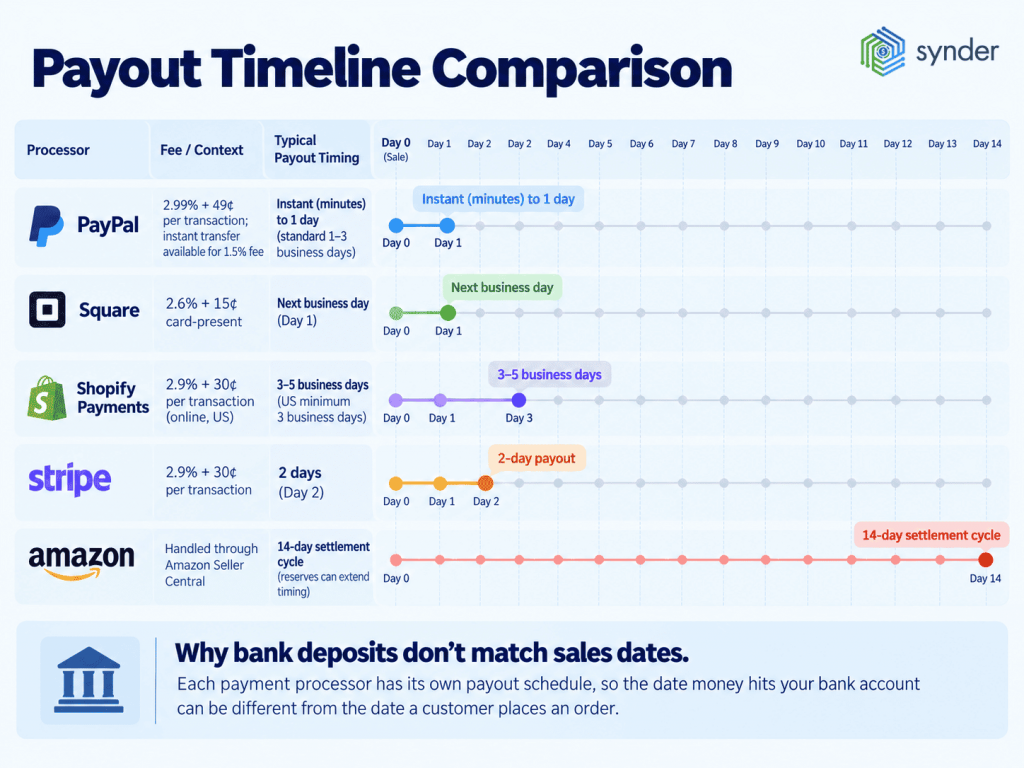
Each processor deposits net amounts (sales minus fees) into your bank account at different times. Your accounting needs to show:
- Gross sales by channel
- Processing fees as expenses
- The timing gap between when sales happened and when you received the money
Without proper automation, you’d spend hours each week manually categorizing these transactions, trying to match deposits to sales, and ensuring fees are recorded correctly. Reconciliation automation handles this by syncing detailed transaction data from each processor and matching payouts to your bank feed automatically.
6. Platform-specific fees and expenses
Beyond payment processing fees, each sales channel charges its own unique fees that need accurate categorization. For example:
Amazon charges:
- Referral fees (typically 8–15% of sale price)
- FBA fees (fulfillment, storage, removal fees)
- Monthly professional seller subscription ($39.99)
- Advertising fees (if you use Amazon PPC)
- Long-term storage fees (for slow-moving inventory)
Take a deeper look at Amazon fees.
eBay charges:
- Insertion fees (for listing items)
- Final value fees (percentage of total sale, including shipping)
- Store subscription fees
- Promoted listings fees
- Payment processing fees
Check out a full guide on eBay fees.
Etsy charges:
- Listing fees ($0.20 per item)
- Transaction fees (6.5% of sale price)
- Payment processing fees (3% + 25¢)
- Advertising fees (if you use Etsy Ads)
- Currency conversion fees (for international sales)
Here’s more on Etsy seller fees.
Your accounting system needs to categorize these fees correctly so you can:
- Calculate true profitability by channel
- Understand your effective commission rate per platform
- Make informed decisions about which channels to prioritize
- Track fee increases over time
Under ecommerce accounting best practices, each fee type then posts to one expense account:
| Fee type | Expense account |
| Referral and final value fees (eBay final value fees include payment processing under eBay managed payments) | Marketplace Commissions |
| FBA fees | Fulfillment Fees |
| Payment processing fees (the merchant discount rate) | Merchant Processing Fees |
| PPC and advertising fees | Marketplace Advertising |
| Seller and store subscriptions | Platform Subscriptions |
Decide once whether fulfillment fees go in COGS or operating expenses (OpEx), because the choice changes reported gross margin.
Online sales tracking software that integrates with your platforms automates this categorization, ensuring fees are consistently recorded in the correct expense accounts.
How to set up multichannel ecommerce accounting
This six-step multichannel ecommerce accounting process applies to both small ecommerce businesses and mid-market brands.
- Keep one set of books. Run every channel through one company file in QuickBooks Online or Xero, so the general ledger produces consolidated financial statements. One set of books is the basis of accounting for ecommerce business operations on any number of channels.
- Create a clearing account per channel and processor. Shopify Payments, Amazon, PayPal (including the PayPal balance), and Stripe each get their own clearing account in the Chart of Accounts, and each account returns to zero when its payout transfers to checking. If a platform’s native processor, such as Shopify Payments, takes the payments, connecting the platform covers them; external gateways such as Stripe, PayPal, and Square need their own connection and clearing account.
- Add fee expense and tax accounts. Create the expense accounts from the fee table above, Sales Tax Payable for tax you collect, and a separate account for marketplace facilitator tax. Bookkeeping for ecommerce needs these accounts in place before the first sync.
- Tag every transaction by channel. Assign each sale, fee, and refund a class or location in QuickBooks Online, or a tracking category in Xero, and run a P&L filtered by that tag.
- Connect each platform once. Connect every sales channel and payment processor a single time through one ecommerce accounting integration per platform, because a second multi-channel ecommerce integration for the same money flow creates duplicate entries. Sync tools that check each unique transaction ID before posting skip records already in the books.
- Set a reconciliation rhythm. Run the ecommerce accounting sync daily, review clearing account balances weekly, and close the month at the month-end cutoff once every clearing account is at zero, the bank reconciliation matches, and the trial balance is reviewed, or let ecommerce reconciliation software flag anything that does not tie.
With this structure in place, the best multi-channel ecommerce accounting software is the one that automates steps 2 through 6 for your platforms.
Multichannel ecommerce bookkeeping software overview
Managing multichannel accounting manually is possible when you’re just starting out, but as sales volume grows, automation becomes necessary. The right software makes the difference between spending hours a month on bookkeeping versus having accurate books that update automatically.
Key features to consider
Per-transaction sync preserves every line item. Summary sync condenses daily activity into one automated journal entry, which keeps the ledger cleaner but moves order-level detail out of the accounting file. That choice comes when you compare ecommerce accounting software and helps determine the best fit for your transaction volume.
Here’s what to look for in ecommerce bookkeeping software:
- Real-time multi-platform sync: Your software should connect directly to all sales channels and payment processors, automatically pulling transactions across ecommerce platforms and payment providers.
- Flexible sync modes: Choose tools that offer both per-transaction sync for detailed tracking and summary sync for high-volume sellers who prefer cleaner, aggregated entries.
- Automated reconciliation: the system should use clearing accounts and automatically match payouts to your bank feed, ensuring accurate cash-flow reporting without manual work.
- Accurate fee categorization: Platform fees should post automatically to the correct expense accounts for clear profitability analysis.
- Tax handling and compliance: Your tool must correctly separate sales tax you collected from marketplace facilitator tax withheld by platforms, supporting multi-state tracking and filing.
- Smart rules and customization: Look for customizable rules that automate categorization, classes, locations, accounts, and other attributes based on transaction details.
- Inventory tracking integration: If your accounting system manages inventory, the software should update quantities and COGS automatically as sales occur.
- Historical data import: The solution should let you import past transactions so your books are complete from day one.
- Multi-currency support: For international sellers, the system must apply correct exchange rates and record currency gains or losses automatically.
Top ecommerce bookkeeping software options
Now that you know what features matter, let’s look at three solutions that stand out for multichannel ecommerce accounting. Each takes a different approach to automation, so the right choice depends on your business size, the platforms you sell on, and how much detail you need in your books. We’ve evaluated these based on platform coverage, sync flexibility, accuracy, and real-world results from ecommerce sellers.
1. Synder
Synder automates multichannel ecommerce bookkeeping by connecting 30+ sales platforms and payment processors with QuickBooks Online, Xero, and QuickBooks Desktop. Businesses using Synder save up to 70+ hours monthly on manual bookkeeping while achieving 99.5%+ reconciliation accuracy across all sales channels.
Key features:
- Dual sync modes: Per Transaction for detailed tracking or Summary Sync for high-volume sellers
- Smart Rules engine for unlimited custom categorization, class/location assignment, and automated workflows
- Automatic clearing account reconciliation with payout matching to bank feeds
- Proper tax handling, including marketplace facilitator tax (Amazon, eBay, Etsy, Walmart, TikTok)
- Balance Reconciliation tool to verify summaries match platform reports
- Multi-entity management for accounting firms and multi-business owners
- Reporting capabilities for real-time analytics
- Synder RevRec for GAAP-compliant revenue recognition
Pricing:
| Plan | Price (billed annually) | What’s included |
| Basic | $52/month | 2 integrations, up to 500 sales transactions/mo |
| Essential | From $103/month | Unlimited integrations, up to 3,000 sales transactions/mo (1,000 included in base price) |
| Pro | From $240/month | Unlimited integrations + 2 premium integrations, up to 20,000 sales transactions/mo (10,000 included in base price) |
| Pro Max | From $480/month | Unlimited integrations + unlimited premium integrations, up to 40,000 sales transactions/mo (20,000 included in base price) |
| Premium | Custom | Unlimited integrations + unlimited premium integrations, unlimited sales transactions |
Best for:
Synder is a good fit for ecommerce businesses selling across multiple channels that need flexible transaction handling and full detail in their books, as well as accounting firms managing multiple ecommerce clients and companies requiring audit-ready, highly customizable accounting automation.
Ready to see how Synder can automate your multichannel accounting? Book a free demo to explore how it works with your specific sales channels and accounting setup.
2. ConnectBooks
ConnectBooks specializes in Amazon and Shopify accounting with exceptional SKU-level profitability tracking and COGS reporting. Built specifically for ecommerce sellers, it provides deep visibility into product performance with advertising costs allocated down to individual SKUs.
Key features:
- SKU-level P&L reports with advertising allocated per product
- Accurate COGS tracking with costs pulled from QuickBooks or Xero
- Both itemized (per-transaction) and summary sync modes
- Advanced Amazon settlement report handling, including FBA fees
- Bundle and kit support for multi-item products
- Inventory forecasting and reorder alerts
- Automatic fee categorization for marketplace charges
Pricing:
| Plan | Price | What’s included |
| Summary | $50/month | Summary sync, basic reporting, 1 marketplace |
| Itemized | $100/month | Per-transaction sync, inventory tracking, SKU-level reports |
| Pro | $200/month | Multiple marketplaces, advanced analytics, priority support |
Best for:
ConnectBooks suits Amazon and Shopify sellers who need product-level profitability insights and detailed inventory accounting, particularly businesses focused on understanding true SKU-level margins after fees and advertising spend.
3. Dext Commerce
Dext Commerce (formerly Greenback) combines ecommerce transaction syncing with expense management in a single platform. It captures itemized sales transactions, fees, taxes, and refunds while also handling receipt and invoice processing with 99.9% data extraction accuracy.
Key features:
- Transaction-level data with itemized sales, fees, taxes, and refunds
- Data extraction accuracy using advanced OCR and AI
- Expense management with receipt capture via mobile, email, or upload
- Integrates with QuickBooks Online, Xero, Sage, and 30+ platforms
- Supports Amazon, Shopify, Etsy, eBay, Stripe, PayPal, and more
- Real-time sales data with standardized reporting
- Multi-currency transaction support
- Bank-level encryption and GDPR compliance
Pricing:
| Plan | Price | What’s included |
| Commerce Lite | $49/month | Up to 5 platforms, basic transaction sync, limited users |
| Commerce | $99/month | Unlimited platforms, full features, multiple users |
| Enterprise | Custom | Volume pricing, dedicated support, and custom integrations |
Best for:
Dext Commerce works well for businesses that need both ecommerce accounting automation and robust expense management in a single platform, especially companies selling on Amazon, Shopify, Etsy, and eBay that want to streamline receipt processing and expense tracking without using multiple tools.
Detailed comparison
| Feature | Synder | ConnectBooks | Dext Commerce |
| Supported platforms | 30+ (Amazon, Shopify, eBay, Etsy, WooCommerce, Square, Stripe, PayPal, etc.) | 6 (Amazon, Shopify, TikTok, Walmart, eBay, Etsy) | 10+ (Amazon, Shopify, Etsy, eBay, Stripe, PayPal, etc.) |
| Sync modes | Per-transaction + Summary | Per-transaction + Summary | Transaction-level only |
| Inventory tracking | Yes (per-transaction mode with full COGS) | Yes (with advanced SKU-level reporting) | Basic |
| Smart rules | Unlimited custom rules | Basic categorization | Limited AI categorization |
| Multi-currency | Full support (both modes) | Limited (itemized only) | Yes |
| Historical data import | Unlimited | Limited | Available |
| Tax handling | Advanced (marketplace facilitator tax, multi-jurisdiction) | Good (basic sales tax) | Good (automated tax calculation) |
| SKU-level profitability | Available in per-transaction mode | Excellent (advertising allocated per SKU) | Available |
| Clearing account reconciliation | Automatic | Automatic | Manual setup required |
| Revenue recognition | Yes (Synder RevRec module) | No | No |
| Best for | Multichannel sellers that need flexible transaction handling and full detail in their books; accounting firms managing multiple ecommerce clients | Amazon and Shopify sellers that need SKU-level margins after fees and advertising spend | Businesses that need ecommerce accounting automation and expense management in one platform |
Conclusion
Multichannel ecommerce doesn’t get out of hand because it’s complex; it gets out of hand because too much of the work is still done manually. The moment you stop acting as the middle layer between platforms, reports, and payouts, your operations become far easier to manage than they look on paper.
Automation changes the rhythm of the business. Instead of chasing numbers, you work with reliable data the moment you need it. Accuracy becomes the default, not the outcome of long nights with spreadsheets. That shift is what lets accounting keep pace with growth instead of slowing it down.
FAQ
Why doesn’t my P&L revenue match my bank deposits?
P&L revenue does not match bank deposits because the P&L records gross sales on the date they are earned, while the bank receives net payouts later, after platform fees, refunds, and chargebacks are deducted. A clearing account per channel bridges the gap: revenue posts on the sale date, and each payout clears the balance when it reaches the bank.
How do I reconcile sales from multiple payment processors?
To reconcile sales from multiple payment processors, give each processor its own clearing account and match that processor’s payouts against it. Sales post to the clearing account at gross value, and fees post as expenses. When a processor sends a payout, a transfer moves the net amount from the clearing account to checking, which brings the clearing balance to zero. Automation software creates these entries and matches each payout to the bank feed.
How do I manage consolidated cash flow across Amazon, Shopify, and TikTok Shop?
Consolidated ecommerce cash flow management across Amazon, Shopify, and TikTok Shop means treating undeposited platform balances as cash in transit and forecasting each platform’s payouts from its own schedule. Each channel’s clearing account balance shows what that platform still owes, including any reserves or holds. Review those balances weekly alongside bank cash.
Will I lose transaction-level detail if I automate bookkeeping?
Ecommerce bookkeeping automation does not lose transaction-level detail when the software runs in per-transaction sync mode. Per-transaction sync records every sale, fee, tax, and refund as its own entry, preserving an order-level audit trail. Summary sync posts one aggregated entry per day or payout, which keeps high-volume ledgers readable but moves order-level detail out of the accounting file.
How do I avoid duplicate entries when syncing multichannel sales?
Duplicate entries are avoided by connecting each money flow to the accounting system exactly once and stopping manual entry from the automation start date. Duplicates come from overlapping sources: connecting a platform and its native processor separately, entering sales by hand that a sync later imports, or re-importing historical data. A clearing account that does not return to zero after payouts flags a duplicate or a missed transaction.
How can I shorten month-end close for a multichannel business?
Month-end close for a multichannel business gets shorter when transactions sync daily, payouts match to the bank feed automatically, and each channel has its own clearing account. Those three steps remove the delays that stall close: waiting for settlement reports from platforms with long payout cycles, matching deposits to orders by hand, and chasing fee or tax discrepancies across channels. With those steps in place, month-end is limited to reviewing the exceptions.
Can I automate inventory tracking across multiple channels?
Inventory tracking across multiple channels can be automated, in the books through per-transaction sync and across storefronts through inventory management software. Per-transaction sync in accounting automation tools updates inventory quantities and COGS as each sale posts. For real-time quantity sync across all platforms that prevents overselling, dedicated inventory management software such as Cin7 or SkuVault connects to the sales channels and the accounting system.
How does the marketplace facilitator tax affect my accounting?
Marketplace facilitator tax affects the books as tax on the sale that the marketplace collects and remits, so it must be recorded in its own account and kept out of Sales Tax Payable. Platforms such as Amazon, eBay, and Etsy collect this tax on the seller’s behalf and pay it to the state, so it never reaches the seller’s bank account. Recording it separately shows the full transaction value, while Sales Tax Payable reflects only the tax the seller actually owes.
Do I need separate books for each sales channel?
Separate books for each sales channel are not needed: all channels belong in one accounting system. Class or location tracking in QuickBooks Online, or tracking categories in Xero, shows performance by channel inside the same books.
What accounting software is best for multichannel ecommerce?
The best accounting software for multichannel ecommerce depends on company size: QuickBooks Online or Xero for small and midsize sellers, and Sage Intacct or NetSuite for companies that need multi-entity consolidation. Any of them works best paired with accounting automation tools like Synder, which sync sales, fees, taxes, and payouts from each channel into the books.