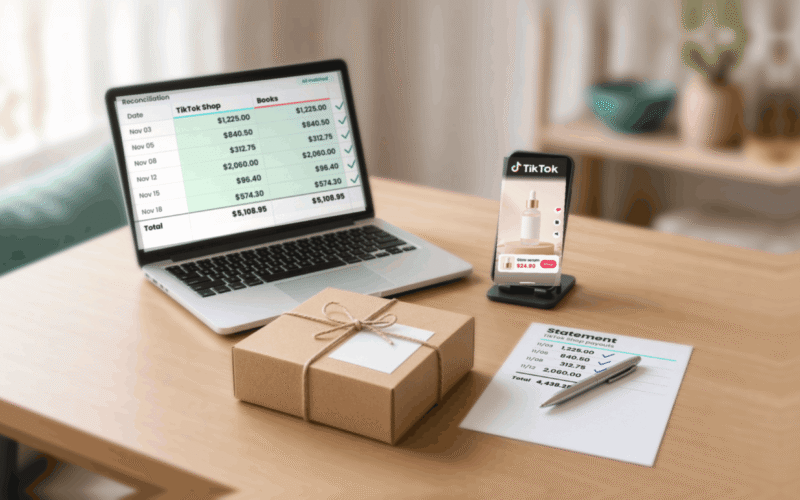
You’ve matched every TikTok Shop deposit to the bank, yet the TikTok clearing account still shows a $412.37 balance that no order explains.
That balance comes from lines that appear only on TikTok’s settlement statement, such as TikTok-funded discounts, refund administration fees and reserves held from one payout to the next. The more a shop sells, the more of these lines each statement carries, and TikTok Shop sales keep rising: the platform took about 2% of US online retail spend in July 2026, up from 1.2% a year earlier, Consumer Edge card data shows.
Since the bank deposit and the sales dashboard leave those lines out, only the statement can explain the balance. TikTok Shop reconciliation therefore matches your books to the settlement statement line by line, so the clearing account in QuickBooks Online, Xero or NetSuite reaches zero after each payout.
This guide shows how to get there, from reading the statement to clearing it in your ledger, and how to choose between per-order and per-statement sync.
TL;DR
The key rules for getting a TikTok clearing account to zero:
- Reconcile to the settlement statement, not the bank deposit.
- Post each statement line separately.
- Record payouts as transfers.
- Keep TikTok-funded discounts in revenue.
- Keep withheld sales tax out of revenue.
- Track reserves in their own account.
- Choose sync by the detail you need.
Why your TikTok Shop payout doesn’t match your sales
A TikTok Shop payout is the settled statement amount, not your sales total. To get from one to the other, TikTok deducts fees, refunds and seller discounts, adds shipping subsidies and adjustments, and may hold back a reserve.
TikTok’s settlement report definitions give the exact formula:
Total settlement amount = Net sales + Shipping + Fees + Adjustment amount
Net sales = Gross sales + Gross sales refund + Seller discount + Seller discount refund
TikTok shows refunds, discounts and fees as negative numbers, which is why the formula adds them. The payout that reaches your bank is the total settlement amount minus any reserve TikTok holds, plus any reserve it releases.
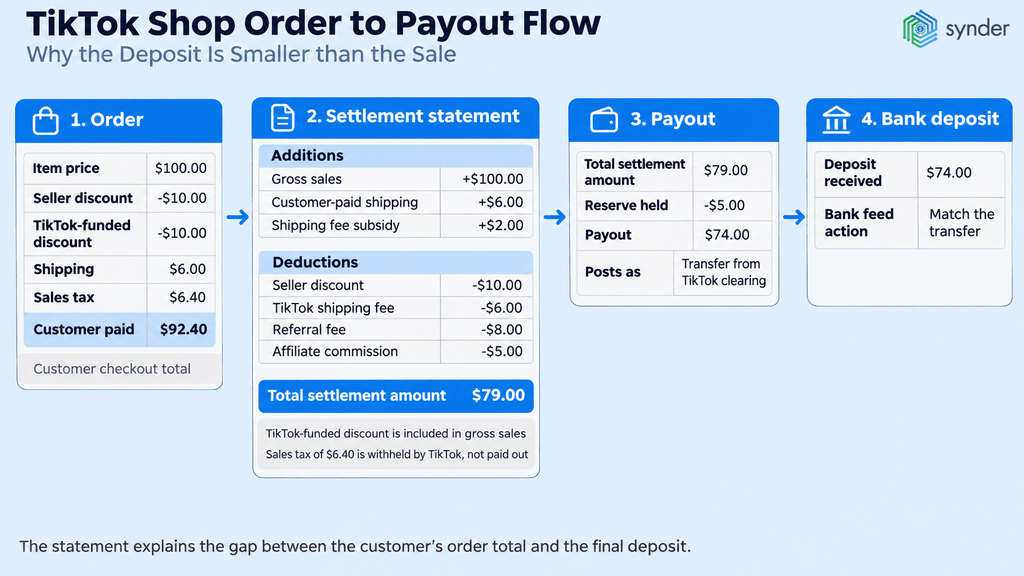
Behind the terms of that formula, seven items explain the gap between gross sales and the payout:
- Fees. Referral fees, affiliate commissions and refund administration fees come off before payout.
- Refunds and seller discounts. Gross sales refunds and seller-funded discounts reduce net sales.
- TikTok-funded discounts and shipping subsidies. TikTok pays part of the item price or shipping for the customer, so the customer pays less than the sale is worth to you.
- Withheld sales tax. In marketplace facilitator states, TikTok collects and remits the sales tax, so it never reaches you.
- Adjustments. Logistics reimbursements, policy violation deductions and chargebacks change the total.
- Reserves. TikTok can hold part of a settlement and release it in a later payout.
- Timing. An order can be created in one month and settled in another.
Fees and payouts change with every statement, which helps explain why 35.7% of the 412 retail businesses in Synder’s review, all of which came to it with an accounting problem, reported difficulties accounting for them.
To see how the seven items add up on a single statement, the worked example later in this guide follows one statement from gross sales to the bank deposit.
What’s in TikTok Shop settlement reports and how to download them
TikTok Shop settlement reports are the source document for reconciliation, because the bank deposit shows only the final net figure while the statement shows the orders, fees and adjustments behind it.
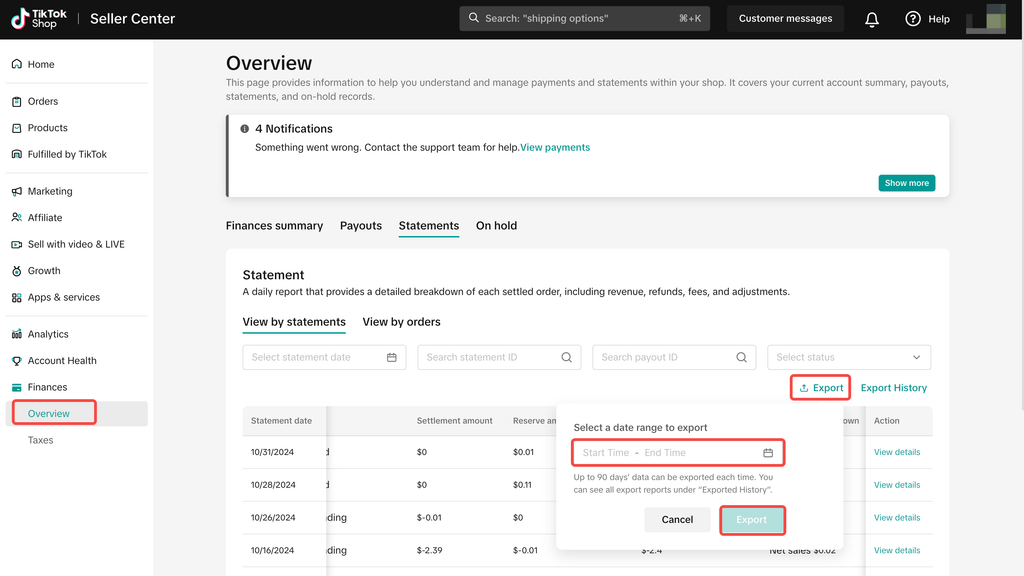
That is why you reconcile from the exported statement file, the TikTok Shop financial statement format in Seller Center that lists those lines. To download it:
- In TikTok Seller Center, open the Finances page.
- Go to the Statements tab.
- Select the statement period and click Export.
Source: TikTok, updated November 18, 2026.
Once you open the export, five columns link statement lines to ledger entries. TikTok’s column definitions cover the rest.
| Column | What it means | How to use it in your books |
| Statement date | Date (UTC) the order is settled | Date for summary entries and the statement period |
| Statement ID | The settlement group an order belongs to | Memo or reference on summary entries |
| Payment ID | Created when TikTok initiates the payout | Memo on the payout transfer, to match the bank deposit |
| Order/adjustment ID | Identifies one order or adjustment line | Reference on per-order entries |
| Type | Shows whether a line is an order or an adjustment | Separates sales from adjustments |
Some tools call the Statement ID a “settlement ID”, so stick with TikTok’s own term in memos to keep them consistent with the export.
Trace it back: put the Statement ID on summary entries and the Order ID on per-order entries. With those references in place, an auditor can follow any ledger line back to the statement it came from.
Map statement lines to your chart of accounts
The IDs tell you where a line came from, while the amounts on those lines need a home in your chart of accounts. The table below uses TikTok’s column names and generic account types, so you can match them to the accounts you already have.
| Statement line | What it is | Typical account | Effect on payout |
| Gross sales | Item price before discounts | Sales income | Increases |
| Gross sales refund | Item price returned to customers | Sales returns and allowances (contra-revenue) | Decreases |
| Seller discount | Discount you fund | Seller discounts (contra-revenue) | Decreases |
| TikTok-funded discount (platform discount) | Part of the price TikTok pays for the customer | Sales income, kept at full price | None |
| Customer-paid shipping and shipping fee subsidy | Shipping paid by the customer or by TikTok | Shipping income | Increases |
| TikTok shipping fee and return shipping fee | Label costs TikTok charges you | Shipping expense | Decreases |
| Referral fee | TikTok’s commission on the sale | Marketplace fees expense | Decreases |
| Refund administration fee | 20% of the refunded referral fee | Marketplace fees expense | Decreases |
| Affiliate commission | Commission paid to the creator who promoted the item | Affiliate commissions expense | Decreases |
| Adjustment amount | Reimbursements, deductions and chargebacks | Depends on the reason | Either |
| Sales tax withheld | Tax TikTok collects and remits | Sales tax payable plus a marketplace facilitator offset | None |
| Reserve held or released | Money TikTok holds back and pays later | TikTok reserve (current asset) | Held: decreases; released: increases |
How to book the six TikTok Shop lines that need special handling
Six rows in that mapping table need more than a one-line posting rule. When one of them is posted the wrong way, the TikTok clearing account keeps a balance that TikTok’s statement can’t explain, so here is how to book each one.
Fees and fee returns
A single TikTok order can carry a referral fee and, if a creator promoted it, an affiliate commission, and TikTok deducts both before the payout. Those fees need their own expense lines, separate from sales and refunds.
If you net fees against sales instead, net sales look smaller than they are. Booking the refund administration fee as part of a refund distorts the other side, because refunds then look bigger than they are.
To keep fees apart from sales and refunds, follow the sign TikTok gives each line:
- Referral fee and affiliate commission: negative on the statement, posted as fee expenses.
- Referral fee returned on a refund: positive, posted as a credit to marketplace fees (a fee return).
- Refund administration fee: negative, posted as a fee expense.
- Return shipping fee: negative, posted as shipping expense.
Refunds show how these signs combine. On an $80 refund where the original referral fee was $6.40, TikTok returns the $6.40 and charges a $1.28 refund administration fee, which is 20% of the refunded referral fee. Both amounts go to marketplace fees, and neither belongs in sales returns.
Synder’s TikTok Detailed Statement sync keeps these lines apart in the same way: fees and fee returns post as their own entries, never inside the sale or the refund, and a row that holds only a fee, such as a return shipping fee, is booked as a fee, not as a refund.
TikTok reimbursements and shipping subsidies
A seller discount and a TikTok-funded discount look alike to the customer, but they mean different things in your books. A seller discount is money you give up, so it reduces revenue. A platform discount is money TikTok pays on the customer’s behalf, so your revenue stays at the full price.
TikTok’s net sales formula reflects this: it subtracts seller discounts but has no line for platform discounts. Co-funded vouchers and Co-Funded Free Shipping split the cost between you and TikTok, so only your share reduces revenue.
The difference shows on a $30 item with a $10 TikTok discount:
| Amount | |
| Item price | $30 |
| TikTok-funded discount | −$10 |
| Customer pays | $20 |
| TikTok reimburses you | $10 |
| Revenue to record | $30 |
If you book only the $20 the customer paid, income is understated by $10, and the clearing account no longer matches the statement’s gross sales. The $30 figure also holds under ASC 606, since revenue reflects the consideration you’re entitled to for the item, even when two parties pay it. Shipping fee subsidies and TikTok Shop shipping incentives follow the same logic for shipping income.
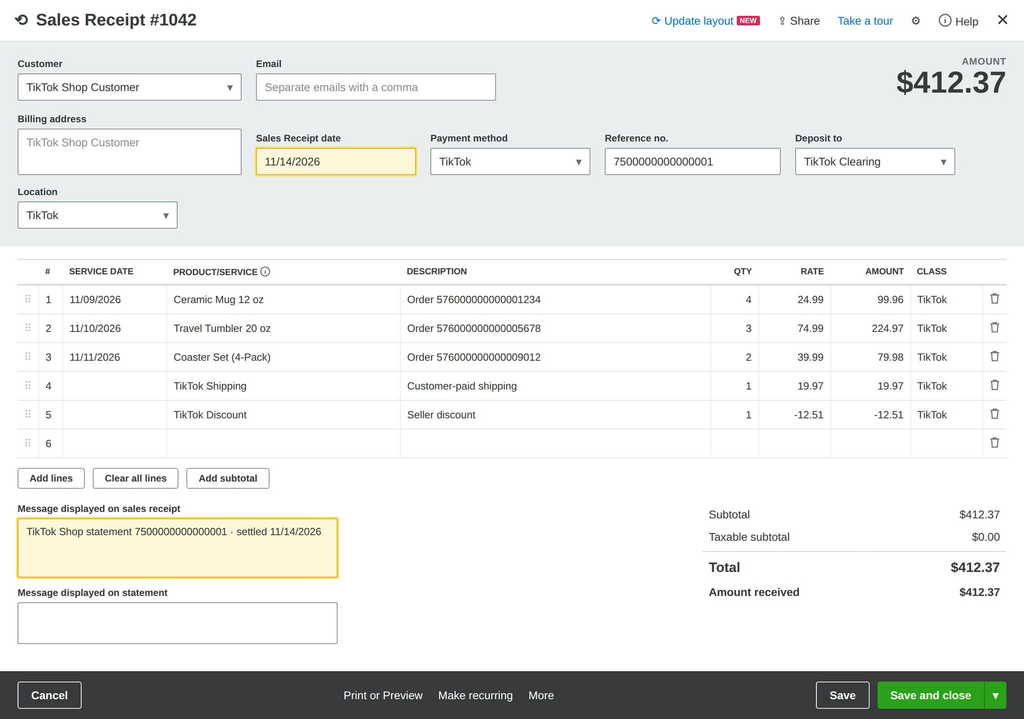
Synder’s Detailed Statement shows that split on the Sales Receipt, where the TikTok-funded amount appears as a fully discounted “TikTok reimbursements” line.
Sales tax withheld by TikTok (marketplace facilitator)
TikTok Shop collects and remits sales tax as the marketplace facilitator, so you record the tax and its offset without owing it twice. That duty comes from marketplace facilitator laws, which states passed after the 2018 South Dakota v. Wayfair decision let them tax remote sellers based on economic nexus.
The tax was still charged on your sale, so it belongs in your records, but not in revenue. If you book tax-inclusive totals as sales, revenue is overstated.
To record it correctly, pair the liability with an offset. For a $40 order with $3.20 of sales tax withheld by TikTok:
| Account | Debit | Credit |
| Sales tax payable | $3.20 | |
| Marketplace facilitator tax (offset) | $3.20 |
The two lines cancel, so your Sales Tax Payable liability account shows the tax without asking you to pay it. Keeping gross figures in the books also helps at year-end, because Form 1099-K reports gross payment amounts, not your net payouts.
Synder’s TikTok Detailed Statement uses the same pairing, booking withheld sales tax as a tax liability plus a marketplace facilitator offset, so the tax is neither missing nor doubled.
For what marketplace facilitator laws cover and what sellers still owe, see this guide to marketplace facilitator laws and sales tax.
Statement adjustments (reimbursements, penalties, chargebacks)
A statement can include a line such as −$28.61 that matches no order. That’s an adjustment, and TikTok lists the reason next to it. If you skip adjustments, the clearing account ends the month off by small, hard-to-trace amounts.
Book each adjustment by its reason, using TikTok’s names:
- Logistics adjustment or logistics reimbursement: shipping expense (debit or credit).
- TikTok Shop reimbursement: other income, or against the inventory loss for lost or damaged units.
- Policy violation deduction: penalties expense.
- TikTok fees adjustment: marketplace fees expense.
- Chargeback: chargebacks (contra-revenue), with any dispute fee posted to fees.
- FBT warehouse service fee: fulfillment expense.
To keep adjustments traceable, reference the Adjustment ID on each entry, just as you would an Order ID.
Synder posts statement adjustments as their own document, dated with the statement, so they stay separate from order entries and can be traced on their own.
Reserves and payouts that cross month-end
TikTok can hold part of a settlement as a reserve under its Dynamic Settlement and Reserve Policy and release it in a later payout. Because of that rolling reserve, a payout can be smaller or larger than the statement it pays.
Here’s how a reserve hold and release work across two statements:
| Statement | Total settlement amount | Reserve | Payout |
| A | $500 | $50 held | $450 |
| B | $300 | $50 released | $350 |
On statement A, move $50 from the clearing account to a separate TikTok reserve account (a current asset). On statement B, move it back. At month-end, the clearing account then holds only statements that have settled but not yet paid out, while the reserve account matches TikTok’s reserve balance.
Later statements can also carry older activity:
Watch out: a refund issued after settlement appears as a negative line in a later statement, so this week’s payout can include last month’s refunds.
Synder’s current TikTok integrations follow the same separation in two ways. The standard sync moves reserve amounts between the Clearing account and a dedicated Reserve account, while the statement sync shows reserve holds as expense lines and releases as deposits.
Order date vs statement date and TikTok Shop payout time
Most orders settle within the TikTok Shop settlement period, TikTok’s normal window from delivery to payout. The TikTok Shop payout schedule US sellers see isn’t fixed, because the length of that window depends on the shop’s standing under TikTok’s Dynamic Settlement and Reserve Policy. Returns windows and disputes also affect TikTok Shop payout time.
Even with a short settlement period, orders delivered near month-end settle in the next month. In rare cases, an old order settles months late: an order created on January 30, for example, can settle on August 24.
In both cases, dating entries by order date puts the sale and its cash in different months. In the January example, January’s books include a sale whose cash arrives in August, and August’s statement includes a sale that isn’t in August’s books, so neither month ties to its payouts.
To avoid that mismatch, date entries by statement date, which ties each accounting period to its payouts. Revenue recognition under ASC 606, however, follows delivery, so controllers who post by statement date often add a month-end cutoff journal entry for orders delivered before the statement period end date but not yet settled.
How to reconcile TikTok Shop settlement reports with a clearing account
A TikTok clearing account is a temporary balance sheet account that holds TikTok activity until the payout reaches the bank. Reconciliation then checks three things: the statement against the bank deposit, the statement lines against the general ledger, and the clearing account’s closing balance against TikTok’s balance.
The last check is where unexplained balances like the one in the opening example show up, and reconciliation trouble of this kind is common: in Synder’s review of 412 retail businesses, 36.4% named reconciliation as an active problem.
This TikTok Shop financial reconciliation workflow covers all three checks in six steps:
- Create the accounts. Set up a TikTok clearing account and a TikTok reserve account.
- Post the statement’s income lines to clearing. Record gross sales, refunds, seller discounts, TikTok subsidies and withheld tax (with its offset) against the clearing account.
- Post fees and adjustments against clearing. Record referral fees, affiliate commissions, refund administration fees, shipping fees and each adjustment by reason.
- Record the payout as a transfer. Move the payout amount from the clearing account to your bank account, with the Payment ID in the memo.
- Match the transfer to the bank deposit. In your ledger’s bank feed, match the TikTok deposit to the transfer.
- Prove the balance. Check that the clearing account’s balance equals TikTok’s unsettled amount for the same date, and that the reserve account equals TikTok’s reserve. When nothing is unsettled, the clearing balance is zero.
Step 4 stays the same whichever TikTok sync option you use: the payout always posts as a transfer from clearing to bank.
Worked example: one statement, from gross sales to zero
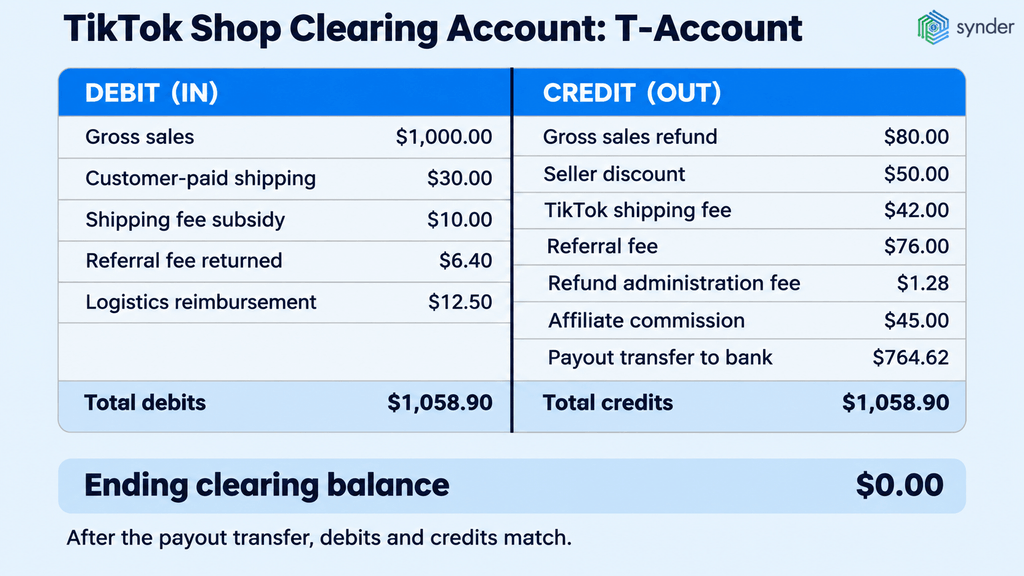
Applied to one statement, the six steps take $1,000 in gross sales to a $764.62 payout and leave the clearing account at zero. The numbers are illustrative, and the referral fee rate is an assumption for the example.
| Clearing account line | In | Out | Balance |
| Gross sales | $1,000.00 | $1,000.00 | |
| Gross sales refund | $80.00 | $920.00 | |
| Seller discount | $50.00 | $870.00 | |
| Customer-paid shipping | $30.00 | $900.00 | |
| Shipping fee subsidy (TikTok-funded) | $10.00 | $910.00 | |
| TikTok shipping fee | $42.00 | $868.00 | |
| Referral fee | $76.00 | $792.00 | |
| Referral fee returned on refund | $6.40 | $798.40 | |
| Refund administration fee | $1.28 | $797.12 | |
| Affiliate commission | $45.00 | $752.12 | |
| Logistics reimbursement (adjustment) | $12.50 | $764.62 | |
| Payout transfer to bank | $764.62 | $0.00 |
The statement’s total settlement amount is $764.62: net sales of $870.00, shipping of −$2.00, fees of −$115.88 and an adjustment of $12.50. Because every line was posted separately, the payout transfer brings the clearing account to exactly zero, and the P&L shows $1,000 in sales and $115.88 in TikTok fees instead of a single $764.62 deposit.
For a full manual check in Excel, see these guides on TikTok clearing account reconciliation and TikTok Statements clearing account reconciliation.
TikTok Shop reconciliation in QuickBooks Online, Xero and NetSuite
The clearing-account method stays the same in any ledger. What changes is the account type, the records you post and the screen where you match the deposit.
The three ledgers below appear in order of how widely they’re used: in Synder’s review of 412 retail businesses, 70.4% used QuickBooks Online, 19.4% used Xero and 3.4% used NetSuite.
QuickBooks Online
Whether you post TikTok Shop to QuickBooks by hand or through a TikTok Shop QuickBooks integration, the QuickBooks Online steps are the same:
- Create the clearing account as a Bank-type account. A Bank-type TikTok clearing account can be reconciled with QuickBooks Online’s Reconcile tool, like a checking account.
- Post the statement. Use a Sales Receipt per order, or one Journal Entry per statement, deposited to the clearing account. Refunds post as Refund Receipts, and fees post as Expenses paid from clearing.
- Record the payout. Create a Transfer from the clearing account to checking.
- Match in Banking. In the bank feed, match the TikTok deposit to the Transfer instead of adding it as income.
- Prove the balance. Open the Balance Sheet report as of month-end and compare the clearing balance with TikTok’s unsettled amount for the same date.
If you’re comparing a TikTok QuickBooks integration tool, check which of these QuickBooks Online records it creates. Synder’s TikTok integration, for example, creates a Sales Receipt for each settled sale and a Refund Receipt for each settled refund, posts fees and fee returns as separate Expenses or Deposits, and creates a Transfer for each payout.
Xero
Bookkeepers who move a client’s TikTok Shop to Xero can reconcile its settlement report with the same method, using one clearing account per client shop:
- Create the clearing account. Add it as a bank account in Xero, so it appears in bank reconciliation, or as a current asset account.
- Post the statement. Use a Xero Manual Journal per statement, or per-order invoices and payments, against the clearing account. Tag lines with Xero Tracking Categories when one client has several shops.
- Record the payout. Post a transfer from the clearing account to the bank account that receives TikTok deposits.
- Match in bank reconciliation. Match the TikTok deposit to that transfer. Bank rules can handle recurring fee lines if you post TikTok activity from a statement file.
- Tie out to the statement. Compare the clearing account’s balance with the statement totals for the period. Xero Central documents both manual journals and bank rules.
For UK shops, the same entries carry VAT instead of US sales tax. Before a new client goes live on any Xero TikTok Shop integration, run one test month and tie it to the statement.
NetSuite
NetSuite follows the same clearing logic, with records chosen for multi-entity reporting:
- Create the clearing account as a Bank-type account, so it has a bank account register and can be reconciled.
- Post the statement. Use a Cash Sale per order or a NetSuite Journal Entry per statement against the clearing account.
- Record the payout. Post a Deposit or Transfer from the clearing account to the operating bank account, and match it in bank reconciliation.
- Tag multi-entity activity. In NetSuite OneWorld, set the Subsidiary on every TikTok entry, and use Class or Department to separate shops. Tax setup depends on whether the account uses SuiteTax.
To post these records automatically, see this NetSuite TikTok Shop integration.
Per order or per statement: TikTok Shop merchant reconciliation approaches compared
Sync TikTok Shop per order when you need product, SKU and customer detail in the books. Sync per statement when you want fewer entries that tie directly to the payout.
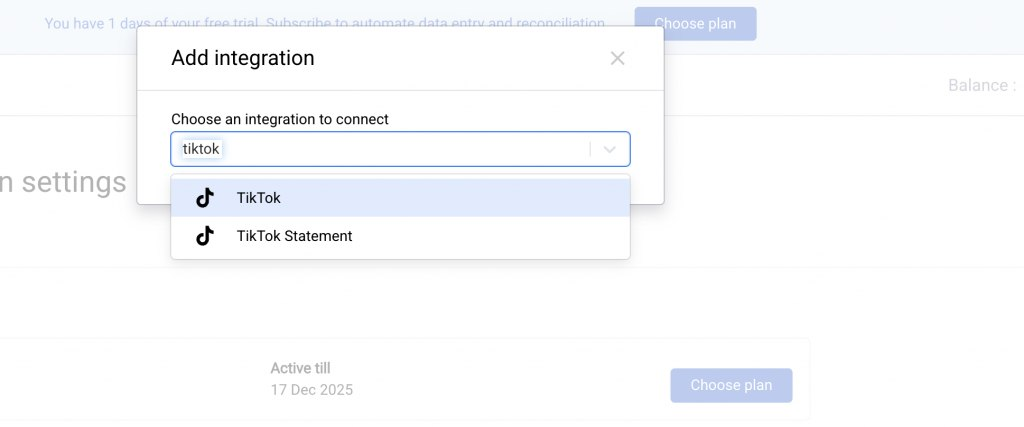
Synder offers two TikTok options for US and UK shops: TikTok, which keeps order, product, SKU and tax detail and ties every entry to the Seller Center statement, and TikTok Statement, which posts one summarized entry per paid statement. The table works as a TikTok Shop reconciliation accuracy comparison, since it shows what each option posts and how it ties to the statement.
| TikTok Statement | TikTok Detailed Statement | |
| What reaches the books | One summarized entry per paid statement | Statement-anchored totals with order detail |
| Detail level | No item-level detail | Customer, product, SKU and tax detail |
| How reconciliation works | Transfers from the Clearing account; reserve holds and releases tracked | Transfers from the Clearing account; totals match the Seller Center statement |
| Best for | Shops that want fewer entries and a faster close | Shops that need order detail and statement-level ties |
Choosing between the first two means choosing between detail and entry count. Synder’s TikTok integration keeps order detail and still ties every entry to the statement. Like other premium integrations, it’s available on Synder’s Pro, Pro Max and Premium plans.
Common TikTok Shop reconciliation mistakes
These five mistakes appear across TikTok Shop merchant reconciliation methods, manual or automated, and leave the clearing account with a balance TikTok’s statement can’t explain:
- Booking the bank deposit as revenue. The ACH bank deposit is net of fees, refunds and reserves, so revenue and fees are both understated.
- Ignoring TikTok-funded subsidies. Recording only what the customer paid understates gross revenue.
- Booking the refund administration fee as a refund. The fee is an expense, so posting it to refunds inflates returns.
- Counting withheld tax as income. Sales tax withheld by TikTok belongs in a liability with an offset, not in revenue.
- Leaving reserves in clearing. Without a reserve account, the clearing balance at month-end can’t be tied to TikTok.
Automating TikTok Shop reconciliation: what to look for
Momentum Works data shows TikTok Shop’s US gross merchandise volume grew 103% year over year to $11.8 billion in H1 2026. As a shop’s order volume grows, so does the number of statement lines that someone has to post and match by hand.
Automation should take over that manual posting, so when you compare tools for a high-volume US shop, check that the tool:
- Ties to the Seller Center statement, so totals match the file you download.
- Keeps order detail, including customer, product, SKU and tax.
- Posts fees separately from sales, with fee returns and refund administration fees in the right accounts.
- Shows TikTok-funded subsidies, so revenue stays at full price.
- Handles withheld sales tax as a liability with a marketplace facilitator offset.
- Posts each statement adjustment as its own entry, and records reserve holds and releases with the payout, so the clearing account ties to TikTok.
- Dates documents by statement date, so each payout reconciles with its statement.
Several TikTok Shop connectors cover parts of this list, so put the same real statement through each one and check which leaves the clearing balance at zero.
Synder, an accounting automation platform (Y Combinator S21, SOC 2 Type 2) used by 5,000+ businesses to sync data from 30+ sales and payment platforms, rebuilt its TikTok integration around the first point on that list, so the books match the statement sellers download from Seller Center. Synder’s TikTok integration, a premium integration on the Pro, Pro Max and Premium plans, reads TikTok’s statements through the TikTok Shop Partner API and adds order detail from TikTok, so each entry carries the customer, products and tax.
As a result, each statement line reaches the ledger as a specific record. Sales post as Sales Receipts with product lines, fees as Expenses, TikTok-funded subsidies as a “TikTok reimbursements” line, withheld tax as a liability with an offset, and payouts as Transfers from the Clearing account. Before release, Synder tested these postings on a live shop, and every case found passed after three fixes: a sale and a refund in one row, a row holding only a return shipping fee, and a refund with shipping tax.
After the sync, Synder’s Transaction Reconciliation matches every line in the TikTok clearing account to TikTok’s own records and flags anything that doesn’t tie 100%, so you review only the transactions that need attention.
If your TikTok clearing account still won’t reach zero after these steps, book a Synder demo and bring one statement to walk through.
Wrapping up
TikTok Shop reconciliation works when the statement, not the bank deposit, is the source document. When you post every statement line to the clearing account against its own account and record the payout as a transfer, the clearing balance matches TikTok’s unsettled amount, and the reserve account matches TikTok’s reserve.
To put this into practice, start with one recent statement: export it from Seller Center, post it line by line, and check that the clearing account reaches zero after the payout transfer.
FAQ
Why is my TikTok Shop payout less than my sales?
A TikTok Shop payout is less than sales because it equals the net payout after deductions. TikTok subtracts referral fees, affiliate commissions, refunds and seller discounts from gross sales, adds shipping and adjustments, and may hold part of the total settlement amount as a reserve.
Can I reconcile TikTok Shop in a spreadsheet?
You can reconcile TikTok Shop in a spreadsheet by comparing the settlement report export (.xlsx) with your clearing account report for the same period. The reconciliation is complete when the ending balance difference is zero; this Excel clearing account guide shows the steps.
Does TikTok Shop collect sales tax for me?
TikTok Shop collects and remits sales tax for you in states with marketplace facilitator laws. Record the sales tax withheld in a sales tax liability account with a matching marketplace facilitator offset, so the tax appears in your records without being counted as revenue or owed twice.