

Synder records these transactions by adding reimbursement lines to the invoice and including both the customer payment and the TikTok-funded amount in the payment record. This guide shows how those amounts appear in Synder so the transaction reflects both what the customer paid and what TikTok covered.
Use this guide if:
- You use TikTok Shop with Synder.
- Your orders include a TikTok Shop discount on items.
- Your orders include a TikTok Shop shipping fee discount.
- You want to understand why Synder adds reimbursement, shipping, or adjustment lines to the records.
What this guide does not cover
- How to connect TikTok Shop to Synder.
- How to set up products, taxes, or accounts.
- General payout troubleshooting outside discount and reimbursement handling.
How Synder records these transactions
Synder handles these transactions by adding additional lines to the invoice that capture the TikTok reimbursement, ensuring your books can be accurately reconciled. The payment consists of the total order amount, the amount received from the customer, and the reimbursement from TikTok.
Example
If a seller lists an item for $30 and TikTok provides a $10 discount to the customer, the customer pays $20. TikTok then reimburses the seller for the $10 difference, so the seller still receives $30.
These reimbursements are reflected in the TikTok order breakdown and are labeled as “TikTok Shop discount on items”.
Invoice:
- Line item: $30
- Line item: TikTok reimbursements: $10
- Discount: $10
- Subtotal: $30 + $10 – $10 = $30
Payment:
- Customer payment: $20
- TikTok reimbursement: $10
- Total: $30
Handling TikTok shipping reimbursements
When TikTok offers a shipping discount on top of the platform discount, Synder records this in the following way to ensure accurate reconciliation:
- Reimbursement: a positive line item labeled “Shipping reimbursements”.
- Shipping cost: In the designated shipping field on the invoice.
- Offset of the shipping cost: Separate expense labeled “TikTok adjustments.”
These shipping reimbursements are shown in the TikTok order breakdown and are labeled as “TikTok Shop shipping fee discount”.
Example scenario
A seller lists an item for $30. TikTok gives the customer a $10 item discount and a $5 shipping discount. The customer pays $20.
Synder records the transaction like this:
Invoice
- Item: $30
- TikTok Reimbursements: $10
- TikTok Shipping Reimbursements: $5
- Discount: -$15
- Shipping: $5
Order total: $35
Payment
- Customer Payment: $20
- TikTok Reimbursement: $10
- TikTok Shipping Reimbursement: $5
Total payment: $35
Expense
- TikTok Adjustments: -$5
Why this looks different
Synder records shipping in more than one place so the invoice total matches the full payment received. That payment includes the customer payment, the TikTok item reimbursement, and the TikTok shipping reimbursement.
Real order example
Let’s analyze a real TikTok order example and and break it down into transactions.
TikTok order breakdown
This is how your order and payment totals are calculated:
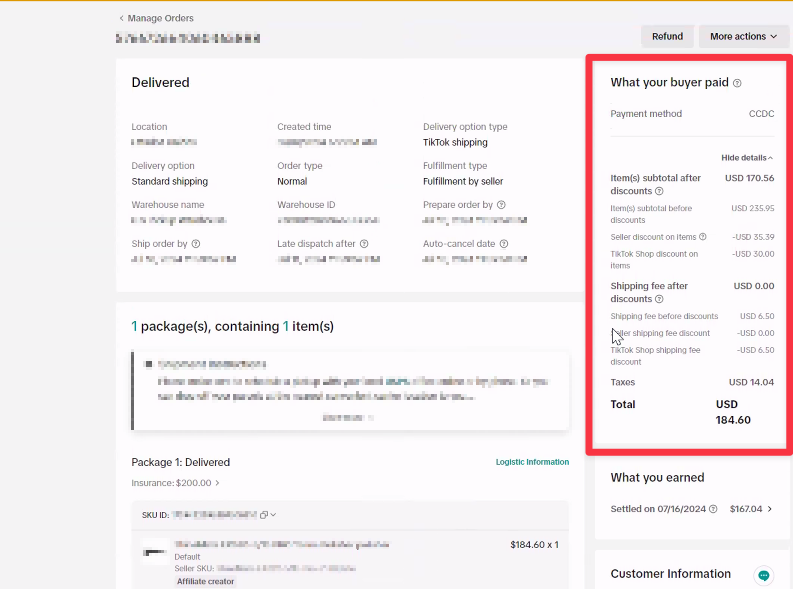
Order details:
- Item Price: $235.95
- Tax: $14.04
- Shipping: $6.50
- Seller Discount: $35.39
- TikTok Platform Discount: $30.00
- TikTok Shipping Discount: $6.50
Subtotal: $235.95 (item price) – $35.39 (seller discount) – $30.00 (TikTok platform discount) = $170.56
Order Total: $170.56 (subtotal) + $6.50 (shipping) – $6.50 (TikTok shipping discount) + $14.04 (tax) = $184.60
TikTok settlement breakdown
This is how your payout is calculated for the order
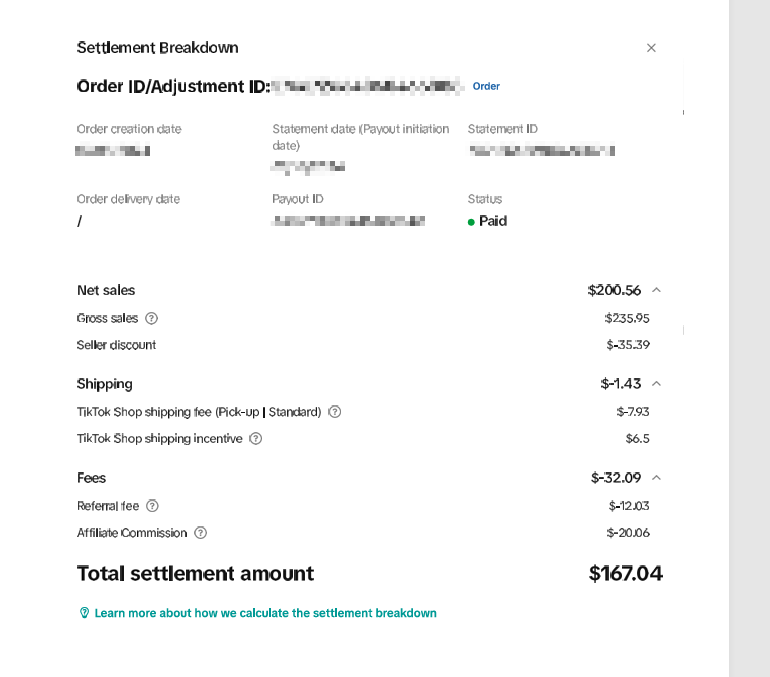
Fees Breakdown:
- Fee: $32.09
- Shipping Cost Adjustment: -$1.43 => (-$7.93 for the actual shipping cost + $6.50 TikTok shipping discount)
Payout Calculation:
- Payout:
$184.60 (customer payment)
– $32.09 (fee)
– $14.04 (tax)
+ $30.00 (TikTok platform reimbursement)
– $7.93 (real shipping cost)
+ $6.50 (TikTok shipping reimbursement)
= $167.04
How Synder records this order
Invoice
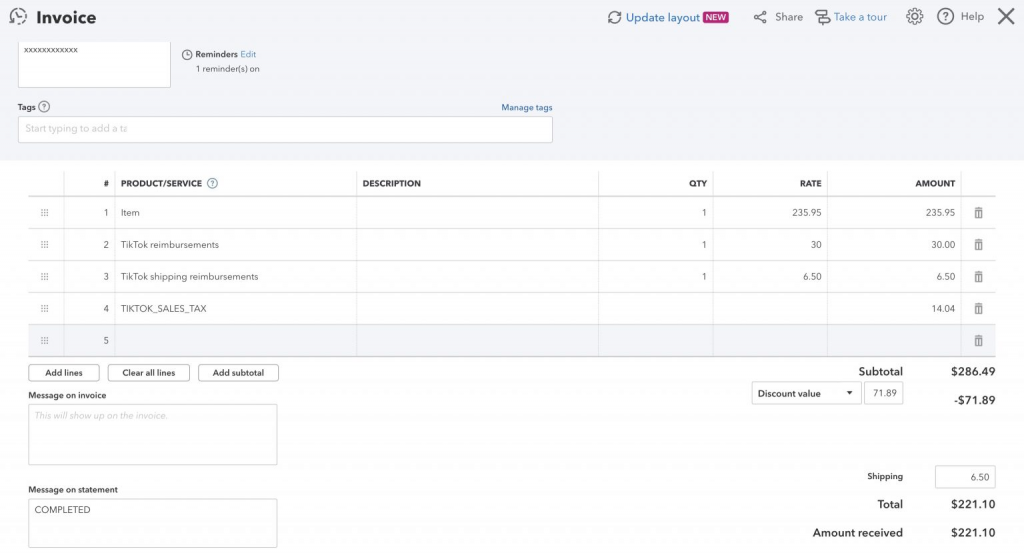
Line items
- Item: $235.95
- TikTok Reimbursements: $30.00
Reimbursed by TikTok for the platform discount. - TikTok Shipping Reimbursement: $6.50
Reimbursed by TikTok for the shipping discount. - Sales Tax: $14.04
Subtotal: $286.49
Discounts
- Seller Discount: $35.39
- TikTok Platform Discount: $30.00
- TikTok Shipping Discount: $6.50
Total discounts: $71.89
Shipping
- Shipping: $6.50
Synder records shipping in the shipping field to match the payment total. The expense record offsets this amount.
Total invoice amount
$221.10
Calculation:
$286.49 subtotal − $71.89 discounts + $6.50 shipping = $221.10
Expense
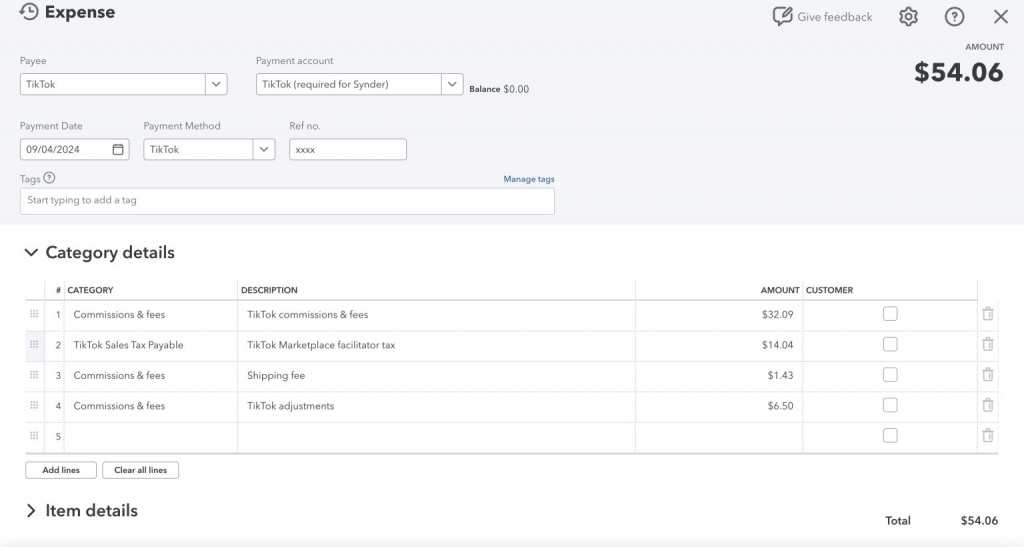
Synder records the expense like this:
- TikTok Fees: $32.09
- TikTok Marketplace Facilitator Tax: $14.04
This offsets the tax recorded on the invoice because TikTok remits it. - TikTok Adjustment: $1.43
This reflects the actual shipping amount adjustment. - Shipping Fee: $6.50
This offsets the shipping amount recorded on the invoice.
Total expense amount: $54.06
Payment
Synder records the payment like this:
- Customer Payment: $184.60
- TikTok Discount Reimbursement: $30.00
- TikTok Shipping Discount Reimbursement: $6.50
Total payment amount: $221.10
FAQ
- Why does the payment amount not match the customer payment?
The payment can include the customer payment and TikTok reimbursement amounts. Check whether TikTok funded part of the discount or shipping.
- Why is shipping shown on both the invoice and the expense?
Synder records shipping this way so the invoice total matches the payment correctly. The expense offsets the shipping amount.
- Why does the invoice total look higher than expected?
The invoice can include reimbursement lines, tax, discounts, and shipping. Review the full invoice instead of only the customer-paid amount.
- What should I compare in TikTok Shop?
Compare the order breakdown and settlement details to the invoice, payment, and expense in Synder.
Reach out to the Synder Team via online support chat, phone, or email with any questions you have – we’re always happy to help you!
