

If you sell the same products on Shopify, Amazon, and Walmart but each platform knows them by a different SKU, name, or variant code, your inventory counts and financial reports are drifting apart every day. Here’s the question that should worry you: when a unit sells on Amazon, does your Shopify inventory know about it?
Product matching is the process that fixes that. Link every duplicate listing back to a single source of truth so one unit sold anywhere updates the right product everywhere.
This guide breaks down what product matching is, why it matters when you sell across multiple channels, how it works under the hood, and how it connects to your inventory and accounting. It’s written for business owners, controllers, and accountants who’ve felt the pain of closing the books with mismatched data, and for ops leaders who need a unified catalog before they scale into more marketplaces.
TL;DR
- One product, one record. Link your SKUs across Shopify, Amazon, Walmart, and the rest to a single accounting item.
- Unmatched products break your numbers. Lost sales, distorted margins, broken books – and the problem grows with every channel you add.
- Three inputs do the matching. Identifiers first, attributes second, images and descriptions for the edge cases.
- You’ll blend three methods. Rules for the obvious cases, manual review for exceptions, ML when catalogs get big.
- Matching has to flow into your books. Without a sync layer, your reconciliation work piles up at month-end.
What is product matching?
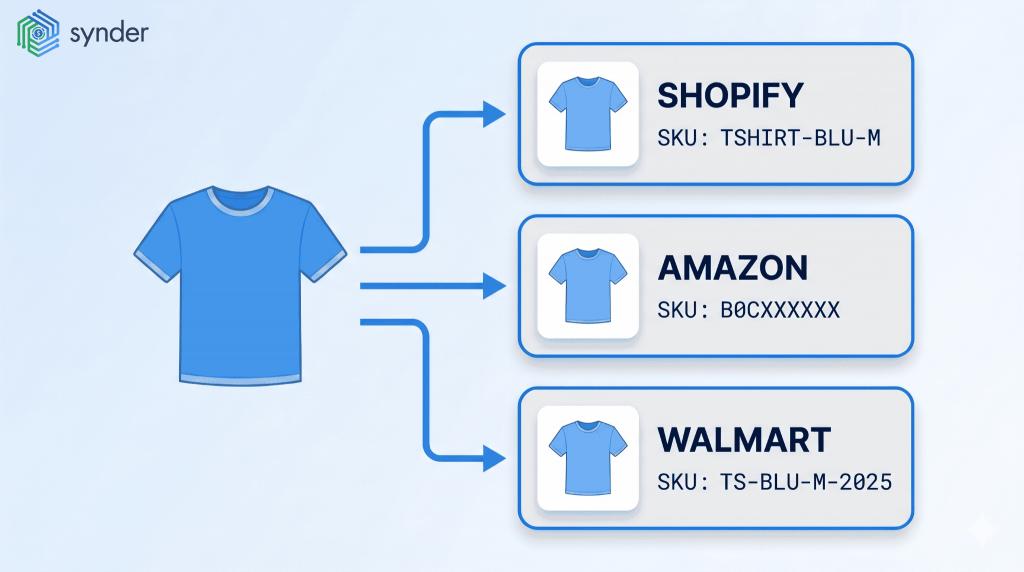
Product matching identifies when two or more product listings refer to the same item, then links them under a single master record. In a multichannel setup, that means tying your Shopify SKU, your Amazon ASIN, your Walmart item ID, and any other marketplace identifiers back to one product in your inventory system.
Why does this matter? Every downstream process assumes your data is consistent. Inventory deductions, COGS, channel-level profitability, sales tax allocation, demand forecasting – all of it breaks the moment two systems disagree about what a product is. A blue medium t-shirt with SKU TSHIRT-BLU-M on Shopify, B0CXXXXXX on Amazon, and TS-BLU-M-2025 on Walmart looks like three products to your books until someone matches them.
That hidden duplication grows fast. If you’re running eight or more channels today, you’re already in a growing company. Veeqo’s 2025 Warehouse Management System survey found 29% of high-volume sellers are now active on TikTok Shop, with new marketplaces being added constantly. Every channel you add introduces another set of identifiers to map, or the gap between your books and your real inventory widens.
How much do mismatched SKUs actually cost you?
The cost of leaving products unmatched appears in three places:
- Lost sales
- Distorted margins
- Broken books
To understand the true impact, look at the numbers. IHL Group’s 2025 research puts the annual global loss from inventory distortion at $1.73 trillion. That’s the combined cost of out-of-stocks and overstocks, now equal to 6.5% of total retail sales. How much of it is yours? A meaningful slice comes from sellers who simply don’t know what they have, because their channels are tracking the same item under different names.
Here’s the part most guides won’t tell you: product matching looks like a software problem, but it’s actually a catalog hygiene problem. No tool fully solves it for you until you’ve done the unglamorous identifier-cleanup work first. The sellers who struggle with product matching just skipped the cleanup step and asked the software to compensate.
Multichannel setups vary, but the pattern repeats across the sellers we see. One mid-sized retailer runs Shopify, Amazon, and Faire into QuickBooks Online through a sync tool. Another runs eBay, PayPal, Magento, Square, and Afterpay at roughly 15,000 transactions a month into Xero. Different platforms, different accounting systems, same problem: each channel speaks its own language, and someone has to make them agree.
Learn how to account for multichannel ecommerce.
Which product categories will you be matching?
Not every “match” looks the same. When practitioners and software vendors talk about product matching, they generally split the problem into four categories of products, each with its own difficulty curve and tooling requirements.
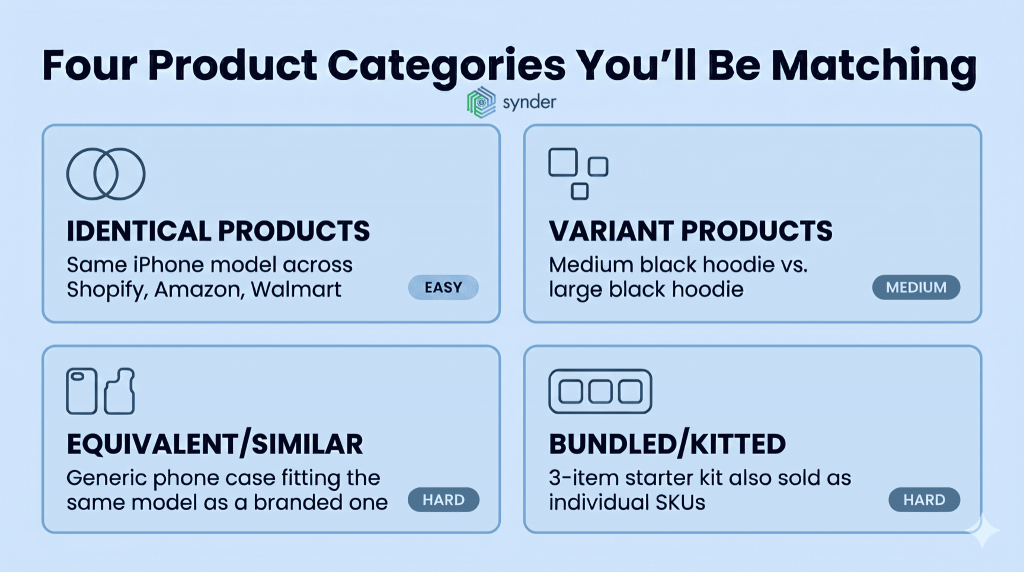
- Identical products are the simplest case: same manufacturer, model, and UPC or GTIN, listed under different SKUs across channels. The main task is data hygiene, making sure each channel has the correct identifier.
- Variant products are the same item in different sizes, colors, or configurations. A medium black hoodie and a large one are separate listings that still need to be linked back to the same parent. Platforms structure variants differently, so mapping those structures is the work.
- Equivalent or similar products are interchangeable but not identical, like a generic phone case versus a branded one. These are harder to match because there is no shared identifier, so the decision relies on attributes, descriptions, images, and price.
- Bundled products combine multiple items into one listing. Matching them means breaking the bundle into components, linking each to the catalog, and keeping the bundle as its own sellable unit.
Here’s how the four compare at a glance:
| Category | Example | Difficulty | What anchors the match |
| Identical | Same iPhone model on Shopify, Amazon, Walmart | Easy | GTIN, UPC, manufacturer part number |
| Variant | Medium black hoodie vs. large black hoodie | Medium | Parent SKU + attribute set (size, color) |
| Equivalent/similar | Generic phone case fitting the same model as a branded one | Hard | Attributes + descriptions + price |
| Bundled/kitted | 3-item starter kit also sold as individual SKUs | Hard | Bundle SKU + component SKU mapping |
Related artilces:
Internal catalog matching vs competitive product matching
A useful distinction at this point: product matching is the same discipline whether you’re aligning your own listings across channels or matching your products against competitor catalogs on the open web. The techniques overlap heavily. But the goals, data sources, and downstream use cases are different enough that you’ll typically run both as separate workflows.
Matching across your own channels
Internal catalog matching is what most of this guide focuses on. Your data sources are your own marketplace listings, your inventory system, and your accounting platform, all pointing back to one master record for each product.
The outputs feed:
- Your inventory sync
- Your COGS calculation
- Channel-level profitability
- Reconciliation
Your accuracy demands here are extremely high, since a wrong match shows up as oversells or distorted books almost immediately.
Matching against competitor catalogs
Competitive product matching powers price intelligence and assortment monitoring. Your data sources are public-facing marketplace listings on Amazon, Walmart, Target, and direct competitor sites, pulled via scraping or commercial data feeds. You match your master product to whichever listing on a competitor’s site represents the same or equivalent item.
The outputs inform:
- Pricing decisions
- Promotional planning
- Assortment-gap analysis
Precision matters more here than for internal matching. A single bad match creates duplicate listings in search, mispriced offers, and lost trust. Most smaller sellers don’t build matching systems for this. Specialized tools handle the scraping, matching, and refreshing on a subscription basis.
Why the distinction matters
Get your internal matching right first, then layer competitive matching on top. Doing it the other way around produces noisy recommendations, because the system can’t tell which of your listings the competitor data is supposed to influence. If you’re under a few thousand SKUs and a handful of channels, internal matching plus periodic manual competitive checks is usually all you need.
How product matching works: three core factors
Product matching software, using either rule-based logic or machine learning, relies on three core factors to decide if two listings refer to the same product: identifiers, attributes, and unstructured content such as images and text descriptions. Each factor on its own is imperfect, which is why robust matching combines all three.
| Factor | What it does best | Where it fails |
| Identifiers (GTIN, UPC, SKU, ASIN) | High-confidence exact matches when both sides carry the same standard code | Internal SKUs and platform IDs aren’t consistent across channels by design |
| Attributes (brand, model, color, size) | Catches matches when identifiers are missing, but structured data lines up | Different channels store attributes in different fields with different value formats |
| Images and descriptions | Handles equivalent products, varied photography, and inconsistent titles | Requires machine learning to operate at scale, with training data and monitoring |
Identifiers
Identifiers are the structured codes meant to be unique to a product. Global Trade Item Numbers (GTINs), UPCs, EANs, ISBNs, and manufacturer part numbers are the gold standard, since they’re issued by external bodies and theoretically consistent across every retailer that sells the item. When both your listings carry the same GTIN, you have a match with very high confidence. Standard GTIN-13 codes are 13 digits, UPC-A is 12 digits, and an Amazon ASIN is exactly 10 alphanumeric characters (most ASINs for products created since 2000 start with B0).
As said before, the main catch is that your internal identifiers – SKUs and marketplace-specific IDs (Amazon’s ASIN, Walmart’s WPID) – aren’t consistent across channels by design, since each platform issues its own. Your own SKUs are also often inconsistent, particularly when your business has grown by adding channels over time and inherited naming conventions from each. So while identifiers solve maybe half of your matching problem cleanly, the other half needs more work.
The case-sensitivity problem is a good example of how marketplace-specific quirks creep into SKU data. Steven Pope, founder of Amazon agency My Amazon Guy, commented on Amazon’s SKU handling in his LinkedIn post.
SKUs are case sensitive, so using different capitalization styles can cause confusion and errors. Using Proper Case or lower case SKUs can cause data bugs in the system, which can lead to issues with inventory management and other aspects of your business.
– Steven Pope, founder of Amazon agency My Amazon Guy
It means that the same underlying SKU written as tshirt-blu-m on one channel and TSHIRT-BLU-M on another isn’t the same SKU to a system doing strict matching. That’s why you can use consistent naming conventions and still end up with silent mismatches across your platforms.
How to handle product matching when one channel doesn’t expose SKUs
A trickier edge case is when a channel doesn’t expose product-level identifiers at all. Payment processors like Stripe (which charges 2.9% + $0.30 per US online transaction and 4.4% + $0.30 for international cards), gift card sales, and some Buy with Prime configurations pass transactions through without SKU or product name attached, which leaves the matching system with nothing structured to anchor on.
You have two workarounds: assign a fallback product name (so every unidentified sale is recorded under a known item in your books), or parse the product from the transaction description if you include one there. Neither is as clean as a real SKU, but both keep your data flowing to one accounting record instead of dozens of unmapped orphans.
Attributes
When identifiers don’t match or are missing, attributes take over:
- Brand
- Model
- Color
- Size
- Weight
- Material
- Category
Two listings with the same brand, model number, color, and size are almost certainly the same product, even if the SKUs differ and the GTIN is missing on one side.
Attribute matching gets harder as data quality drops. Different channels store attributes in different fields, with different value formats. One might say “Color: Royal Blue,” while another says “Royal Blue” in the title and leaves the structured field blank. Matching systems have to normalize these values before they can compare them, which is why catalog hygiene work tends to pay off long before the matching software ever runs.
Images and descriptions
Images and product descriptions cover the cases where structured data isn’t enough. This is the territory where machine learning has changed the economics of matching. Vision models can compare product images and detect that two photos show the same item from different angles or with different backgrounds. Language models can compare descriptions and titles and pick up on the fact that “16 oz stainless steel water bottle” and “Insulated 16-ounce metal bottle” probably refer to the same product.
This unstructured layer is also where the different types of matching get expressed. Exact matching looks for products that are demonstrably the same item, while fuzzy or approximate matching handles small variations in text, spacing, and formatting. Similarity matching uses scoring to find products that are close but not identical, which is what powers competitive price monitoring. Most production systems run all three in sequence, treating high-confidence exact matches as automatic and routing edge cases to either a fuzzy pass or a human reviewer.
Set against this technical foundation, the next question is how teams actually operationalize it in their own businesses.
Which product matching method can you use?
So which method should you use? There are three dominant approaches, and you’ll likely use a blend of them depending on your catalog size, change frequency, and budget.
Manual matching
Manual matching is exactly what it sounds like. A team member sits down with a spreadsheet, a list of your marketplace listings, and time. For small catalogs of fewer than a few hundred SKUs, this is often your right answer: slow but accurate. It also forces your team to clean up data along the way.
The classic workflow on Amazon Seller Central, for instance, uses an existing-listing match. You search by keyword or paste an ASIN to copy an existing product’s details rather than rebuilding the listing from scratch.
Rule-based matching
The rule-based matching approach automates the parts of manual matching that follow consistent patterns. A rule might say: if your Shopify SKU matches your Amazon SKU exactly, auto-map them. Or: if your GTIN matches across two channels, auto-map regardless of SKU. Amazon’s own Multichannel Fulfillment app for Shopify works this way. It auto-maps products when your Shopify SKU name matches the Amazon SKU value and falls back to manual mapping otherwise.
Rule-based matching scales much better than manual work and is what most mid-market ecommerce tools rely on. Just remember, your rules need periodic maintenance.
Machine-learning-based matching
The third approach uses trained models to handle the cases that rules can’t. ML matching is most valuable when your catalog is large, changes frequently, or includes lots of equivalent or similar products. Large marketplaces and price intelligence platforms use deep-learning approaches internally to match millions of products across catalogs that no rule set could practically cover. The trade-off: ML handles edge cases rules miss, but it needs training data, ongoing monitoring, and confidence thresholds someone has to manage.
In practice, you probably don’t need a custom ML system. What you need is a clean, rule-based layer with manual review for exceptions, sitting on top of a well-maintained master catalog. The ML layer becomes worth it once your catalog grows past several thousand SKUs or you’re doing competitive price monitoring against listings you don’t own.
Learn how to automate accounting for your ecommerce business.
Methods of product matching: a quick comparison
The table below summarizes where each approach fits best.
| Approach | Best for | Pros | Cons | Typical tooling |
| Manual matching | Catalogs under a few hundred SKUs, low channel count, infrequent changes | High accuracy, forces data cleanup, no software cost | Doesn’t scale, slow, prone to fatigue errors | Spreadsheets, marketplace admin UIs |
| Rule-based matching | Mid-sized catalogs, stable SKU conventions, 2–5 channels | Predictable, fast, easy to audit, low ongoing cost | Brittle when conventions change | Ecommerce operations tools, accounting sync platforms with mapping rules like Synder |
| ML-based matching | Large catalogs, frequent changes, competitive price monitoring, equivalent-product matching | Handles edge cases, learns from new data, scales | Needs training data, less transparent, higher cost | Dedicated product matching software, price intelligence platforms |
| Most growing multichannel businesses often use a combination of the approaches. Rule-based matching covers the bulk of recurring decisions, ML handles the long tail, and manual review absorbs the genuinely ambiguous cases that neither rules nor models should decide on their own. |
Bringing matched products into accurate inventory and accounting
Matching products is only the starting point. These matches need to be carried through into the systems that run the business: your inventory software, your accounting platform, and your reporting setup. If the catalog stays in a spreadsheet, it won’t stop overselling or fix the books.
On the accounting side, when a Shopify and an Amazon sale for the same product land in QuickBooks or Xero under different names, channel-level reports can look fine, but product-level reporting starts to fall apart. You can’t tell which products are profitable, because each one is split across two or three records, and reconciliation breaks because transactions are matched to multiple ledger entries that should have been one.
Where a sync layer fits
A sync layer between your sales channels and your accounting system makes that visibility possible. Synder is an accounting automation tool that helps businesses sync their ecommerce and financial data across 30+ platforms, including Shopify, Amazon, Walmart, eBay, Stripe, PayPal, and Square, into QuickBooks Online, Intuit Enterprise Suite, Xero, Sage Intacct, NetSuite, and other accounting systems.
With Synder’s automation rules, you set up the product mapping once, and Synder applies it from there.
- You decide which SKU maps to which accounting item, manually or via CSV
- Synder automatically applies that mapping to every new transaction going forward
- If product names or SKUs already match, Synder maps them with no input
- For unmapped SKUs, you choose what happens: auto-create the item, hold the sync until you’ve mapped it, or fall back to a default product
So you stay in control of the logic, and Synder takes care of applying it consistently.
For sellers running multiple channels, the value is that every transaction from every channel gets in one place, under consistent product names, with all transaction details mapped correctly.
Take RadRoller, a Colorado-based recovery products company selling 19+ products across Shopify, Amazon, PayPal, Stripe, and Faire. Before automating, their bookkeeper spent 5 to 10 hours a week importing data and reconciling across channels – roughly 40 hours every month on data entry alone, at an estimated $2,000+ in monthly bookkeeper costs. After connecting their sales channels to QuickBooks Online through Synder, manual data entry disappeared, and 150,000+ records now flow through automatically.
Meghan S., Operations Manager at RadRoller, described the shift like that:
Of all the apps that I use to help make QuickBooks more functional, Synder is the one I have the least complaints about. Before Synder, when our bookkeeper had to do it manually, it was taking between 5-10 hours a week of importing data, adding data, changing forms and sheets. With over 150k records now processed automatically, it’s been a huge savings of both time and money.
Meghan S., Operations Manager at RadRoller
This pattern repeats across multichannel sellers: once products are consistently matched and synced, your team stops spending time on data plumbing and shifts to analysis, and the business can grow without adding headcount.
The point isn’t that one tool solves everything. Inventory management platforms, order management systems, and accounting connectors all have a role, and most growing sellers run a stack of two or three. The point is that product matching is the layer underneath all of them, and if it’s wrong, nothing else can fully compensate.
| If you want to see how to streamline your product matching, you can book a demo with Synder. |
A practical roadmap for unifying your multichannel catalog
For most multichannel sellers, getting from a fragmented catalog to a clean, matched one is a project, not a one-time fix. The work splits into roughly five steps, and skipping any of them tends to undo the rest.
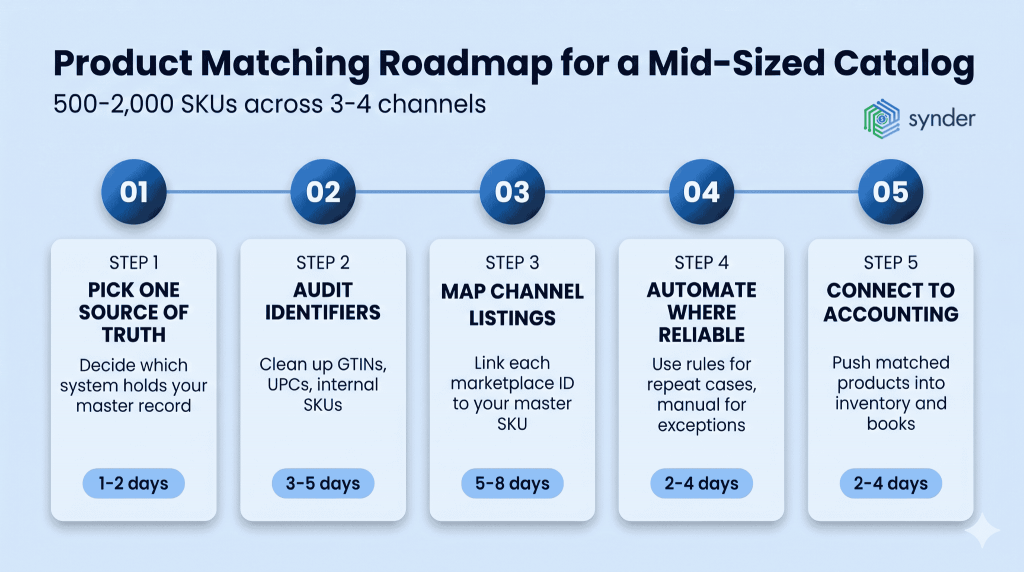
- Pick one source of truth. Decide which system holds the master record for each product. This is usually your inventory management system or a dedicated product information management (PIM) tool, not a sales channel. Whatever you pick, every channel-specific listing eventually needs to point back to a single record there.
- Audit and normalize identifiers. Go through your catalog and make sure each master product has a clean GTIN or UPC where one exists, and a consistent internal SKU that you actually use. This is the unglamorous part. It also pays for itself within months because every subsequent matching decision gets easier.
- Map channel listings to master records. For each marketplace, build the mapping between its identifiers (ASIN, Walmart item ID, eBay item number, Shopify variant ID) and your master SKU. Start with the highest-volume channels and the highest-volume products. You don’t need to match everything on day one.
- Automate where the rules are reliable. Once you have mappings in place, automate the easy cases through rules, so your team isn’t doing repetitive matching for new products. Reserve human review for variants, bundles, and similar-product decisions that need judgment.
- Connect the matched catalog to inventory and accounting. Make sure your sync layer respects the matching you’ve done. Every sale on every channel should be posted to your books under the master product name, with channel and fee detail preserved separately. Otherwise, the matching work doesn’t translate into cleaner financials.
This sequence is also the order the work tends to grow. The first time you do it, it’s a project. After that, adding a new channel usually means mapping its identifiers to records you’ve already cleaned, which takes hours, not weeks.
Here’s roughly how the work splits across a mid-sized 500–2,000 SKU catalog with 3 to 4 channels:
| Step | Typical effort | Who owns it |
| Pick your source of truth | 1 to 2 days | Ops lead or controller |
| Audit and normalize identifiers | 3 to 5 days | Ops or catalog manager |
| Map channel listings to master records | 5 to 8 days | Ops + channel managers |
| Automate where rules are reliable | 2 to 4 days | Ops + accounting |
| Connect to inventory and accounting | 2 to 4 days | Accounting + tech lead |
The numbers shift with catalog size and team experience, but the order rarely does. Skipping step 2 to save time almost always costs more days later in steps 3 through 5.
Conclusions on product matching for multichannel ecommerce
Product matching is one of the operational pieces that decides whether your numbers are reliable. If you sell across multiple channels, mistakes lead to oversells, margins that don’t line up, and reports your team stops trusting. The fix is to choose one source of truth, clean up your identifiers, map your products, automate what you can rely on, and connect it all to inventory and accounting.
Teams that get this right tend to treat the master catalog as core infrastructure and handle matching before adding a new sales channel, not after. Once you’re on five or seven channels, your books, inventory, and forecasts stay consistent because every product you sell can be traced back to a single record.
If most of your sales run through one main channel plus accounting, it helps to first make that setup clean end-to-end before adding more channels.
FAQ
Does product matching work for service businesses or only physical products?
The same principles apply to service businesses with productized offerings, especially SaaS companies running multiple plans or add-ons across billing systems. The match is between a plan code in your billing platform and a revenue line in your accounting system.
How often should I re-audit my product matches?
Quarterly is a reasonable baseline for most mid-sized multichannel sellers, with a deeper audit annually. Off-cycle triggers are adding a new sales channel, launching a major new product line, or noticing that channel-level reports have started disagreeing with each other.
What’s the difference between product matching and inventory syncing?
Product matching is the identification layer that establishes which listings represent the same item. Inventory syncing is the operational layer that keeps stock counts aligned across those matched listings. You need matching before syncing can work correctly.
Do I need a PIM system, or can my inventory tool handle product matching?
For most sellers under a few thousand SKUs, a well-configured inventory management system or accounting sync layer covers matching adequately. A dedicated PIM tool becomes worth the investment once you have rich product attributes to manage or frequent catalog changes.
How should variants and bundles be matched differently from standard products?
Variants need parent-child mapping: each size or color is mapped individually, but the relationship to the parent product is preserved, so reporting can roll up. Bundles work the opposite way: the bundle is mapped as a sellable unit, while its components are mapped separately, so inventory deductions apply to the correct SKUs.
How long does it take to set up product matching for a mid-sized catalog?
For a 500 to 2,000 SKU catalog across three or four channels, expect one to three weeks of focused work: a few days to audit identifiers, a week to map and verify, and a few more days to connect the matched catalog to inventory and accounting.