Payout reconciliation matches each payment-processor deposit to the orders, fees, and adjustments behind it. A $50,000 Shopify sales week can arrive as $47,800 in your bank once Stripe deducts processing fees and nets out refunds and a chargeback. Tracing that $2,200 gap by hand takes hours of spreadsheet work. This guide breaks down the payout reconciliation process, common discrepancy types, and automation methods, with steps you can apply this month. You’ll learn how to:
- Match payouts from Stripe, PayPal, and Amazon to your general ledger step by step
- Identify where processing fees, refunds, and chargebacks shrink your deposits
- Cut month-end close from eight days to three with automated reconciliation
Teams that automate payout reconciliation report a 62% reduction in close time. Here’s how the process works.
TL;DR
- Payout reconciliation matches each payout to the transactions it settles and to the bank deposit.
- Deposits come in below gross sales because fees, refunds, chargebacks, and reserves are deducted before payout.
- A clearing account per platform records gross sales and each deduction, then returns to zero when the payout is matched.
- The process covers collecting payout reports, recording transactions, matching payouts to deposits, and resolving discrepancies.
- Automation replaces manual matching and shortens month-end close.
What is payout reconciliation?
Payout reconciliation is a type of account reconciliation that ties together three records for every deposit:
- The platform transaction record
- The payout settlement report from the payment processor (such as Stripe, PayPal, or Adyen)
- The batched deposit in your bank account
Stripe, Shopify Payments, and Amazon each combine many orders into one transfer, so the bank receives only the net settlement amount. The general ledger (GL) needs more detail than that: gross sales and each deduction recorded separately, usually through a clearing account.
For example, when Stripe sends one $4,122.25 deposit for 15 Shopify orders, the payout settlement report shows $4,250 in sales and $127.75 in fees. The clearing account records both figures, and the transfer from the clearing account to checking equals the $4,122.25 bank deposit.
But how is payout reconciliation different from account reconciliation? Payout reconciliation is more specific and helps you match the payouts you receive in your bank account with corresponding payment batches and other related transactions. This guarantees that all payments and disbursements are fully recorded, which:
- Keeps financial records secure
- Prevents discrepancies
- Maintains data integrity
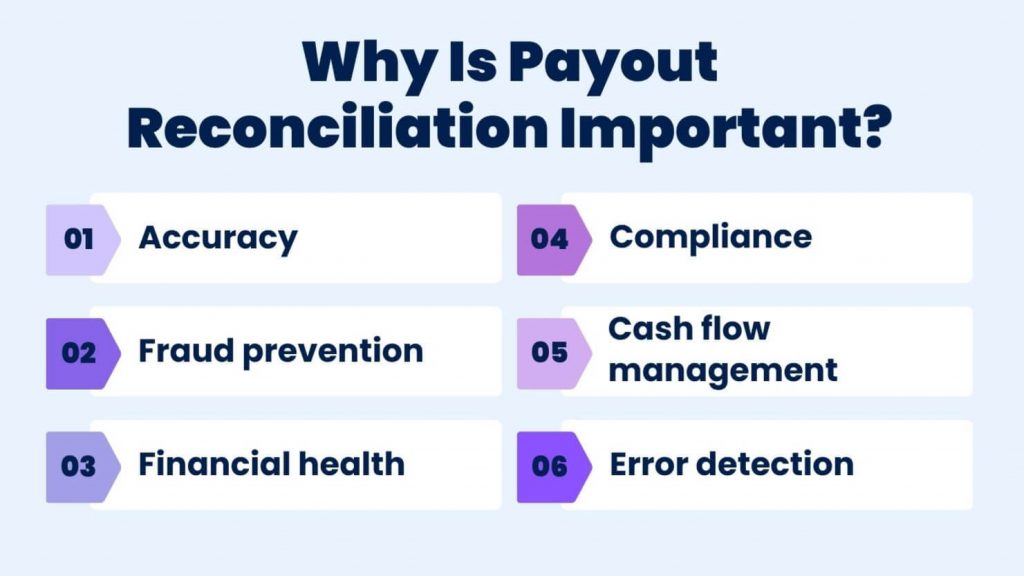
In a Synder study of 1,033 businesses, 34.6% of SaaS companies cited fees and payouts confusion as a critical operational challenge. That confusion is the gap between what a platform reports as sales and what the bank receives.
The payout reconciliation process at a glance
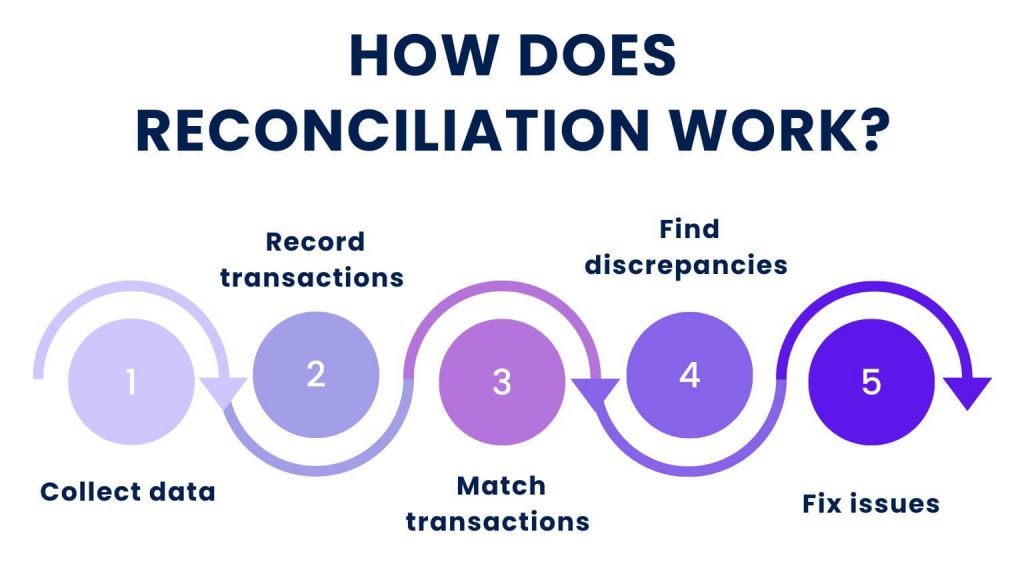
Payout reconciliation follows five steps, covered in detail in the process section below:
- Collect data: download each platform’s payout report, your bank statement, and the general ledger detail for each clearing account.
- Record transactions: post gross sales, fees, refunds, and chargebacks to a separate clearing account for each platform.
- Match transactions: tie each payout to its bank deposit, then each transaction inside it to an order through a shared ID.
- Find discrepancies: flag every payout where the deposit and the clearing account disagree, and classify the cause.
- Fix issues: correct internal errors with adjusting entries and escalate processor errors with the payout identifiers.
Why your sales don’t match your bank deposits
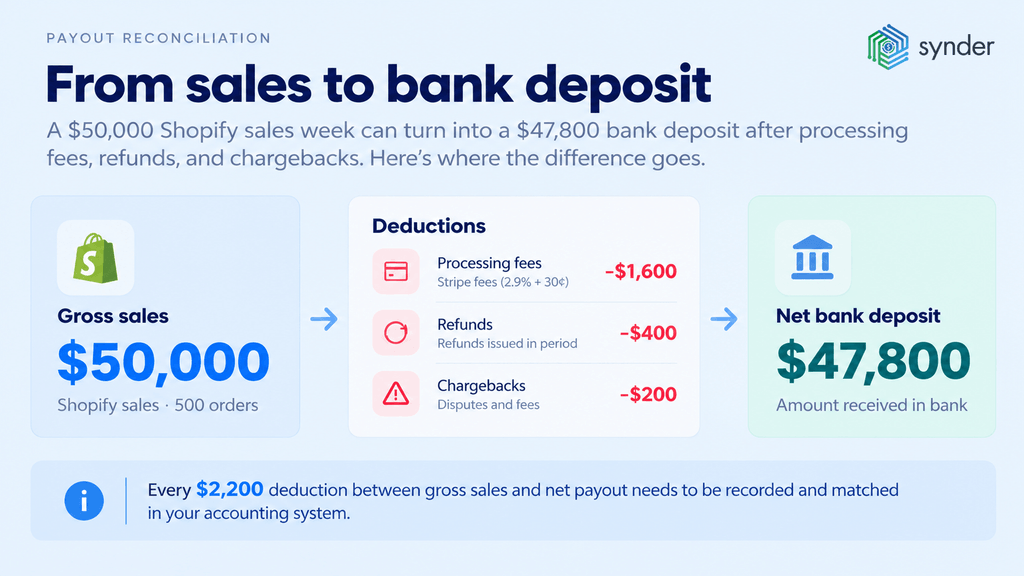
A $50,000 Shopify week becomes a $47,800 bank deposit after three deductions:
- $1,600 in Stripe processing fees
- $400 in refunds
- $200 in chargebacks and dispute fees
Payment processors and marketplaces take their deductions before they pay out, so the deposit shows the net settlement amount, not the gross merchandise value (GMV) your store reports.
Those deductions are large across the market: U.S. merchants paid a record $198.25 billion in card processing fees in 2025, according to the Merchants Payments Coalition. Part of each processing fee is the interchange fee, which the card-issuing bank keeps. The rest covers card network and processor charges, which flat-rate processors such as Stripe bundle into one rate of 2.9% + 30¢ per successful domestic card transaction.
Adjustments that reduce your payout
Seven adjustments explain the gap between sales and deposits:
- Processing fees – Stripe deducts 2.9% + 30¢ from each domestic card charge before the payout.
- Refunds – refunds issued during a payout period come out of that period’s payout, even when the original sale was paid out earlier.
- Chargebacks – the processor withdraws the disputed amount and a dispute fee from the next payout.
- Reserves and holds – PayPal and other processors can hold part of your sales as a reserve and release it later.
- Marketplace fees – Amazon deducts referral fees and, for FBA sellers, fulfillment fees from each settlement.
- Currency conversion – sales in other currencies are converted at the processor’s rate, and the conversion fee reduces the payout.
- Payout timing and batching – one deposit can combine orders from several days, and orders from the last days of a month can arrive in the next month.
Gross-to-net payout breakdown
A gross-to-net breakdown lists each deduction as a named line between gross sales and the net deposit. For the $50,000 week above, with 500 orders averaging $100:
| Breakdown line | Amount | Running total |
| Gross captured (500 orders) | $50,000 | $50,000 |
| Refunds | −$400 | $49,600 |
| Disputes (chargebacks and dispute fees) | −$200 | $49,400 |
| Percentage fees (2.9% of $50,000) | −$1,450 | $47,950 |
| Per-transaction fees (500 × $0.30) | −$150 | $47,800 |
| Reserve withheld | $0 | $47,800 |
| Reserve released | $0 | $47,800 |
| Net deposit | – | $47,800 |
When every line in the breakdown has a matching entry in the clearing account, the deposit is explained in full.
Fees, refunds, and chargebacks in payout reconciliation
$100 card sale on Stripe arrives as a $96.50 deposit after Stripe deducts its $2.90 + $0.30 processing fee before the payout. If the customer requests a refund the following week, the $100 comes out of a later payout, and Stripe does not return the original $3.20 fee.
Each adjustment type changes the payout amount differently:
- Fees reduce every payout and need their own expense or cost account, separate from revenue.
- Refunds reduce revenue in the period the refund is issued, which can differ from the period of the original sale.
- Chargebacks remove the sale amount plus a dispute fee, and a won dispute returns the funds in a later payout.
- Reserves withhold cash without reducing revenue, so the held amount belongs in a reserve account until the processor releases it.
From Synder’s experience working with multi-channel ecommerce businesses, payout miscategorization costs most of them 1–3% of margin visibility. The typical errors are:
- Fees booked as expenses instead of COGS adjustments
- Refunds netted against the wrong period
- Chargebacks not matched back to the originating transaction
Chargebacks and representment
Mastercard’s 2026 research with Datos Insights projects 286 million chargebacks globally in 2026 and 359 million a year by 2029. Each chargeback creates two reconciliation events: a debit when the processor withdraws the funds, and, if chargeback representment succeeds, a credit in a later payout that has to be matched back to the original order.
In a clearing-account setup, each adjustment gets its own journal entry:
| Adjustment | Debit | Credit |
| Sale captured | Clearing Account | Sales Revenue |
| Processing fee | Processing Fees | Clearing Account |
| Refund | Refunds (contra revenue) | Clearing Account |
| Chargeback | Chargeback Loss | Clearing Account |
| Reserve withheld | Processor Reserve | Clearing Account |
| Payout received | Checking Account | Clearing Account |
Types of payout reconciliation
Credit card and debit card reconciliation
Most businesses use credit and debit cards in their business. But what does reconciling an account involve in this case? Credit and debit card reconciliation involves comparing center records with monthly statements and bank statements to ensure all transactions have been recorded correctly, avoiding potential discrepancies.
For example, let’s say you purchased office supplies using a credit card. You may want this activity to appear in three places:
- Your credit card statement
- Your company accounts
- Your bank account statement
Bank reconciliation
This common type of reconciliation involves checking bank records against various transactions. Failing to balance records properly can lead to consequences of unbalanced reconciliation, such as:
- Mismatched payouts
- Inaccurate deposits
- Errors in accounting for fees and penalties
For instance, if your company pays a vendor $500 and deposits $1,000 in sales, you need to make sure that both the payment and deposit are accurately reported on your bank statement and internal records.
Cash reconciliation
In physical stores, cash reconciliation is essential. This process involves comparing the cash collected to the sales receipts to identify any discrepancies. It helps detect potential issues like employee theft or accounting errors.
Imagine this: if a store reports $500 in sales receipts for the day, the cash reconciliation process would involve counting the actual cash collected to ensure it also totals $500. Any discrepancies might indicate problems that need to be addressed.
Digital wallet reconciliation
As digital wallets become more popular, businesses need to reconcile transactions made through these platforms. However, keep in mind that statements from digital wallet providers aren’t always available, and there are significant security challenges to consider.
For instance, if a customer pays for a product using a digital wallet like PayPal, the business must ensure that this transaction appears correctly in their internal records. PayPal provides downloadable reconciliation reports, so the work is matching those reports to your books and your bank statement.
How do businesses reconcile PayPal payouts with their bank statements?
Businesses reconcile PayPal payouts with their bank statements by matching each PayPal transfer to its bank deposit, then splitting that transfer into the parts behind it:
- Sales
- Fees
- Holds
PayPal’s Balance Reconciliation Report (BRR) and Disbursement Reconciliation Report (DRR) provide the data. The BRR shows the exact net settled amount per transaction, and the DRR covers disbursement reconciliation for each transfer to your bank, including multi-currency settlement.
Four PayPal-specific items create differences between PayPal activity and the bank deposit:
- Gross vs net PayPal deposit: PayPal deducts its fee from each payment, so your PayPal balance holds net amounts while revenue has to be recorded gross.
- Rolling reserve: PayPal can hold a percentage of each sale for a set period and release it on a rolling schedule. For example, a 10% rolling reserve on a $1,000 sale holds $100 until the release date.
- Payment holds: PayPal can hold individual payments, often for new sellers or high-risk orders, until delivery is confirmed.
- Cross-border fee: payments from buyers in other countries carry an additional international fee, recorded as a separate expense line.
Record PayPal activity in a PayPal clearing account. For a $500 sale with an $18 PayPal fee:
| Entry | Debit | Credit |
| Record the sale | PayPal Clearing $500 | Sales Revenue $500 |
| Record the fee | PayPal Fees $18 | PayPal Clearing $18 |
| Record the transfer to the bank | Checking $482 | PayPal Clearing $482 |
When the transfer reaches your bank, the QuickBooks Online bank feed shows one $482 deposit, which matches the transfer entry from PayPal Clearing to Checking.
How does the payout reconciliation process work?
Going from payout to reconciliation takes five steps:
- Fix them.
- Collect platform reports.
- Record transactions in a clearing account.
- Match payouts to deposits.
- Find discrepancies.
Step 1: Collect payout reports and bank data
Download three sets of data for the period:
- The payout report from each platform
- Your bank statement
- The general ledger detail for each clearing account
Use this data collection checklist to pull the right payout reconciliation report from each platform:
| Platform | Report to pull | What it shows |
| Stripe | Payout reconciliation report or Balance transactions export | Each automatic payout with the charges, refunds, fees, and disputes it settles |
| Amazon | Settlement Report V2 (Flat File V2) | Orders, refunds, Amazon fees, and FBA charges for each settlement period |
| PayPal | Balance Reconciliation Report (BRR) and Disbursement Reconciliation Report (DRR) | Net settled amount per transaction and the transactions behind each bank transfer |
| Shopify Payments | Payouts export from the Shopify admin | Orders, refunds, and fees in each payout |
The Stripe payout reconciliation report is available only for accounts on automatic payouts, and it also lists failed payouts in a separate section. For Amazon order and payout reconciliation, the Settlement Report V2 groups every order, refund, and fee under a settlement ID that matches one disbursement.
Step 2: Record transactions
Record each platform’s activity in its own clearing account, with each item on a separate line:
- Gross sales as revenue
- Fees
- Refunds
- Chargebacks
The clearing account represents money the processor holds for you. When the payout arrives, a transfer moves the net amount from the clearing account to checking, and the clearing balance for that payout returns to zero.
Step 3: Match transactions
Match each payout to its bank deposit by amount and date, then match the transactions inside the payout to your orders with a shared key:
- Order ID for Shopify and Amazon orders
- Transaction ID for PayPal
- Payout ID for Stripe
You can match a few payouts a week manually; the tiered method in “The best way to reconcile thousands of daily payouts at scale” covers higher volumes.
Step 4: Find discrepancies
Flag every payout where the bank deposit and the clearing account disagree, and classify the cause:
- Fee deductions that were not recorded
- Refunds from an earlier period deducted from the current payout
- Reserve holds or releases
- Chargebacks and dispute fees
- Currency conversion differences
- Payouts still in transit at the end of the period
- Unrecorded or unauthorized transactions
Step 5: Fix issues
Correct internal errors with adjusting entries, such as a missed fee or a refund posted to the wrong period. If the discrepancy comes from the processor, open a case with these identifiers:
- Payout reference
- Batch or settlement ID
- Acquirer Reference Number (ARN) for card disputes, which card networks use to trace a transaction between banks
Report unauthorized transactions to the processor and your bank immediately.
The best way to reconcile thousands of daily payouts at scale
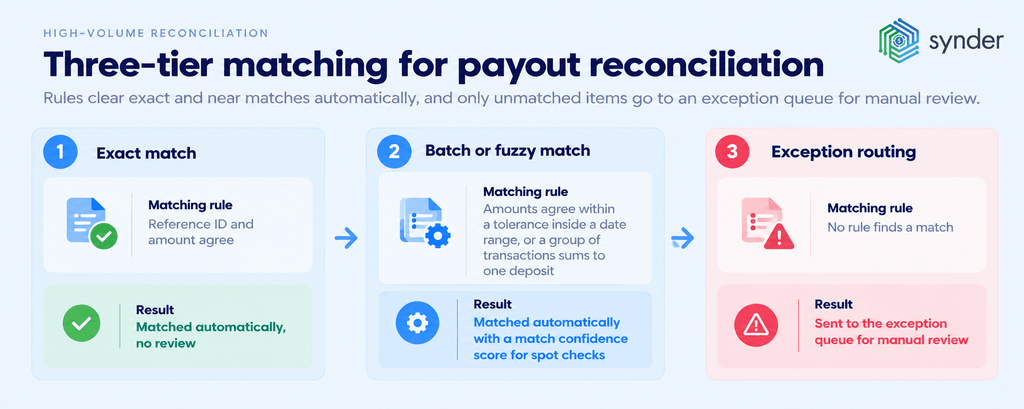
High-volume payout reconciliation uses a three-tier matching framework: rules clear exact and near matches automatically, and only unmatched items go to an exception queue for manual review.
| Tier | Matching rule | Result |
| 1. Exact match | Reference ID (payout ID, Order ID, or Transaction ID) and amount agree | Matched automatically, no review |
| 2. Batch or fuzzy match | Amounts agree within a set tolerance inside a date range, or a group of transactions sums to one deposit | Matched automatically with a match confidence score for spot checks |
| 3. Exception routing | No rule finds a match | Sent to the exception queue for manual review |
Automation triggers start matching without manual exports. For example, Stripe’s payout.reconciliation_completed webhook event signals that the transactions in an automatic payout can be queried, so matching can begin as soon as it arrives.
Work each exception in four steps:
- Verify the batch – confirm the deposit belongs to the payout you selected, not an adjacent one.
- Check for non-sales adjustments – reserves, disputes, and fee corrections change a payout without an order behind them.
- Classify the gap – mark it “not yet received” (in transit or held in reserve) or “not explained” (needs investigation).
- Escalate with identifiers – send the processor the batch ID, payout reference, and ARN for card disputes.
Shopify payout reconciliation: matching Shopify orders with Stripe payouts
Stripe sends many Shopify orders to your bank as one batched payout, so reconciling Shopify orders with Stripe payouts means tracing each order inside a single bank transfer. Take 15 Shopify orders totaling $4,250 in one Stripe payout:
| Line | Calculation | Amount |
| Gross sales | 15 orders | $4,250.00 |
| Percentage fees | 2.9% × $4,250 | −$123.25 |
| Per-transaction fees | 15 × $0.30 | −$4.50 |
| Total Stripe processing fee | $123.25 + $4.50 | −$127.75 |
| Bank deposit | $4,250 − $127.75 | $4,122.25 |
Reading the Stripe payout reconciliation report
Stripe payout reconciliation starts with the Stripe payout reconciliation report for that payout and the Shopify orders export (or the same data pulled through the Shopify Payments API). Match on the Order ID wherever the Stripe charge carries it in its description or metadata, and on amount and date where it does not. Account for payout transit time: Stripe’s report shows the expected arrival date of each automatic payout, so orders captured late in the week can arrive in the following week’s deposit.
Three clearing-account journal entries record the payout:
| Entry | Debit | Credit |
| Record 15 orders | Stripe Clearing $4,250.00 | Sales Revenue $4,250.00 |
| Record Stripe fees | Processing Fees $127.75 | Stripe Clearing $127.75 |
| Record the payout | Checking $4,122.25 | Stripe Clearing $4,122.25 |
After the payout entry, the Stripe Clearing balance for this batch is $0, which confirms the payout is reconciled.
Handling failed, returned, and reversed payouts
A failed payout, a returned payout, and a reversed payout each need a different ledger treatment, because the money stops at a different point in each case.
| Payout status | What happens | Ledger treatment | Resolution |
| Failed | The processor never executes the payout, for example because of invalid bank details | No transfer entry; funds stay in the clearing account | Update bank details; the processor resends under its payout retry logic |
| Returned | The payout is sent, but the receiving bank rejects it and sends it back | Reverse the transfer entry (debit Clearing Account, credit Checking) or hold the amount in a suspense account | Fix the account issue and match the resent payout |
| Reversed | Funds are pulled back after clearing, or the processor debits your bank to cover a negative balance | Record the debit against the suspense account until the cause is confirmed | Match the debit to its cause, such as a dispute or a negative balance |
For ACH transfers, the bank’s return code identifies the cause:
- R01: non-sufficient funds (NSF)
- R02: the account is closed
- R03: no account was found
These NACHA return codes are standard across all U.S. banks.
An R01 return can occur when a processor tries to debit your bank account to cover a negative balance after refunds or chargebacks exceed new sales. Your bank may also charge an ACH return fee for each returned item, which belongs in a bank fees expense account.
How to automate payout reconciliation
Payout reconciliation across multiple platforms and payout types can be handled three ways:
- Manual exports
- Native platform connections
- Third-party automation tools connected through APIs
To automate bank payout reconciliation, replace manual file exports with three automated steps:
- Scheduled imports of payout data from each platform
- Real-time API sync and webhooks for new transactions
- Rule-based matching that compares payouts with bank deposits
Payout reconciliation automation methods compared:
| Automation method | Sync approach | Platforms supported | Best for |
| Manual export and import (CSV files, spreadsheets, journal entries) | Manual export | Any platform with a downloadable report | Low volume on one or two channels |
| Native platform connection (processor reports, bank feeds, built-in accounting apps) | Scheduled import or daily bank feed | One platform per connection | Single-channel sellers |
| Third-party automation tools (API-based) | Real-time API sync or webhook-triggered sync | Many platforms in one workspace | Multi-channel businesses and accounting firms |
Payout reconciliation automation with Synder
Synder is accounting automation software that syncs payment data from 30+ sales and payment platforms into your accounting system and automates payout reconciliation through its Auto Reconciliation feature. Ecommerce businesses, SaaS companies, and accounting firms use it to replace manual payout matching with automated checks before and after data reaches the books. Synder syncs into seven accounting systems:
- QuickBooks Online
- QuickBooks Desktop
- Xero
- Sage Intacct
- NetSuite
- Intuit Enterprise Suite
- Puzzle
Synder automates the payout workflow in five steps:
- Sync: Synder Sync records every sale, fee, refund, and chargeback in a clearing account, either line by line in Per Transaction mode, updated hourly, or as grouped entries in Summary Sync mode.
- Payout matching: Synder breaks each payout into its underlying charges, fees, refunds, and chargebacks, so the deposit ties out to their sum. In Summary Sync, per-payout grouping is available for Stripe, Amazon, and select other integrations.
- Transfer: when the processor issues the payout, Synder records a transfer of the exact amount from the clearing account to checking, which matches the deposit in your QuickBooks Online or Xero bank feed.
- Verification: Transaction Reconciliation and Balance Reconciliation check the synced data against the platform’s own records.
- Fix and re-run: Synder shows the full transaction journey, so you can investigate a mismatch, sync rolled-back entries, and re-run reconciliation inside the app.
The two verification features cover different sync modes:
| Feature | Sync mode | What it checks | Result |
| Transaction Reconciliation | Per Transaction and Summary Sync | Every line in your clearing account against the platform’s own records, via API, standard upload, or custom mapping | Anything that doesn’t tie 100% is flagged, so you review only the transactions that need attention |
| Balance Reconciliation | Summary Sync | Each period’s summaries against the platform’s reported starting and ending balances, before you post them to your books | Every reconciliation keeps a full audit trail you can download or revisit |
Transaction Reconciliation also handles 1-to-1, 1-to-many, many-to-1, and many-to-many matches, so a charge that maps to a payment-plus-expense pair is matched inside Synder. Olena Svoiak, Financial Manager at Stape, described the result:
It now takes me about 40 minutes to finish and review a month’s data, whereas manually, it would have taken at least two days.
Olena Svoiak, Financial Manager at Stape
| Synder is SOC 2 Type 2 certified and backed by Y Combinator. To test payout matching on your own Stripe, Shopify, or PayPal payouts, book a Synder demo. |
Reconciling multi-platform payouts in QuickBooks or Xero
Reconciling payouts from several ecommerce platforms in QuickBooks Online or Xero requires one clearing account per platform, so each processor’s balance can be checked against its own reports. The workflow has five steps:
- Create a clearing account per platform, such as Stripe Clearing, PayPal Clearing, Shopify Payments Clearing, and Amazon Clearing.
- Record gross sales from each platform into its clearing account.
- Record fees, refunds, chargebacks, and reserves as separate lines against the same clearing account.
- Match each net payout to its bank deposit in the bank feed.
- Reconcile each clearing account balance to zero, or to the total of payouts still in transit.
In QuickBooks Online, add each clearing account in the Chart of Accounts as a Bank or Other Current Asset account so payout transfers can be recorded against it. In Xero, add each clearing account in the Chart of Accounts as a current asset or as a separate bank account, then match the payout transfer when the deposit appears in the bank feed.
Each platform pays out on its own schedule, so clearing balances at month-end differ by platform. A balance that equals the payouts in transit is expected; any other balance is a discrepancy to investigate.
Tools and software for payout reconciliation
Ecommerce businesses use three kinds of payout reconciliation software:
- Native platform reports
- Accounting system connectors
- Full-stack automation platforms that sync several channels into one ledger
| Tool | Category | Platforms supported | Sync method | Starting price |
| Stripe payout reconciliation report | Native report | Stripe | Manual download or API | Included with a Stripe account |
| Stripe Sigma | Native report (SQL) | Stripe | Scheduled queries | Paid Stripe add-on |
| Amazon Seller Central settlement reports | Native report | Amazon | Manual download or SP-API | Included with a Seller Central account |
| PayPal BRR and DRR | Native report | PayPal | Dashboard download or SFTP | Included with a PayPal business account |
| QuickBooks Online and Xero bank feeds | Accounting connector | Connected bank accounts | Scheduled bank feed import | Included with the accounting subscription |
| Synder | Full-stack automation | 30+ sales and payment platforms into QuickBooks Online, QuickBooks Desktop, Xero, Sage Intacct, NetSuite, Intuit Enterprise Suite, and Puzzle | Hourly Per Transaction sync or Summary Sync | 15-day free trial, no credit card required |
For Shopify payouts in QuickBooks Online or Xero, the choice depends on channel count. A single Shopify store can rely on Shopify’s payout export and the bank feed. A store that also sells on Amazon or takes PayPal has to reconcile each channel’s payouts separately unless one tool syncs every channel into the same clearing-account structure.
Payout reconciliation for accounting firms and bookkeepers
Accounting firms and bookkeepers reconcile payouts for multiple ecommerce clients by standardizing three things across every client file:
- Chart of Accounts (CoA) – the same clearing, fee, refund, and reserve accounts for every client, so one review checklist applies across the portfolio.
- Per-client platform connections – each client’s Stripe, Shopify, PayPal, and Amazon accounts connect to that client’s own books. In Synder, each QuickBooks or Xero company is a separate Organization.
- Multi-client payout mapping matrix – a table listing each client, platform, clearing account, payout schedule, and report source.
Once these are in place, automation cuts the time spent on each client. For example, Decimal, an accounting firm, saved 6–8 hours per client each month after automating data syncing and reconciliation across Stripe, PayPal, Shopify, Amazon, and QuickBooks Online. For client accounting services (CAS) practices that bill a fixed monthly fee, every hour saved per client increases the margin on that fee.
Reconciling outgoing payouts
The same matching logic applies to outgoing payouts. Each of these matches money sent to the commitment behind it:
- Vendor payout reconciliation
- Affiliate payout reconciliation
- Creator payout reconciliation
Brokerage payout reconciliation in QuickBooks
Brokerage payout reconciliation in QuickBooks follows the same pattern: the brokerage records the commission received from a closing in a clearing account, then matches each agent’s payout against it. In QuickBooks broker payout reconciliation, the clearing balance returns to zero once every agent split is paid and the brokerage’s share is moved to income.
Speeding up month-end close with payout reconciliation
Synder estimates that those that adopt automated payout reconciliation cut their month-end close from eight days to three, a 62% reduction. The month-end cutoff date defines the work: payouts that settle by the last day of the month belong to that month’s reconciliation, and payouts still in transit stay in the clearing account as an open balance.
Sales captured before the cutoff date and paid out after it are already recorded as revenue in the month of sale, so they do not need an accrued revenue entry; only the cash is in transit. Before signing off, validate each processor balance:
Opening processor balance + net settlement activity − payouts received = closing processor balance
If the closing balance does not equal the processor’s reported ending balance, the period is not clean. Synder’s Balance Reconciliation automates this check for Summary Sync users.
A daily reconciliation cadence helps streamline the payouts process by spreading the work across the month instead of leaving it for close week:
- Daily – match the previous day’s payouts to bank deposits and clear new items from the exception queue.
- Weekly – review the unreconciled items dashboard and follow up on open disputes and reserve releases.
- Monthly – confirm the cutoff date, calculate the processor balance equation for each platform, and complete the reconciliation sign-off workflow, with one person preparing and another approving, to reach a day-5 close target.
Conclusion
Payout reconciliation is key to keeping your business’s finances on track. While it might seem tedious, it’s vital for:
- Accuracy
- Preventing fraud
- Staying compliant with financial rules
Using automation can make this process faster and reduce mistakes, leading to clear and accurate records. This makes managing your finances easier and helps your business grow.
FAQ
What is a payment reconciliation?
Reconciling payments entails the confirmation of the balances that have been recorded in the books of account with the balances in the bank statements. This means that all the payments are clear and if there are any wrong figures, they are corrected.
What is the main purpose of reconciliation?
The main purpose of a reconciliation is to ensure that the total amount of money spent matches the amount shown in the account at the end of the period. People and companies do this regularly to check for errors or fraud.
What is the difference between payment settlement and reconciliation?
Settlement of payment is the transfer of money and completion of the financial transaction. Reconciliation is the comparison of an organization’s internal accounts to ensure they match other published accounts.
What is a transaction reconciliation?
Transaction reconciliation is a process that accountants use to check and verify each entry in a ledger or report. They compare these entries with the original transaction records to make sure everything is right.
How do I reconcile my payouts?
To reconcile your payouts, follow these simple steps:
- Collect data;
- Record transactions;
- Compare transactions;
- Find differences;
- Fix mistakes.
The “How does the payout reconciliation process work?” section above explains each step with platform reports and matching rules.
What is the difference between payout reconciliation, payment reconciliation, and bank reconciliation?
Payout reconciliation matches processor payouts to the transactions inside them, payment reconciliation matches customer payments to the invoices or orders they pay, and bank reconciliation matches the cash in your books to the bank statement. The “What is payout reconciliation?” and “Bank reconciliation” sections above cover each in more detail.
Which tools do you need for payout reconciliation reporting?
Payout reconciliation reporting needs two kinds of tools: platform reports, such as Stripe’s payout reconciliation report, PayPal’s BRR and DRR for disbursement reconciliation, and Amazon’s Settlement Report V2, and reconciliation software that matches those reports to your general ledger. The “Tools and software for payout reconciliation” and “How to automate payout reconciliation” sections above compare the options.