
Payment reconciliation software automatically matches ecommerce transactions, payouts, and fees to bank deposits. The need is growing fast: U.S. retail ecommerce sales reached $340.2 billion in Q2 2026, up 12.2% year over year, while online sales reached 17.1% of total U.S. retail.
For sellers using Shopify, Amazon, Stripe, and other platforms, each payout can combine orders, fees, refunds, and adjustments into one net deposit. Reconstructing and matching those payouts across different formats and schedules can add days to the month-end close.
Below, we compare five payment reconciliation tools by platform coverage, accounting integrations, matching level, multi-currency support, tax handling, pricing, and the revenue tier each best serves.
TL;DR
- The core challenge in ecommerce accounting is the payout gap: fees, chargebacks, and refunds are deducted before the deposit arrives, so it never matches the sales total.
- Seven capabilities separate ecommerce payment reconciliation tools: automated matching, multi-channel integration, real-time reporting, custom rules, multi-currency, tax compliance, and continuous close.
- Integration depth divides the market: some tools post straight into QuickBooks or Xero, others only into SAP, NetSuite, or Dynamics.
- Fit varies by tier: mid-market multichannel sellers, accounting firms with many clients, and ERP-based enterprises.
Challenges in ecommerce payment reconciliation
Ecommerce reconciliation breaks down in three places: multiple sales channels and payment gateways paying out on different schedules, platform deductions that shrink each deposit before it arrives, and transaction volumes too large to check line by line. A seller running Shopify Payments, Amazon, and PayPal receives daily, biweekly, and on-demand payouts reported in different formats. Payment gateway reconciliation therefore runs per channel, with a separate fee schedule and payout cadence to check.
The gap between a sales report and a bank deposit comes from deductions taken before payout. For instance, a company will anticipate a $500 payout from Amazon but, through $15 in chargebacks and $20 in fees, will see only $465. Without a system that itemizes those deductions, finance teams spend hours reconstructing why the two numbers differ.
Volume makes that manual work unsustainable. A store processing 5,000 orders a month generates tens of thousands of individual fee, refund, and adjustment records across its channels. Automated reconciliation for ecommerce removes that manual step: the five tools below match the records and flag only what doesn’t tie.
Key features to consider in payment reconciliation software
Ecommerce payment reconciliation software should cover seven capabilities.
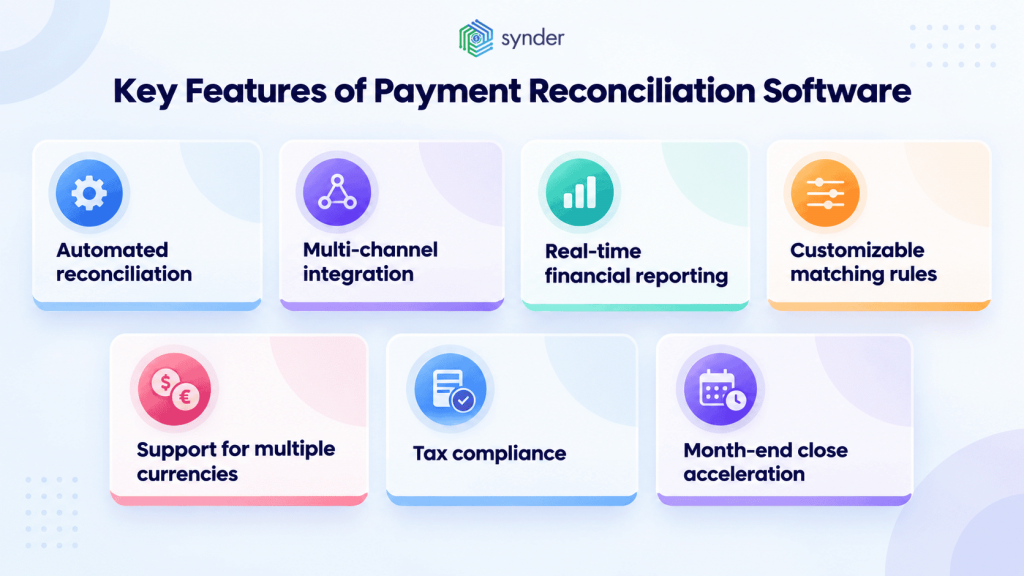
- Automated reconciliation: Automated payment reconciliation software matches transactions without the need for manual bank reconciliation.
- Multi-channel integration: An effective reconciliation tool supports integration with several ecommerce platforms, payment gateways, and accounting systems such as Xero, QuickBooks, or Sage Intacct.
- Real-time financial reporting: Businesses should have real-time visibility into revenue, expenses, and cash flow.
- Customizable matching rules: Look for software that lets you define custom matching rules by order ID, SKU, or payout reference, so edge cases like partial refunds or split shipments reconcile automatically.
- Support for multiple currencies: For cross-border sales, the tool should handle transactions in various currencies, ensuring accurate pricing and conversions.
- Tax compliance: It must also support VAT, sales tax, and other regional tax rules to stay compliant with local regulations. Forty-five states levy a state-level sales tax, and the District of Columbia adds its own, with a population-weighted national average combined rate of 7.53% as of July 2026 (Tax Foundation). The same Tax Foundation data shows local rules shifting mid-year: Illinois eliminated its 1% state tax on food effective January 1, 2026, while many Illinois jurisdictions imposed their own local food taxes in response, and many Georgia counties raised rates by up to a percentage point under the Floating Local Option Sales Tax. Software that doesn’t update tax rules automatically falls out of step within a single quarter.
- Month-end close acceleration: Payment reconciliation automation that matches transactions continuously keeps your books current through the period, so closing the month means reviewing flagged exceptions and signing off.
Learn why manual reconciliation is holding you back.
Overview of top 5 ecommerce payment reconciliation software
The best payment reconciliation software for your business depends on where your data starts. Sellers looking for Amazon payment reconciliation software, or a Stripe-only tool, usually need multi-channel coverage anyway, because fees arrive from several sources at once. These five ecommerce reconciliation software options solve the problem in different ways: two are built around accounting software, one around marketplace fulfillment, one around omnichannel retail operations, and one around ERP bank reconciliation.
1. Synder
Synder is an accounting automation platform that syncs payments, fees, refunds, and taxes from 30+ ecommerce and payment platforms into your accounting system. The tool is built by CloudBusiness Inc., headquartered in San Francisco, and joined Y Combinator’s S21 batch. It serves 5,000+ businesses and is SOC 2 Type 2 certified with end-to-end encryption. Synder is also a Stripe Verified Partner, a Square Certified Partner, and an Intuit QuickBooks Solution Provider.
- Supported platforms: Shopify, Amazon, eBay, Walmart, Etsy, TikTok Shop, WooCommerce, BigCommerce, Magento, Stripe, PayPal, Square, Clover, Braintree, Authorize.Net, GoCardless, and more.
- Accounting integrations: QuickBooks Online, QuickBooks Desktop, Xero, Puzzle, Sage Intacct, Oracle NetSuite, and Intuit Enterprise Suite.
Synder categorizes transactions against your own chart of accounts through custom transaction mapping and Smart Rules. The platform offers both sync modes per connected integration: Per Transaction posts each order, platform fee, refund, and adjustment as a separate line, while Summary Sync posts one consolidated entry per payout or chosen period. It also handles multi-currency accounting, sales tax automation, COGS tracking, and automated profit and loss reports.
Synder’s Auto Reconciliation covers three checks. Transaction Reconciliation matches every line in your clearing account against the platform’s own records through API, standard upload, or custom mapping, and flags anything that doesn’t tie 100%, so only the exceptions need review. Balance Reconciliation confirms that a period matches the platform’s reported starting and ending balances before summaries reach your books, with a full audit trail you can download or revisit. Payout matching breaks a deposit into its underlying charges, fees, refunds, and chargebacks, so bank reconciliation runs on figures that already tie out.
For accounting and bookkeeping firms, client companies connect as separate Organizations with their own platform connections and mapping, so one login covers a multi-client portfolio.
Synder pricing
| Plan | Price | What’s included |
| Basic | $52/mo | 500 synced transactions/mo, 2 integration slots, QuickBooks Online, Xero and Puzzle, daily import, email support |
| Essential | from $103/mo | Up to 3,000 sales transactions/mo, unlimited integrations, hourly import, product mapping, COGS tracking, duplicate control |
| Pro | from $240/mo | Up to 20,000 sales transactions/mo, adds NetSuite, Intuit Enterprise Suite and Sage Intacct, 2 premium integration slots, 3 free Smart Rules, guided setup |
| Pro Max | from $480/mo | Up to 40,000 sales transactions/mo, unlimited premium integrations, custom ERP, 10 free Smart Rules, 5 custom modifications |
| Premium | Quote | Unlimited transaction volume, dedicated implementation, unlimited users and custom modifications |
| Want to see how this your channel mix? Book a Synder demo for a walkthrough. |
2.Taxilla
Taxilla is an enterprise payment reconciliation platform that runs alongside your existing ERP instead of replacing it, ingesting marketplace, order, ERP, and bank data into a single control layer.
- Supported platforms: Amazon Seller Central through API connectors, plus order management, ERP, and bank data through file-based feeds.
- Accounting integrations: SAP S/4HANA and ECC, Oracle ERP Cloud and Fusion, Microsoft Dynamics 365, Oracle NetSuite, Sage, and Tally, with QuickBooks supported through SFTP or file-based integration.
Taxilla automates payment, receipt, return, and ecommerce order reconciliation for businesses, saving them from manual effort and loss of revenue. With built-in alerts, mismatch reports, and configurable workflows, it ensures financial accuracy and compliance across jurisdictions.
Its depth comes at the cost of setup time: Taxilla puts a typical payment reconciliation implementation at eight to twelve weeks from requirements analysis to production use, depending on data sources, volumes, and reconciliation complexity.
Taxilla pricing
Taxilla publishes no rates. Quotes scale with reconciliation volume, account complexity, and the number of legal entities, and the platform is licensed by module, so e-invoicing, VAT and GST compliance, and financial close are priced separately from payment reconciliation. Implementation is scoped on top of the subscription, which matters given the eight-to-twelve-week timeline above.
3. eShopBox
eShopBox is an India-focused ecommerce operations platform that combines distributed fulfillment, inventory management, and marketplace payment reconciliation in one dashboard.
- Supported platforms: pre-built reconciliation templates for Amazon, Flipkart, Myntra, TataCliq, and Nykaa, plus a standard template for other channels that requires reformatting their reports first.
- Accounting integrations: no QuickBooks, Xero, Sage Intacct, or NetSuite integration is published. Reconciliation output stays inside eShopBox and moves to your books separately.
The tool automates reconciliation of payouts, highlights overcharges, and supports claims recovery to minimize revenue loss. With real-time tracking, barcode-based inventory management, and a nationwide fulfillment network, eShopBox streamlines ecommerce operations while improving financial accuracy and visibility.
eShopBox pricing
eShopBox publishes no rates for its reconciliation module. Costs are quoted alongside its fulfillment and finance operations services, so reconciliation arrives inside a wider operations contract instead of being licensed as standalone software. Weigh the fulfillment and warehousing side of that contract when comparing eShopBox against tools priced purely on transaction volume.
4. Vinculum

Vin Reco is Vinculum’s marketplace payment reconciliation module inside the Vin eRetail suite, built for omnichannel retailers that also need order, inventory, and product data in one system.
- Supported platforms: Vin eRetail publishes 175+ ready integrations across marketplaces, webstores, 3PLs, front-end platforms, and ERPs.
- Accounting integrations: Vin eRetail connects to SAP, Tally, and QuickBooks. Posting reconciled transactions into SAP or another ERP sits in Vinculum’s paid enterprise services, not the standard Vin Reco plan.
Its payment reconciliation gives real-time tracking of transactions for unpaid, paid, reconciled, disputed, and returned merchandise, enabling companies to detect and resolve financial discrepancies. Vinculum’s inventory management offers centralized visibility and control, making it possible to manage stock effectively across multiple locations.
Vinculum pricing
Vinculum publishes no rates. The standard Vin Reco plan covers marketplace reconciliation, scenario-wise discrepancy reports, and dispute case creation in Amazon Seller Central and Flipkart Seller Hub. Posting reconciled transactions into SAP or another ERP falls under Vinculum’s paid enterprise services and is quoted separately, so the accounting integration you need may not be part of the base plan.
5. Nolan
Nolan Business Solutions builds bank reconciliation and electronic payment add-ons for finance teams already running Microsoft Dynamics or Oracle NetSuite, with more than 2,500 customers worldwide.
- Supported platforms: bank statement data through Nolan Bank Feeds, including UK Open Banking. Nolan publishes no direct connectors to Shopify, Amazon, Stripe, or PayPal, so ecommerce data reaches it through your ERP.
- Accounting integrations: Oracle NetSuite, Microsoft Dynamics 365 Business Central, and Microsoft Dynamics GP.
Its software gives greater visibility into accounts, automates the reconciliation process, and makes payment processing easier for suppliers, employees, and vendors. Nolan also supports ecommerce operations, allowing users to manage multiple storefronts, currencies, and tax jurisdictions from one central system. With capabilities for cross-border transactions and multi-entity management, it provides the scalability needed for growing businesses.
Nolan pricing
| Plan | Price | What’s included |
| Nolan Bank Feeds | £50/month per module | 3 bank accounts, first 50,000 statement lines per month, UK Open Banking, one-month trial through Microsoft AppSource |
Automated Bank Reconciliation is priced separately and not published, though it carries three Nolan Bank Feeds connections at no extra charge. Additional statement lines are billed monthly in arrears, and implementation is quoted at prevailing hourly rates.
Comparison of the ecommerce payment reconciliation software
The table below scores all five tools against the same eight criteria, so you can filter by revenue tier, platform mix, and accounting stack before booking any demos.
| Software | Best for (revenue tier) | Platforms supported | Accounting integrations | Matching level | Multi-currency | Tax | Pricing model |
| Synder | Mid-market multichannel sellers and accounting firms ($2M–$100M) | Shopify, Amazon, eBay, Walmart, Etsy, TikTok Shop, WooCommerce, BigCommerce, Stripe, PayPal, Square, Clover (30+ total) | QuickBooks Online, QuickBooks Desktop, Xero, Sage Intacct, Oracle NetSuite, Intuit Enterprise Suite | Order level and payout level (Per Transaction or Summary Sync) | Yes, with FX gain/loss posting | Sales tax automation, VAT tracking, marketplace facilitator tax | $52–$480/mo billed yearly, plus quote-based Premium |
| Taxilla | Enterprise and multi-entity groups ($50M+) | Amazon Seller Central; ERP, OMS, and bank data via file feeds | SAP, Oracle ERP Cloud and Fusion, Microsoft Dynamics 365, NetSuite, Sage, Tally; QuickBooks via file | Order level, with four-way settlement matching on higher tiers | Yes | Indirect tax compliance across 50+ countries (GST, VAT, e-invoicing) | Quote-based; scales with volume, account complexity and entity count |
| eShopBox | Medium to large Indian marketplace brands | Amazon, Flipkart, Myntra, TataCliq, Nykaa; other channels via standard template | None published | Order level against marketplace settlement reports | Not published | Not published | Quote-based |
| Vinculum | Omnichannel retailers ($10M–$100M) | 175+ marketplace, webstore, 3PL, and ERP integrations | SAP, Tally, QuickBooks (ERP posting is a paid enterprise add-on) | Order level against marketplace settlements | Order currency to base currency conversion | GST reporting for Indian marketplaces | Not published; standard plan plus quote-based enterprise services |
| Nolan | Multi-entity finance teams on Dynamics or NetSuite | Bank statement data via Nolan Bank Feeds and UK Open Banking; no direct ecommerce connectors | Oracle NetSuite, Microsoft Dynamics 365 Business Central, Microsoft Dynamics GP | Bank statement line level inside the ERP | Yes, multi-currency and multi-bank | VAT submission modules | £50/mo per module (2022 list price) via Microsoft AppSource |
| Pro tip: The best reconciliation tool for your business depends on your sales channels, accounting setup, and financial needs. To identify your best option, think about the level of automation, integration, and financial insights you require. The best tool will help you save time, minimize errors, and provide greater visibility into cash flow so that you can concentrate on business development. |
FAQ
Do these tools reconcile at the individual transaction level or payout level?
Payment reconciliation tools split into two groups: some post a single summary entry per bank deposit, while others break a payout into its component orders, fees, refunds, and chargebacks. The level you choose decides what your general ledger looks like, how much detail an auditor can follow, and whether channel-level or product-level profitability is available without extra work. When evaluating a tool, ask which of the two it does, and whether that level can be set per integration instead of once for the whole account.
How does automated payout matching work in QuickBooks Online?
Automated payout matching in QuickBooks Online works by splitting a net marketplace deposit back into its component transactions before the deposit reaches your bank feed. The software pulls the settlement report from Amazon or Shopify, separates individual orders, platform fees, refunds, and adjustments, and creates corresponding entries in QuickBooks Online. When you open your bank feed, each deposit already has categorized transactions waiting against it, so the match clears in clicks instead of requiring a manual journal entry.
Can accounting firms use these tools for multiple ecommerce clients?
Accounting firms can manage multiple ecommerce clients in a single reconciliation tool when that tool supports multi-client dashboards, broad platform coverage, and per-client data isolation. In Synder, client accounting companies connect as separate Organizations with their own platform connections and mapping rules, so one login covers the portfolio. When evaluating for a firm, check SOC 2 certification and confirm that the pricing model scales with client count instead of charging per seat.
Which reconciliation tool is best for a mid-size ecommerce business ($1M–$50M)?
At $1M to $50M in revenue, the right reconciliation tool is one that connects directly to your sales channels and posts into QuickBooks Online or Xero without an ERP in between. Businesses at this tier typically run several thousand monthly transactions across multiple channels, which rules out spreadsheet workflows and enterprise implementations measured in months. Synder is built for this tier; Nolan fits if you already run Microsoft Dynamics or NetSuite; Taxilla targets enterprises above $50M with cross-jurisdictional compliance requirements.
How does multi-currency reconciliation work in these tools?
Multi-currency payment reconciliation converts each foreign-currency transaction to your home currency at the exchange rate applied on the payout date, then matches the converted amount against your bank deposit. For US-based sellers with international sales, look for tools that take conversion rates from the payment processor itself, preserve the original transaction currency for audit trails, and post FX gain or loss automatically. Synder and Nolan handle multi-currency payouts, and Synder can either combine currencies into a home-currency summary or keep separate mappings per currency and bank account.
Can reconciliation software also track sales tax?
Some reconciliation tools track sales tax collected on each transaction across platforms, so your liability is calculated as sales post instead of at filing time. Synder includes sales tax automation, VAT tracking, and marketplace facilitator tax handling. When evaluating, ask two questions: is tax tracked per transaction or only at payout level, and does the tool apply nexus rules for multi-state US sellers, where 45 states plus the District of Columbia levy sales tax and local rates change mid-year.
Bottom line
The right ecommerce payment reconciliation software is the one that covers every channel you sell on and posts into the accounting system you already use. Online payment reconciliation tools differ most in where they operate: inside your ERP, inside your marketplace stack, or between your sales channels and your books. The best automated payment reconciliation software for your setup is whichever one turns every channel into a single ledger you can trust. Instead of drowning in spreadsheets and manual checks, the right payment reconciliation software can automatically match transactions, sync data, and identify discrepancies, saving you time and stress.
Software like Synder automates the process, providing you with precise records, real-time visibility, and complete control over your cash flow across multiple channels. Once transactions match continuously, month-end close becomes a review of flagged exceptions instead of a multi-day reconstruction. The correct tool doesn’t merely clean up your finances, it empowers you to scale.