Set up now, save all year: 40% off Synder, this July only
Get the discount ➔

Synder vs Shopify Connector by QuickBooks: Which Fits Your Books?

Both tools sync Shopify with QuickBooks Online, but they serve different problems. The Connector by QuickBooks is a free option for simple stores, while Synder supports multichannel businesses with advanced automation and reconciliation.

Book a demo to see it live
4.7
average rating · 3,400+ reviews on G2 & Capterra
100%

Accuracy in syncing sales data

$24K

Saved yearly on bookkeeping

140h

Saved on month-end close

Graphic showing a VS matchup with a hexagon tech logo on the left and Finaloop logo on the right with a blue dotted background streak.

Why Synder pulls ahead of the native Shopify Connector

Detailed transaction breakdowns

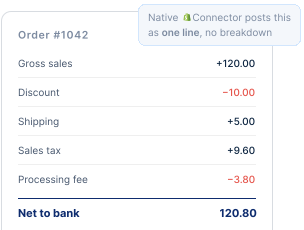
Synder records sales, refunds, fees, taxes, and discounts as separate components within each transaction, giving you a clear audit trail. The Connector posts mostly net summaries you'll have to investigate later.

Automation rules for categorization

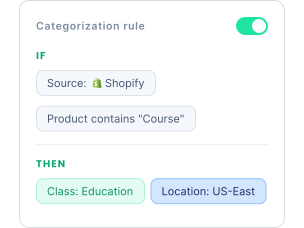
Build rules that automatically categorize, tag, or apply classes, locations, and memos based on your own criteria. This is a Per Transaction feature, and it's something the native Connector doesn't offer.

One setup across every channel and processor

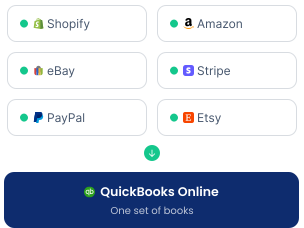
The Connector handles Shopify only, with each store as its own separate setup. Synder brings Shopify, Amazon, eBay, Stripe, PayPal, and more into one QuickBooks Online company, so adding a channel or processor doesn't mean another tool.

Verification against your platform reports

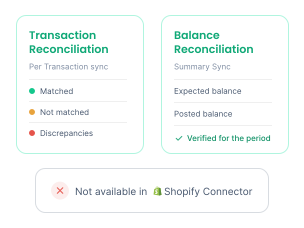
In Per Transaction sync, Synder's Transaction Reconciliation cross-checks your clearing account against your Stripe and Shopify reports, flagging matched, missing, and discrepant transactions. Summary Sync users get Balance Reconciliation to verify summaries against expected period balances. The native Connector offers neither.

Synder vs Shopify Connector by QuickBooks: feature comparison

Both apps connect Shopify to QuickBooks, but the differences in detail, channel coverage, and control shape your day-to-day bookkeeping.
Synder
Shopify Connector by QuickBooks
Built by
CloudBusiness (Synder)
Intuit
Deployment
Cloud-based
Cloud-based
Free trial
Yes, 15 days, no credit card
Free to connect with a QuickBooks Online subscription
Accounting systems
QuickBooks Online and Desktop, Xero, Sage Intacct, NetSuite, Intuit Enterprise Suite, Puzzle
QuickBooks Online only (Desktop uses a separate Intuit Connector app)
Sales platforms
Shopify, Amazon, Walmart, eBay, Etsy, WooCommerce, BigCommerce, TikTok Shop, Magento, and more
See all integrations
Shopify
Payment platforms
Stripe, Square, PayPal, Afterpay, Clover, Braintree, and more
See all integrations
Shopify Payments data via Shopify payouts
Sync detail
Per Transaction (line-item) and Summary Sync
Mainly payout and daily summary
Sync frequency
Hourly
Daily
See all

Takeaway: when to choose the Connector and when to move to Synder

The Shopify Connector by QuickBooks works well for single-store businesses that need a simple, free connection to QuickBooks Online. Synder is better suited to growing businesses that sell across multiple channels or need more detailed syncing, automation, and reconciliation.

"Synder had pretty much every major integration that we needed - from Stripe to Shopify, to Amazon, etc., that you can use under one account. It was very simple to pull it in. And then being able to tire back to the end user level as well as bank reconciliation – it makes the tool very-very powerful."

Dr. William Ferro
Betr Health
Gradient logo with overlapping circles enclosing the letters RAD.

Quick answers to your FAQs

Close Cookie Preference Manager
Privacy Overview
This website uses cookies to improve your experience while you navigate through the website. Out of these, the cookies that are categorized as necessary are stored on your browser as they are essential for the working of basic functionalities of the website. We also use third-party cookies that help us analyze and understand how you use this website. These cookies will be stored in your browser only with your consent. You also have the option to opt-out of these cookies. But opting out of some of these cookies may affect your browsing experience.
Strictly Necessary (Always Active)
Cookies required to enable basic website functionality.
Made by
Oops! Something went wrong while submitting the form.