Synder and Bookkeep both automate ecommerce bookkeeping and reduce manual work. For simple setups, either can be a good fit. Differences become more apparent as you add channels, payment methods, or need more detailed records.
Book a demo to see it liveAccuracy in syncing sales data
Saved yearly on bookkeeping
Saved on month-end close


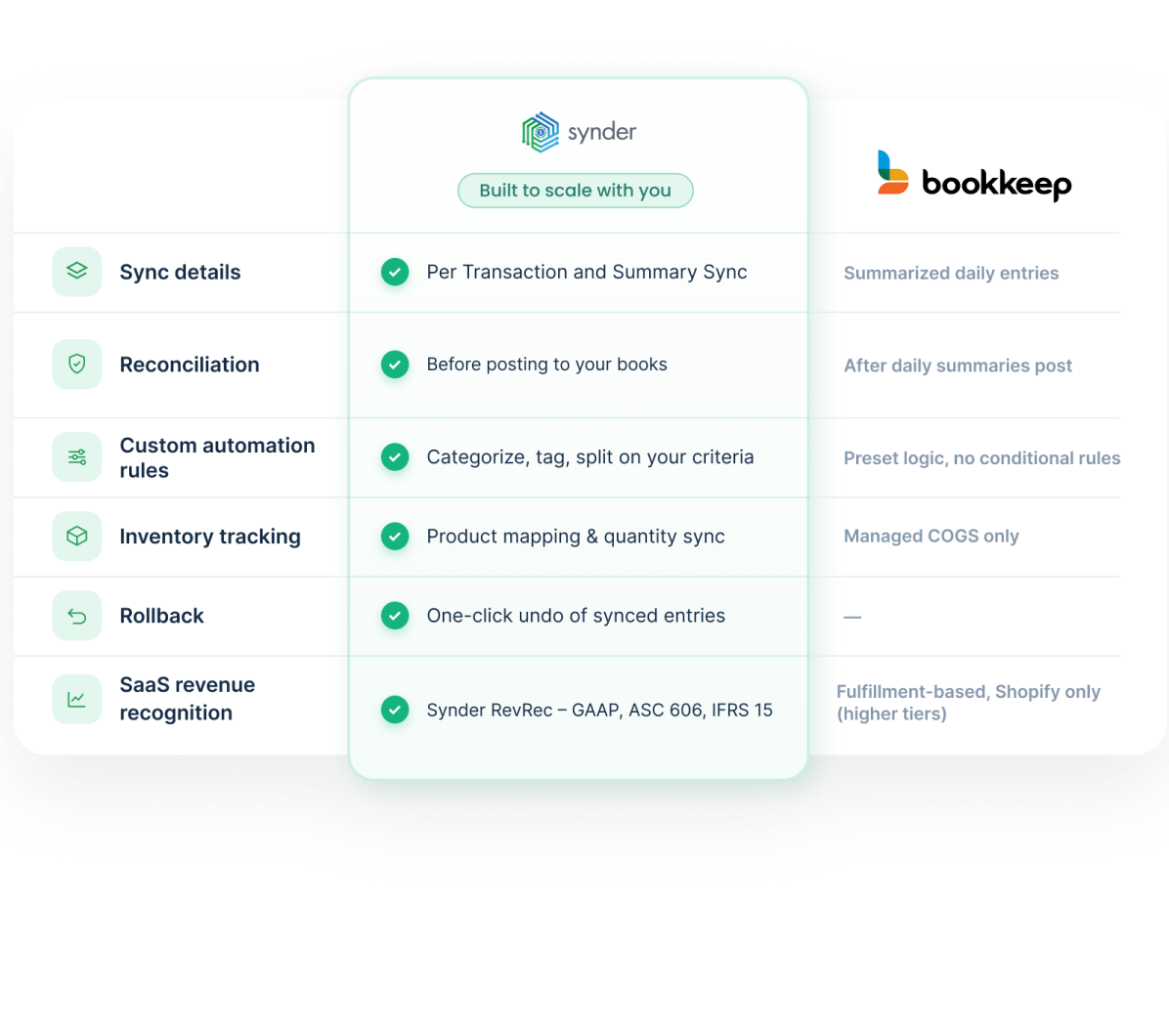
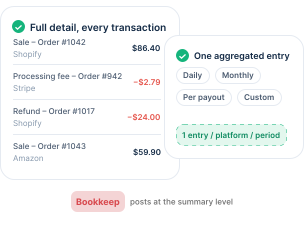
Bookkeep posts at the summary level and stops there. Synder adds Per Transaction sync for detailed, customer-and-item-level records, including line items, fees, taxes, discounts, and refunds, alongside Summary Sync for aggregated daily, weekly, monthly, or per-payout entries.
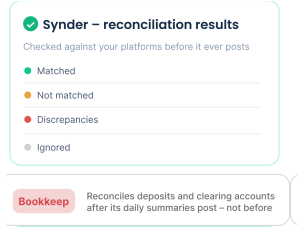
Synder records sales, fees, and refunds in a clearing account, where Balance Reconciliation confirms summaries match the platform balances before posting, and Transaction Reconciliation matches Per Transaction records against the platform to flag mismatches. Bookkeep reconciles deposits and clearing accounts after its daily summaries post, not before.
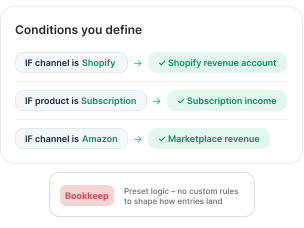
Synder's automation rules categorize transactions on conditions you define, so revenue from different channels or products goes to the right accounts. Bookkeep applies its own preset logic, with no custom rules to shape how entries land.
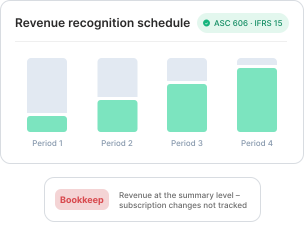
Synder automates ASC 606- and IFRS 15-compliant revenue recognition based on Stripe billing events like upgrades, downgrades, and cancellations. Bookkeep handles revenue at the summary level and doesn't track these subscription changes.
Bookkeep suits businesses that prefer summary-level books and managed sales tax. Synder is better suited to businesses needing transaction-level detail, reconciliation tools, broader accounting platform support, or subscription revenue recognition. As complexity grows, capabilities often matter more than price.
It depends on the level of detail you need. Bookkeep is strong if you want clean daily summaries and managed sales tax filing for channels like Shopify, Square, and Toast. Synder fits when you need transaction-level detail, in-app reconciliation before posting, custom automation rules, or a wider set of accounting platforms, including QuickBooks Desktop. High-volume and multi-processor sellers tend to land on Synder for the detail and control.
Synder takes more upfront configuration than a summary-only tool: you connect your channels and processors, choose a sync mode per integration, map your accounts, and build automation rules. That work is what produces transaction-level detail and reconciliation you can trust. Most sellers are running within a day, and Synder's onboarding team offers live chat, phone, Zoom sessions, and help-center resources to guide your mapping.
At the entry level, Bookkeep can be cheaper, starting lower on a per-entity basis. Synder's plans (billed annually) run $52, $92, and $220 per month for Basic, Essential, and Pro, with custom Premium pricing, and scale with transaction volume. Bookkeep adds per-filing, per-transfer, and per-historical-entry charges on top of its plans, so the cheaper-at-entry gap narrows as your needs grow. Compare on the workflow you actually need, not the headline price.
Yes. Synder syncs to QuickBooks Desktop and Puzzle in addition to QuickBooks Online, Xero, Sage Intacct, NetSuite, and Intuit Enterprise Suite. Bookkeep only covers QuickBooks Online, Xero, Zoho Books, NetSuite, Sage Intacct, and Intuit Enterprise Suite. Zoho Books is the one platform Bookkeep supports that Synder does not.
Synder automatically tracks tax from your connected integrations and records it in your books for reporting, capturing what was collected on each sale or summary so your tax liability stays accurate. It does not file and remit returns on your behalf. If you need a service that files and remits across US states, that is where a managed offering like Bookkeep's has an edge; if you need accurate tax recording inside detailed books, Synder does it well.
Summary Sync posts one aggregated entry per source per period/payout, totaling sales, fees, taxes, discounts, and refunds. It keeps the books light and is easy to reconcile against a payout. Per Transaction sync records every transaction individually, with customer, item, fee, and refund data linked together, which is what you need to investigate a specific order or close open invoices with incoming payments. Synder offers both modes and lets you pick per integration; Bookkeep posts summarized entries only.
Yes. Synder is widely used by professional accounting services and bookkeeping firms that manage ecommerce clients. Per Transaction sync gives the transaction-level detail a practice needs to stand behind a client's books, built-in reconciliation lets the team verify the numbers before they post, and reusable automation rules let you replicate a mapping setup across similar clients. Synder also offers a Partner Program and dedicated onboarding resources for firms scaling their client roster.
Yes. Synder RevRec automates GAAP-compliant revenue recognition for subscription and SaaS revenue, handling billing events like upgrades, downgrades, and cancellations, and allocating revenue across the right periods. Its Deferred Revenue Auto-Reconciliation Report compares your recorded balance against Synder's calculated schedule, so month-end close becomes a review rather than a spreadsheet rebuild. This is a fit for SaaS and membership businesses, not just ecommerce sellers.
Start by connecting your sales channels and payment processors to Synder, then link your books. Choose a cutover date that gives you a clean break between the two tools. Run a historical data import in Synder up to that date, then open your sync settings before going live so transactions categorize correctly from the very first sync. If you're on Summary Sync, you assign accounts directly; on Per Transaction, the accounts that get hit are determined by the product in your accounting software, your tax configuration, and similar factors, though a number of them remain editable in the settings. Lock in your automation rules, then check the first batch in Synder's reconciliation before it posts. Notice a mistake? One-click rollback removes the synced entries so you can correct your setup and sync again.