The AI Returns Gap: A 2026 Playbook for Finance Teams
Get your copy ➔

Synder vs Blue Onion: Which Fits Your Stack?

Two tools, one goal: get your ecommerce transactions into your accounting system without touching a spreadsheet. The differences show up in how deep the data goes, how many books you can post to, and whether you can catch mismatches before they land in your GL or after.

Book a demo to see it live
4.7
average rating · 3,400+ reviews on G2 & Capterra
100%

Accuracy in syncing sales data

$24K

Saved yearly on bookkeeping

140h

Saved on month-end close

Graphic showing a VS matchup with a hexagon tech logo on the left and Finaloop logo on the right with a blue dotted background streak.

What you get with Synder that you won't with Blue Onion

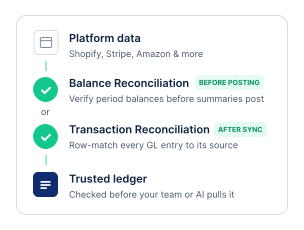
Verified data you can actually trust

Synder gives you two built-in checkpoints. Verify period balances against your platform before summaries post. Row-match every GL entry against the source integration afterward. Whatever your AI agent or your controller pulls from the ledger has already been checked.

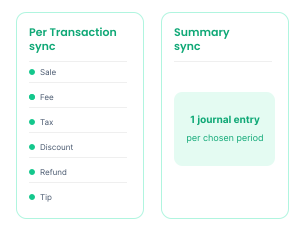
Two sync modes

Per Transaction sync posts every sale, fee, tax, discount, refund, and tip as its own entry inside your accounting platform, so any transaction is can be traced back to its source. Summary Sync rolls the chosen period into a single clean journal entry when you want less noise in the GL.

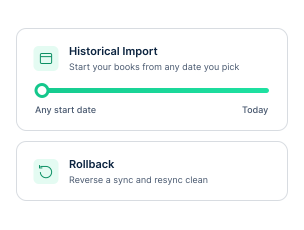
Built-in historical import and rollback

Synder imports historical data at any depth you pick, so your books can start from any date, not just the day you signed up. Made a mistake or reconfigured a rule? Rollback reverses what was synced and lets you resync clean.

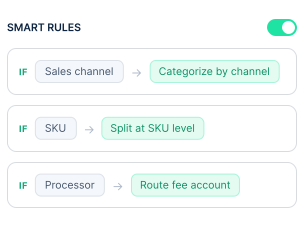
Smart Rules for custom automation

Smart Rules let you decide how each transaction gets categorized, tagged, split, or memoed – based on any conditions you set. Sales by channel? SKU-level splits? Fee accounts by processor? Build the logic once, and every future transaction follows it.

How they line up: feature-by-feature comparison

A side-by-side look at both tools across integrations, sync options, transaction detail, reconciliation, and everything in between.

Synder
Blue Onion
Deployment
Cloud
Cloud
Free trial
Yes, 15 days
No, demo request only
Accounting platforms
QuickBooks Online, QuickBooks Desktop, Xero, Sage Intacct, NetSuite, Intuit Enterprise Suite, Puzzle
QuickBooks, NetSuite, Xero, Sage Intacct, Acumatica
Payment processors
Stripe, PayPal, Square, Clover, Authorize.Net, Braintree, Klarna, Afterpay, Affirm, and more
See all integrations
Stripe, PayPal, Adyen, Braintree, Authorize.Net, Amazon Pay, Klarna, Afterpay, Affirm, and more
Sales channels
Shopify, Amazon, eBay, Walmart, Etsy, WooCommerce, BigCommerce, and more
See all integrations
Shopify, Amazon, TikTok Shop, Walmart, BigCommerce, WooCommerce, Global-e, custom OMS
Syncing options
Per-Transaction and Summary
Daily summary journal entries
Sync frequency
Hourly
Daily
Transaction detail
Line items, fees, taxes, discounts, refunds, tips and more
Orders, fees, refunds, reserves, chargebacks
Tax recording
Yes, including marketplace facilitator tax handling
COGS tracking
Yes
Manual
Inventory tracking
Yes
Not tracked
Multi-currency
Yes
Yes
Custom automation rules
Yes, transaction-level Smart Rules (categorize, tag, split, memo per condition)
Yes, JE-level templates (group by, filter, GL mapping)
Built-in transaction reconciliation
Yes, Transaction Reconciliation (Per Transaction) and Balance Reconciliation (Summary Sync) with verification before posting
Yes, post-sync three-way match + Smart Adjustments
Discount handling
Yes
Yes
SaaS revenue recognition
Yes, ASC 606 / IFRS 15-compliant revrec with deferred revenue waterfall reporting
Yes, ASC 606 deferred revenue waterfall for subscriptions
Channel analytics
Yes
Historical data import
Yes
Yes
Rollback
Yes
No batch rollback; manual per-JE unbook only
Price (billed annually)
Starting $52/mo
Not published
Support
Email, chat, live support
Email, in-app chat, dedicated CSM
See all

Takeaway: choosing the right tool

Blue Onion is a fit for larger DTC brands with in-house finance teams. Synder is the better call when you want line-item detail in your books, verified data your team and your AI can trust, and the flexibility to grow across ecommerce, SaaS, and subscriptions.

What Synder users say

"Time is money. Instead of a bookkeeper spending 40 hours a month manually reviewing thousands of transactions each month – clicking into each one, checking metadata, and categorizing it – Synder does it all automatically, the moment the charge happens. Which means we save 480 hours and almost $24K yearly.”

Justin McKelvey
Head of Product at PlayYourCourt
Gradient logo with overlapping circles enclosing the letters RAD.

Quick answers to your FAQs

Close Cookie Preference Manager
Privacy Overview
This website uses cookies to improve your experience while you navigate through the website. Out of these, the cookies that are categorized as necessary are stored on your browser as they are essential for the working of basic functionalities of the website. We also use third-party cookies that help us analyze and understand how you use this website. These cookies will be stored in your browser only with your consent. You also have the option to opt-out of these cookies. But opting out of some of these cookies may affect your browsing experience.
Strictly Necessary (Always Active)
Cookies required to enable basic website functionality.
Made by
Oops! Something went wrong while submitting the form.