Set up now, save all year: 40% off Synder, this July only
Get the discount ➔

Synder vs Amazon Seller Connector by QuickBooks: A Side-by-Side Look

Both tools sync Amazon data with QuickBooks Online, but they target different types of businesses. The Amazon Connector by QuickBooks is a free option for a single Amazon account, while Synder supports multiple sales channels with detailed accounting and reconciliation.

Book a demo to see it live
4.7
average rating · 3,400+ reviews on G2 & Capterra
100%

Accuracy in syncing sales data

$24K

Saved yearly on bookkeeping

140h

Saved on month-end close

Graphic showing a VS matchup with a hexagon tech logo on the left and Finaloop logo on the right with a blue dotted background streak.

Where Synder offers that the native Amazon Seller Connector doesn’t

Every channel under one roof

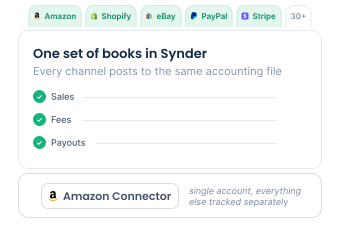
Synder connects 30+ marketplaces, storefronts, and payment processors, including Amazon, Shopify, eBay, Walmart, PayPal, and Stripe, bringing every channel into one set of books. The Amazon Seller Connector ties to a single Seller Central account, so anything you sell elsewhere has to be tracked separately.

Settlement reports parsed to the fee

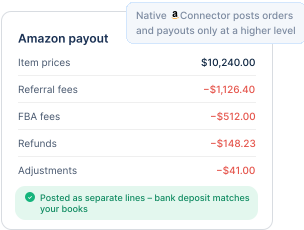
Each Amazon payout gets split into item prices, referral and FBA fees, refunds, and adjustments, posted as separate lines so the deposit in your bank matches your books without hand-sorting thousands of rows. The native connector brings in orders and payouts at a higher level, leaving the makeup of each deposit for you to untangle.

Smart categorization

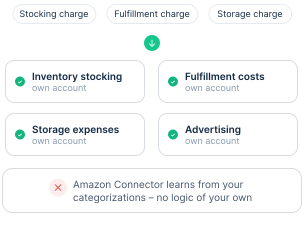
Synder lets you write rules that classify transactions on criteria you define, including classes, locations, and custom fields, so stocking, fulfillment, storage, and advertising charges route to their own accounts. The native connector tracks products and learns from your categorizations but adds no logic of your own.

Marketplace facilitator tax handled correctly

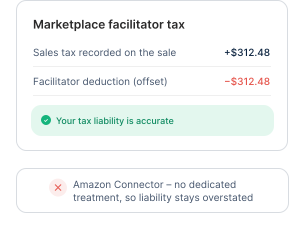
When Amazon collects and remits sales tax for you, Synder records the tax on the sale and offsets it as a facilitator deduction, keeping your liability accurate instead of overstating what you owe. The native connector offers no dedicated treatment for this.

Feature comparison: a detailed breakdown

Both tools bring Amazon data into QuickBooks Online, yet how much they capture and how cleanly it posts is where they part ways.
Synder
Amazon Seller Connector by QuickBooks
Deployment
Cloud-based
Cloud-based
Free trial
Yes, 15 days, no credit card required
Free app, Amazon Seller Central account required
Accounting systems
QuickBooks Online and Desktop, Xero, Sage Intacct, Oracle NetSuite, Intuit Enterprise Suite, Puzzle
QuickBooks Online only
Payment platforms
Stripe, Square, PayPal, Amazon Pay, Clover, Braintree, Authorize.net, and more
See all integrations
None beyond Amazon
Sales platforms
Amazon, Shopify, Walmart, eBay, Etsy, TikTok Shop, WooCommerce, BigCommerce, and more
See all integrations
Amazon Seller Central only
Multichannel support
Yes
No, single Amazon account
Amazon Seller Central support
Yes
Yes
Settlement report parsing
Yes, fees, refunds, and adjustments split into separate lines
Limited, manual confirmation and review per transaction
Syncing options
Per Transaction and Summary Sync
Per-transaction import with a confirm queue

Note: Feature details for the Amazon Seller Connector by QuickBooks reflect Intuit's published documentation at the time of writing and may change.

See all

Takeaway: matching the tool to your seller profile

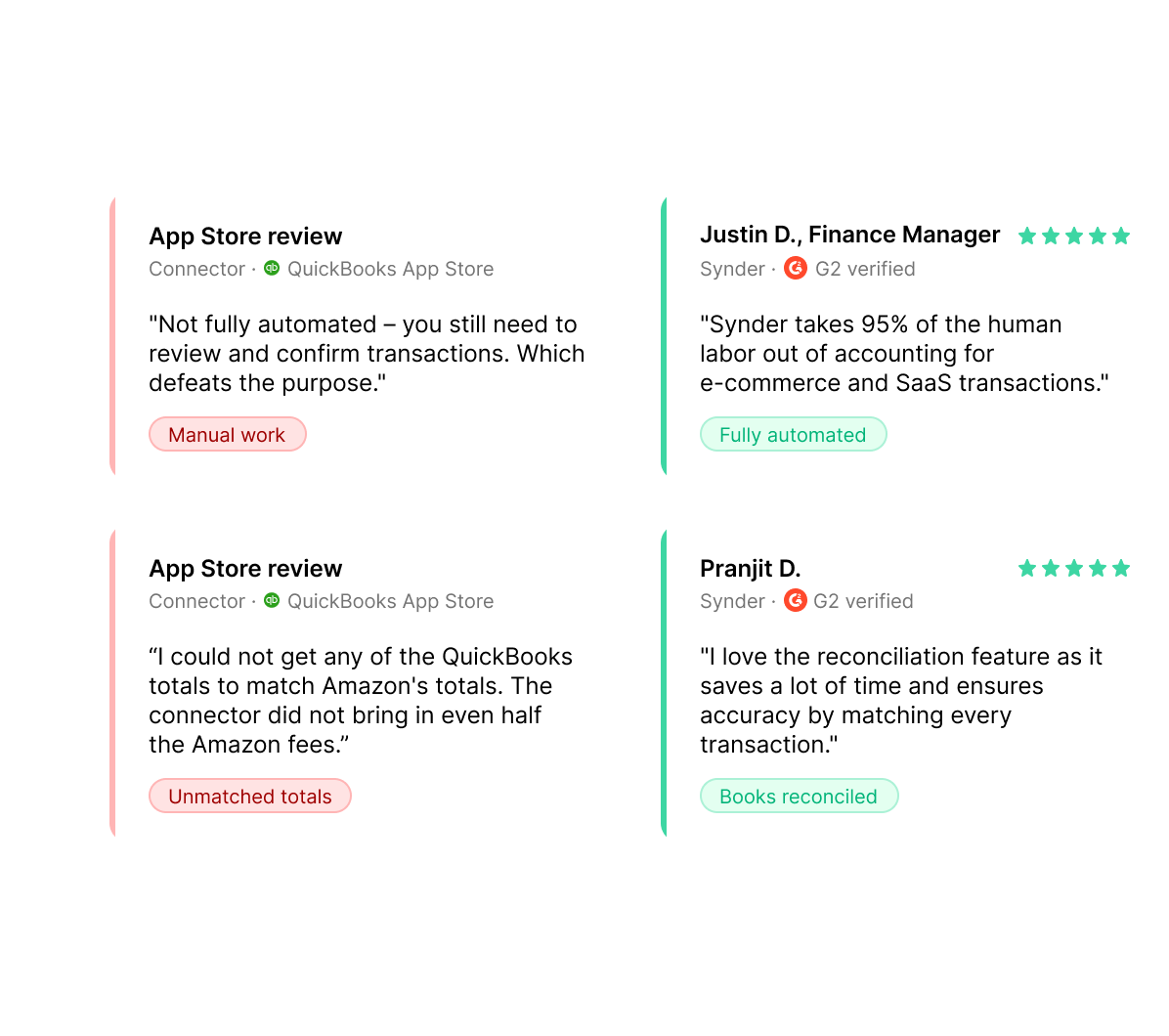
The Amazon Seller Connector by QuickBooks is a solid free option for sellers running a single Amazon account on QuickBooks Online who don't mind some manual review. Synder is better suited to businesses with higher sales volume, multiple channels, more complex accounting needs, or a need to automate settlement breakdowns and reconciliation.

What Synder users say

“Synder has allowed me to remain independent in my role and accomplish more things in less time. Before, I would have had to hire additional staff at a cost of $5,000-$6,000 a month to help me operate the accounting department. By cutting out data entry, we're saving on labor costs while improving efficiency by removing the errors."

Andy Pozniak
CFO at Dermeleve
Gradient logo with overlapping circles enclosing the letters RAD.

Quick answers to your FAQs

Close Cookie Preference Manager
Privacy Overview
This website uses cookies to improve your experience while you navigate through the website. Out of these, the cookies that are categorized as necessary are stored on your browser as they are essential for the working of basic functionalities of the website. We also use third-party cookies that help us analyze and understand how you use this website. These cookies will be stored in your browser only with your consent. You also have the option to opt-out of these cookies. But opting out of some of these cookies may affect your browsing experience.
Strictly Necessary (Always Active)
Cookies required to enable basic website functionality.
Made by
Oops! Something went wrong while submitting the form.