
Most accounting errors slip in as a transposed digit, a duplicated entry, or a processing fee that never made it into the ledger, and by the time someone notices, they’ve had weeks or months to replicate across the books. For businesses processing payments across multiple platforms, managing vendor invoices, or operating across different systems, records can drift out of sync with what actually happened. Often, the gap only becomes visible during reconciliation or an audit.
According to a survey of financial decision-makers at large companies published by CFO.com, half of respondents said their payments are reconciled accurately less than 80% of the time, and 97% agreed that automated reconciliation is essential. As transaction volumes grow, unreconciled records can distort financial statements, weaken audit readiness, and lead to decisions based on incomplete data.
This guide explains what transaction reconciliation is, how the process works step by step, why it becomes difficult at scale, and how automation is helping finance teams focus more on analysis and less on chasing discrepancies in spreadsheets.
TL;DR
- Transaction reconciliation defined: It’s the process of matching internal records against external data to catch errors, fraud, and discrepancies before they compound into bigger problems.
- A five-step workflow: Collect data, compare records, identify discrepancies, investigate and adjust, then document and sign off.
- There are multiple reconciliation types: Bank, credit card, accounts payable, accounts receivable, and intercompany reconciliation. Each addresses a different part of your financial picture.
- Manual reconciliation doesn’t scale: As transaction volume grows, spreadsheet-based processes become a bottleneck as companies still rely on manual methods.
- Synder automates it: Synder’s transaction reconciliation feature compares payment platform data against accounting system records automatically, flagging mismatches for fast resolution.
What is transaction reconciliation?
Imagine a mid-size ecommerce company processing thousands of orders across Shopify, Amazon, and its own website. Payments arrive through Stripe and PayPal, each deducting fees before sending net payouts on their own schedules. When the controller compares QuickBooks Online records to the bank statement at month-end, a $4,300 gap appears – that’s exactly the kind of discrepancy transaction reconciliation is meant to catch.
At its core, transaction reconciliation is the process of comparing two sets of financial records to confirm that every transaction is accurately captured and any differences are identified and explained. These typically include:
- Your internal accounting records
- A bank statement
- A payment processor report
- A vendor invoice or external financial document
In the scenario above, the $4,300 could be platform fees that weren’t mapped to the right account, a payout that landed in January instead of December, a duplicate order entry, or some combination of all three. Reconciliation is what finds out which.
Why transaction reconciliation matters
Beyond catching errors, reconciliation supports several critical parts of financial management:
- Reliable financial records – ensures financial statements reflect the company’s true position for management, investors, and lenders.
- Fraud detection – helps surface unusual patterns like duplicate payments, unauthorized charges, or payouts to unfamiliar accounts.
- Audit readiness and compliance – creates clear records and audit trails required by most financial reporting frameworks.
- Accurate cash flow visibility – ensures decisions are based on the company’s real cash position, not unreconciled data.
Types of transaction reconciliation
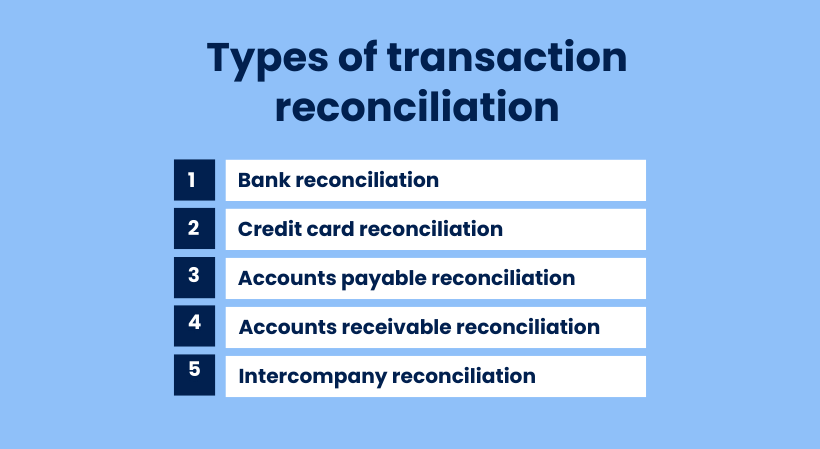
Not all reconciliation covers the same ground, and most businesses deal with several types regularly. Common examples include:
- Bank reconciliation – matching the company’s cash ledger to the bank statement, usually monthly or more often for high-volume businesses.
- Credit card reconciliation – comparing card statements with recorded expenses to detect unauthorized charges or billing errors.
- Accounts payable reconciliation – confirming that vendor balances in your ledger match what you actually owe, helping catch duplicate payments or missing invoices.
- Accounts receivable reconciliation – verifying that incoming payments are recorded correctly and applied to the right invoices, especially important for subscription or high-volume sales.
- Intercompany reconciliation – ensuring transactions between related entities cancel out correctly in consolidated reports.
For ecommerce businesses using platforms like Stripe, PayPal, Shopify, or Amazon, there’s an additional layer: reconciling payment processor payouts with the accounting system. Each platform has its own payout schedules, fees, and reporting formats, which rarely map neatly to the general ledger without additional processing.
How the transaction reconciliation process works
The process follows a consistent workflow regardless of business size or the accounts being reconciled. This is how it typically unfolds:
- Collect and organize data. Gather all relevant financial documents for the period: bank statements, general ledger reports, payment processor exports, invoices, and receipts. Organizing by date and transaction type before starting saves significant time later, since hunting for a missing document mid-reconciliation is one of the most common sources of delay.
- Compare records across sources. Match transactions in your internal records against the external data. Every line item should appear in both places. Discrepancies – amounts that don’t match, transactions present in only one source, or entries recorded in the wrong period – get flagged.
- Identify and investigate discrepancies. Once mismatches are flagged, the investigation begins. Common causes include timing differences (a check issued before month-end that clears in the following period), data entry errors such as transposed digits, bank fees not recorded internally, or duplicate entries from a system import.
- Make adjustments. After identifying the root cause, correct the records. This usually means creating journal entries to bring the books in line with reality, voiding duplicates, or requesting corrections from a bank.
- Document and sign off. Compile the final reconciliation report along with supporting documentation for each adjustment, and route it for appropriate approval. A clean, consistent audit trail makes future reconciliations easier and keeps the business prepared for external audits.
The table below summarizes each step:
| Step | What you do | Key inputs | Output |
| 1. Collect data | Gather all records for the period | Bank statements, GL reports, processor exports, invoices | Organized document set ready for comparison |
| 2. Compare records | Match internal entries to external data | Internal ledger, external statements | List of matched and unmatched transactions |
| 3. Identify discrepancies | Flag everything that doesn’t agree | Mismatch list from step 2 | Discrepancy log with details per item |
| 4. Investigate & adjust | Find root causes, post journal entries | Discrepancy log, source documents | Corrected, accurate financial records |
| 5. Document & approve | Compile the final report and sign off | Adjusted records, investigation notes | Signed reconciliation report with audit trail |
How automation changes the reconciliation equation
At small volumes, reconciliation can be handled with spreadsheets and a careful eye. But once a business starts processing thousands of transactions across multiple channels, that approach quickly becomes difficult to sustain. Multichannel ecommerce, subscription billing, and high payment volumes generate far more data than manual matching can reliably handle.
Businesses that adopt automated reconciliation often see data entry errors during month-end drop by around 70%, while also saving hours that would otherwise go into manually matching thousands of transactions.
Automated reconciliation tools work by pulling transaction data directly from payment processors, banks, and accounting systems, then matching records based on configurable rules.
How Synder automated transaction reconciliation
Synder is an accounting automation tool that helps ecommerce and SaaS businesses sync financial data from 30+ platforms like Stripe, PayPal, Amazon, and Shopify into accounting systems such as QuickBooks Online, Xero, NetSuite, Sage Intacct, and Puzzle.
Its transaction reconciliation feature is available for QuickBooks Online, Xero, and NetSuite when using the Per Transaction sync mode. In this mode, Synder syncs each transaction individually into your accounting system, which means the reconciliation engine can match records one-to-one.
Its transaction reconciliation feature works as a matching engine: it compares what’s recorded in your clearing account against the transaction data from your payment platform, then surfaces any inconsistencies. The feature supports three modes for pulling that data, depending on your setup:
- Automated mode – Synder fetches data directly via API from both the accounting system and the integration. No file uploads required; just select your date range and run the match.
- Standard mode – For platforms where Synder knows exactly which export file to expect, it provides step-by-step instructions on what to download and upload. Synder then handles all column matching and data normalization.
- Manual mode – You upload any file containing your transaction data and map the columns yourself, for example, which column is the primary ID, which is the amount. Once you save the mapping as a template, it’s reused every time you reconcile that platform, so the column mapping is a one-time setup.
Once the match runs, the results are organized into four tabs:
- Matched – transactions confirmed on both sides
- Discrepancy – the transaction ID matches, but the amounts differ
- Not matched – the transaction exists on one side only
- Ignored – items you’ve manually set aside
Only a 100% match rate returns a reconciled status. Anything below that prompts further investigation.
| Note: For transactions flagged as missing in accounting, you can copy the transaction ID directly from the results screen and look it up in Synder’s transaction list to see exactly what happened to it, whether it was deleted, rolled back, or never synced. For transactions missing in the integration, the likely cause is a manually added entry in accounting, which can be safely ignored if confirmed. |
What you get with Synder’s capabilities
The time difference is tangible. Stape, a server-side tracking platform, used to spend two full working days on each reconciliation cycle. After switching to Synder’s automated sync and reconciliation, that same process now takes 40 minutes. Similarly, Dermeleve, a consumer healthcare brand reconciling over 170,000 transactions across four sales channels maintains 99.5%+ reconciliation accuracy through Synder’s automated transaction matching – a result that would be very difficult to achieve at that volume manually.
If your team spends meaningful time each month on manual reconciliation, that time is worth quantifying. The case for automation tends to become fairly clear once the real cost of the status quo is on the table.
Ready to stop reconciling transactions manually? Try Synder free or book a demo to see how automated reconciliation fits your workflow.
Common challenges in transaction reconciliation
Understanding what makes reconciliation hard is useful because most difficulties are predictable and addressable once you know what to look for.
- Volume and complexity are the primary scaling problems. A business selling across multiple ecommerce channels with several payment processors is dealing with different data formats, payout schedules, and fee structures simultaneously. 84% of companies still depend heavily on manual tasks and spreadsheets for reconciliation, and at scale, that approach creates a growing backlog that’s difficult to clear without errors.
- Timing differences create reconciliation breaks that aren’t errors, but are the result of transactions landing in two systems at slightly different times. A payment processed on the last day of the month might not clear the bank until the next period. These items still need to be documented and tracked so they don’t get confused with genuine discrepancies.
- Data format mismatches are a particular challenge for ecommerce businesses. Stripe exports look different from PayPal exports, which look different from Amazon settlement reports. Getting all of them to map cleanly to your chart of accounts takes either careful manual work or software that handles the translation automatically.
- Human error is the everyday cost of manual data processing. Such mistakes are the expected outcome of asking people to process large volumes of repetitive data without systematic checks. The solution isn’t to hire more careful people, but to build automated processes that catch the inevitable slips before they cascade.
- Gross vs. net transaction differences create reconciliation friction. Payment processors often report transactions as net amounts after fees, while accounting systems require those same transactions to be recorded as separate components: gross revenue and associated fees. A single $93 Stripe charge, for example, may need to be reflected as a $100 payment and a $7 expense. This isn’t an error, but it breaks the one-to-one matching logic that reconciliation relies on. As a result, teams have to manually trace and match one processor transaction to multiple accounting entries, which slows down the process and increases the likelihood of inconsistencies at scale.
Best practices for consistent reconciliation
The teams that make reconciliation work well tend to operate by a few consistent principles.
- Reconcile frequently. Monthly is the minimum. High-volume businesses, or those with complex payment flows, should reconcile weekly or daily. The longer the gap between reconciliation runs, the harder it becomes to trace the source of a mismatch, and the more items pile up in the queue.
- Separate duties. The person recording transactions shouldn’t be the same person reconciling the accounts. Segregation of duties is both a best practice and a fraud-prevention control that most audit frameworks expect to see.
- Standardize the workflow. Document who does what, by when, and what approval is required. This matters most under deadline pressure – a clear, written process is harder to shortcut than an informal one.
- Maintain documentation for every adjustment. Every correction should have a documented reason. This creates an audit trail that supports internal reviews, external audits, and any future investigation into why a particular entry was changed.
- Use automation where it makes sense. Automation removes the repetitive matching work that makes manual reconciliation slow and error-prone, so your team can focus on investigating exceptions that actually need human attention.
Key takeaways
Transaction reconciliation is one of those processes that’s easy to overlook when it’s working smoothly and impossible to ignore when it isn’t. Accurate, timely reconciliation keeps your financial records trustworthy, your audit exposure manageable, and your team’s time focused on work that moves the business forward.
The fundamentals remain constant: collect the data, compare the records, investigate mismatches, adjust the books, and document everything. What’s changed is how much of that work software can now handle automatically and how significantly that changes the time, accuracy, and scalability of the process for businesses that make the shift.
FAQ
What is transaction reconciliation?
Transaction reconciliation is the process of comparing a company’s internal financial records against external data sources, such as bank statements, payment processor reports, or vendor invoices, to verify accuracy and identify discrepancies. It’s a foundational accounting control used across businesses of all sizes.
What are the three types of reconciliation?
The three main types are bank reconciliation (matching the cash ledger to the bank statement), balance sheet reconciliation (verifying that balance sheet accounts are accurate and supportable), and intercompany reconciliation (matching transactions between related entities so they cancel out in consolidated reporting). Accounts payable and accounts receivable reconciliation are also standard practices.
What are the four steps of a transaction?
A financial transaction typically moves through authorization (the payment is approved), authentication (the parties are verified), clearing (the transaction is matched and processed), and settlement (funds are transferred). Reconciliation happens after settlement to confirm that all records across systems agree.
What are the four common reconciliation adjustments?
The four most common adjustments are outstanding checks (issued but not yet cleared), deposits in transit (recorded internally but not yet on the bank statement), bank errors, and errors in the company’s own records, such as duplicate entries or transactions recorded at the wrong amount.
How often should transaction reconciliation be done?
Monthly is the standard for most accounts. Businesses with high transaction volumes, multichannel ecommerce sales, or tight compliance requirements should reconcile weekly or daily. More frequent reconciliation means smaller discrepancies and faster resolution.
What’s the difference between transaction reconciliation and bank reconciliation?
Bank reconciliation is a specific subset focused on matching the cash ledger to the bank statement. Transaction reconciliation is the broader concept that applies to any financial data set, like accounts payable, accounts receivable, payment processor data, and intercompany accounts, not just cash.