

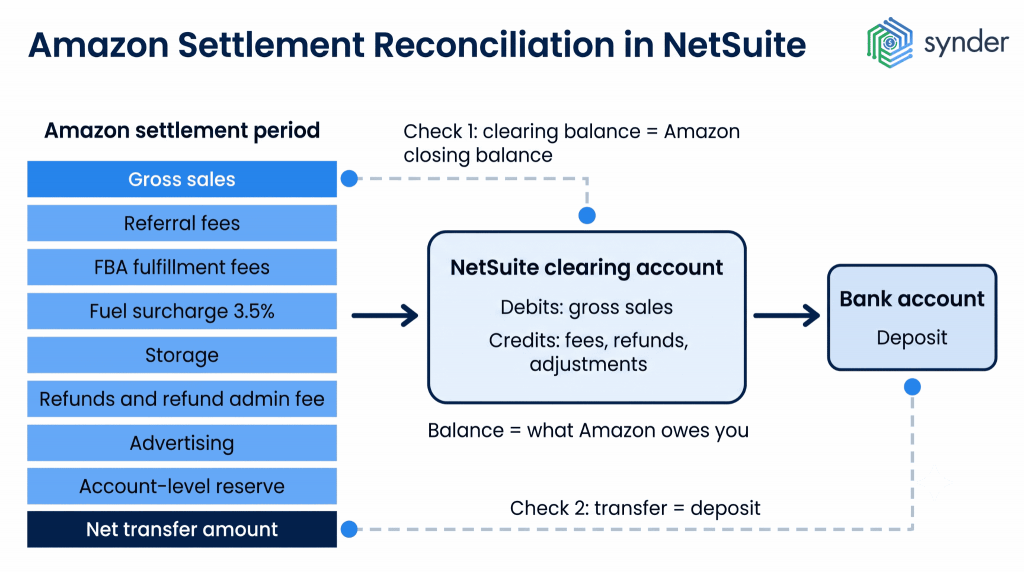
Reconciling Amazon settlements in NetSuite means confirming that the net transfer Amazon reports for a settlement period matches the deposit in your bank, with every deduction between gross sales and that transfer recorded in the correct general ledger account.
Amazon usually settles every two weeks and pays the remaining balance after deducting referral fees, refunds, fulfillment fees, storage charges, refund administration fees, advertising costs, and any reserve it holds. Those settlement periods don’t line up with accounting periods, so it’s common for a single deposit to cover activity from two different months. Controllers, ecommerce bookkeepers, and finance leads at Amazon-selling businesses using NetSuite deal with this as part of every close.
What you’ll learn
- Don’t expect your Amazon payout to match your sales. It already includes fees, refunds, reserves, and timing differences.
- Match each settlement to the bank deposit, then check that your clearing account matches Amazon’s closing balance.
- If you’re only processing a small number of transactions, manual imports can be enough. Once volume picks up, automation saves time and keeps all fee-level details.
- A properly set up clearing account, accurate fee mappings, and a consistent month-end process make reconciliation much easier.
Why your Amazon payouts don’t match the sales in NetSuite
You look at the Amazon payout, then you look at NetSuite, and the totals are different. That’s completely normal.
One reason is that Amazon doesn’t pay you the full value of your sales. Before the money goes out, it deducts referral fees, fulfillment fees, storage charges, refunds, refund administration fees, advertising costs, and any reserve it’s holding.
The other reason is timing. Amazon follows its own settlement schedule, so one payout can include transactions from two different accounting periods.
If you post that payout as revenue, your gross sales will be too low. The fees and other costs bundled into the payout won’t be recorded separately, so your margins won’t reflect what actually happened. And with Amazon fees continuing to rise, that matters more than ever. Marketplace Pulse’s 2026 Seller Index, a survey of 181 marketplace businesses, showed that fees are the biggest margin concern for 49% of active Amazon sellers, while 47% reported a year-over-year decline in margins.
When you’re trying to figure out where the numbers came from, open the settlement statement first. It lists every deduction that went into the payout.
What Amazon means by a settlement
When Amazon talks about a settlement, it simply means the payment statement it creates at the end of each disbursement cycle. It isn’t connected to the FTC Prime enrollment case or the third-party seller antitrust litigation. If you’re entitled to money from either of those cases, it comes from a court-appointed administrator, not through your Amazon disbursement account.
You can find your settlements in Amazon Seller Central under Payments, either in Statement View or by downloading the flat file. Amazon calculates the settlement by taking the opening balance, adding your sales, then subtracting refunds, expenses, and any account-level reserve. If there were reserves or an unrecovered negative balance left over from the previous settlement, those are rolled into the opening balance too.
Amazon reports you’ll use during reconciliation
When you’re trying to figure out where the numbers came from, start with Amazon’s own reports. Seller Central offers several views of the same activity, but each one answers a different question. Opening the right report first saves you from jumping back and forth between them during the reconciliation process.
| Report | Where to find it | What’s in it | When to use it |
| Settlement report (Flat File V2) | Reports → Payments → All Statements | Every financial event in a settlement period, including the transaction type, amount description, order ID, and settlement ID | This is usually the best place to begin. Match the net transfer in the report to the deposit in your bank. |
| Statement View | Reports → Payments | The opening balance, sales, refunds, expenses, account-level reserve, and closing balance for the settlement period | Use it for a quick overview of the settlement. It’s also where you’ll find the ACH trace ID if you’re tracking down a missing deposit. |
| Transaction View | Reports → Payments → Transaction View | Every transaction from the last settlement through the previous day, with filters for different transaction types | Helpful when you need to check a specific order, fee, or refund before the next settlement closes. |
| Date Range Summary report (PDF) | Reports → Payments → Reports Repository | A summary of income, expenses, taxes, and transfers for any date range you choose | Review activity by calendar month instead of Amazon’s settlement periods. |
| Date Range Transaction report (CSV) | Reports → Payments → Reports Repository | Every transaction for the selected date range | Export the data for spreadsheet work or import it into your accounting system. |
| Reimbursements report | Reports → Fulfillment → Reimbursements | FBA reimbursements for lost or damaged inventory within the selected date range | Use it to separate reimbursement income from your regular sales. |
What a good Amazon reconciliation report should show
A completed reconciliation should show the settlement ID and the settlement period, Amazon’s opening and closing balances, gross sales, each deduction category, the net transfer amount, the matching bank deposit, and a final variance of zero.
Any unmatched items should appear separately, along with the reason they couldn’t be matched and who is responsible for resolving them. It’s also worth recording exactly what was included at the time of close, because Amazon can post late adjustments that change settlement figures after the reporting period ends.
Date boundaries, file retention, and the account balance
Date Range reports include activity from 12:00 a.m. on the first date through 11:59 p.m. on the last date, using your local time. That becomes important if your NetSuite subsidiary uses a different time zone.
It’s a good idea to archive every flat file when Amazon issues it, because reports are only available for a limited time. Also, keep in mind that the account balance shown in Seller Central includes funds Amazon is still holding in reserve, so it doesn’t represent the earnings for that period.
Inside the reserve balance
Seller Central shows the total reserve balance, but it doesn’t list the individual transactions that make it up. Deferred transactions and the account-level reserve are also different figures. Funds first move into deferred status when an order ships, then move into the reserve after the delivery is confirmed.
If you want to estimate what’s included in the reserve, you’ll need to cross-reference the All Orders or Amazon Fulfilled Shipments reports and check the confirmed delivery dates.
Three routes to get Amazon settlement data into NetSuite
All three routes to integrate Amazon and NetSuite start with the same settlement report. The difference is how the data gets into your ledger and how much fee detail makes it through.
Route one: manual settlement imports and journal entries
Download each flat file, summarize the data, and post a journal entry that debits the clearing account for gross sales and credits it for each fee, refund, and adjustment. Some teams import a formatted CSV instead of entering the journal manually. This approach usually works well for sellers processing fewer than a few hundred transactions each month.
Synder’s sales conversations with Amazon sellers show that about half identified manual data entry as their biggest challenge, while another third pointed to reconciliation. One nonprofit finance team that moved marketplace and point-of-sale data into NetSuite through Excel reported spending around 20 hours a week extracting data and preparing journal entries. Manual summarization also rolls different fee types into a single “Amazon fees” line, so charges like the fuel surcharge, refund administration fees, and long-term storage no longer appear separately in fee analysis.
Route two: the native NetSuite Connector
NetSuite Connector, Oracle’s certified connector that was previously called FarApp, includes Amazon Settlement Sync. It pulls settlement reports from Amazon Seller Central through the API and posts them into NetSuite. The connector also provides a dashboard where you can review synced transactions, errors, and report history.
Oracle documents how these entries are posted. Order modifications, which are fees tied to a specific order, are added as fees or credits to that order’s billed record. Non-order modifications, such as storage fees or reimbursements for lost or damaged inventory, are totaled across the report. If the overall balance favors Amazon, the connector creates a cash refund summary transaction. If it favors you, it creates a cash sales summary transaction.
A couple of documented behaviors are worth keeping in mind at month-end. If a posting error occurs, the connector skips that transaction, retries it on later runs a limited number of times, and then cancels it automatically if it still fails. That can leave part of a settlement period posted and part of it missing. Also, you can’t view non-order modification fees and credits on the dashboard, so you’ll need to investigate those period-level charges directly in NetSuite.
Route three: third-party accounting automation software
These connectors act as the link between the marketplace and your accounting system. They break the settlement file into individual transaction types, post each one to the right mapped account, and wait until the settlement is final before posting anything, so the numbers don’t change afterwards. Compared with a general ERP connector, they usually offer more detailed fee mapping, support multiple sales channels, and include their own reconciliation tools.
Synder is one example. It’s accounting automation software that syncs ecommerce and payment data from more than 30 platforms into accounting systems, including NetSuite. Its Amazon integration offers two sync modes. Summary Sync groups an entire settlement into a single summarized entry, while Per Transaction records each order separately. Both options capture item-level sales, platform fees, shipping, and discounts. For Amazon, Synder waits until the settlement is finalized and the exchange rate is confirmed before posting.
Payouts are first recorded in a clearing account, then moved to the checking account when the funds arrive. Marketplace facilitator tax is posted as separate journal entry lines in both sync modes, reducing total sales tax payable. You can also import historical data for earlier periods, within Amazon’s API limits, and every Amazon marketplace is supported. Each connected sales or payment channel posts to its own account, so keeping activity from different channels separate in NetSuite is much easier.
| If you’d like to see what a finalized Amazon settlement looks like in NetSuite, book a Synder demo and compare the resulting journal entry with your own records. |
| If you choose… | How it works | It’s usually a good fit if… | Keep in mind… |
| Manual imports and journal entries | Download each settlement file, summarize the data, then either create a journal entry or import a CSV into NetSuite. | You process a relatively small number of orders, have a straightforward fee structure, and don’t work with multiple currencies. | As sales grow, so does the manual work. Different fee types also tend to be grouped into a single “Amazon fees” line. |
| Native NetSuite Connector | Pulls settlement reports from Amazon through the API and automatically posts order modifications, non-order modifications, and refunds. | You’re already using NetSuite Connector to sync Amazon orders. | Posting errors that aren’t resolved after a limited number of retries are cancelled automatically. The dashboard also doesn’t provide a period-level view of fees. |
| Third-party accounting automation software | Waits until a settlement is finalized, then posts it to a clearing account using your account mappings and reconciliation settings. | You sell across multiple channels, process higher transaction volumes, or need detailed fee reporting. | You’ll need to set up another application and pay for an additional subscription. |
Setting up the NetSuite side
The clearing account
A clearing account is a balance sheet account that tracks money Amazon is still holding for you. Gross sales, fees, refunds, and adjustments are posted there first. When Amazon sends the payout, it’s recorded as a transfer from the clearing account to your bank account.
After the payout is recorded, the remaining balance in the clearing account should match the amount Amazon says it still owes you, including any reserve balance.
If you’re using NetSuite OneWorld, it’s usually best to create a separate clearing account for each marketplace and currency. Amazon can send payments to the same bank account from multiple currency pools, and keeping those balances separate makes reconciliation much easier.
Fee mapping
Referral fees, FBA fulfillment fees, storage fees, long-term storage, advertising, and the fuel surcharge each represent a different type of cost. They have different drivers, so it’s worth mapping them separately. Once they’re grouped into a single expense account, you lose much of the reporting value that comes from importing detailed settlement data.
In most US states, Amazon collects and remits sales tax as the marketplace facilitator. That amount isn’t your revenue or your tax liability. Recording it as a separate line helps keep your sales tax payable account accurate.
Two changes introduced in 2026 added new charge types that many existing mappings won’t recognize. Starting in August 2026, Amazon began moving some advertisers away from credit card billing for Sponsored Products, Sponsored Brands, and Sponsored Display, so advertising costs are deducted from the seller balance before the payout is issued. The change had originally been scheduled for April. Separately, a 3.5% fuel and logistics surcharge began applying to FBA fulfillment fees in the US and Canada on April 17, 2026, then expanded to Multi-Channel Fulfillment and Buy with Prime on May 2.
Advertisers affected by this change can switch to Pay by Invoice, which keeps advertising costs out of the settlement. If you don’t update your mappings for these new charge types, they’ll usually post to a catch-all expense account, which makes your fee reporting less useful.
Refunds, reimbursements, and adjustments
These transactions don’t move through your books the same way as sales, so they’re behind a lot of reconciliation issues.
- Refunds reverse the original sale, reverse any fees Amazon returns to you, and include the refund administration fee Amazon charges for processing the return.
- Reimbursements for inventory Amazon lost or damaged should be recorded as other income, not as a sales reversal or a reduction in fulfillment costs.
- Inventory adjustments reflect FBA quantity changes that appear on settlement reports. They affect inventory value but don’t change revenue.
- Chargebacks and A-to-Z claims often show up in a later accounting period than the original order, even though they’re tied to that transaction.
- Removal and disposal orders are usually recorded as period operating costs rather than costs linked to an individual sale.
Handling month-end cutoffs
Amazon’s settlement schedule doesn’t line up with the calendar month, so it’s common for one settlement to include activity from two accounting periods. Under accrual accounting, you recognize revenue when the performance obligation is satisfied, even if Amazon hasn’t paid you yet. That usually means posting an accrual at month-end for sales that have shipped or been delivered but haven’t shown up in a settlement yet, then reversing it when the settlement comes through. The reserve balance and deferred transactions in Seller Central show you the amounts to use.
If you report on a cash basis and don’t have external reporting requirements, it’s usually enough to reconcile one settlement at a time.
The Delivery Date Based Reserve policy, or DD+7, makes those accruals bigger because Amazon holds the funds until seven calendar days after the order is confirmed as delivered. Only then can they be released in the next disbursement cycle. That increases both the deferred transactions balance and the account-level reserve. North American accounts that were still on the old shipment-date policy switched to DD+7 in March 2026. For accounting purposes, it’s the delivery date that determines which reporting period the income belongs to. The payout date doesn’t change that.
A simple month-end reconciliation routine for Amazon in NetSuite
You only need to set this up the first time. After that, you follow the same steps every settlement cycle. The order matters because each step narrows down the list of things you’ll need to look into.
First, check that every settlement for the period was imported into NetSuite. Partial or failed imports are one of the most common reasons the numbers don’t match.
Next, compare your clearing account balance with Amazon’s closing balance for the same date, including reserves and deferred transactions.
Then match each net transfer to the corresponding bank deposit in NetSuite. Every amount should match exactly.
If anything is left over, review those exceptions one at a time. Sometimes a transaction is missing from one system. Other times it’s in both places, but the amounts are different.
Finally, post the cut-off entry for sales that shipped but haven’t appeared in a settlement yet, then save the flat files along with your reconciliation output.
Amazon can post adjustments after a settlement is complete, and its reports are only available for a limited time. Following the same routine every settlement cycle makes those changes much easier to find and explain.
Speeding up reconciliation with automated matching
Instead of checking every transaction line by line, automated reconciliation compares your accounting records with the source data and points out only the differences. That leaves you with a much shorter list of transactions to review during the close.
Synder does this in two ways. Transaction reconciliation compares every entry in your clearing account with the platform’s own records, whether the data comes through the API, a standard upload, or a custom mapping. If something isn’t a 100% match, it’s flagged, so you only need to review the exceptions.
Balance reconciliation runs before summarized entries are posted to your books. It checks that the opening and closing balances for the period match the platform’s records, then keeps a complete audit trail you can download or review later.
Payout matching is designed around the way Amazon settlements work. In Summary Sync, the per-payout grouping option available for Amazon splits each deposit into charges, fees, refunds, and chargebacks, with every category posted to its own account. That way, the bank deposit matches the entries behind it. Transaction reconciliation also supports 1-to-1, 1-to-many, many-to-1, and many-to-many matching, covering cases where a settlement charge is recorded as a payment plus a separate expense. If a discrepancy appears, you can trace it across both systems, sync rolled-back entries, and run the reconciliation again before the period closes.
Because you review only the transactions that are flagged, handling high transaction volumes becomes much more manageable without adding staff. Dermeleve’s CFO, for example, manages Shopify, Amazon, wholesale, and Stripe alone while reporting more than 99.5% reconciliation accuracy, over 170,000 synced transactions, and estimated annual staffing savings of $60,000 or more.
Synder has allowed me to remain independent in my role and accomplish more things in less time. Before, I would have had to hire additional staff at a cost of $5,000-$6,000 a month to help me operate the accounting department. By cutting out data entry, we’re saving on labor costs while improving efficiency by removing the errors.
Andy Pozniak, CFO at Dermeleve
Conclusion: getting Amazon reconciliation right in NetSuite
A successful reconciliation means the Amazon settlement transfer matches the bank deposit, the clearing account matches Amazon’s closing balance, including reserves, and every deduction between those figures is posted to an account that reflects its purpose on your profit and loss statement.
Manual entry works well when you’re processing only a few hundred transactions each month. As volume grows, along with the number of different charge types, data entry usually becomes the slowest part of the close. Automating the import and the matching preserves fee-level detail and limits your review to the transactions that actually need attention.
Whichever method you use to bring Amazon data into NetSuite, it’s a good idea to review the configuration before each close.
FAQ
How does AI help with Amazon reconciliation?
Categorization and matching follow certain rules, so they don’t require machine learning. AI is more useful for spotting unusual activity, such as a new fee type, a fee that’s outside its normal range as a percentage of sales, or a settlement that looks different from recent periods. Accounting policy decisions still belong to the controller.
Should Amazon orders post to NetSuite individually or as summarized settlement entries?
Posting orders individually gives you SKU-level and customer-level detail for inventory and profitability analysis. At higher transaction volumes, though, it can make the general ledger difficult to work with. Summarized settlement entries keep NetSuite cleaner and better reflect how cash moves, but they don’t provide order-level detail.
How do I handle Amazon settlements across multiple NetSuite subsidiaries?
Assign each settlement to the subsidiary that made the sale. NetSuite OneWorld consolidates correctly only when every entry starts with the appropriate subsidiary and currency. Automating those mappings saves you from filling in those fields manually for every transaction. For example, Synder includes a subsidiary mapping field, and if you sell across international Amazon marketplaces, its multi-currency support keeps each currency in a separate clearing account.
What causes a clearing account balance that never returns to zero?
The most common reasons are a missing settlement, a payout recorded without the corresponding settlement entry, or fees posted directly to an expense account instead of through the clearing account. A small ongoing balance isn’t necessarily a problem. Most of the time, it represents Amazon’s reserve and deferred transactions, which are amounts Amazon still owes you but hasn’t yet paid out.