.png)

If you’re running ecommerce across multiple channels, you know it all too well: inventory is always slightly wrong, orders live in three different places, and books never quite catch up. At that point, the question shifts from whether to connect your ecommerce platform to your ERP system to how quickly you can get it done. According to a 2025 B2B eCommerce Trends Report by Dynamicweb and Sapio Research, 45% of businesses now list efficiency through system integration as a top priority, which gives a sense of how mainstream this has become.
This article is for those who want a clear, practical picture of what ERP ecommerce integration actually does, which data it moves, what the setup options look like, and how to evaluate solutions without getting lost in vendor marketing.
TL;DR
- ERP ecommerce integration automates data flow: orders, inventory, customer records, and financials sync between your storefront and ERP without manual entry.
- The main business benefits are accuracy, speed, and visibility: real-time inventory, faster order fulfillment, and clean financial data replace spreadsheets and guesswork.
- There are three integration methods: direct API connections, middleware/iPaaS platforms, and native connectors, each suited to different business sizes and technical setups.
- Choosing the right solution requires matching integration depth to your accounting structure: transaction-level detail matters for audit readiness; summary-level may work for high-volume operations.
- Synder bridges the gap between ecommerce platforms and accounting systems like QuickBooks Online, NetSuite, Xero, and Sage Intacct, syncing financial data automatically and handling multi-channel reconciliation out of the box.
What is ecommerce ERP integration?
Ecommerce ERP integration connects your online store, whether that’s Shopify, Amazon, WooCommerce, BigCommerce, or another platform, to your enterprise resource planning (ERP) system, which typically manages accounting, inventory, supply chain, and customer data. The connection automates data exchange between the two, so that when an order is placed on your storefront, the ERP sees it, adjusts inventory, triggers fulfillment, and records the revenue without manually copying information from one system to the other.
At its simplest, your ERP is the engine running the business, and your ecommerce platform is what customers see and interact with. Without integration, they’re telling the same story in two different places, and someone has to constantly reconcile the two. That’s where delays, mismatches, and extra manual work start to pile up. Integration removes that gap by keeping everything in sync in real time.
Benefits of ecommerce ERP integration
- Accurate, real-time inventory: Inventory updates instantly across systems with no drift, fewer stockouts, and no overselling.
- Faster, error-free order processing: Orders trigger fulfillment workflows automatically, reducing delays and manual mistakes.
- Clean financial records (no manual entry): Sales, fees, taxes, and refunds are recorded correctly and in real time for faster closes and easier audits.
- Single source of truth: Finance, operations, and support work from the same up-to-date data for better decisions.
- Scaling without extra overhead: Handle 50 or 5,000 orders with the same system without linear increase in manual work.
Integration scope depends on your business model
What that connection includes can look very different depending on the business:
- For lean DTC brands or early-stage Shopify stores, it’s often just orders and inventory moving back and forth.
- For high-volume ecommerce sellers, marketplaces aggregators, or subscription-based SaaS businesses, it goes much deeper: syncing fees, taxes, refunds, and multi-currency flows so financials stay accurate down to the detail.
- Multi-entity companies, wholesalers with ecommerce channels, and global brands often need even more: consolidated reporting, intercompany transactions, and granular revenue tracking.
There’s no single “right” setup. It all comes down to how complex your operations are and how precise your accounting needs to be.
What data flows between an ERP and ecommerce platform?
Before evaluating any solution, it helps to know exactly what moves across the connection. The data types involved fall into a few clear categories, and understanding them will save you a lot of confusion during vendor conversations.
The table below summarizes the most common data flows and what they enable on each side.
| Data type | From ecommerce to ERP | From ERP to ecommerce |
| Orders | Triggers fulfillment, invoicing, revenue recording | Order status and tracking updates |
| Inventory levels | Adjusts stock on purchase/return | Real-time availability displayed on storefront |
| Customer records | Creates or updates CRM entries | Customer-specific pricing, terms, credit limits |
| Product catalog | SKUs, variants, pricing received | Updated products and pricing pushed to store |
| Payments & fees | Recorded with full breakdown (sales, fees, taxes, refunds) | N/A |
| Financial data | Revenue, COGS, AP/AR posted to general ledger | N/A |
In practice, most ecommerce businesses prioritize order management and inventory first because those have the most immediate operational impact. Financial sync – getting payments, fees, and refunds into the accounting system accurately – is where the real compliance value lies, and it’s often underestimated in early integration planning.
How ecommerce ERP integration works: the main methods
The architecture of your integration matters as much as the business outcomes you’re targeting. There are three primary approaches, and they serve different types of businesses.
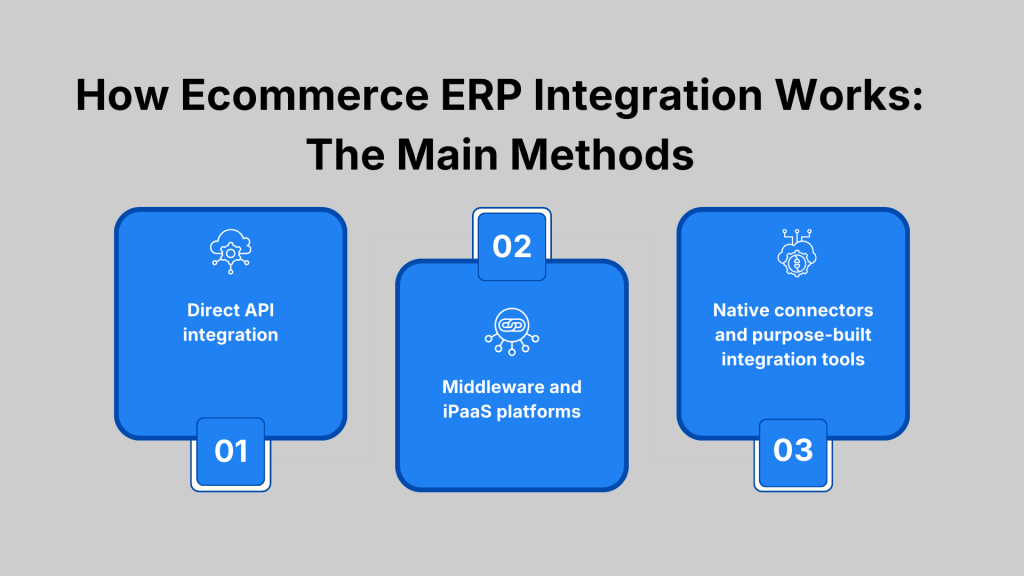
Method 1: Direct API integration
Direct API integration connects your ecommerce platform and ERP system point-to-point, with data flowing through APIs maintained by your team or a development partner. It gives you precise control over what data moves and when, but it requires technical resources to build and maintain. Custom APIs are common among larger enterprises with dedicated IT teams and highly specific data requirements.
On the downside, the ongoing maintenance burden is significant. Any time either platform updates its API, your integration may break, and fixing it requires developer time that could be spent elsewhere.
Method 2: Middleware and iPaaS platforms
These sit between your ecommerce and ERP systems and handle data routing, transformation, and scheduling between them. Platforms like Boomi, Celigo, or MuleSoft are popular in this category. They reduce the engineering burden compared to custom APIs and work well when you’re connecting multiple systems simultaneously.
The flip side is greater complexity and higher licensing costs.
Method 3: Native connectors and purpose-built integration tools
These tools are pre-built connections designed specifically for common platform combinations, such as Shopify to QuickBooks Online, Amazon to NetSuite, and so on. They’re faster to set up, require less technical expertise, and often handle the business logic (like reconciling payout amounts to individual transactions) out of the box. This approach makes the most sense for small and mid-size ecommerce businesses that want a connection without the overhead of a custom build.
The limitation is that native connectors can be narrow in scope. They may cover the most common data flows, but fall short when your requirements are more specific, such as custom fee categorization, multi-currency handling, or reconciliation against payout settlements.
Accounting automation tools: why they matter for ecommerce ERP integration
For many ecommerce businesses, the most pressing integration gap isn’t between the storefront and a full ERP, but between ecommerce payment data and the accounting system. According to a 2025 survey of 500 US business professionals by Parseur and QuestionPro, manual data entry costs companies an average of $28,500 per employee each year, with 50% of respondents reporting it directly causes errors and delays – the exact conditions that make ecommerce payment reconciliation unreliable when done by hand. This is where purpose-built accounting integration solutions fill a role that generic ERP connectors often miss.
The core problem is that ecommerce payment data doesn’t arrive clean. A Shopify payout, for example, is a net deposit combining sales, platform fees, refunds, and taxes across multiple orders placed over several days. Matching that deposit back to individual transactions and categorizing everything correctly in your books requires logic that most ERP connectors aren’t built to handle. Accounting-specific integration tools are designed around exactly this problem.
Synder is an accounting automation tool that connects ecommerce platforms and payment processors, like Shopify, Amazon, Stripe, PayPal, TikTok, Klarna, and more, directly to accounting systems and ERPs: QuickBooks Online, Xero, NetSuite, Sage Intacct, and Puzzle. The practical benefits for ecommerce businesses are concrete:
- Payout amounts are broken down into sales, fees, taxes, and refunds automatically, so your books reflect the actual composition of each deposit rather than a single lump sum.
- Both per-transaction and summary-level recording are supported, giving you flexibility based on whether you need customer-level detail or a clean consolidated view.
- Reconciliation against bank deposits is handled within the platform, eliminating the manual matching step that typically consumes accountants’ time at month-end.
- Multi-channel data from different platforms is consolidated into one accounting system, so a business selling on Shopify, Amazon, and Stripe doesn’t need three separate reconciliation workflows.
Ecommerce businesses using this approach see immediate results. Teams managing high transaction volumes across Shopify and PayPal report saving over 70 hours per month on manual reconciliation work, reducing a 3–4 hour daily task to under an hour by automating per-transaction sync and categorization across 30+ locations. On the cost side, businesses automating the review and categorization of thousands of Stripe transactions have saved 480+ hours and over $24,000 per year on bookkeeping services, with the integration running in the background with minimal oversight once set up.
For ecommerce businesses that need reliable financial sync across multiple platforms and ERP, Synder’s free trial and live demo are good places to see whether the approach fits your setup.
How to choose the right ERP ecommerce integration solution
With no shortage of options, the selection process benefits from a clear framework. A few questions to work through before committing to any platform:
- What platforms do you need to connect? Verify that the solution supports your specific ecommerce platforms, payment processors, and accounting or ERP system, not just the popular ones. Compatibility with your exact tech stack matters more than a long list of supported integrations that doesn’t include yours.
- What level of financial detail do you need? If you need audit-ready records with customer-level detail and individual transaction breakdowns, you need a tool that supports per-transaction sync. If your priority is keeping the general ledger clean without high transaction volume in your accounting system, summary-level sync may be sufficient.
- How will you handle historical data? Initial setup often requires importing historical transactions to get books current before going live. Check whether the solution supports back-sync and how far back it can reach.
- What does the setup process look like? Some integrations require developer resources and weeks of configuration. Others are designed for finance teams and can be set up without IT involvement. Your team’s technical capacity should factor into this decision.
- What’s the support model? Ecommerce data can be complicated: payouts, multi-currency, marketplace fees, and refund logic can create edge cases. The quality of onboarding and ongoing support often determines whether an integration actually delivers what it promises.
Making ecommerce ERP integration work over time: pro tips
Getting the integration live is the start, not the finish. A few practices help it stay accurate and useful as your business changes.
Tip 1: Validate your mappings regularly. Account mappings set at launch can become outdated when you add new products, sales channels, or accounting categories. A quick monthly review of your sync settings prevents miscategorized transactions from compounding into larger reconciliation problems.
Tip 2: Monitor sync logs actively. Most integration tools log every transaction processed and flag errors. Reviewing those logs regularly keeps small issues from turning into large corrections.
Tip 3: Coordinate system changes across both platforms. When you update your chart of accounts in your ERP or add a new sales channel on the ecommerce side, those changes need to be reflected in your integration settings too. Treating the integration as a living connection prevents data gaps.
Tip 4: Measure what changes. Track the metrics that matter most to your business: close time, error rate, reconciliation hours per period, order processing time. These give you a quantifiable picture of what integration is actually delivering and where further optimization is worth the effort.
Wrapping up: the real value of connecting your ecommerce and ERP systems
Ecommerce ERP integration is an operational decision with direct consequences for financial accuracy, reporting quality, and how much time your team spends on data management. Businesses that do it well stop fighting their systems and start using the data those systems produce.
The best outcomes come from treating integration as a business process question first and a technology question second: what data needs to move, how accurately, at what frequency, and to what end. When those answers are clear, the right solution usually becomes obvious.
FAQ
What is an ERP system?
An ERP (enterprise resource planning) system is software that manages core business processes in one place: typically finance, inventory, supply chain, order management, and customer data. It serves as the operational backbone that different departments share, replacing isolated tools with a unified system of record.
What’s the difference between ecommerce ERP integration and accounting software integration?
ERP integration typically covers a broader set of business functions, like inventory, fulfillment, CRM, and financials. Accounting software integration focuses specifically on getting financial data (sales, fees, taxes, refunds) into your books accurately. Many ecommerce businesses start with accounting integration and layer in broader ERP connectivity as they scale.
How long does ecommerce ERP integration take to set up?
It depends on the method and complexity. Native connector tools designed for specific platform pairs can be configured in days. Custom API integrations or middleware-based setups involving multiple systems typically take weeks to months. The more complex your data mapping requirements, the longer the timeline.
How to choose the best ERP ecommerce integration solution?
Start by listing the specific platforms and accounting systems you need to connect, then verify compatibility. Clarify whether you need per-transaction or summary-level financial sync. Evaluate the setup process against your team’s technical capacity, and check the depth of support available. A solution with a free trial lets you test the fit before committing.
How to optimize ERP ecommerce integration?
Review your account mappings monthly, monitor sync logs regularly to catch errors early, and update integration settings whenever you change your chart of accounts or add a new sales channel. Measuring specific metrics, such as close time, reconciliation hours, error rate, helps you identify where the integration is underperforming and worth improving.
Can I integrate multiple ecommerce platforms with one ERP?
Yes, and for businesses selling across Shopify, Amazon, eBay, or other channels simultaneously, this is often the main goal. Solutions like Synder that support multi-channel integration consolidate data from all platforms into a single accounting or ERP system, giving you a unified view of sales, fees, and financial performance across the business.
What are the most common challenges with ecommerce ERP integration?
The most frequent issues are data mapping mismatches (where categories in your ecommerce platform don’t align with your chart of accounts), handling payout-level reconciliation from payment processors, managing multi-currency transactions, and keeping integration settings current as your business changes. Choosing a tool with strong reconciliation logic and good support documentation reduces most of these.