

This article explains how PayPal functions as a bank-type account in QuickBooks when connected through Synder. It clarifies how PayPal balances change, how positive and negative payouts are recorded, and how balance movements appear between PayPal and your checking account.
Use this guide if:
- You connected PayPal to QuickBooks through Synder
- You see positive or negative payout transactions
- Your PayPal balance changes while the bank balance changes in the opposite direction
- You want to understand how spending directly from PayPal affects your accounting records
How PayPal Bank Account Functions
PayPal can function similarly to a bank account as it can both:
- Receive money from customer payments
- Spend money on purchases, fees, or transfers
When PayPal is connected through Synder, transactions are recorded in a PayPal clearing account configured as a bank-type account in the QuickBooks Chart of Accounts.
This account reflects the actual balance of your PayPal wallet.
Typical activity recorded in this account includes:
- Sales received through PayPal → recorded as sales
- PayPal processing fees → recorded as fees
- Expenses paid using PayPal → recorded as expenses
- Transfers between PayPal and a bank account → recorded as transfers between the PayPal account and the checking account
The PayPal account register should represent all funds moving into and out of PayPal, similar to a standard bank ledger.
How Synder Records Transfers Between PayPal and Your Bank
PayPal activity may move funds between PayPal and the connected bank account.
These transfers appear in Synder as payouts and may have either a positive or negative value.
Positive Payouts
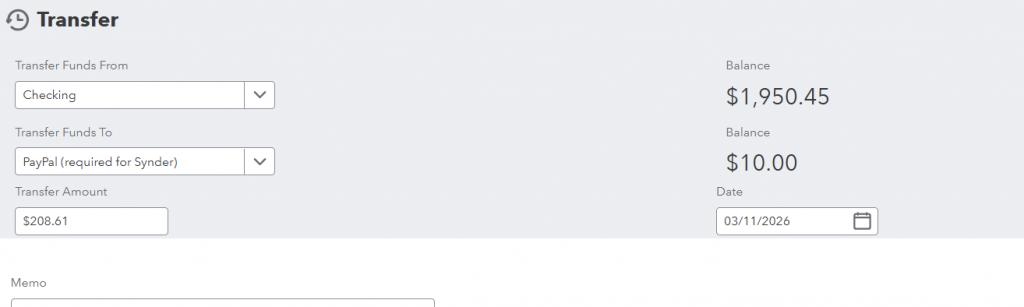
A positive payout occurs when money is transferred from your connected bank account to PayPal.
This typically happens when the PayPal balance is insufficient to complete a payment. PayPal pulls the remaining amount from the connected bank account.
As a result:
- Checking account decreases.
- Clearing account increases.
Example Scenario
PayPal balance: $10
Purchase made through PayPal: $50
PayPal uses $10 from the PayPal balance and $40 from the connected bank account. The money movement looks as follows:
- Checking account → –$40
- PayPal account → +$40 (funding transfer)
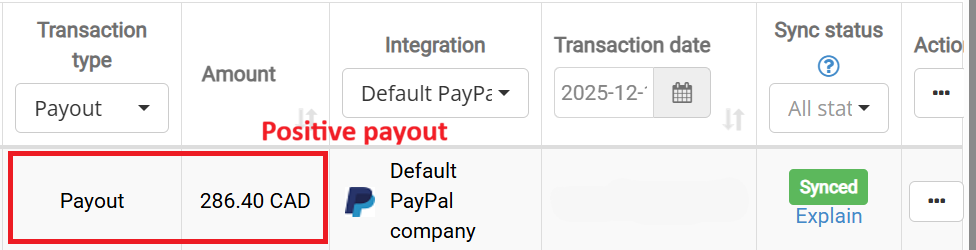
In Synder, this transfer appears as a positive payout, representing funds moving from the bank account to PayPal.
How This Appears in Synder
How This Appears in the Accounting Platform (QuickBooks Online Example)
Negative Payouts
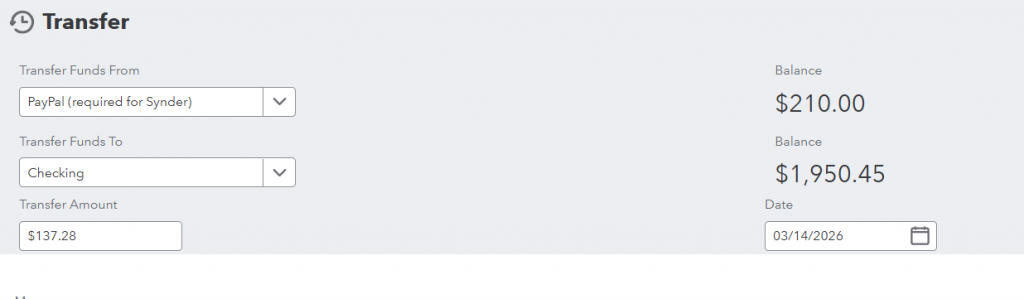
A negative payout occurs when money is transferred from PayPal to your bank account.
This typically happens when PayPal pays out available funds to the checking account.
- Checking account increases.
- Clearing account decreases.
Example Scenario
Your PayPal balance is $500. PayPal sends $300 to the bank.
As a result:
- PayPal balance → –$200
- Checking account → +$300
In Synder, this transaction appears as a negative payout, representing a transfer from PayPal to the bank account.
How This Appears in Synder

How This Appears in the Accounting Platform (QuickBooks Online Example)
Important Notes
- A negative payout does not mean an error. It simply means PayPal transferred available funds to your bank account.
- During a transfer, the PayPal balance may temporarily become negative. This can occur if PayPal processes the transaction before the bank transfer fully settles.
FAQ
- Why does my bank balance change when I make a PayPal payment?
If your PayPal balance does not have enough funds to complete the payment, PayPal may pull the remaining amount from your connected bank account.
This bank transfer is recorded as a positive payout. - Do positive or negative payouts affect my income or expenses?
No. Payouts are transfers between accounts, not income or expenses.
Your sales, fees, and expenses are recorded separately when transactions are synced from PayPal. - Why do I see multiple payouts in one day?
PayPal may create several transfers depending on how funds move during the day. For example:
- Multiple bank transfers
- Funding transfers when PayPal balance is low
- Automatic PayPal deposits to your bank account
Each transfer is recorded separately so that your PayPal account in QuickBooks reflects the actual flow of funds.
Reach out to Synder Team via online support chat or email with any questions you have – we are always happy to help you!
