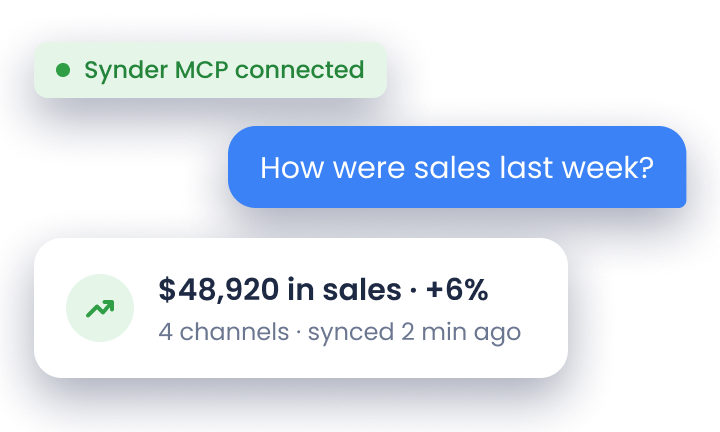
Your Shopify dashboard says you did $612,000 in sales last year. Your bank shows $518,000 in deposits. The IRS receives a 1099-K from Shopify reporting a third number, and your CPA is asking which one goes on Schedule C. None of them is wrong, and only one of them is your gross revenue.
That gap, the one between what platforms pay out, what they report, and what you actually owe tax on, is where most ecommerce tax problems start. This article will give you the full filing picture: income tax, sales tax nexus, deductible expenses, quarterly payments, and the practical workflow for getting it all right. It applies to sole proprietors, LLCs, S-corps, and C-corps selling through Shopify, Amazon, Etsy, eBay, and WooCommerce.
A note before you start: if you’re searching for this guide in March, you’re already behind. Block out a half-day this week to set up the tax workflow described in section 2. By April it’ll be triage, not planning.
TL;DR
- Online sellers owe four taxes, not one: income tax, self-employment tax (sole props and SMLLCs), sales tax in nexus states, and use tax on out-of-state purchases. Each has its own form and deadline.
- Your platform payout isn’t your revenue. Treating Shopify or Amazon deposits as gross sales is the most common error and creates a mismatch with the 1099-K the IRS already has.
- Set aside 25 to 30% of net profit on payout day, in a separate account. Sales tax collected belongs to the state and was never your operating cash.
- Economic nexus thresholds reset every January 1. Run a quarterly nexus review against each state’s threshold ($100K in most states, $500K in California, Texas, and New York).
- Manual reconciliation breaks at scale. Sellers across 3+ channels routinely spend 3 to 4 hours a day reconciling fees, refunds, and tax splits. Automation is the only thing that holds up past two channels.
What taxes do ecommerce businesses have to pay?
So what are the taxes a typical ecommerce business has to pay? Most online sellers deal with more tax types than they initially expect. Your main obligations are:
| Tax | Who it applies to | Form | Due date |
| Income tax | All business structures | Schedule C (sole proprietors/LLCs), Form 1120-S (S-corps), Form 1120 (C-corps), Form 1065 (partnerships) | April 15 (extensions available) |
| Self-employment tax | Sole proprietors and single-member LLCs | Schedule SE, filed with Form 1040 | April 15; paid via quarterly estimated payments |
| Quarterly estimated tax | Anyone expecting to owe $1,000+ for the year | Form 1040-ES | April 15, June 16, September 15, January 15 |
| Sales tax | Sellers with nexus in a state | State-specific returns | Varies by state and revenue volume: monthly, quarterly, or annually |
| Use tax | Businesses that purchased taxable goods from out-of-state vendors without paying sales tax | Typically reported on the state sales tax return | Same schedule as sales tax filing |
Set up your tax buckets on day one. Open a dedicated savings account, link it to your operating account, and the moment a Stripe or Shopify payout arrives, move 25 to 30% of the net figure into it. Then move every dollar of sales tax collected into a separate liability holding account. Sales tax was never your money. It was the state’s, routed through your platform. Treating both pots as untouchable from the first sale removes the single biggest source of cash-flow shock at filing time.
Why income tax and sales tax aren’t the same problem
Different forms, different recipients, different schedules. Confusing them is the most expensive mistake new sellers make.
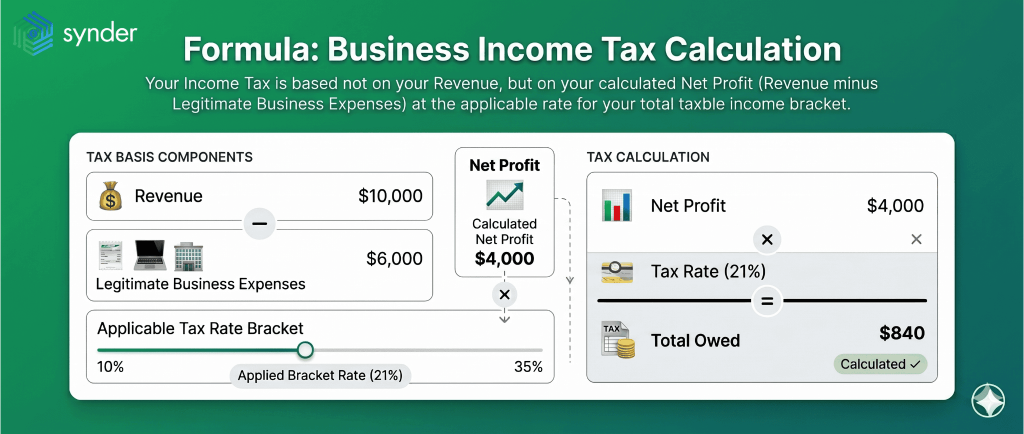
Income tax is calculated on net profit, meaning revenue minus legitimate business expenses, at the rate that applies to your total taxable income bracket. A seller with $200,000 in revenue and $160,000 in expenses owes income tax on $40,000, not on $200,000.
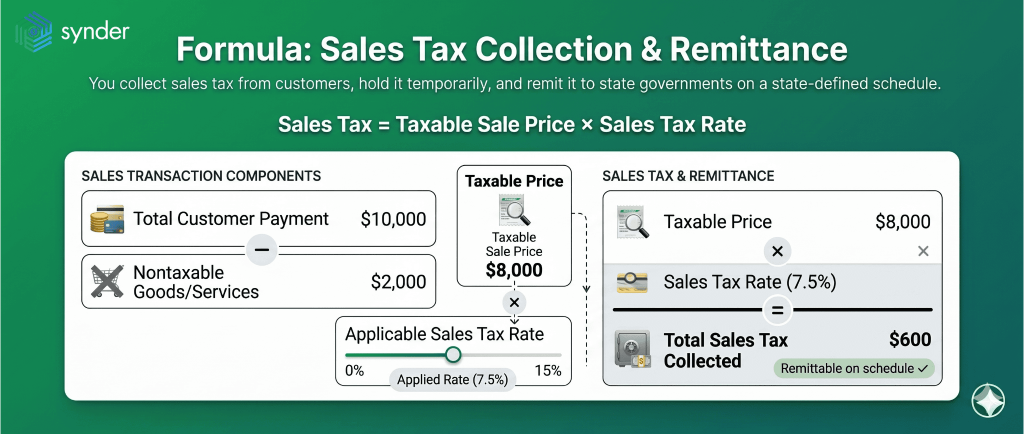
Sales tax isn’t your money. You collect it from the customer, hold it in trust, and remit it to the state on a schedule the state assigns. If you spend collected sales tax on inventory because it was sitting in your operating account, you’ve effectively borrowed from the state, and most states treat that as a fiduciary breach, not an ordinary debt.
How ecommerce sales tax works
Sales tax isn’t a once-a-year filing. It’s an ongoing, state-by-state obligation that can require returns in dozens of states simultaneously, each with its own rate, threshold, and deadline. The concept that determines where you owe is nexus.
What creates nexus?
Nexus means your business has a strong enough connection with a state for that state to require you to collect tax on its behalf. No nexus? No obligation. Two flavors:
Physical nexus comes from people and property. Employees (including remote workers), inventory storage (including Amazon FBA warehouses and any 3PL), and owned or leased vehicles or office space all create it. If you have any of these in a state, register and start collecting from day one.
Economic nexus was established by South Dakota v. Wayfair in 2018 and is triggered by sales volume alone, regardless of physical presence. The default threshold across most states is $100,000 in gross sales or 200 transactions into the state in a calendar year. California, Texas, and New York set the bar at $500,000. Kansas triggers nexus at $100,000 with no transaction count required at all. The thresholds reset every January 1, and you’re never retroactively on the hook for sales made before you crossed the line.
Read about sales tax automation software.
When does economic nexus actually create an obligation?
What happens when you cross a threshold ? Actually, crossing it doesn’t automatically mean you owe anything. Work through these three questions before you register:
- Are your products taxable in that state? Groceries, prescription medications, and certain clothing categories are exempt in many states. Digital products vary: Louisiana only added SaaS to its taxable base in January 2025. If your products aren’t taxable there, the threshold is moot.
- Are your sales going through a marketplace facilitator? Amazon, Etsy, eBay, and Walmart Marketplace are legally required to collect and remit sales tax on your behalf in all 45 sales-tax states plus D.C. If your sales in a state flow exclusively through these platforms, you have no collection obligation.
- Do you also sell direct? Marketplace facilitator laws only cover transactions those platforms process. Your own Shopify store, WooCommerce site, or any direct channel is entirely your responsibility, even if you sell the same products on Amazon.
All three conditions need to be true before registration is required: threshold crossed, products taxable, selling direct.
One quirk worth flagging: Connecticut requires both the transaction count and the revenue threshold to be met before nexus exists. And a growing number of states have eliminated transaction-based thresholds entirely, moving to revenue-only criteria, so the 200-transaction count isn’t relevant everywhere.
Synder’s take: stop counting transactions
Is the “$100K or 200 transactions” formulation most nexus guides give still accurate? After watching this play out across thousands of seller setups, we can say that the transaction count is functionally obsolete for any seller above $50K in revenue. Twelve states have already dropped it, and the trend is one-directional. Build your nexus review on revenue thresholds and treat any transaction-count states as legacy edge cases. You’ll stop registering in states where a few low-AOV sales pushed you past 200 transactions on $4,200 of revenue, a scenario that creates more compliance overhead than tax liability.
Your sales tax filing playbook
- Register for a permit in each nexus state before collecting. You can’t legally charge customers sales tax without one.
- Configure your platform. Shopify, BigCommerce, and most major platforms calculate rates automatically once you’ve entered your registered states.
- File returns on the schedule each state assigns: monthly for high-volume sellers, quarterly or annually for lower volumes.
- Remit by the deadline. Penalties compound fast. Washington State’s combined penalty structure can reach 39% of the tax due, among the steepest in the country, per the Washington Department of Revenue’s published penalty schedule.
| Step | Action | Key point |
| Nexus review | Map physical and economic nexus by state | Run quarterly; thresholds reset January 1 |
| Registration | Obtain sales tax permit before collecting | Required per state |
| Collection | Configure platform tax settings | Automated once you’re registered |
| Filing | Submit returns on the state’s schedule | Frequency depends on your in-state revenue |
| Remittance | Pay collected tax by deadline | Penalties accrue per state’s schedule |
Sales tax nexus vs income tax nexus
These are separate rules and you can trigger one without the other. And what do experts say about it?
Chris Henderson, CPA and Tax Partner at Aprio, has written that treating nexus as a sales-tax-only problem creates a blind spot where income tax obligations attach without the seller noticing.
Storing inventory through FBA, using in-state contractors, or running an affiliate program with in-state partners can all create income tax nexus even with no office in the state. Run your nexus review for both, not just sales tax.
Chris Henderson, CPA and Tax Partner at Aprio
Quick action: open your FBA inventory placement report and your contractor 1099 list side by side, and map each state that appears on either one. Any state showing up that you haven’t already flagged for sales tax review goes straight onto your income tax nexus watchlist. Ten minutes of mapping now will surface the obligations a year of growth created.
How ecommerce income tax works
Income tax is typically the larger of the two annual liabilities. But what does the form depend on? Shortly, your structure:
- About 95% of independent online sellers file Schedule C, attached to their personal Form 1040.
- S-corps file Form 1120-S.
- C-corps file Form 1120.
- Multi-member LLCs file Form 1065 and issue a K-1 to each partner.
For sole proprietors, the business isn’t taxed separately. Net profit flows into your personal return alongside any other income, and the combined figure determines your rate. That same net profit also flows to Schedule SE, where self-employment tax is calculated at 15.3% of net earnings.
Why your platform payout is not your revenue
The deposit that arrives from Shopify, Amazon, or PayPal isn’t your revenue. It’s a net payout after the platform has deducted fees, processed refunds, and potentially withheld reserves. Treating platform deposits as gross revenue is the single most common error ecommerce specialists see in returns prepared by generalist accountants. It understates both income and deductible expenses, distorts profit, and creates a direct mismatch with the 1099-K figures the IRS receives from platforms.
So, what’s the fix?
Gross revenue is the full amount customers paid, including shipping. Platform fees, refunds, and processing costs are deducted separately as business expenses. At scale the gap is material. A seller with $600,000 in gross sales might receive only $510,000 in deposits, and both numbers need to be in the books.
This is where Synder fits the workflow. This automation tool fetches each Stripe, Shopify, or Amazon payout, separates the gross sale from fees, taxes, and refunds, and posts a clean journal entry to QuickBooks, Xero, or another accounting system so your reported revenue actually matches what the platform sent the IRS.
Learn how to calculate your revenue with formula and examples.
What goes where on Schedule C
Part I reports total sales as a single lump sum, not broken out by platform, channel, or product. Shipping charged to customers is included. Refunds issued during the year are deducted in the same section.
Part II is where deductible business expenses are claimed, and the list is broader than most sellers assume: advertising, commissions and fees, legal and professional services, office expenses, and supplies all have dedicated lines. Any expense that’s ordinary and necessary to running the business is generally deductible, regardless of whether it was paid from a personal or business account. (Keep accounts separate anyway. It makes proving expenses far easier.)
Part III covers inventory and cost of goods sold, and only applies to businesses holding physical stock. If you sell digital products or services, skip it entirely.
What happens when you book a loss
If your business ends the year at a loss, that loss flows to your Form 1040 and can offset other income on your return, including a spouse’s W-2 wages. The benefit of a loss year isn’t wasted; it offsets total household income.
COGS isn’t what you bought, it’s what you sold
A common filing error is deducting the full cost of inventory purchased during the year. The deduction only covers inventory that left your warehouse as a sale. Unsold stock on December 31 stays on the balance sheet as an asset. Overstating COGS reduces profit artificially, which looks fine until an audit compares your reported inventory levels with supplier invoices.
What is use tax, and when do you owe it?
Use tax is the buyer-side counterpart to sales tax. You owe it when you buy goods from an out-of-state vendor that didn’t charge sales tax, and the items are taxable in your home state. For ecommerce sellers it most often comes up when sourcing inventory, packaging, or equipment from out-of-state suppliers.
Track every out-of-state purchase where no sales tax was charged. Check whether the item is taxable in your state. Report it on your regular sales tax return, since most states have a dedicated line for use tax. Enforcement at small scale is rare, but it’s a common audit finding once a business grows enough to attract attention.
How self-employment tax stacks on top
Sole proprietors and single-member LLC owners pay self-employment tax on top of income tax, not instead of it. It runs 15.3% of net earnings: 12.4% Social Security plus 2.9% Medicare, covering both the employer and employee halves. A W-2 employer splits this with you; when you’re self-employed, you pay both sides.
What that means in practice: your effective tax rate as an ecommerce sole proprietor is higher than your income tax bracket alone suggests. Someone in the 22% federal bracket is effectively paying closer to 37% on the first dollar of net profit once SE tax is layered on. One small offset: you can deduct half of the self-employment tax you pay as an above-the-line deduction, which reduces your adjusted gross income.
Don’t forget SE tax when sizing your reserve account. Many first-year sellers budget for income tax at their bracket rate and get blindsided by the SE bill on top. Calculate both when you estimate quarterly payments.
Quarterly estimated taxes: the rhythm you can’t skip
Ecommerce income has no withholding. No employer is setting taxes aside. If you wait until April, you’ll face a large lump sum and likely an underpayment penalty. The deadlines:
| Quarter | Period | Due |
| Q1 | January to March | April 15 |
| Q2 | April to May | June 16 |
| Q3 | June to August | September 15 |
| Q4 | September to December | January 15 of the following year |
Ecommerce businesses with Q4 holiday spikes face a brutal timing problem: the biggest quarter’s tax obligation is due on January 15, two weeks into the new year, exactly when cash flow is still recovering from holiday inventory investment.
Use the prior-year safe harbor. Pay at least 100% of last year’s total tax liability split across four equal installments, or 110% if your prior-year AGI exceeded $150,000, and underpayment penalties are off the table regardless of what you ultimately owe. For growing businesses, a strong revenue year will still produce a balance due in April, but without a penalty. For most sellers, setting aside 25 to 30% of net profit each quarter is more reliable than precise quarterly recalculation.
Which deductions actually move the needle?
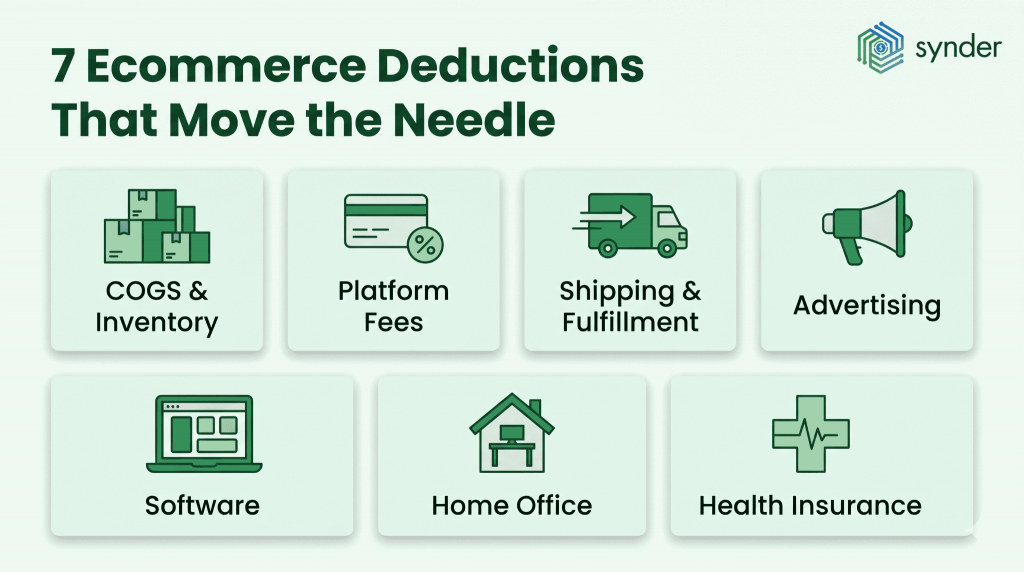
Ecommerce tax specialists are consistent on one point: sellers who maintain bookkeeping throughout the year claim materially more deductions than those who reconstruct records under deadline pressure.
The specific risk of catching up on a full year’s bookkeeping at tax time is the deductions that disappear in the process. Small purchases from months earlier are forgotten, receipts are gone, and expense categories blur. Every missed deduction is taxable income that didn’t need to be.
Here’s the full list of deductions:
- COGS: inventory sold, inbound shipping, packaging; dropshippers can deduct per-order supplier costs
- Platform fees: Shopify, Amazon (referral + FBA), Etsy, eBay, Stripe, PayPal; at scale these become material (e.g. 15% on $500K = $75K)
- Shipping & fulfillment: postage, carrier fees, third-party logistics and warehousing
- Advertising & marketing: paid ads (Google, Meta, TikTok), email tools, influencer fees, creative and photography
- Software: accounting, inventory, project management, design, SEO tools; small monthly costs add up over the year
- Home office: simplified method ($5/sq ft up to 300 sq ft) or a share of rent, mortgage, and utilities
- Health insurance: self-employed premiums for you, your spouse, and dependents are deductible above the line, reducing adjusted gross income
One change for the current filing year: employer-provided meals are now 0% deductible, down from the prior 50% under the One Big Beautiful Bill Act.
Check our post on post-tax deductions for more info on the topic.
Record-keeping that survives an audit
If the IRS audits your return, the burden of proof rests with you. Every deduction requires documentation: receipts, invoices, platform payout statements, bank records. The IRS standard audit window is three years from filing, but tax advisors generally recommend retaining records for seven years, and longer if income was substantially underreported.
| Document type | Examples | Retain |
| Income records | Platform payout statements, 1099-K forms, customer invoices | 7 years |
| Expense records | Receipts, supplier invoices, subscription confirmations | 7 years |
| Bank and payment records | Bank statements, PayPal/Stripe transaction exports | 7 years |
| Sales tax records | Filed returns, amounts collected by state | 7 years |
| Inventory records | Purchase orders, year-end counts, COGS calculations | 7 years |
When manual reconciliation stops working
From our work with thousands of ecommerce sellers, the pattern is consistent: manual reconciliation is where the hours disappear and the errors accumulate. Multichannel sellers report spending whole afternoons splitting Stripe deposits into sales, taxes, and fees in QuickBooks. Others lose hours matching Amazon settlements line by line and miss fees entirely. Add a third or fourth channel, and the problem multiplies instead of scaling.
Healthy Meals Direct, an ecommerce business operating across 30+ locations, was spending three to four hours every day on manual reconciliation just to keep books accurate enough for New York State’s monthly sales tax submissions. After connecting Shopify, PayPal, and QuickBooks Online through Synder, the same process took under 45 minutes daily, recovering more than 70 hours per month.
On the tax side, Synder:
- Separates sales tax from revenue on every sync and routes it to the correct liability account
- Applies the correct rate by state, county, or ZIP code based on the shipping address
- Breaks collected tax out by state so multi-state filings have the right figures already split
| If you want to see it work across multiple sales channels, book a Synder demo. |
The bottom line
Ecommerce taxes aren’t complicated because of the rules, but they get complicated when your data is inconsistent, incomplete, or misclassified. Most of the problems sellers run into, including underpayment penalties, audit risk, and unpleasant surprises in April, trace back to the same root causes: treating payouts as revenue, missing obligations across states, or trying to reconstruct a year of activity at the last minute.
Sellers who stay in control do three things consistently: they separate tax types from day one, track nexus and filing obligations as they grow, and reconcile books to platform data throughout the year, not at the end of it. Once those foundations are in place, taxes are a matter of reporting, not a cleanup project under pressure.
FAQ
Do you need an accountant, or can you handle ecommerce taxes yourself?
For a sole proprietor on a single channel with simple inventory, self-filing with tax software is manageable. The threshold rises quickly: nexus in more than two or three states, sales across three or more channels, or annual revenue above $200,000 are all signals that a specialist CPA pays for itself. Professional preparation typically runs $500 to $2,000 and is itself a deductible business expense. What separates an ecommerce specialist from a generalist is familiarity with platform payout reports, inventory accounting methods, and multi-state nexus analysis.
How do you file taxes if you sell online as a side hustle?
Side hustle ecommerce income is fully taxable regardless of scale, and there’s no minimum threshold below which sales go unreported. The $20,000 / 200-transaction 1099-K rule only determines when a platform sends you a form; it doesn’t change what’s taxable. If your net profit from self-employment exceeds $400, Schedule C is required. If you also receive W-2 income, quarterly estimated payments are likely required once your combined tax liability is expected to exceed $1,000 after withholding.
What is use tax, and do you owe it as an ecommerce seller?
Use tax applies when you buy supplies, equipment, or inventory from an out-of-state vendor who didn’t charge sales tax. Your state may require you to self-report and remit. It’s rarely enforced aggressively at small scale, but worth tracking if you source heavily from out-of-state suppliers.
What is the $600 rule, and does it still apply?
No. The $600 1099-K reporting threshold introduced by the American Rescue Plan Act was reversed by the One Big Beautiful Bill Act. The threshold has reverted to $20,000 and 200 transactions for 2025 and 2026. All net profit remains taxable regardless of whether a 1099-K is issued.
Do you have to report marketplace sales under $20,000?
Yes. The 1099-K threshold determines when a platform is required to send a form, not when income is taxable. All net profit from self-employment is reportable, and Schedule C is required if profit exceeds $400 in a year.
When do you need to register for a sales tax permit?
Before you start collecting in a state. For economic nexus, that means once you’ve crossed the state’s threshold, typically $100,000 in sales (or 200 transactions where that still applies) in the current or prior calendar year. California, Texas, and New York use $500,000. If you’ve already crossed a threshold without registering, Voluntary Disclosure Agreements are available in most states with reduced or waived penalties, but proactive registration is always the cheaper path.
How do you file taxes as an ecommerce business selling in multiple states?
Start with a nexus review across all 50 states. Register for a sales tax permit in each state where you have nexus before collecting. Configure your platforms to apply the correct rates. File sales tax returns on each state’s assigned schedule. For income tax, use the correct form for your structure, pay quarterly estimated taxes if you expect to owe $1,000 or more, and make sure your revenue figures reflect gross sales, not net platform payouts.