
Accounting teams now handle a wider range of inputs on a daily basis, especially in fast-moving sectors like ecommerce and SaaS. Sales platforms generate transactions continuously, payment systems apply fees and adjustments on their own schedules, and invoices and expenses move through different approval paths. All of this data eventually needs to land in the accounting system in a consistent and traceable way. When large parts of that flow rely on manual steps, even well-defined processes become slower to execute and harder to review in real time.
A recent survey found that half of all finance teams still take six or more business days to close their books each month. Much of this effort goes into data entry, invoice processing, reconciliation, and correcting errors after reporting has already started. In this article, we look at how to automate accounting processes in a controlled way, which accounting tasks are best suited for automation, and how automated accounting supports accuracy and reliability without disrupting established workflows.
TL;DR
- Manual accounting slows teams down through repeated data entry, late reconciliation, and ongoing fixes.
- Automation is most effective for repeatable tasks like transaction syncing, categorization, invoice processing, and reconciliation.
- The main gains are practical: fewer errors, clearer cash flow visibility, and a more predictable close.
- Software like Synder automate accounting processes by recording structured transaction data that is easy to review and reconcile.
What accounting automation actually means in modern finance
Accounting automation starts with defining how financial data should be recorded and categorized, then letting the system apply that logic consistently. This is particularly critical for industries like ecommerce and SaaS, where transaction volumes grow quickly and data arrives from multiple sources on varying schedules.
In everyday accounting work, automation focuses on tasks that follow stable rules and repeat frequently. These tasks consume time when handled manually and are prone to human error as volume grows. Automation shifts attention toward review and exception handling, where accounting expertise has the most impact.
Accounting automation vs manual accounting
Manual accounting depends on people repeating the same steps across systems. Transactions are entered by hand, invoices are processed individually, and reconciliation often happens late in the reporting cycle. As data arrives unevenly, control becomes harder to maintain.
Automated accounting applies predefined rules inside accounting software. Transactions are recorded and categorized automatically as data enters the system. Review still takes place, but it focuses on mismatches and unusual activity rather than rebuilding the data flow. In practice, the difference looks like this.
Manual workflows:
- Manual data entry
- Case-by-case invoice processing
- Reconciliation concentrated at month-end
Automated workflows:
- Automatic data entry and categorization
- Rule-based invoice processing
- Continuous reconciliation with visible exceptions
Common myths about automated accounting
Automation is sometimes viewed as risky because it reduces manual handling. In practice, risk grows when accounting processes depend on repeated manual actions. Automated workflows apply the same logic every time and make inconsistencies easier to spot early.
There is also an assumption that accounting automation software mainly benefits large teams. However, smaller teams often see the impact sooner, since manual accounting consumes a larger share of their time and limits their ability to scale.
Accounting processes you can automate today
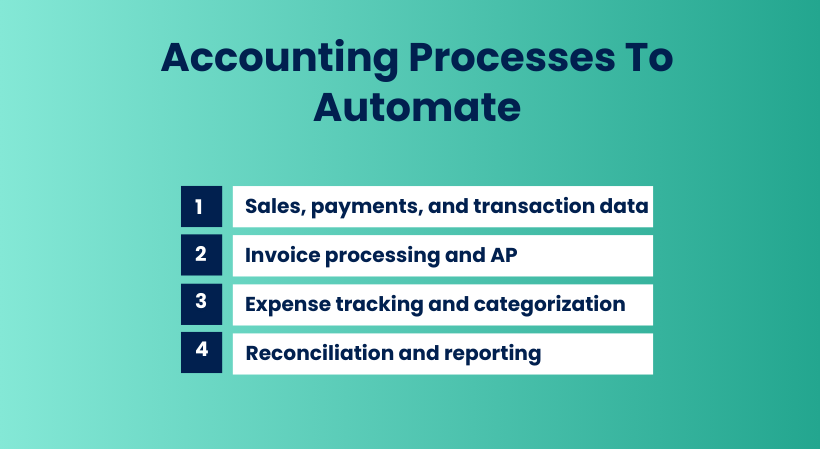
Not every accounting task benefits from automation, but many high-volume processes already follow clear rules and produce predictable outcomes. In industries like ecommerce and SaaS, these are exactly the areas where automation reduces manual work without introducing uncertainty.
Sales, payments, and transaction data
Sales and payment data is one of the easiest areas to automate because the source systems already structure the data. When transactions flow automatically from sales platforms and payment systems into accounting software, manual data entry is removed from the process.
Automation here typically covers:
- Recording sales and refunds
- Capturing payment fees and adjustments
- Posting transactions to the correct accounts
- Keeping financial data aligned with real activity
This reduces timing differences between systems and improves accuracy at the transaction level.
Invoice processing and accounts payable
Invoice processing and accounts payable often involve repeated steps that follow the same logic every time. Automation handles invoice data entry, validation, and posting based on predefined rules.
Common accounting tasks automated in this area include:
- Invoice data entry
- Matching invoices to vendors and accounts
- Applying approval logic
- Posting to accounts payable automatically
Expense tracking and categorization
Expenses tend to generate large volumes of small transactions, which makes manual entry inefficient and error-prone. Automated expense workflows capture expense data, apply categorization rules, and post entries directly into the accounting system. This improves consistency across accounts and reduces the need for cleanup during reporting.
Reconciliation and reporting
Reconciliation benefits from automation because it relies on matching logic. When transactions are recorded automatically, reconciliation can happen continuously rather than at the end of the period.
Automation supports:
- Ongoing account reconciliation
- Early detection of mismatches
- Faster report preparation
- More reliable financial reports
How accounting automation works behind the scenes
Most accounting automation setups start with direct connections to source systems. Sales platforms, payment systems, banks, and expense tools provide structured financial data. Once connected, the accounting software receives this data automatically, without manual imports or manual data entry.
Rules, workflows, and processing logic
Automation works because accounting rules are defined upfront. These rules determine how transactions are categorized, which accounts are used, how taxes and fees are handled, and how invoices and expenses are recorded.
Typical automation logic includes:
- Mapping transaction types to accounts
- Applying consistent categorization rules
- Assigning taxes and fees automatically
- Grouping related transactions into coherent records
Once rules are set, the system applies them every time similar data appears, reducing variation and manual intervention.
Visibility and control over automated processes
Automation doesn’t remove oversight, but changes where oversight happens. Instead of checking every entry, accounting teams review summaries, exception reports, and reconciliation results.
Good accounting automation software provides:
- Clear logs of automated actions
- Reports that show how data was recorded
- Visibility into errors or mismatches as they occur
How to decide which accounting tasks to automate first
Automation works best when applied selectively. Trying to automate everything at once often creates confusion and slows adoption. The goal is to start with accounting tasks where automation reduces manual effort without increasing review overhead.
A good starting point is to look at where time is spent repeatedly on the same work. Tasks that occur daily or weekly and follow clear rules tend to benefit most from automation.
Focus on frequency and volume
High-frequency tasks consume more time than occasional ones, even if each step looks small. Manual data entry, invoice processing, and payment matching often fall into this category.
Indicators that a task is a good candidate for automation include:
- Large transaction volume
- Repetitive steps with little variation
- Frequent corrections during reconciliation
- High reliance on spreadsheets or exports
Consider risk and downstream impact
Some accounting processes carry more risk when errors occur. A mistake in revenue, tax, or accounts payable often affects reports, cash flow, and compliance.
Tasks with high downstream impact usually benefit from automation because consistent logic reduces variation. Automation also makes issues easier to trace when something does go wrong.
Use a simple decision framework
Before automating a task, it helps to evaluate it against a small set of criteria:
- How often does this task occur?
- How much time does it consume?
- How likely is manual error?
- How difficult is correction later?
Tasks that score high across these areas usually deliver the fastest and most visible gains when automated.
How Synder supports automated accounting in practice
Tools that promise accounting automation often stop at importing data. Synder is built around a different idea: for ecommerce and SaaS businesses, financial data should enter the accounting system in a form that already reflects real activity and accounting logic, so it can be reviewed and reported on without repeated correction.
At a practical level, Synder connects sales platforms and payment systems directly to accounting software (QuickBooks Online, Xero, NetSuite, Sage Intacct, and Puzzle) and records transactions automatically as they occur. Sales, refunds, fees, taxes, and payouts can be synced either per transaction or in summary-based mode. This eliminates manual data entry and keeps account balances aligned with what actually happened on the platform, not just what reached the bank.
Synder is typically used where transaction volume or platform complexity makes manual accounting fragile. Instead of rebuilding data during reconciliation, teams work with entries that are already categorized, linked to the right accounts, and traceable back to the source. Rules define how transactions are recorded, which allows the same logic to be applied consistently across systems without daily intervention.
Key capabilities:
- Automatic syncing of transaction-level financial data from sales and payment platforms
- Integration with 30+ sales and payments platforms such as Shopify, Stripe, etc.
- Rule-based mapping for accounts, taxes, fees, and products
- Support for both detailed and summarized posting, depending on reporting needs
- Built in reconciliation logic that ties platform activity to payouts and bank deposits
- Clear activity records that show how each entry was created
Because the system handles repeatable accounting tasks automatically, accounting teams spend less time fixing data and more time reviewing results. That shift is where automation delivers its real value, not by removing oversight, but by making oversight easier and more reliable.
Accounting automation is easier to evaluate when you can follow the full workflow. Start a free Synder account or book a demo to see how transactions, fees, and payouts are handled automatically in your accounting system.
Choosing accounting automation software that actually fits your business
Once teams decide to automate accounting processes, the next challenge is choosing software that supports real accounting work. Many tools automate part of the workflow but still leave gaps that need manual attention later.
A practical way to evaluate accounting automation software is to follow the data. Look at how sales, payments, fees, and adjustments move from source systems into the accounting system and how much manual work is still required along the way.
How well the software handles real transaction data
Strong automation works at the transaction level. Sales, refunds, payment fees, and adjustments should be recorded automatically and posted to the correct accounts as they occur. When this happens, balances reflect actual activity and reconciliation becomes a review step.
This level of automation is especially important when dealing with multiple payment systems or high transaction volume, where manual data entry increases error risk and consumes disproportionate time.
Flexibility without constant manual overrides
Accounting workflows vary between businesses, even within the same industry. Automation software should allow you to define rules for categorization, account mapping, taxes, and invoice processing.
For example, teams using tools like Synder rely on rule-based logic to ensure transactions are recorded consistently across platforms while still retaining control over how data appears in the accounting system.
Visibility, control, and audit support
Automation only works when results are easy to verify. Accounting teams need to see how entries were created, what rules were applied, and where the data came from. Clear logs and traceable records make reviews and audits easier and reduce reliance on individual memory.
Software that provides detailed activity history and transparent reporting allows teams to trust automated accounting without giving up control.
Support for growth and complexity
Automation should hold up as the business grows. Higher transaction volume, additional payment systems, or new entities should not require rebuilding the setup from scratch.
Accounting automation tools that are designed around structured workflows and real-time data handling make it easier to scale operations while maintaining accuracy and consistency.
Benefits of accounting automation software
The value of automation shows up most clearly in outcomes. Let’s review the most tangible benefits of accounting automation. Let’s highlight the most tangible benefits of accounting automation – see our recent article for a more detailed breakdown.
- Time savings that add up over the year. Small manual tasks compound quickly. In one ecommerce setup, automating transaction syncing and categorization saves 2 to 3 hours per week. Over a year, that translates into roughly 12 to 18 full working days no longer spent on exports, uploads, and manual fixes.
- Lower bookkeeping costs at scale. Reducing manual work directly reduces finance costs. In a higher-volume business, removing several hundred hours of transaction categorization per year results in annual savings exceeding 20,000 dollars on bookkeeping services. These savings are ongoing, driven by a permanent reduction in manual processing.
- Fewer errors and more consistent reporting. Manual accounting increases the risk of missed refunds, misclassified fees, and incorrect postings. In a multi-channel operation, structured automation pushes reconciliation accuracy above 99% across platforms. That level of consistency improves reporting quality and reduces friction during audits and reviews.
Final thoughts
Automating accounting processes is a practical response to the way financial data moves today. When transactions are recorded automatically and follow clear rules, accounting work becomes easier to review and easier to trust. The result is not less control, but more clarity over what is happening in the books and why.
The next step is usually simple – look at where manual effort still concentrates and test automation there first. Seeing real data move through an automated workflow is often the fastest way to evaluate whether accounting automation fits your setup and supports the level of accuracy and oversight your team expects.
FAQ
What is accounting automation?
Accounting automation uses software to record, categorize, and reconcile financial data automatically, reducing manual data entry and improving accuracy.
Which accounting processes can be automated?
Many routine accounting tasks can benefit from automation. In general, processes like accounts receivable, accounts payable, expense categorization, and financial reporting follow clear rules and can be streamlined. For industries like ecommerce and SaaS, automation often focuses on transaction syncing, invoice processing, and reconciliation.
Is accounting automation suitable for small businesses?
Yes, businesses with recurring transactions or multiple payment systems benefit early because automation reduces manual workload without adding staff.
Does accounting automation reduce errors?
Yes, applying consistent rules automatically lowers the risk of human error and improves reconciliation accuracy, especially for ecommerce and SaaS businesses.
What tools can help automate accounting processes?
Accounting automation software such as Synder connects sales and payment platforms to accounting systems and records structured transaction data automatically.