Modern accounting software handles everything from transaction recording to financial reporting, but choosing the right system means understanding which features deliver real value versus which add unnecessary complexity.
According to Grand View Research, the global accounting software market reached $19.38 billion in 2024 and continues growing at 8.4% annually, driven by businesses seeking automation and accuracy in their financial operations. This growth reflects a huge shift in how companies handle their books, moving from manual processes to integrated digital systems that reduce errors and save time.
This article explains which accounting software features matter at different stages of growth, where core systems fall short, and how integrations close the gaps, so you can choose tools that support scale instead of slowing it down.
TL;DR
- Accounting software features matter because they determine how accurately financial activity is captured, interpreted, and scaled as your business grows.
- Features fall into clear groups: core accounting foundations, banking and reconciliation, reporting and controls, advanced capabilities for growth, and integrations.
- The right setup depends on your business stage and industry, so choosing features that support current needs and near-term growth avoids friction and rework.
- Accounting platforms alone can’t handle ecommerce and payment complexity, which is why integration tools like Synder are needed to keep books clean and scalable.
How accounting software features impact your business
As financial activity scales, businesses need a consistent way to structure and interpret it. Accounting software turns the constant motion of money in your business into order, recording transactions, organizing workflows, and transforming day-to-day activity into financial clarity.
Beyond digitization, the right accounting software features reduce errors, provide real-time visibility, and create reliable audit trails for compliance and reporting. For example, with proper software, businesses can cut hours of manual work each month and reduce bookkeeping costs.
Ultimately, the features you choose determine whether your accounting system becomes a strategic asset, supporting smarter decisions, faster closes, and confident growth.
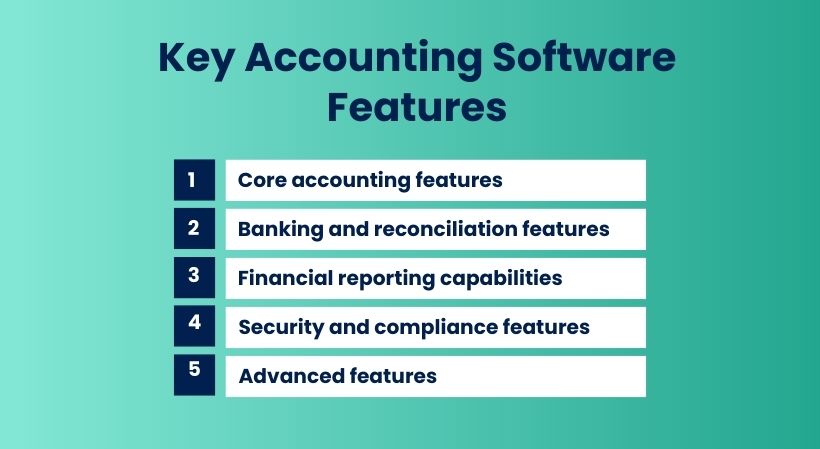
Core accounting features that form the foundation
Every accounting system is built on a small set of core capabilities. These features determine how reliably financial activity is captured, structured, and translated into reports you can actually trust.
General ledger management and chart of accounts
The general ledger is the central record of your business’s finances. Every transaction flows into it and updates account balances used to generate financial statements. The chart of accounts organizes this data into categories like assets, liabilities, revenue, and expenses so activity can be reported and analyzed consistently over time.
Strong ledger functionality lets you tailor this structure to your business: tracking revenue by product, service, or region, for example, and supports accounting standards such as GAAP or IFRS. The ability to drill down from summary reports to individual transactions is critical because when numbers look off, you need to see exactly what created them.
Accounts receivable features that accelerate cash collection
Accounts receivable (AR) features manage the process of billing customers and collecting payment. They track who owes you money, how much is outstanding, and when payment is due. Beyond generating invoices, AR automation handles recurring billing, tax calculations, discounts, late fees, and payment reminders, reducing delays and ensuring revenue turns into cash with minimal manual effort.
Integrated payment options further shorten the gap between invoicing and collection. When customers can pay directly from an invoice, payments are recorded automatically, matched to the right documents, and reflected in AR aging in real time.
Accounts payable for vendor management
Accounts payable functionality tracks what you owe and when. By centralizing bills, payment schedules, and upcoming obligations, AP features help balance cash flow, avoiding late fees without paying too early.
Advanced AP tools support purchase orders and three-way matching, comparing POs, received goods, and vendor bills before payment. Vendor credits are tracked automatically, ensuring refunds and corrections are applied instead of forgotten.
Banking and reconciliation features that ensure accuracy
Once transactions are recorded, the next challenge is ensuring they reflect what actually happened in your bank accounts. Banking and reconciliation features exist to remove gaps between financial activity and cash reality.
Bank feed integration for automatic transaction import
Bank feeds connect your accounting software directly to your bank and credit card accounts, importing transactions automatically on a daily or near-real-time basis. Deposits, withdrawals, and transfers appear in your system without manual entry.
Basic bank feeds simply import raw transactions and leave categorization to the user. More advanced systems apply learning and rules, suggesting categories based on past behavior or automatically assigning accounts for recurring charges. Support for multiple bank accounts is critical for businesses that separate operating cash, payroll, and tax reserves, while still reporting on the business as a whole.
Reconciliation tools that catch discrepancies immediately
Reconciliation verifies that your accounting records match your bank statements. This process identifies missing transactions, duplicates, timing differences, and errors before they affect reporting.
Automated reconciliation handles the matching process for you, pairing bank activity with ledger entries based on amount, date, and reference details. Exceptions are identified clearly, so the review focuses only on what needs attention. Strong reconciliation tools also enforce controls, maintaining audit trails, locking reconciled periods, and requiring deliberate review before any changes are made.
Financial reporting capabilities that drive decisions
Accurate data only becomes valuable when it can be interpreted quickly and consistently. Financial reporting features determine how easily you can understand performance, spot issues, and act on accurate financial data.
Standard financial statements and operational reports
Accounting software should generate the three core financial statements:
- balance sheet
- income statement (profit and loss)
- cash flow statement
Together, they show your financial position, profitability over time, and how cash actually moves through the business.
Beyond these fundamentals, operational reports support day-to-day control. AR aging reports show which customers owe you money and for how long. AP aging reports track upcoming and overdue vendor payments. Budget-versus-actual reports highlight where spending or revenue deviates from plan.
Flexible reporting periods are essential. The system should let you analyze results by any date range and filter reports by dimensions such as department, location, or class, so financial performance aligns with how your business is organized.
Advanced reporting and analytics features
Advanced reporting tools allow you to move beyond standard statements and ask more specific questions. Custom report builders let you combine and group data to reflect your business model, such as margin by product category or expenses as a percentage of revenue by team.
Data visualization makes trends easier to recognize. Charts and graphs reveal patterns, shifts, and outliers faster than tables alone, helping both finance and non-finance stakeholders interpret results.
Comparative reporting adds context by placing periods side by side. Month-over-month, quarter-over-quarter, and year-over-year comparisons help distinguish meaningful trends from normal variation.
Security and compliance features that protect your business
Role-based access controls limit what different users can do within the system. Your bookkeeper might be able to enter transactions and run reports, but not delete historical data. Managers could view financial statements for their departments, but not access payroll information. The system administrator controls all these permissions, adding or removing access as roles change.
Audit trails track every action taken in the system: who created, modified, or deleted each transaction, and when. This forensic record proves invaluable during audits, when investigating discrepancies, or if you suspect unauthorized access. The audit log should be tamper-proof, preventing anyone from editing or deleting entries.
Data backup and recovery capabilities protect against disasters. Cloud-based systems typically handle this automatically, maintaining multiple backup copies in geographically distributed data centers. If you’re running on-premise software, verify that backup processes run regularly and test restoration procedures periodically to ensure they actually work when needed.
Advanced features for growing businesses
As your business expands, you’ll need capabilities beyond basic bookkeeping. These advanced features handle complexity that small startups don’t face but that growing companies encounter regularly.
| Feature | Description |
| Inventory management and cost tracking | Tracks products bought, held, and sold with purchase costs and quantities; automatically moves costs from inventory to COGS when items sell; supports different costing methods (FIFO, LIFO, weighted average) and reorder point alerts |
| Multi-currency support for international operations | Records transactions in original currency, converts to home currency for reporting; automatically pulls exchange rates and tracks currency gains/losses. |
| Payroll processing and employee management | Calculates wages, tax withholdings, and deductions to produce net pay; generates pay stubs, quarterly reports, and W-2s; handles direct deposit and tax filing |
| Project accounting and job costing | Tracks revenue and expenses by individual project to show profitability; assigns costs to projects during entry and compares estimates to actuals |
| Multi-entity consolidation | Maintains separate books for each legal entity with consolidated views; automatically removes intercompany transactions to avoid double-counting |
| Time tracking for billable services | Records employee hours on client work for accurate billing; supports timers or manual entry, and classifies hours as billable or non-billable |
Integration apps that extend accounting software
Accounting platforms aren’t designed to natively process detailed activity from payment processors and ecommerce channels. They lack the logic to correctly interpret sales events, platform fees, refunds, chargebacks, taxes, and payout timing differences. As a result, native integrations are often inconsistent or net-based.
This is where dedicated integration apps fill the gap. Accounting automation software like Synder sits between your sales channels and your accounting system, translating raw platform activity into structured, GAAP-ready accounting data.
Instead of forcing accounting software to handle ecommerce complexity, these tools specialize in it, saving you 70+ hours of monthly reconciliation work, preserving detail, improving reconciliation, and keeping reporting clean. Beyond time savings, automation delivers measurable cost benefits, cutting your operational costs by $60K+ with 99.5%+ reconciliation accuracy.
For ecommerce and multi-channel businesses, this layer is what makes accurate, scalable accounting possible.
How Synder simplifies feature selection for ecommerce businesses
Synder removes integration complexity from the decision-making process. You can choose accounting software for how well it handles reporting, controls, and compliance, while Synder takes care of connecting sales channels and payment platforms.
Key Synder capabilities include:
- Automatic sync of sales, refunds, chargebacks, taxes, shipping, and platform fees
- Support for over 30 major platforms (Shopify, Amazon, Stripe, PayPal, Square, and more)
- Accurate clearing account–based reconciliation to bank deposits and payouts
- Customizable Smart Rules for transaction categorization and account mapping
- Clean, audit-ready data for QuickBooks, Xero, Sage Intacct, NetSuite, and Puzzle
- Consistent handling of multi-channel sales with consolidated reporting
- Automated balance reconciliation to verify all transactions match across platforms and prevent discrepancies
This approach keeps your books accurate, your reconciliations predictable, and your accounting software focused on what it does best: reporting and control.
If your accounting setup needs to handle ecommerce and payment complexity without adding manual work, start a free Synder trial or book a demo to see how clean, scalable accounting actually works.
Selecting features based on your business stage and industry
The right accounting features depend on where your business is today and how it plans to grow. Not every capability adds value at every stage.
- Early-stage businesses need simplicity. Invoicing, expense tracking, and basic financial reports are usually sufficient. Paying for advanced features like inventory, multi-currency, or entity consolidation adds cost and complexity without benefit.
- Growing businesses should plan ahead. Features such as payroll, advanced reporting, or multi-user controls may not be needed immediately, but choosing software that supports them avoids disruptive migrations later. Growing into unused features is easier than switching systems mid-scale.
- Industry-specific businesses require specialized capabilities. Retail relies on inventory and POS integrations. Professional services depend on time tracking and project accounting. Construction businesses need job costing and progress billing. Features that matter vary widely by industry.
Takeaway: Choose accounting features that match your current operations, support near-term growth, and align with your industry’s financial workflows. Anything beyond that is usually friction.
Final thoughts on accounting software features
Accounting software features shape how reliably financial activity becomes usable data. Core capabilities determine whether transactions are captured correctly, reconciliation ensures records reflect reality, and reporting defines how easily performance can be understood.
As complexity grows, advanced features and integrations become necessary to maintain accuracy without slowing operations. Choosing features deliberately and using integration tools like Synder where accounting systems fall short, keeps your books clean, your reporting consistent, and your finance stack ready to scale.
FAQ
What features are most important in accounting software?
General ledger management, accounts receivable/payable automation, and bank reconciliation form the essential feature set for any business. These core capabilities handle fundamental accounting tasks and create the data needed for financial reporting. Beyond these basics, prioritize features that align with your specific business model, like inventory management for retailers or multi-currency support for companies with international operations.
How does cloud-based accounting software differ from desktop versions?
Cloud-based accounting software runs on remote servers accessed through web browsers, providing anywhere access to your financial data and automatic software updates. Desktop versions install locally on your computer, offering more control over data but requiring manual updates and backups. Cloud platforms typically include better collaboration features since multiple users can access the same system simultaneously from different locations.
Can accounting software handle multiple currencies?
Quality accounting software includes multi-currency features that let you record transactions in foreign currencies while converting them to your home currency for reporting. The system tracks exchange rates used for each transaction and calculates currency translation gains or losses. This functionality becomes necessary for businesses with international customers, foreign suppliers, or operations in multiple countries.
What’s the difference between accounts payable and accounts receivable features?
Accounts receivable (AR) features manage money owed to your business by customers, handling invoice generation, payment tracking, and collection reminders. Accounts payable (AP) features track money you owe to vendors and suppliers, managing bill entry, payment scheduling, and vendor credit memos. Both are core accounting functions, but they operate in opposite directions: AR brings money in, while AP sends money out.
How important is bank reconciliation automation?
Bank reconciliation automation greatly reduces the time and error rate associated with matching your accounting records to bank statements. Manual reconciliation requires checking each transaction individually, a process that takes hours and easily misses discrepancies. Automated reconciliation matches transactions in seconds and immediately highlights exceptions that need review. For businesses processing hundreds or thousands of transactions monthly, this feature saves dozens of hours and catches errors that would otherwise remain hidden until audit time.