

When your business relies on accurate financials and seamless operations, manually recoA Shopify NetSuite integration connects Shopify commerce data with NetSuite so finance teams can account for orders, payouts, fees, taxes, refunds, shipping, and payment activity inside the ERP.
Shopify pays out in batches. One deposit can carry sales from dozens of orders alongside fees, refunds, tax collected, and adjustments, and NetSuite needs each component recorded separately and tied to the cash that reached the bank. Without that structure, month-end begins with rebuilding every payout in a spreadsheet.
That work grows with the business, and NetSuite is the ERP those businesses consolidate into: Oracle reported in October 2025 that 77% of the Forbes Cloud 100 run on it. This guide covers the benefits, the four connection routes and their costs, the payout accounting behind reconciliation, and the errors that break it at close.
TL;DR
- A Shopify NetSuite integration has to account for orders, refunds, fees, taxes, shipping, gift cards, and payouts in the NetSuite structure that finance already reports from.
- A clearing account holds Shopify Payments activity between the sale and the bank deposit, which makes payout reconciliation possible.
- Four routes exist: Oracle’s NetSuite ERP Connector, iPaaS middleware, a purpose-built accounting connector, and a custom API build.
- Oracle’s connector covers operational data. Payout composition, fee categorization by payment method, and clearing-account logic are a separate accounting layer.
- Mappings for accounts, items, taxes, payment methods, and currencies should be tested across complete payout cycles before go-live.
Benefits of integrating Shopify with NetSuite
Integrating Shopify with NetSuite puts commerce data inside the system finance already uses for consolidation, reporting, and close.
For an ecommerce company doing $10M to $100M a year, that consolidation is the whole point of the ERP. Subsidiaries, currencies, locations, payment methods, and sales channels each multiply the volume of activity someone has to classify, and Shopify is often the largest single source of it.
- Financial visibility: Shopify sales, refunds, fees, taxes, and payouts report alongside every other revenue source in NetSuite.
- Consolidated reporting: P&L, balance sheet, and cash flow statements draw on categorized Shopify activity directly.
- Multi-entity and multi-currency support: Shopify activity follows the subsidiary, location, class, and department dimensions NetSuite reports on.
- Audit trail: finance can trace a bank deposit back to the individual accounting entries that make up the amount.
- Shorter close: correct mappings and payout records reduce the number of entries finance has to investigate at period end.
Gartner predicts that finance organizations using cloud ERP applications with embedded AI assistants will see a 30% faster financial close by 2028. Gartner’s five themes for the category name intelligent process automation, which covers reconciliation, as one of the drivers, and put AI-enabled tools at 62% of cloud ERP spending by 2027, up from 14% in 2024. That is a forecast about a category, not a measured result for any one integration, and it should be read that way.

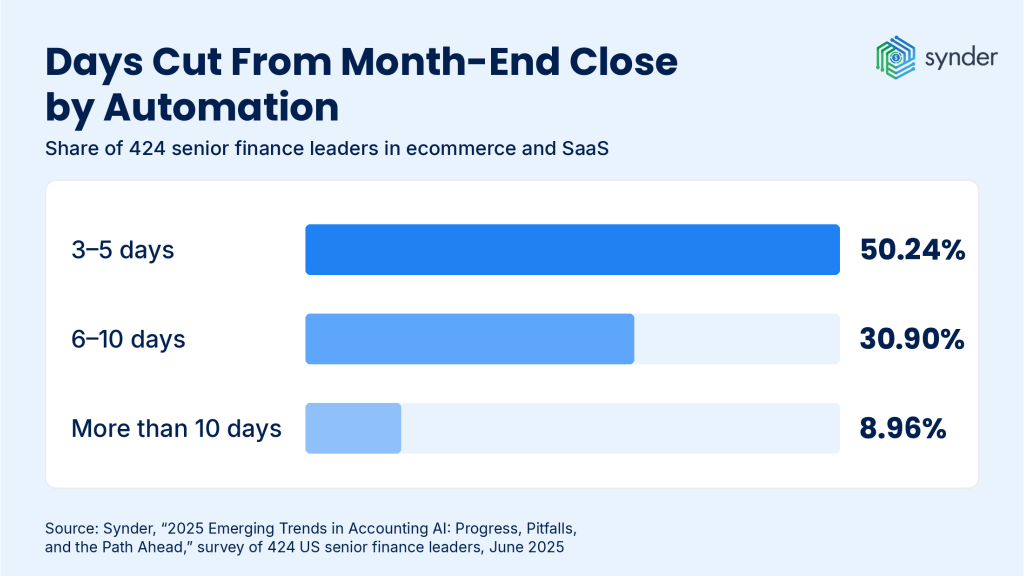
The nearer-term evidence points in the same direction: in Synder’s 2025 survey of 424 senior finance leaders across ecommerce and SaaS, 50.24% said automation had already cut 3 to 5 days from their month-end close, a further 30.90% reported 6 to 10 days, and 8.96% more than 10 days.
How Synder adds to these benefits
Synder is a SOC 2 Type 2 certified accounting automation layer between Shopify and NetSuite. Synder imports the transactions behind each order and payout from 30+ sales channels and payment processors, categorizes every component against the mappings finance configures, and writes the result to NetSuite as either individual records or period summaries.
- Zero-discrepancy reconciliation: Match every Shopify order to its payout automatically.
- Smart mapping: Configure tax, fee, shipping, and discount accounts with full control.
- Historical data import: Upload years of Shopify transactions into NetSuite in minutes. Keep in mind that this option may incur a fee.
- Audit-ready books: Clean records that make tax season, audits, or investor reviews painless.
- Multicurrency support: Shopify international sales are synced with accurate exchange rates.
Shopify NetSuite integration methods compared
Four routes connect Shopify to NetSuite: Oracle’s NetSuite ERP Connector, iPaaS middleware such as Celigo or Boomi, a purpose-built accounting connector such as Synder, and a custom API build. Setup work, published pricing, accounting coverage, and who owns maintenance differ across all four.
Direct API integration still held 46.49% of ecommerce ERP integration revenue in 2025. Mordor Intelligence puts iPaaS as the fastest-growing approach at a 7.78% CAGR through 2031, and notes that enterprises now run an average of 47 active integrations. Maintaining that many endpoints in-house is the reason the money is moving toward managed platforms.
| Method | Setup | Published cost | Accounting coverage | Maintenance |
| NetSuite ERP Connector (Oracle) | Configuration of Shopify and NetSuite data flows | From $199.92/month; $249.92 for B2C Premium and POS tiers | Product, pricing, inventory, sales order, fulfillment | Oracle maintains the connector; business configuration stays in-house |
| Middleware (Celigo, Boomi) | Integration flows and mappings designed and tested per system | Celigo: quote-based, no published rates. Boomi Pay-As-You-Go: $99/month plus $0.05 per message | Broad operational integration with configurable accounting logic | Ongoing flow monitoring and version management |
| Accounting connector (Synder) | Finance configures mappings and sync settings | From $52/month (Basic: 500 orders, 2 integration slots) | Sales, refunds, fees, taxes, payouts, categorization | Vendor maintains the connector; finance owns its accounting settings |
| Custom API build | Development, testing, and deployment project | Quote-based; no published rate card | Whatever the requirements specify | Internal team or partner owns every API change |
Two caveats on the published prices:
- Oracle bills the NetSuite ERP Connector separately from the Shopify invoice, so the $199.92 does not appear on the Shopify bill.
- Boomi’s $99 Pay-As-You-Go plan is open only to accounts converting from an active 30-day trial, and its committed subscription editions are quote-based. The entry price is not what a multi-system integration costs to run.
The column the table cannot carry is accounting logic. Oracle’s connector, middleware, and a custom build all move operational data competently, and none of them decides how a payout splits into revenue, fees, tax, and refunds. That decision belongs to the accounting layer, whichever route carries the data.
Related: ERP Ecommerce Integration: Methods & Best Practices
Common challenges in Shopify NetSuite integration
Shopify and NetSuite structure the same sale differently, and most integration problems trace back to that gap.
Mapping Shopify records to NetSuite structure
Shopify stores the order, product, tax, discount, customer, and payment data generated at the point of sale. NetSuite needs that same activity assigned to its accounts, transaction types, items, subsidiaries, and reporting dimensions, and it will accept whatever assignment the integration gives it.
Product reporting depends on Shopify SKUs matching the correct NetSuite items. The cases that break it are renamed SKUs, variants that exist as one SKU in Shopify and several items in NetSuite, and items that exist in only one of the two systems.
Define the mappings and the item-matching rules before live transactions start posting, because every unmapped case becomes a manual correction later.
Payout composition and fee detail
A Shopify payout combines activity from many orders with refunds, fees, and adjustments, so recording only the net deposit leaves revenue, processing fees, shipping, discounts, and tax collected out of the accounting record entirely.
The dates make it worse. Sales and their settlement fall in different places on the calendar, which means matching order-date sales against a deposit-date payout produces a difference every single time.
Rebuilding that composition by hand is where the errors enter. Among the 424 finance leaders Synder surveyed, 92.46% said automated processing produces higher accuracy than manual methods, and payout reconstruction is exactly the high-volume, rules-based work that assessment refers to.
The structural answer is a clearing account that records processor activity before settlement and clears when the payout reaches the bank.
Multi-currency and tax jurisdiction mapping
Foreign-currency sales and the payouts that settle them can use different exchange rates, which produces a settlement difference that has to go somewhere deliberate.
Keep the transaction currency and the rate used identifiable in NetSuite, and record any difference according to the company’s foreign-exchange accounting policy instead of letting it absorb into revenue.
Tax carries the same requirement. Shopify’s tax data has to map to the appropriate NetSuite tax codes and accounts by jurisdiction and nexus, and the only useful test covers the jurisdictions, subsidiaries, and locations the business actually sells into.
Best practices for Shopify NetSuite integration
Best practice for a Shopify NetSuite integration is to document the accounting rules before any automated posting begins: payout clearing, account mappings, item matching, tax treatment, revenue timing, currency handling, and exception handling.
Test those rules across complete payout cycles, using the store’s real payment methods, currencies, refunds, gift cards, and fulfillment patterns. GAAP-compliant, audit-ready books come from the mapping decisions made at this stage, not from the sync frequency chosen afterward.
Setting up clearing accounts for Shopify payouts
A clearing account records Shopify Payments activity between the sale and the cash deposit, holding the balance the processor still owes.
The timing gap is what makes it necessary. Shopify’s Help Center lists a minimum settlement time of three business days for U.S. Shopify Payments accounts, and Shopify puts the bank’s own processing at a further one to three business days after the payout is sent.
The flow, in order:
- A Shopify order posts gross sales, refunds, fees, taxes, and adjustments to the Shopify Payments clearing account.
- Shopify sends the payout, and the corresponding amount transfers out of the clearing account.
- The amount arrives in the NetSuite bank account.
- The deposit is matched against the bank line and reconciled.
Whatever remains in the clearing account after the match is Shopify activity that has not settled yet, which makes the balance itself a useful check at period end.
Give each processor its own clearing account. A store running Shopify Payments alongside PayPal has two settlement schedules and two sets of adjustments, and one shared clearing account hides which of them is causing a variance.
Related: Transaction Reconciliation Explained: Process, Steps, and Best Practices
How Shopify data maps to NetSuite records
Shopify data maps to NetSuite according to the accounting event the source transaction represents. The exact record design depends on the company’s NetSuite configuration, so finance and the implementation team should confirm these before go-live.
| Shopify activity | Typical NetSuite treatment |
| Order | Sales Order + Item Fulfillment + Customer Payment |
| Refund | Credit Memo + Customer Refund |
| Processing fee | Journal-entry line to the relevant fee expense account |
| Sales tax | Tax line mapped to the relevant tax code or liability account |
| Payout | Bank Deposit / clearing-account settlement |
| Gift card sale | Liability until redemption |
Revenue timing follows the company’s GAAP revenue-recognition policy. For fulfilled retail goods, that means recognition at the point the performance obligation is satisfied, which is the fulfillment event and not the order date.
Item matching is worth testing harder than the rest of the map, because it fails without an error message and shows up later as reporting noise. SleepEh, a Canadian sleep-products retailer selling through Shopify and a physical location, was maintaining duplicate SKUs across its storefront and its books before automating the connection; the company now reports 100% accuracy syncing Shopify sales data and 12 to 18 full workdays saved a year on ledger management. That setup posts to QuickBooks Online, but the SKU-resolution problem is identical in NetSuite, where a mismatched item also breaks inventory and COGS.
Separating fees by payment method
Processing fees belong in their own expense accounts, one per payment method, and never inside revenue.
A store accepting Shopify Payments and PayPal should carry accounts such as “Processing Fees – Shopify Payments” and “Processing Fees – PayPal.” The separation pays off twice: cost per processor becomes reportable, and a payout that arrives short can be traced to the fee line that explains it.
Synder auto-categorizes fees from Shopify Payments and third-party gateways according to the configured mappings, and includes the mapped fee activity in the aggregated record when Summary Sync posts the period.
Common Shopify NetSuite integration mistakes
Five setup errors account for most reconciliation and reporting failures after go-live.
- Posting gross revenue straight to the bank account. The deposit and the sales it represents fall on different dates, so the account never ties, and the difference has no home in the ledger.
- Lumping payment fees into one unidentified amount. Cost by payment method disappears from reporting, and a payout that differs from expectation gives finance nothing to trace it against.
- Matching order-date sales to deposit-date payouts. The two never agree, and the variance gets written off as a timing difference every month instead of being resolved once.
- Recording sales tax as revenue. The top line overstates, and the liability owed to the taxing authority goes unrecorded, so the problem appears at filing instead of at close.
- Activating the integration before testing the mappings. One mapping error repeats across every transaction that uses it, so the cleanup scales with exactly the volume the integration was bought to handle.
How Synder handles Shopify NetSuite integration
Synder came through Y Combinator’s S21 batch and the 2023 AICPA and CPA.com Startup Accelerator, and now serves 5,000+ businesses and 200+ accounting firms. Synder Sync connects Shopify financial data with NetSuite and applies the accounting mappings the finance team configures. Synder’s NetSuite integration supports both sync modes: Summary Sync, which groups transactions for the configured period and posts them as aggregated journal entries, and Per Transaction, which writes individual order-level records.
In a Summary Sync workflow, Synder imports the source transactions, groups them for the period, and applies the mappings for revenue, refunds, fees, taxes, shipping, discounts, gift cards, and related accounts. The Shopify payout record then carries the gross-to-net composition finance uses to match the bank line, without anyone exporting a CSV to rebuild it.
Verification happens before the data reaches the books. Synder’s Transaction Reconciliation module matches every line in the clearing account against Shopify’s own records, automated via API, standard upload, or custom mapping, and flags anything that does not tie 100% so finance reviews only the exceptions. Balance Reconciliation works at period level, checking that the summary totals agree with Shopify’s reported starting and ending balances before they post, with a downloadable audit trail on every run.
Volume is where the difference registers. Rad, a Colorado recovery-products brand selling across Shopify, Amazon, PayPal, Stripe, and Faire, cut 40 hours a month of manual data importing and $2,000+ a month in bookkeeper costs.
Before Synder, when our bookkeeper had to do it manually, it was taking between 5-10 hours a week of importing data, adding data, changing forms, and sheets. With over 150k records now processed automatically, it’s been a huge savings of both time and money.
Meghan S., Operations Manager at Rad
That store posts to QuickBooks Online; the multi-gateway problem it solved is the same one a NetSuite merchant faces once a second payment method appears.
For connection steps and UI settings, use the dedicated setup guide: Connecting Shopify to Oracle NetSuite via Synder.
| Connecting a Shopify store to NetSuite and want the payout side settled before go-live? Book a Synder demo and walk through the mapping. |
FAQ
Does Shopify have a native NetSuite integration?
Shopify does not publish its own NetSuite integration. Oracle NetSuite maintains the NetSuite ERP Connector on the Shopify App Store, covering product, pricing, inventory, sales order, and fulfillment data for Shopify, Shopify Plus, and Shopify POS. Payout composition, fee categorization, and clearing-account logic are evaluated separately because operational sync and accounting treatment are different requirements.
Can I reconcile Shopify payouts automatically in NetSuite?
Shopify payouts reconcile automatically in NetSuite when the integration records both the transactions behind the payout and the cash movement that settles them. When one payout spans two accounting periods, keep the sales, fees, refunds, and taxes in the periods they belong to, and record the payout in the later period as the settlement that clears the processor balance.
Can I sync historical Shopify orders and payouts into NetSuite?
Historical Shopify orders and payouts import into NetSuite through Synder’s historical data import. Availability is plan-dependent: Synder describes the import as included on higher tiers and a paid option on entry-level plans, so confirm the terms for your plan before scoping a large backfill. Configure account, item, tax, and currency mappings first, because the mappings in force at import determine how each entry posts.
Will Shopify discounts and gift cards sync correctly?
Shopify discounts reduce the sale they apply to, and gift card proceeds stay on the balance sheet as a liability until redemption. When several discount codes stack on one order, the combined reduction stays attached to that order. A partial gift card redemption reduces the liability by the redeemed amount only, leaving the unused balance outstanding.
How does the Shopify NetSuite integration handle partial refunds?
A partial refund reverses the accounting for the refunded portion of the original sale and leaves the remaining revenue recorded. The related processing fee, shipping, and tax adjustment follow the treatment applied to the original transaction. Match the refund to the order it came from so the revenue still earned on that order stays intact.
How are multi-currency Shopify orders handled in NetSuite?
Multi-currency Shopify orders keep the transaction currency and the exchange rate used at the time of sale. A payout settling at a different rate produces a foreign-exchange gain or loss, which should stay identifiable in NetSuite instead of being absorbed into revenue. Synder supports multi-currency transactions on its NetSuite integration.
What happens if a Shopify or NetSuite field doesn’t match?
Synder flags mismatches and provides tools to correct them. You can map custom fields and set fallback rules to ensure smooth syncing.
How do I verify that my Shopify NetSuite integration is producing GAAP-compliant books?
Verify GAAP compliance by running a complete payout cycle and checking the output against the company’s revenue recognition policy. Confirm that the payout total agrees to the bank deposit, that tax collected reports as a liability and not as revenue, and that items, subsidiaries, accounts, and currencies resolve to the intended NetSuite records on every transaction type the store produces.
I migrated from QuickBooks to NetSuite. Why isn’t my Shopify data mapping correctly?
NetSuite requires transaction types, account mappings, subsidiary assignments, item records, and reporting dimensions that a QuickBooks-era setup does not carry over. Rebuild those mappings in NetSuite before importing more Shopify data, then run the new configuration in parallel across at least one full payout cycle and compare it against the QuickBooks period it replaces.
How do I scope a Shopify NetSuite integration project?
Scope a Shopify NetSuite integration by starting with the flows finance has to close: payout reconciliation, fee categorization by payment method, tax mapping by jurisdiction, order and item detail for reporting, and multi-location inventory where it applies. Document the Shopify source field, the NetSuite record it becomes, and the exception handling for each. Underscoping the accounting layer is the common failure, because most connectors stop at order sync.