Global retail ecommerce sales are set to reach $6.88 trillion in 2026, accounting for 21.1% of all retail commerce worldwide, according to Shopify’s Global Ecommerce Sales report. That’s a large market, and a demanding one. Running a lean direct-to-consumer brand or managing finance for a mid-market retailer means that the infrastructure behind your store will determine how quickly you scale and how expensive that growth becomes.
That infrastructure has a name: an ecommerce tech stack. For finance teams, controllers, and business owners responsible for the numbers, the wrong stack means manual reconciliation, data gaps, and month-end nightmares. The right one means clean data, faster close, and a clear picture of what the business is doing. This article covers what an ecommerce tech stack is, which components matter, how to build one that scales, and where most businesses go wrong.
TL;DR
- An ecommerce tech stack is your full operating infrastructure: it covers every tool your business uses, from storefront and payments to inventory, marketing, and accounting.
- Components fall into two layers: front-end tools that customers interact with, and back-end systems that handle the operations behind the scenes – connected through integrations.
- The accounting layer needs a lot of attention: inaccurate books, a slower month-end close, and unreliable P&L reports are the typical results when finance tools are connected late or left disconnected from the rest of the system.
- Synder belongs in the accounting layer of any multichannel ecommerce stack: it connects 30+ sales and payment platforms directly to QuickBooks, Xero, NetSuite, Sage Intacct, and Puzzle, so transaction data flows in automatically without manual exports or end-of-month scrambles.
What is an ecommerce tech stack?
An ecommerce tech stack is every tool your business uses to run end-to-end, from the moment a customer lands on your store to the moment that sale hits your general ledger cleanly. It splits into two layers:
- The front end – what customers see and click
- The back end – what keeps the operation running behind it: inventory, order processing, payments, fulfillment, and financial records.
In a well-built stack, these two layers talk to each other automatically through APIs. A sale happens, and inventory updates, the CRM logs it, and accounting records it. No one has to push anything by hand.
That’s what separates a real stack from a pile of subscriptions: integration. Tools that share data automatically give you a business running on accurate, current information. Tools that don’t give you a team spending its time acting as middleware: copying data between systems, reconciling mismatches, fixing errors that compound over time. The more channels you add (your own site, Amazon, TikTok Shop, wholesale), the more that gap costs you.
The core components every ecommerce tech stack needs
Most ecommerce tech stacks look different in the specifics, but they share the same set of functional categories. Understanding what each component does and why it belongs in the stack helps you make choices based on your actual operational needs rather than feature lists. Here’s what a complete, functional stack covers.
Ecommerce platform
This is the foundation. It’s where your store lives, your products are listed, and your checkout process runs.
- Shopify dominates for direct-to-consumer brands because of its app ecosystem, hosted infrastructure, and strong payment integration.
- WooCommerce suits businesses already running WordPress who need more flexibility.
- BigCommerce, Magento, and Salesforce Commerce Cloud appear more often in mid-market and enterprise contexts where customization requirements are higher.
Your platform choice shapes which other tools you can use natively and which require custom integration work.
Payment processing
Every order needs a payment gateway to authorize the transaction, and most businesses work with more than one.
- Stripe is widely used for its API flexibility and subscription handling.
- PayPal remains a customer trust signal.
- Square fits businesses with both physical and digital sales.
- Klarna and similar buy-now-pay-later services are increasingly part of checkout alongside traditional processors.
Each processor generates its own fee structures, payout schedules, and transaction records. And all of that data eventually needs to land accurately in your books.
Inventory and order management
An inventory management system (IMS) tracks what’s in stock; an order management system (OMS) handles fulfillment, routing orders, managing warehouse picks, and processing returns. As selling channels multiply, your OMS becomes the central authority on product availability across your website, marketplaces, and any retail locations. Linnworks, ShipBob, and Skubana are commonly used in this tier.
CRM and marketing tools
Your customer relationship management system stores purchase history, contact information, and behavior data that powers personalization and retention campaigns. Email marketing platforms like Klaviyo or Mailchimp, advertising management, and analytics tools sit in this layer. Google Analytics and similar tools show conversion data that informs both marketing spend and product decisions.
Customer service
Post-purchase experience covers returns, inquiries, reviews, and loyalty programs. Tools like Gorgias, Zendesk, and Intercom handle ticket routing and customer communication. For ecommerce businesses where repeat purchase rate is a key growth driver, this tier matters more than it might initially appear.
Accounting and finance
This layer takes all the transaction data generated by your payment processors and ecommerce channels and maps it accurately to your general ledger. It includes your accounting software, like QuickBooks Online, Xero, NetSuite, Sage Intacct, and any automation tools that connect your sales platforms to those systems. This is the layer most businesses add last and underinvest in first.
Why accounting automation tools are so important
The accounting software itself is rarely the problem. The problem is the connection between your sales data and your books. Each payment processor produces its own payout files, fee structures, and settlement schedules. Each marketplace deducts its own costs before transferring funds. Without a tool that understands all of that and maps it correctly to your chart of accounts, someone on your team is doing that mapping manually, or it isn’t getting done at all.
That’s why ecommerce stack needs accounting automation solutions like Synder. Synder is a platform that connects 30+ ecommerce and payment platforms, like Stripe, Shopify, Amazon, PayPal, TikTok Shop, and others, directly to your accounting software or ERP, syncing transaction-level data automatically and applying categorization rules so your books reflect actual activity across every channel. The practical result is a faster month-end close, cleaner reconciliation, and a finance team that spends its time on analysis, not on tedious data entry.
Sign up with Synder to connect your ecommerce and payment platforms directly to your accounting software or book a demo to see how automated transaction sync, categorization, and reconciliation work across your specific channel setup.
A quick look at ecommerce stack
| Component | What it handles | Common tools |
| Ecommerce platform | Storefront, product catalog, checkout | Shopify, BigCommerce, WooCommerce, Magento |
| Payment processing | Transaction authorization, refunds, payouts | Stripe, PayPal, Square, Klarna |
| Inventory & OMS | Stock tracking, order fulfillment, returns | Linnworks, ShipBob, Skubana |
| CRM & marketing | Customer data, email, ads, analytics | Klaviyo, HubSpot, Google Analytics |
| Customer service | Support tickets, returns, loyalty | Gorgias, Zendesk, Intercom |
| Accounting & finance | Revenue recording, reconciliation, reporting | QuickBooks, Xero, NetSuite + Synder |
All these categories represent the functional minimum. As your business grows, you’ll add specialized tools within each category, such as tax compliance software, subscription management, demand forecasting, and revenue recognition, but the categories themselves stay consistent. The goal is to fill each one intentionally, with tools chosen based on how they connect to your existing setup.
How to choose tools that actually work together
Choosing tools based on feature comparisons is a reasonable starting point, but integration compatibility should be the first filter, not the last. A tool that does everything on its feature list but doesn’t connect cleanly to your existing stack creates more work than it eliminates.
According to Synder’s 2025 Finance Automation Report, which surveyed 424 senior finance leaders across ecommerce and SaaS businesses, 85.85% of respondents said seamless integration was a top priority when evaluating new automation platforms. That finding reflects a shift in how finance teams think about software: the question isn’t just “does this do the job?” but “does this fit into the broader system without creating new friction?“
Key factors to consider when choosing tools
- Total cost of ownership: Monthly subscription fees are just the surface. Include implementation time, potential custom development for integrations, and ongoing maintenance as systems evolve.
- Scalability: Assess whether the tool can handle 10× your current volume without forcing a migration or a steep pricing increase. Check limits on transactions, users, and data storage.
- Vendor support: For critical systems like OMS or accounting software, support quality is essential. Review response times, support tiers, and availability of onboarding or implementation assistance.
- Data portability: Understand how your data is stored and how easily it can be exported or migrated if you switch tools later – this becomes more important as your data grows.
- Multi-channel complexity. If you sell across platforms like Shopify, Amazon, and TikTok Shop, each brings different transaction structures, fees, and payout timing. Your tools need to handle this without creating reconciliation gaps.
- Ecosystem compatibility: Treat your tech stack as a connected system, not isolated tools. Every tool should clearly define:
- What data it sends or receives
- What happens if that data flow breaks
- Integration reliability: Prefer tools with strong documentation, active developer communities, and native integrations. Custom-built connections often introduce long-term maintenance risk and fragility.
How to build your ecommerce tech stack from the ground up
Building a tech stack doesn’t mean selecting all your tools before you launch. Most successful ecommerce businesses start with a small core and add layers as volume and complexity grow. The key is having a clear sense of the order in which to add things – and building integration into the plan from the start rather than bolting it on after the fact.
Step 1: Start with your ecommerce platform
This is the decision that constrains everything downstream. Choose based on your team’s technical capacity, your expected growth trajectory, and the integrations you know you’ll need. Shopify works well for businesses that want managed hosting and a wide app marketplace. WooCommerce suits teams with development resources who want more control. Enterprise setups with complex product catalogues, B2B pricing, or multi-country operations often require Magento or a headless architecture.
Step 2: Connect your payment processors
Once your store is live, you need reliable payment handling. Most platforms have a native payment option, but many businesses also connect a separate processor for more flexibility or lower fees. Document how each processor handles payouts – how often they settle, what fee deductions look like, and how refunds appear in reporting. This documentation will matter when you set up the accounting layer.
Step 3: Add inventory and order management
At low order volumes, your ecommerce platform’s built-in inventory tracking may be enough. As volume grows, or as you add channels, a dedicated OMS prevents overselling, fulfillment errors, and the manual reconciliation that comes from tracking stock across spreadsheets. Build this layer before the problems it prevents become routine.
Step 4: Build out marketing and analytics
This step is about email, paid advertising, and analytics tools. The goal is connecting customer and campaign data so you can understand what’s driving sales, not just that sales happened. Getting this right depends on how well these tools connect to the rest of your stack: disconnected marketing data produces confident-sounding reports that are actually incomplete.
Step 5: Set up your accounting and finance layer early
This is the most common sequencing mistake: businesses wait until month-end closes are taking weeks to address the accounting connection. The better approach is to map your chart of accounts to your payment and ecommerce data from the beginning, so every transaction hits the right account without manual intervention. The later you address this, the larger the backlog you’ll need to clean up.
Step 6: Connect your ecommerce platforms to your accounting software
Setting up an accounting automation tool like Synder takes a few straightforward steps. Here’s how the process works from scratch.
How to connect ecommerce platforms and accounting software via Synder
1. Create your account. Sign up for Synder and start the setup process.
2. Provide your business details. Fill in the basic information about your business as part of the organization setup, then move to the next step.
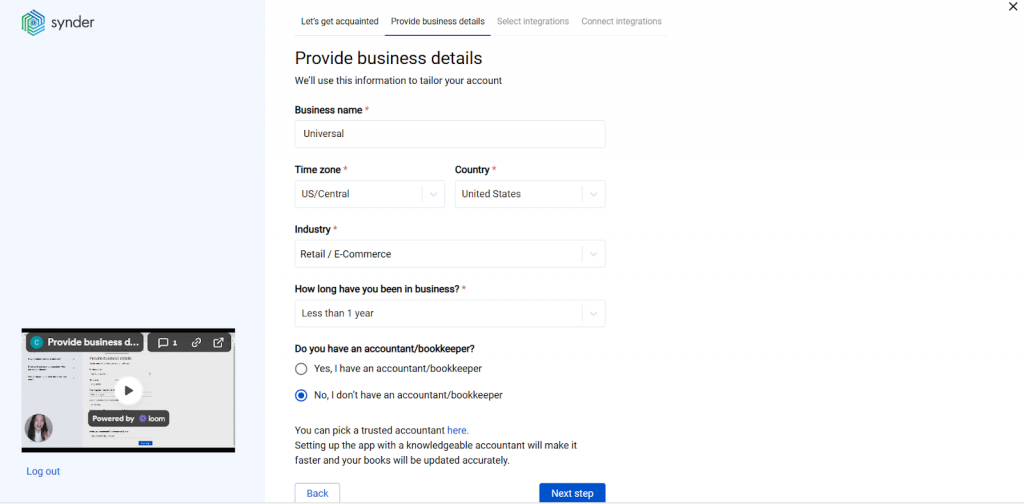
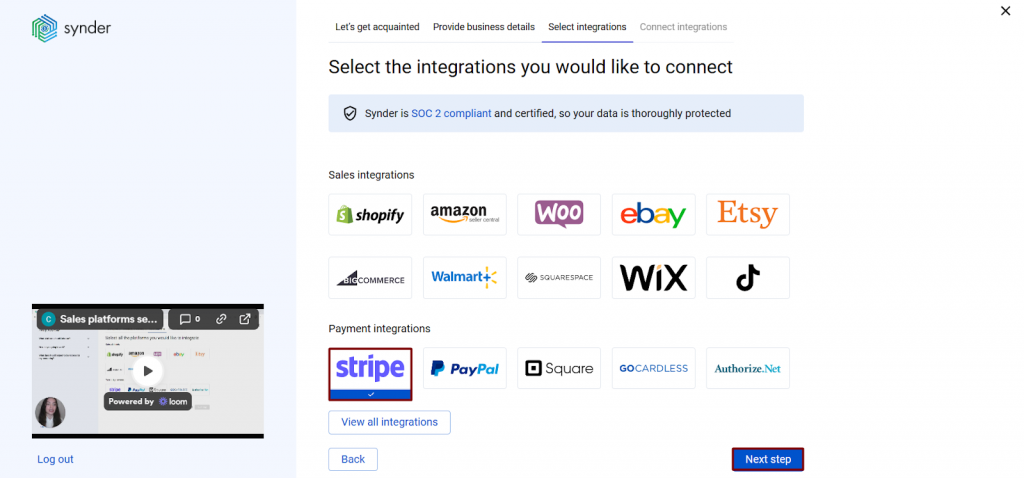
3. Select the platforms you want to integrate. You’ll see a list of all available sales channels and payment processors. Select every platform you use to receive payments. You can connect them all at once or skip some and add them later.
4. Connect your accounting software. Select the accounting company you want to link to Synder.
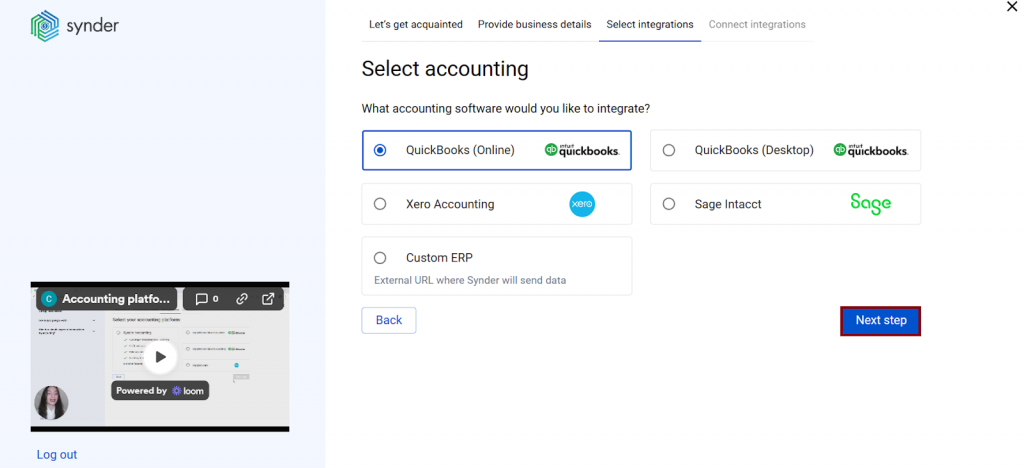
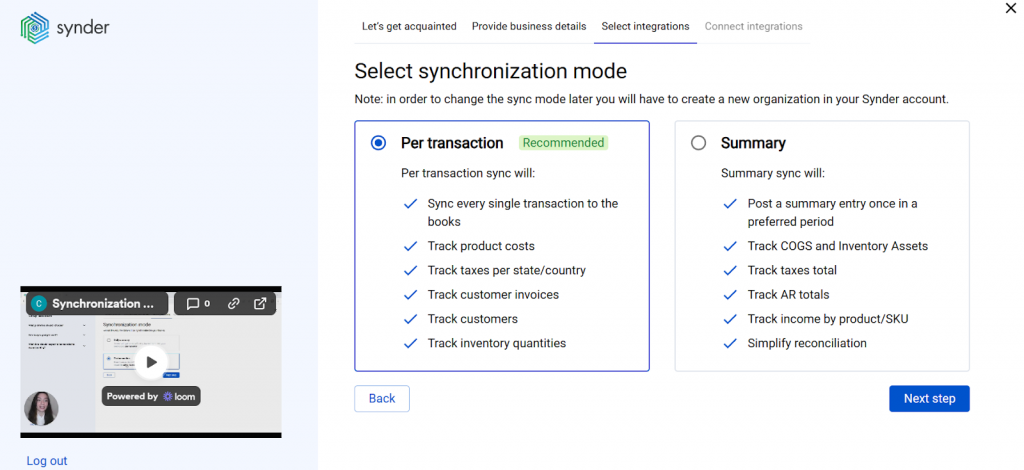
At this step you’ll also be prompted to choose your sync mode (either individual transaction-level recording or aggregated summaries by period) before completing the connection.
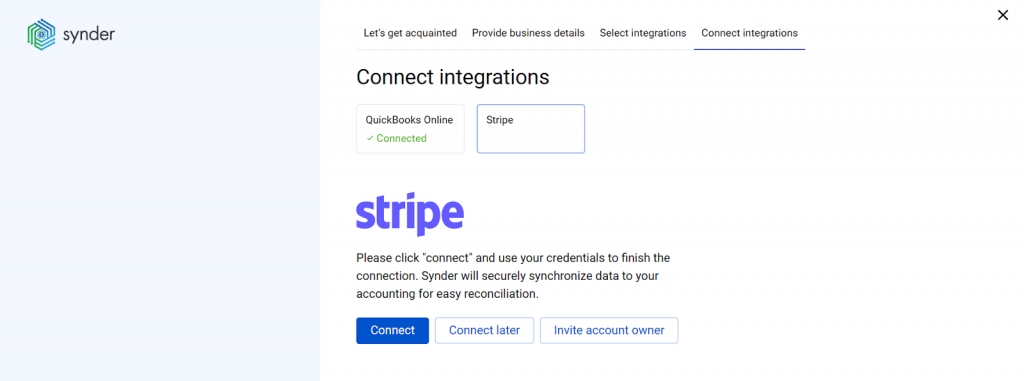
5. Connect your sales and payment platforms. Connect each platform one by one by granting Synder the necessary permissions. If you don’t have admin access for a particular account, you can send an invitation to the account owner to complete that step.
6. Set up each integration. To finish the configuration, map each connected platform to the correct bank account where its payouts land. This is what allows Synder to match incoming deposits to the transactions it’s already recorded, and what makes one-click reconciliation possible.

As your business matures, each of these layers will evolve. The platform might not change, but the tools around it will. What matters is having a modular structure where each component can be swapped or upgraded without requiring you to rebuild everything connected to it.
What businesses get with the right tools
The difference between a stack that scales and one that creates friction at every growth stage often comes down to how early integration decisions were made and whether the accounting layer was treated as a core component rather than an afterthought. Here are two ecommerce businesses that approached this the right way.
Take Dermeleve, for example. Selling across Shopify, Amazon, Stripe, and wholesale channels, the company managed to keep its entire accounting operation running with a single CFO, with no additional accounting staff, by connecting all four channels through Synder. With 170,000+ transactions synced automatically and 99.5%+ reconciliation accuracy across platforms, the company avoided $60,000+ in annual staffing costs that a manually managed multi-channel setup would have required.
A similar pattern shows up in a different setup. SleepEh, an ecommerce retailer selling sleep apnea and sleep hygiene products through Shopify and PayPal, was managing duplicate SKUs and manual data entry across two sales channels, which introduced errors and consumed hours the team couldn’t afford to lose. After connecting both platforms through Synder, the process became fully automated: products added once, everything else synced automatically. The result was 2–3 hours saved per week on manual data entry, adding up to 12–18 full workdays recovered every year, with 100% accuracy in syncing sales data from Shopify across to their accounting records.
Common mistakes that make ecommerce tech stacks expensive
Most tech stack mistakes aren’t careless. They’re short-term decisions that don’t account for growth. Here are the most common ones:
- Building a Frankenstack: Tools are added one by one without an integration plan. Data gets fragmented, systems fall out of sync, and fixing it later requires a costly consolidation project at the worst time.
- Choosing for current volume: What works at 500 orders breaks at 5,000. Always evaluate tools based on where you’ll be in 12–18 months, not where you are today.
- Treating accounting as passive: Accounting isn’t just a destination for data – it needs to be actively configured and integrated, with clear rules for data flow, categorization, and error handling.
- Skipping integration testing: Unverified integrations can create duplicates, missed fees, and tax errors. Always test with real transactions before going live.
These mistakes are recoverable, but they’re easier and cheaper to avoid. Every tool decision in your stack is also a data decision, and data problems compound over time.
Building a tech stack that scales: what this guide covered
An ecommerce tech stack is more than the sum of its software subscriptions. It’s the infrastructure that determines whether your business has accurate, actionable information at any given moment, or whether it doesn’t. Getting the components right is a prerequisite for growth, but it’s the connections between those components that actually determine how well the whole thing works.
The accounting and finance layer is where this matters most. Every sale, refund, fee, and payout that moves through your payment processors and channels needs to land somewhere accurate in your books. The earlier you build that connection properly, the less time your finance team spends on reconciliation and the more they can contribute to strategy and decision-making. Choosing tools that communicate well, planning for scale from the start, and treating integration compatibility as a primary criterion – these decisions pay off disproportionately as your business grows.
FAQ
What are the 4 types of ecommerce?
The four main types are B2C (business to consumer), B2B (business to business), C2C (consumer to consumer), and D2C (direct to consumer). The business model often influences platform selection, payment setup, and accounting structure within the stack.
What are the 7 pillars of ecommerce?
The seven pillars typically referenced are: product selection, pricing strategy, platform and technology, payment processing, logistics and fulfillment, customer service, and marketing. Each pillar maps to one or more components in your ecommerce tech stack.
What are the 7 C’s of ecommerce?
The 7 C’s framework – Customer, Content, Commerce, Community, Communication, Customization, and Connectivity – is a user-experience model used to evaluate how well an ecommerce store or platform serves its audience across different touchpoints.
What is an ecommerce tech stack?
An ecommerce tech stack is the complete set of software tools a business uses to run its online store, from storefront and payment processing to inventory, marketing, customer service, and accounting. The tools connect through APIs to share data automatically.
Why is an ecommerce tech stack important?
A well-integrated stack reduces manual work, prevents data silos, and gives operations and finance teams accurate, real-time information. When tools don’t communicate, the business runs on incomplete data, and teams spend time on reconciliation that should be spent on growth.
What tech stack is best for a startup ecommerce business?
For early-stage businesses, a managed platform like Shopify combined with Stripe and a cloud accounting tool like QuickBooks Online is a reliable and low-maintenance starting point. It minimizes setup time and offers wide native integration coverage without requiring custom development. Adding Synder to that setup ensures all three layers actually communicate – syncing transaction data from Shopify and Stripe directly into QuickBooks automatically, so the accounting side stays accurate from day one instead of becoming a backlog to clean up later.
How do I choose tools for my ecommerce tech stack?
Prioritize integration compatibility, total cost of ownership, scalability to higher order volumes, and data portability. Every new tool should have a clear answer to: how does this connect to my existing systems, and what happens when that connection needs to be updated?