.png)

Accounts receivable automation changes how businesses manage payments, collections, and cash flow by removing manual handoffs and replacing them with systems that move invoices, reminders, and payments forward automatically. Instead of chasing data across spreadsheets and inboxes, finance teams gain a continuous, end-to-end process from invoice creation through payment application.
For companies offering net-30 or longer payment terms, manual AR quickly turns into a cash-flow bottleneck. PYMNTS Intelligence reports that 86% of businesses have up to 30% of their monthly invoiced revenue sitting overdue. At the same time, finance leaders, CFOs, and controllers are under pressure to collect faster without adding headcount or increasing operational costs tied to invoicing, payment matching, and follow-ups.
This article breaks down what AR automation actually delivers, how it solves the most common receivables problems and why finance teams are prioritizing it to create steadier, more predictable cash flow.
TL;DR
- Accounts receivable automation replaces manual invoicing, payment tracking, and reconciliation with connected, rules-based systems that run the entire order-to-cash cycle automatically.
- Modern AR automation covers invoicing, cash application, collections, self-service payments, dispute tracking, and real-time reporting, either through ERP extensions or specialized platforms.
- Ecommerce makes AR harder due to multiple sales channels, fee structures, and settlement schedules; software like Synder centralizes this complexity by syncing data from sales and payment platforms into accounting systems.
- The business impact is measurable: faster collections, lower processing costs, higher accuracy, better forecasting, and scalable growth without adding headcount.
What is accounts receivable automation?
Accounts receivable (AR) automation uses software, AI, and rules-based workflows to streamline the entire order-to-cash cycle. Instead of managing invoices, payments, and reconciliations manually, finance teams run AR through connected systems that keep data in sync from invoice creation to cash application.
At a high level, AR automation replaces manual invoice creation and email follow-ups, spreadsheet-based payment tracking, hand-matched bank deposits and invoices, and repetitive updates across accounting and payment systems.
What a modern AR automation stack includes
Most AR automation platforms cover a common set of capabilities:
- Automated invoicing – Generate and deliver invoices electronically with consistent terms and numbering
- Cash application – Match incoming payments to open invoices automatically
- Collections workflows – Trigger reminders and follow-ups based on rules and due dates
- Customer self-service – Let customers view invoices and pay online
- Dispute tracking – Manage deductions and escalations in one place
- Real-time visibility – Dashboards for aging, DSO trends, and collection performance
Some businesses extend ERP functionality, while others adopt specialized platforms such as HighRadius, BlackLine, or Bill.com.
Why ecommerce makes AR more complex
For ecommerce businesses, AR challenges multiply across platforms like Shopify, Amazon, and TikTok Shop. Each channel produces different transactions, fees, refunds, and settlement timelines, making clean reconciliation difficult.
This is where tools like Synder stand out, automatically pulling detailed transaction data from 30+ sales and payment platforms such as Shopify, Amazon, Stripe, PayPal, and TikTok Shop, then syncing it into accounting systems and ERP like QuickBooks, Xero, Sage Intacct, NetSuite, and Puzzle in an accounting-ready format.
Synder’s AR automation in practice
Synder applies AR automation directly to invoicing and collections:
- Invoice creation – Invoices are created using customers, products, and payment terms pulled directly from your accounting system, including Net 10, Net 30, and recurring schedules.
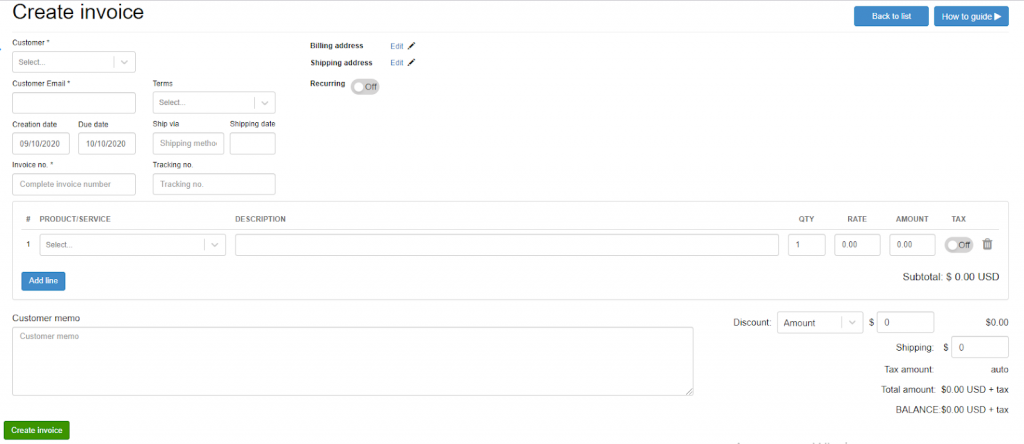
- Seamless sync – Each invoice automatically syncs to your accounting books with matching invoice numbers, customer records, and line-level details.
- Payment links – Customers receive a secure checkout page that allows them to pay instantly through Stripe or Square or other platforms without manual follow-ups.
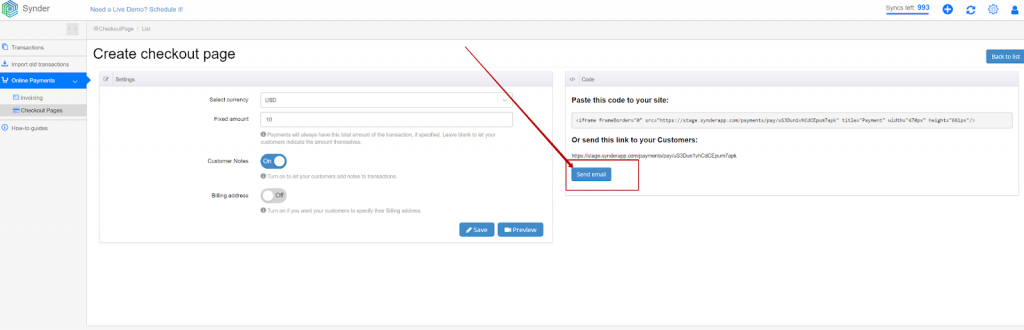
- Automatic cash application – Incoming payments are automatically applied to the correct open invoices, removing the need for manual payment matching or adjustments.
- Recurring billing – Recurring invoices are generated and sent on weekly, monthly, or annual schedules, with each occurrence created and recorded automatically.
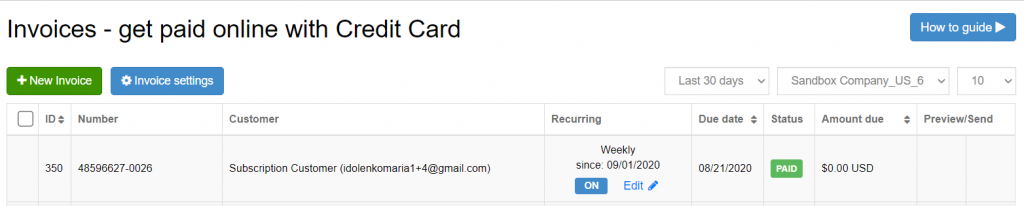
The result is a fully automated AR flow from invoice to cash, without spreadsheets, manual follow-ups, or reconciliation clean-up later, backed by Synder’s SOC 2 Type 2–certified security controls, GDPR and HIPAA readiness, and end-to-end encryption that protects sensitive financial data both in transit and at rest.
Ready to automate AR for your business? Start your free 15-day Synder trial or book a demo to see how automated invoicing, payment matching, and multi-channel reconciliation can reduce your DSO and free up your team from manual data entry.
9 Key accounts receivable automation benefits
The advantages of automating AR extend well beyond simple time savings. Organizations that implement comprehensive AR automation typically see measurable improvements across multiple financial and operational metrics.
1. Accelerated cash flow and reduced DSO
The most immediate benefit shows up in Days Sales Outstanding metrics. According to the American Productivity and Quality Center (APQC), median DSO sits at 38 days, but top-performing organizations collect payments in under 30 days. Automation closes this gap by accelerating every step of the collection cycle.
Digital invoices reach customers instantly, automated reminders keep unpaid balances visible without manual follow-ups, and incoming payments are matched to invoices in real time instead of waiting for month-end cleanup. Over time, this compounds into faster collections: companies using AR automation commonly reduce DSO by 8–10 days, improving working capital and lowering reliance on external financing.
2. Significant cost reduction
Processing invoices manually costs between $2 and $9 per invoice, according to APQC research, with the variance largely attributable to automation levels. Organizations that automate AR processes achieve 3x lower costs per $1,000 in revenue compared to those relying on manual workflows.
The savings come from multiple sources. Automated invoice generation eliminates the labor of manually creating documents, calculating amounts, and distributing them through multiple channels. Digital delivery cuts printing and postage costs while speeding delivery time. Payment matching happens automatically without staff manually combing through bank statements and remittance emails.
Perhaps more importantly, automation reduces the need to scale headcount as transaction volumes grow. Companies using Synder for AR automation eliminate over 40 hours of monthly manual data entry, saving more than $2,000 monthly in bookkeeper costs while processing 150,000+ records automatically.
3. Enhanced accuracy and fewer errors
Manual data entry introduces mistakes. Transposed numbers, duplicate invoices, misapplied payments, and missed discounts create write-offs, customer disputes, and countless hours of cleanup work. AR automation eliminates these error sources through systematic, rule-based processing.
Automated systems pull data directly from source systems like order management or service delivery platforms, removing the risk of transcription errors. When payments arrive, intelligent matching algorithms apply cash to the correct invoices even when remittance information is incomplete or customers reference the wrong invoice numbers.
Top-performing AR teams using automation achieve higher cash application accuracy, with most payments matched and posted correctly without manual intervention. This reliability is especially important for businesses dealing with complex fee structures or operating across multiple sales channels. It enables CFOs to manage multiple sales channels with 99.5%+ reconciliation accuracy across 170,000+ transactions annually, avoiding over $60,000 annual cost of hiring additional accounting staff.
4. Improved cash flow forecasting
Finance teams can’t make strategic decisions without reliable data on future cash inflows. Manual AR processes make forecasting difficult because collections patterns vary unpredictably, aging reports update infrequently, and visibility into customer payment behavior remains limited.
Automation transforms forecasting accuracy by providing real-time visibility into the entire receivables pipeline. Dashboards show which invoices are coming due, which customers typically pay early or late, and where collection efforts should focus. Predictive analytics can flag at-risk invoices before they become delinquent, allowing proactive outreach.
This visibility extends beyond the AR team. Sales can see customer payment history before extending credit on new orders. Leadership can model cash scenarios based on actual collection patterns rather than rough estimates. Treasury can optimize short-term financing decisions with confidence in the timing of incoming payments.
5. Better customer relationships
The AR process is inherently customer-facing. How you invoice, communicate about payments, and handle disputes directly affects customer satisfaction and retention. Automation helps deliver a professional, frictionless experience.
Self-service portals let customers view outstanding invoices, check payment history, and submit payments 24/7 without calling or emailing your AR team. Multiple payment options (ACH, credit card, wire transfer) reduce friction and speed up collections. Automated reminders use professional, consistent messaging rather than rushed follow-up emails from busy collectors.
When disputes do arise, automated systems track the entire resolution process, ensuring nothing falls through the cracks. Customers receive timely updates on claim status, while your team works from a single source of truth rather than scattered email threads.
6. Stronger security and compliance
Manual AR processes create security vulnerabilities. Paper invoices can be intercepted, payment details get shared through unsecured email, and audit trails exist only in scattered spreadsheets and file folders. AR automation strengthens security through several mechanisms.
Digital invoicing eliminates paper-based fraud risks and ensures invoice data remains encrypted in transit and at rest. Payment portals use tokenization and PCI-compliant processing, protecting sensitive financial information. Role-based access controls ensure only authorized users can view customer data, approve credits, or process adjustments.
Compliance benefits matter particularly for businesses operating across multiple jurisdictions. Automated systems apply the correct tax treatment based on customer location, maintain complete audit trails for every transaction, and archive records according to regulatory requirements. This systematic approach becomes especially valuable during audits or when responding to customer inquiries about historical transactions.
7. Scalable operations without proportional headcount growth
Perhaps the most strategic benefit of AR automation is the ability to handle growing transaction volumes without scaling your team at the same rate. Manual AR processes require adding staff as sales increase – more invoices to generate, more payments to apply, more collection calls to make.
Automation breaks this linear relationship. The same system that processes 1,000 invoices monthly can handle 10,000 or 100,000 with minimal additional resources. This scalability proves crucial for fast-growing businesses or those with seasonal volume fluctuations.
For instance, using Synder’s automation you can save 70+ hours monthly working across 30+ locations. What previously took you 3-4 hours of daily reconciliation work will now require just 30-45 minutes, allowing your team to focus on strategic work rather than data entry.
8. Enhanced reporting and decision-making capabilities
Real-time dashboards replace static spreadsheets, giving finance teams instant visibility into AR performance. Modern automation platforms track critical metrics like DSO, collection effectiveness index, aging bucket distributions, and individual collector productivity.
These insights enable proactive management rather than reactive firefighting. When DSO starts creeping up, you can immediately see which customer segments or products are driving the increase. If a particular collector’s performance declines, coaching can happen in real time rather than months later during annual reviews.
The reporting also improves collaboration across departments. Sales teams can access customer payment history before negotiating terms on new deals. Operations can identify delivery issues that might be causing payment disputes. Executive dashboards provide a clear view of cash generation without waiting for month-end close.
9. Multi-channel transaction management
For businesses selling through multiple channels, managing AR becomes exponentially more complex. Each platform (Shopify, Amazon, TikTok Shop, retail POS, wholesale orders) generates transactions with different formats, fee structures, and settlement schedules. Reconciling these disparate data sources manually creates endless opportunities for errors and omissions.
This multi-channel capability proves particularly valuable for growing ecommerce businesses, saving 2-3 hours weekly by eliminating duplicate SKU management between your online store and brick-and-mortar location, which will allow you to focus on customer service rather than accounting complexity.
Key accounts receivable automation benefits comparison
The financial impact of AR automation becomes clear when comparing manual and automated approaches across core metrics. The table below highlights the measurable differences in cost efficiency, collection speed, and payment processing accuracy.
| Benefit area | Manual process | Automated process | Typical impact |
| Invoice processing cost | $7-$9 per invoice | $2-$3 per invoice | 60-70% cost reduction |
| Days sales outstanding | 38+ days (median) | Under 30 days | 8-10 day improvement |
| Cash application rate | Manual matching required | 90-95% straight-through | 30%+ efficiency gain |
How to maximize AR automation benefits
Simply installing automation software isn’t enough. Teams that see the strongest results approach AR automation as a process change, not a plug-and-play tool.
- Start with workflow mapping. Before selecting any software, document how AR works today, from order entry to cash application. Identify manual handoffs, recurring errors, and bottlenecks. This baseline helps you automate the right steps and often delivers improvements through standardization alone.
- Prioritize deep system integration. AR automation should connect directly to your ERP, order management system, and bank feeds. Weak integrations create new manual work and data gaps that undermine automation. For ecommerce, platforms like Synder that support 30+ sales and payment channels reduce coverage gaps as new channels are added.
- Roll out in phases, not all at once. Begin with high-volume, low-complexity tasks such as invoice generation or payment reminders. Once those are stable and delivering ROI, expand into more complex areas like dispute handling or credit management. Phased adoption lowers risk and accelerates buy-in.
- Define metrics and review them regularly. Track DSO, cost per invoice, collection effectiveness, and straight-through processing rates on a monthly basis. Set targets, review progress with stakeholders, and treat automation as an ongoing optimization effort, not a one-time implementation.
- Invest in change management and training. Automation succeeds only if teams use it correctly. Involve AR staff early, provide clear training and documentation, and address concerns about role changes. The goal is to shift effort away from manual work toward higher-value activities like customer communication and financial analysis.
Real-world results: How actual businesses benefit from AR automation
The impact of AR automation becomes clear when you look at how it performs in real operating environments. Across industries and company sizes, businesses consistently report faster reconciliation, lower operational costs, and more time for higher-value finance work.
Stape reduced reconciliation time by 95%, shrinking a two-day monthly process to just 40 minutes. As a SaaS business managing complex subscription billing, Stape now saves roughly 180 hours per client each year during month-end reviews. Automated subscription mapping ensures GAAP-compliant revenue recognition, while built-in multi-currency support removes the need for manual adjustments on international transactions, freeing the finance team to focus on analysis rather than cleanup.
For high-volume payment environments, the gains are just as tangible. PlayYourCourt saves more than 480 hours and $24,000 annually by automating Stripe payment categorization and reconciliation. Instead of manually reviewing thousands of transactions each month, Smart Rules automatically classify payments, refunds, and fees. As their head of product puts it, time spent reviewing transactions manually is time lost – automation now handles the work reliably in the background.
Another service-based business sees similar results. Tentho saves around 10 hours per month overall and cuts PayPal reconciliation time by 150 minutes alone by automating AR workflows across 30+ platforms for its clients. That efficiency allows the firm to shift effort away from data entry toward financial analysis and advisory services without increasing costs.
Across these examples, the pattern is consistent: AR automation replaces manual effort with predictable processes, turning reconciliation and collections from a recurring bottleneck into a scalable, low-touch operation.
Common challenges when implementing AR automation
AR automation delivers clear value, but implementation often surfaces a familiar set of challenges. Knowing what to expect makes them easier to manage.
- Data quality issues. Automation relies on clean, consistent data, yet many teams uncover duplicate customers, outdated records, or inconsistent naming during setup. If left unresolved, these issues get amplified rather than fixed.
Pro tip: Run a one-time data cleanup and standardize naming conventions before automation goes live. - Integration complexity. Connecting AR tools to legacy systems or heavily customized ERPs can require more effort than planned. Without proper coordination, integrations can introduce new manual work instead of removing it.
Pro tip: Involve IT early and prioritize native integrations or proven connectors over custom-built links. - Resistance to change. AR teams accustomed to manual workflows may worry about job security or feel unprepared to use new systems. This hesitation can quietly undermine adoption.
Pro tip: Position automation as a way to remove low-value tasks and invest in training that shows how roles evolve, not disappear. - Scope creep. Trying to automate every AR process at once often leads to longer timelines, higher costs, and diluted results.
Pro tip: Start with one or two high-volume processes that deliver fast ROI, then expand once those workflows are stable.
Conclusion
Accounts receivable automation replaces manual AR work with a structured, scalable process that improves cash flow visibility, accuracy, and operational efficiency. As transaction volumes grow and sales channels multiply, automation becomes essential for keeping receivables under control without increasing finance overhead.
Tools like Synder support this shift by handling the complexity of multi-channel sales and payments, automatically syncing detailed transaction data into accounting systems in a consistent, accounting-ready format. Used thoughtfully, AR automation allows finance teams and businesses to spend less time reconciling data and more time managing cash, risk, and performance.
FAQ
What is AR automation?
AR automation uses software and AI to streamline accounts receivable tasks like invoice generation, payment matching, collections, and reporting. It connects your accounting system with payment processors and sales platforms to handle transactions automatically, reducing manual work and accelerating cash flow.
How does accounts receivable automation improve cash flow?
Automation speeds up the entire collection cycle by sending invoices immediately, triggering payment reminders on schedule, and applying incoming payments in real time. Organizations typically reduce DSO by 8-10 days, freeing up working capital without adding collection staff or pressuring customers.
What are the main benefits of accounts receivable automation?
Key benefits include faster cash collection, lower processing costs (3x reduction per dollar of revenue), fewer errors in payment posting, better forecasting accuracy, improved customer experience through self-service portals, and the ability to scale operations without proportional headcount increases.
How much does AR automation typically cost?
Costs vary widely based on transaction volume and feature requirements. Specialized platforms can range from $200-$2,000+ monthly for small businesses, while enterprise solutions often involve six-figure annual contracts. For ecommerce businesses managing multiple sales channels, tools like Synder start around $52 monthly depending on transaction volume, with higher tiers providing unlimited historical data syncing and advanced features.
Can small businesses benefit from AR automation?
Absolutely. Small businesses often see the largest proportional benefits because they’re replacing entirely manual processes. Cloud-based solutions eliminate hefty upfront investments, and modern platforms scale to fit small transaction volumes. Many SMBs report that automation lets them delay or avoid hiring additional accounting staff as they grow.
What’s the difference between AR automation and AP automation?
AR automation handles money coming into your business: invoicing customers, tracking payments, and managing collections. AP automation handles money going out, like processing vendor invoices, routing approvals, and making payments. While both improve efficiency, AR automation directly impacts cash flow and working capital availability.
How long does it take to implement AR automation?
Implementation timelines range from a few weeks to several months depending on system complexity and integration requirements. Cloud-based solutions with pre-built integrations can go live in 4-8 weeks for most SMBs. Enterprise implementations involving custom integrations, data migration, and extensive workflow configuration often take 3-6 months.
Does AR automation work for businesses with multiple sales channels?
Yes, and this is actually where automation delivers particularly strong benefits. Managing receivables across ecommerce platforms, marketplaces, POS systems, and traditional invoicing creates reconciliation nightmares without automation. Tools like Synder specifically address multi-channel complexity by syncing transactions from 30+ platforms directly to your accounting software.