.png)
Accounts Receivable Automation Explained: What It Is and How It Works
Accounts receivable automation replaces time-consuming manual work with software-driven workflows that manage invoicing, payment tracking, and collections from end to end. Adoption is accelerating: the global accounts receivable automation market was valued at USD 3.8 billion in 2023 and is projected to reach USD 8.8 billion by 2030, growing at 12.9% annually.
That growth reflects a clear business outcome. Companies using AR automation collect payments in an average of 55 days, compared with 78 days for businesses relying on manual processes. Faster collections translate directly into healthier cash flow and less operational strain on finance teams.
This article explains how AR automation shifts routine work into the background: handling invoices, reminders, and reconciliation automatically, so finance teams can spend less time chasing payments and more time on analysis, planning, and decision-making.
TL;DR
- Accounts receivable automation replaces manual invoicing, reminders, payment matching, and reconciliation with rule-based software workflows that run end to end.
- Automating core AR tasks (invoicing, reminders, payment processing, reconciliation) speeds up collections and can save dozens of hours each month, especially for high-volume ecommerce and subscription businesses.
- Modern AR automation connects sales platforms, payment processors, and accounting software so AR data stays accurate and up to date without spreadsheets or manual cross-checks.
- Finance teams gain real-time visibility, faster payment cycles, fewer errors, and higher productivity – with companies using tools like Synder managing AR across 30+ platforms and reducing reconciliation time by hours per client each month.
What is accounts receivable automation?
Accounts receivable is the money customers owe you after you issue an invoice, say, when you sell on net-30 terms and wait to get paid. Until that payment arrives, the amount sits in AR and directly affects cash flow.
Accounts receivable automation uses software to run this process end to end without manual handling. Instead of someone creating invoices, checking due dates, sending follow-ups, and matching payments by hand, the system does it automatically using predefined rules.
Think of it as the difference between managing AR with a spreadsheet and sticky notes versus running it on autopilot. When a sale happens, the system generates the invoice, schedules reminders, tracks whether it’s overdue, and posts the payment to the correct account once funds arrive. Sales systems and accounting software stay in sync automatically: no copy-pasting, no manual cross-checks, no “Did we follow up on this one?” moments.
Common accounts receivable tasks you can automate
Not every AR task needs automation, but these areas deliver the fastest payoff when manual work is removed.
- Recurring invoice generation: Invoices for subscriptions or repeat billing are created and sent automatically, with pricing changes, proration, upgrades, and cancellations handled by the system.
- Customer payment reminders: Automated reminders go out on a set schedule, removing the need to track due dates manually while keeping follow-ups consistent and timely.
- Credit card and ACH payment processing: Payments are accepted through multiple methods, applied to the correct invoices, and recorded instantly—often with support for recurring payments.
- Cash application and reconciliation: Incoming payments are matched to invoices automatically. For example, you can reduce payment gateway-to-accounting software reconciliation from 8 hours a month to 15 minutes, saving 96 hours annually.
These tasks highlight where automation removes the most friction in day-to-day AR work. The difference becomes clearer when you compare how receivables are handled manually versus with automation.
| Manual AR Process | Automated AR Process |
| Manually create invoices from sales data | Automatic invoice generation from sales platforms |
| Track payment due dates in spreadsheets | Automated payment reminders on schedule |
| Match incoming payments to invoices by hand | Automatic cash application and reconciliation |
| Follow up on overdue accounts manually | Automated escalation workflows |
| Reconcile AR records with accounting system | Real-time sync between systems |
How AR automation works
AR automation links sales platforms, payment processors, and accounting software into one continuous workflow.
How the flow works:
Sale happens on Shopify, Amazon, or Stripe → invoice is generated automatically → invoice is sent with a payment link → reminders go out before the due date → payment arrives via Stripe, PayPal, Klarna, or Square → payment is matched to the invoice → data syncs to accounting systems like QuickBooks, or Xero → AR balances and financial reports update instantly.
Nothing moves manually between systems. Each step triggers the next, keeping receivables accurate and current without spreadsheets or manual follow-ups.
This is how Synder works, connecting ecommerce and subscription sales platforms (Shopify, Amazon), payment processors (Stripe, PayPal, Klarna), and accounting software (QuickBooks, Xero, Sage Intacct, NetSuite, Puzzle) so invoices, payments, and AR data stay aligned end to end.
Let’s look at Synder’s AR automation in action.
How to create and send invoices with payment links
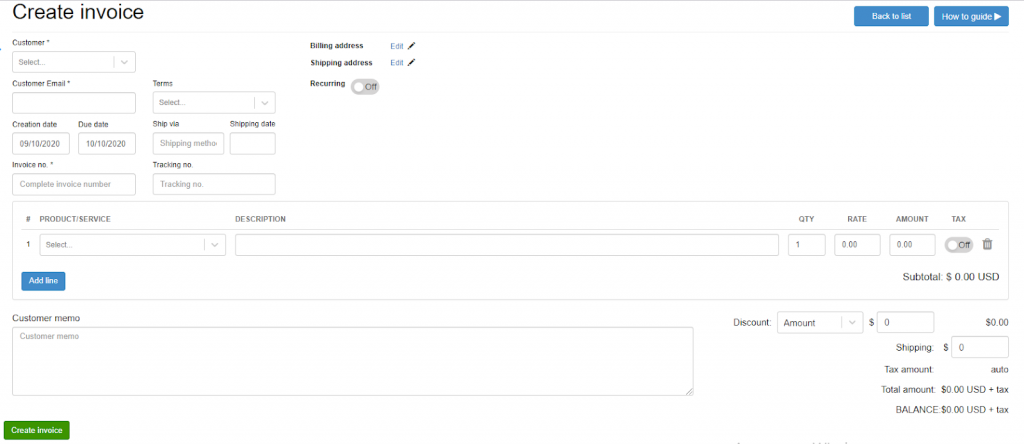
With Synder, invoices are created directly from your accounting system instead of a separate AR tool. You select customers from your accounting software, set payment terms, and add line items, discounts, shipping details, or notes. For recurring billing, invoices can be scheduled to generate automatically on a weekly, monthly, or annual basis.
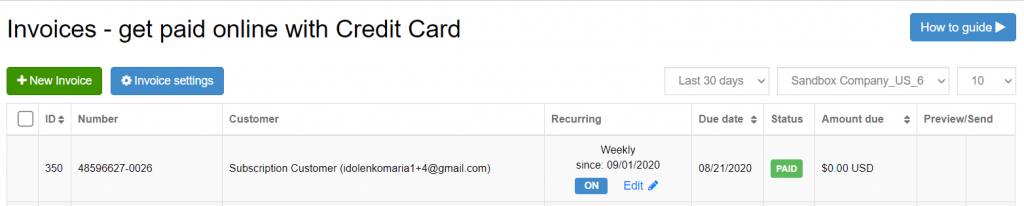
Invoices are sent by email with embedded payment links. Customers pay through a secure checkout using Stripe or Square, without additional portals or follow-up. All invoice details are visible at checkout, which reduces payment delays caused by clarification requests.
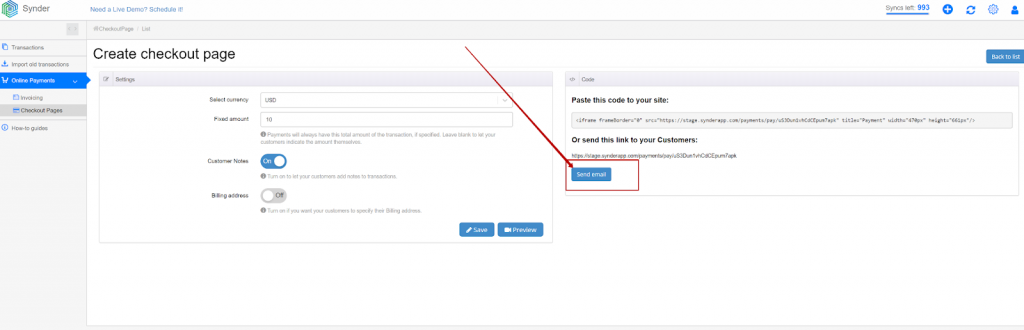
Ready to simplify AR and keep your numbers accurate as volume grows? Start a free Synder trial to automate AR workflows end to end, or book a demo to see how it fits your specific accounting setup.
How to automatically capture transactions from sales channels
Not all receivables start with an invoice. When sales happen on platforms like Shopify, Amazon, or Stripe, Synder pulls transaction data into your accounting system automatically, including customer details, products, pricing, taxes, fees, and payment method.
For ecommerce businesses, this removes the need to reconstruct AR from exports or settlement reports, which enables you to process over 150,000 records annually, eliminating more than 40 hours per month previously spent manually sorting and posting AR-related data.
How to apply payments and reconcile payouts automatically
Payments collected through Synder’s invoice links are applied to the correct open invoices in your accounting system automatically, including partial payments when applicable. Invoice statuses update without manual intervention.
For marketplace and processor payouts, Synder uses clearing accounts to mirror real cash movement. Sales post to clearing first, then settle when funds arrive from Stripe or PayPal. This keeps receivables, bank balances, and payouts aligned and eliminates guesswork during reconciliation, giving finance teams a real-time, accurate view of outstanding balances across all channels.
Choosing the right AR automation solution
The AR automation market ranges from simple invoicing tools to platforms that support the full order-to-cash lifecycle. When evaluating options, focus on whether the solution fits your existing systems, scales with transaction volume, and improves the customer payment experience.
- Integration capabilities: AR automation should fit into your current stack, not create another silo. Look for solutions like Synder that integrate natively with your accounting software, ecommerce platforms, and payment processors, so receivables data flows automatically without manual imports or reconciliations.
- Scalability and pricing structure: AR automation should scale predictably as your business grows. Some tools price per invoice or per user, which can become costly as volumes rise. Others base pricing on transaction volume, aligning costs more closely with actual usage. Platforms with tiered, volume-based pricing tend to work better for businesses that expect growth or seasonal spikes, allowing finance teams to automate more without constantly re-evaluating costs.
- Customer payment experience: The customer-facing side of AR matters just as much as internal efficiency. Payment friction such as limited methods, unclear invoices, or clunky portals, directly slows collections. Evaluate whether a solution supports modern payment options, mobile-friendly checkout, and clear invoice presentation. Software like Synder, for instance, enable invoice payments through embedded links that route customers to familiar payment processors, helping reduce delays without requiring customers to learn a new system.
Key benefits of automating accounts receivable
Finance teams that automate accounts receivable typically see improvements across speed, accuracy, and visibility.
Real-time AR visibility across platforms
AR automation keeps receivables data continuously up to date across all connected systems. Outstanding balances, invoice aging, and customer payment status are always current, without relying on spreadsheets or delayed manual updates. Finance teams can see exactly which invoices are unpaid, how long they’ve been outstanding, and the total receivables position at any moment.
This visibility is especially critical for ecommerce merchants and accountants supporting businesses that operate across multiple sales and payment channels, where AR data is often fragmented across systems. For example, firms using Synder can manage accounts receivable across 30+ platforms for their clients, saving approximately 10 hours per client each month.
Faster payment cycles
Automated invoicing happens immediately after a sale, removing delays caused by manual invoice creation. Payment reminders are sent on schedule without relying on memory or follow-ups. Research shows that 87% of businesses using AR automation report improvements in overall process speed, which translates into faster cash collection.
Fewer errors and disputes
Manual AR processes introduce risk through data entry mistakes, misapplied payments, and inconsistent follow-ups. Automation eliminates these issues by pulling data directly from source systems and applying consistent rules. Clear, accurate invoices reduce customer confusion and significantly lower the number of payment disputes.
More productive teams
When software handles invoicing, payment tracking, and reconciliation, finance teams can focus on higher-value work. Dermeleve, an ecommerce skincare brand, provides a clear example: its CFO manages accounting across four sales channels without additional staff. By automating AR, the company avoided $60,000–$72,000 in annual staffing costs while maintaining 99.5% reconciliation accuracy across more than 170,000 transactions.
Wrapping up: The strategic value of AR automation
AR automation brings structure to receivables as businesses grow more complex. By standardizing invoicing, payment tracking, and reconciliation, it keeps AR accurate across multiple channels and payment methods.
With real-time visibility into outstanding balances and payment behavior, finance teams can forecast cash flow more reliably and address collection issues earlier. Less time is spent correcting data, and more time is available for planning and analysis.
Solutions like Synder demonstrate how AR automation supports this shift by keeping sales, payments, and accounting systems aligned, resulting in more predictable cash flow and cleaner financial reporting.
FAQ
What is accounts receivable?
Accounts receivable is the money customers owe your business for goods or services delivered on credit. When you allow customers to “buy now, pay later,” the amount they owe appears as accounts receivable on your balance sheet until they complete payment.
Can you automate accounts receivable?
Yes, modern AR software like Synder can automate most receivables tasks including invoice generation, payment reminders, cash application, and reconciliation. The extent of automation depends on your business model and the platform you choose. Some companies automate end-to-end while others start with specific high-impact tasks.
How does AR automation work?
AR automation works by connecting your sales and accounting systems through software integrations. When a sale occurs, the automation platform generates an invoice, schedules payment reminders, processes payments, and updates your accounting records automatically. The system follows predefined rules and workflows without requiring manual intervention for routine transactions.
What’s the best accounts receivable automation software?
The best AR automation software depends on your business type and needs. Ecommerce businesses benefit from platforms like Synder that connect sales channels directly to accounting systems. Larger enterprises might need comprehensive solutions with advanced collections workflows and credit management. Evaluate options based on your existing software stack, transaction volume, and specific pain points.
Why should you care about AR automation?
AR automation directly impacts your cash flow and operational efficiency. Businesses using automation collect payments 23 days faster on average than those relying on manual processes. Beyond speed, automation reduces errors, frees up finance team capacity, and provides better visibility into receivables performance for more accurate forecasting.
What are the 5 C’s of accounts receivable management?
The 5 C’s are Character (customer payment history), Capacity (customer’s ability to pay), Capital (customer’s financial resources), Collateral (assets backing the credit), and Conditions (economic factors affecting payment). These criteria help businesses evaluate credit risk when extending payment terms to customers.
What is the 10 rule for accounts receivable?
The 10% rule suggests that no single customer should represent more than 10% of your total accounts receivable. This diversification protects your cash flow if one customer defaults or pays late. Concentrating too much AR with any single customer creates unnecessary financial risk.