

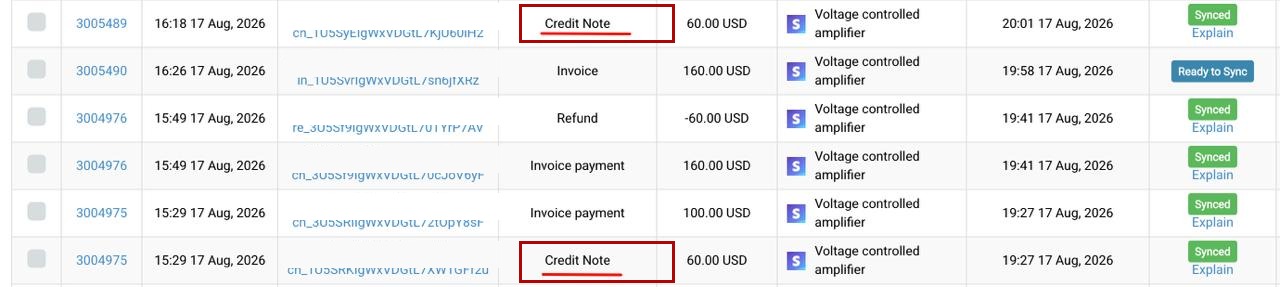
Stripe credit notes are how you reduce what a customer owes on an invoice — a post-sale discount, a partial cancellation, or writing off part of a bill. Synder now imports each Stripe credit note as its own transaction the moment it happens. It then keeps that credit note correct across the entire invoice lifecycle, so your books stay matched to Stripe without manual cleanup.
This guide explains what changed, the scenarios Synder now handles automatically, what you will see in the app, and how to turn the feature on for your organization.
What changed
Previously, Synder only picked up a Stripe credit note indirectly. It reached your books when the related invoice synced or when a payment came in. If the timing lined up differently — for example, a credit note issued after a partial payment — Synder could miss it entirely. The result was mismatched accounts receivable (AR) and income, invoices that would not close, and manual adjustments.
With the new behavior, Synder treats a credit note as its own transaction type. It imports that credit note the moment it happens in Stripe, independent of when the invoice or payment syncs. Synder also tracks the credit note through its whole life: if Stripe later voids the credit note, Synder removes it from your books too. Your AR and income stay aligned with Stripe automatically.
Scenarios Synder now handles automatically
Each of these used to require manual work or left your books out of sync. Synder now handles them for you:
- Credit note issued between invoice and payment — Synder imports it when it happens, not only if it exists at invoice-sync time.
- Credit note voided after it synced — Synder imports the void as its own event and removes the credit note from your books, so AR and income match Stripe.
- Credit note larger than the invoice’s remaining balance — Synder calculates it against the amount still due, so it applies cleanly and closes the invoice instead of failing.
- An invoice voided while a credit note is applied — Stripe auto-voids the credit note, and Synder reverses it in step with the invoice void, with no failed application.
- An invoice marked uncollectible, then voided or later paid — Synder keeps your books in step with Stripe’s current state at each event.
Synder also accounts for sync order. These events may reach Synder in a different sequence than they occurred in Stripe. Even so, the end state in your books is correct: Synder tracks all related transactions on the invoice and creates, deletes, or skips whatever is needed.
What you will see in Synder
Once your CSM enables the feature for your organization, a few things look different:
- A new transaction type on the Transactions page: Voided invoice — it represents a Stripe invoice void in your accounting.
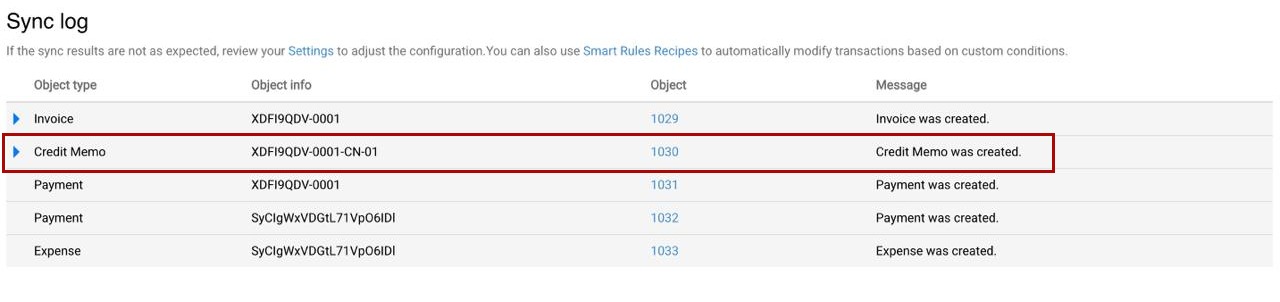
- The Sync log spells out rollbacks — during a sync that reverses earlier activity, you will see entries such as “Credit Note was deleted” and “Payment was deleted.” They let you follow exactly what Synder did along the timeline.
- In Revenue Recognition, a renamed transaction type — what used to appear as “Credit Memo” now appears as “Voided/Uncollectible Invoice.” It is the same object with a clearer name.
How it works with Revenue Recognition
Credit notes now participate in your revenue recognition schedule. Synder recognizes a customer-issued credit note as its own event. It posts the credit note in your books as it happens in Stripe, and it applies the effect on revenue using Synder’s core RevRec principle — adjust the future, not the past.
In practice, Synder never rewrites the recognition schedule for closed months. It applies any incoming change — a credit note, a void, or an uncollectible invoice that later gets paid — to future recognition periods. Across the full schedule, the totals reconcile to the current state in Stripe.
How the “Sync open invoices” setting affects this
Your Synder Sync open invoices setting determines how credit notes behave:
- Sync open invoices ON — credit notes and their changes (voids, updates) reflect as separate transactions the moment they occur. In RevRec, this matches invoice-date recognition, and all scenarios above apply.
- Sync open invoices OFF — credit notes reach your books when a payment (partial or full) arrives. In RevRec, this matches payment-date recognition. Stripe does not allow voiding, marking uncollectible, or crediting a fully paid invoice, so several of the scenarios above cannot occur.
Supported integrations
The feature works across QuickBooks Online, Xero, QuickBooks Desktop, and Summary Sync.
How to enable Stripe credit notes sync
This behavior is off by default, and it is not a self-serve setting — there is no toggle in your Synder account. It is available on Pro and Premium plans, and your Customer Success Manager (CSM) enables it per organization.
- If you would like Synder to sync Stripe credit notes this way, reach out to your CSM or contact Synder support to request it.
- When enabled, Synder starts importing credit notes on the next sync cycle. Synder does not duplicate credit notes that already exist in your books.
- If you later turn the feature off, previously imported credit notes and voids stay in your books — Synder removes nothing retroactively.
Related guides
- Understanding How Synder Syncs Transactions Paid Using Customer Balance
- How Synder Works With Canceled/Voided Stripe Transactions
- How to Track Refunds With Synder
- Synder RevRec: Refunds Categorization and Tracking
