.png)
There is a moment every finance professional knows all too well. You open your accounting system, see an invoice waiting to be paid, and your brain asks, are we sure this belongs here? Maybe the vendor name looks familiar, maybe the amount feels reasonable, yet there’s still that tiny pause before hitting approval. That pause exists for a reason.
Money movement has a way of testing your confidence. Payments come in, invoices pile up, and somewhere in between, you’re expected to keep everything accurate, defend every decision, and still keep operations running smoothly. That pressure is real, as according to industry surveys, around 60% of businesses cite cash flow management as an ongoing challenge. That is where invoice matching earns its real importance and why smarter, more automated approaches to it are becoming essential.
TL;DR
- Invoice matching checks whether invoices truly align with what was ordered and paid.
- Businesses use two-way, three-way, or four-way matching depending on control needs.
- Manual matching gets hard with timing gaps, platform fees, and duplicate documents.
- Synder automates matching invoices to payments and reduces manual work.
What is invoice matching?
Invoice matching is the practice of comparing an invoice with the documents and payment activity connected to it so you can confidently say, yes, this payment is correctly assigned. Think of invoice matching a bit like checking the bill at a restaurant before handing over your card. You glance to see if everything you ordered is actually there, nothing extra sneaked in, and the total makes sense. In finance, the same idea applies, only with much bigger consequences.
In day-to-day accounting, it helps ensure the business is paying for what it actually ordered, received, and approved, rather than relying on assumptions or memory. Done well, it reduces uncertainty, improves trust in numbers, and saves you from uncomfortable conversations later. And since not every business needs the same level of checking, there are different types of invoice matching, each suited to different levels of control and complexity.
Types of invoice matching explained
In practice, most companies rely on three main methods of invoice matching. Each one adds another layer of verification and control, moving from basic to very thorough. Let’s look at how two-way, three-way, and four-way matching differ and why each of them exists in the first place.
Two-way matching
Two-way matching is the most straightforward approach. Compare the invoice with the original purchase order and ensure that details such as amounts, quantities, vendor information, and agreed-upon terms align. If the two documents match, the invoice can be approved.
This method works well for predictable purchases, trusted vendors, and lower-risk transactions where you simply need confirmation that the billed amount reflects what was originally agreed upon. When physical delivery, more variables, or higher risk enter the picture, finance teams usually move beyond two-way matching to add another layer of certainty.
Three-way matching
Three-way matching adds one more checkpoint to the process. Instead of only comparing the invoice with the purchase order, you also verify it against a receiving document or goods receipt. In other words, you’re not only checking what was agreed and what was billed, but also confirming that the product or service was actually delivered.
Three-way matching is especially useful when physical items are involved or when there’s a higher chance of discrepancies between ordering, delivery, and billing. It helps prevent situations where the business pays for something that never arrived or arrived in a different quantity than expected.
Four-way matching
Four-way matching takes the same idea a step further. Along with the purchase order, invoice, and receipt of goods or services, you also verify quantity or quality approval, usually from a warehouse, operations team, or responsible department.
This method is typically used in industries where controls need to be very tight, where compliance matters, or where even small discrepancies can become expensive. It gives you strong assurance that the business received the right thing, in the right amount, with the right approval, before money leaves the account.
Common challenges in manual invoice matching
Manual invoice matching often sounds doable in theory, but in real accounting work, it rarely stays neat. The moment you combine real vendors, real timing differences, and real people, things may get messy fast.
Here’s what usually goes wrong in practice:
- Different versions of the truth. The purchase order says one thing, the invoice reflects another, and the warehouse confirms something slightly different. You spend time figuring out which document deserves to be believed.
- Partial deliveries and split payments. Vendors ship in batches or get paid in portions, and suddenly one invoice is connected to several payments or vice versa. Matching stops being “compare A to B” and becomes Sherlock Holmes’ work.
- Platform-driven complications. Marketplaces, payment processors, and subscription systems introduce fees, holds, reserves, and adjustments. Trying to manually reconcile those with invoices quickly becomes exhausting.
- Duplicate or slightly changed invoices. Vendors resend invoices with small edits, revised dates, or updated amounts. Now you need to be sure you aren’t paying twice or approving the wrong version.
- Audit trail anxiety. When matching lives in inboxes, PDFs, and memory, explaining a payment later becomes uncomfortable. You know it was handled correctly, but proving it for audits, compliance, or internal reporting takes effort.
When everyday work starts looking like this, relying only on manual matching feels risky and too dependent on individual attention. That’s why a tool-assisted way to match invoices to payments begins to make much more sense, especially inside QuickBooks, one of the most popular accounting platforms in the US. Let’s see how Synder, an accounting automation software, streamlines this process.
How to match invoices to payments in QuickBooks (with Synder)
QuickBooks is where many businesses manage their daily accounting, so matching invoices to payments there matters a lot. Synder helps make this process more reliable and easier to handle, so you aren’t constantly fixing connections manually. See how payment matching works across platforms.
Step 1. Enable automatic matching in Synder
In the Synder settings, turn on Apply payments to unpaid Invoice/Bill transactions. This tells Synder to search for open invoices in QuickBooks and automatically match payments to them when possible.
Step 2. Make sure invoices exist and are visible to Synder
Synder matches payments based on customer identity, such as name or email. When a payment arrives, it searches for unpaid invoices linked to that customer in QuickBooks. If a suitable invoice exists, the payment is applied instead of being recorded as standalone income.
For Shopify and Stripe integrations, Synder can also sync unpaid invoices into QuickBooks before payment. But this option is not available for all integrations. In other cases, invoices must already exist in QuickBooks for matching to work. Uploading invoices via Google Spreadsheets is possible, but this is a separate method used only when needed and not required for typical sales platform integrations.
What happens when no invoice is found
If no matching invoice exists, Synder can create a sales receipt in QuickBooks so the transaction is still recorded correctly. If you prefer not to post anything without a matching invoice, you can change the settings to stop Synder from creating new documents automatically.
Handling multiple invoices and corrections
When several unpaid invoices exist for the same customer, Synder applies the payment to the oldest open invoice. If that is not the correct one, you may need to review the customer’s invoices in QuickBooks and adjust them before resyncing the payment. Thus, it ensures payments close the right balances and keeps invoice aging accurate.
Ready to stop manually matching invoices to payments? Try Synder for free or book a demo to see how your invoices, payments, and reconciliations connect automatically.
Best practices for successful invoice matching
Invoice matching works best when the process is clear, predictable, and easy to follow, even on busy days. With the right structure and automation in place, you get fewer surprises, faster decisions, and financial records you feel confident working with.
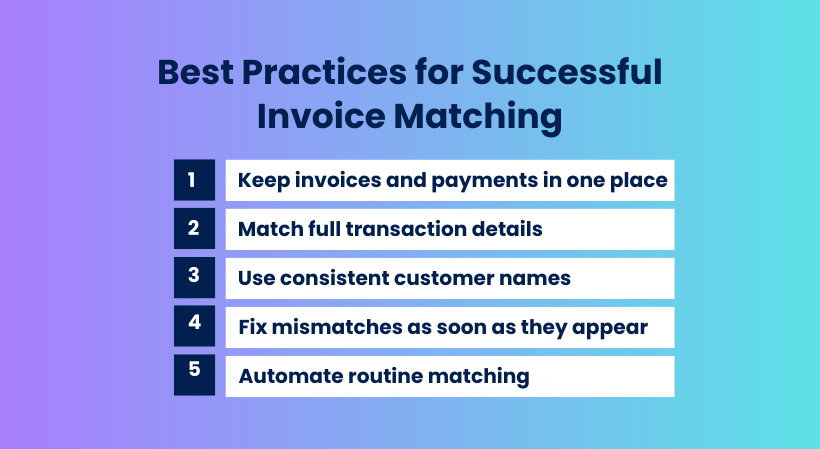
- Keep invoices and payments in one place. Use systems like Synder because with their help, everything flows into a single accounting environment where you actually see what happened with money movement.
- Match full transaction details. Automation reads all details correctly, so you don’t have to keep explaining to yourself why a number feels off.
- Use consistent customer names. Consistent names and references give automation enough clarity to confidently match payments to the right invoices instead of sending you another manual rescue mission.
- Fix mismatches as soon as they appear. Automated systems catch issues early, letting you fix them calmly instead of spending a painful afternoon untangling them later.
- Automate routine matching. When a tool automatically applies payments to the right invoices and flags only questionable situations, your work turns into a thoughtful review instead of repetitive matching.
Conclusion
Invoice matching plays a huge role in how confident you feel about your numbers. When payments clearly connect to the right invoices, your records stop feeling like something you constantly need to defend and start feeling like a reliable picture of what truly happened.
Whether you deal with split payments, multiple platforms, subscription activity, or a growing transaction volume, having a structured and automated approach makes the work calmer and far more sustainable. Synder helps bring payments and invoices together in a way that feels natural rather than exhausting, so your team can focus on decisions instead of endless verification.
FAQ
What are the benefits of the invoice matching process?
Invoice matching helps prevent overpayments and duplicates, supports cleaner financial records, reduces disputes with vendors, and makes audits far less stressful. On a daily level, it simply gives you confidence that what you’re paying truly reflects what the business received and agreed to.
How are purchase orders associated with invoices?
In most workflows, the purchase order is the “promise” and the invoice is the “request for payment”. The purchase order defines what was ordered, at what price, and under what terms. The invoice arrives later and should reflect that agreement. When invoice matching is in place, the invoice is compared to the purchase order and, in some cases, to delivery confirmations as well, so you can see whether everything lines up before money leaves the account.
How often should invoice matching be done?
The best rhythm depends on the volume of transactions and how fast your business moves. Many companies handle matching as part of regular accounts payable work rather than saving it for the month-end. The closer the process is to real-time, the fewer surprises you face later. Automation helps here because it makes matching continuous instead of occasional.