.png)

Integrating Klarna as a payment gateway lets your customers pay in installments while you receive immediate payment. Klarna serves over 180 million active users globally, making it one of the most recognized Buy Now, Pay Later (BNPL) payment methods worldwide. For business owners managing accounting processes, understanding how Klarna integration affects your books is just as important as offering the payment method itself.
This article explains how Klarna payment gateway integration works, what technical setup you’ll need, and how to sync Klarna transactions with your accounting software. You’ll learn practical steps to add Klarna payment options and maintain clean financial records.
TL;DR
- Klarna is a Buy Now, Pay Later payment method that is most commonly added to ecommerce checkouts through existing payment gateways like Stripe, PayPal, Adyen, or Square.
- When enabled through a gateway, Klarna runs on the same processing, settlement, and payout infrastructure as your other payment methods, but introduces distinct fees, refund rules, and payout structures.
- Different integration options (gateway-based, native platform plugins, or direct API) affect how much control you have over the checkout experience and how Klarna data flows downstream.
- From an accounting perspective, Klarna payments routed through gateways don’t automatically translate into clean accounting entries, especially when payouts bundle sales, fees, and refunds together.
- Synder connects Klarna payment gateway activity to accounting systems by importing settlements, breaking them into sales, fees, refunds, and adjustments, and reconciling payouts automatically across QuickBooks, Xero, Sage Intacct, NetSuite, and Puzzle.
What is Klarna as a payment gateway?
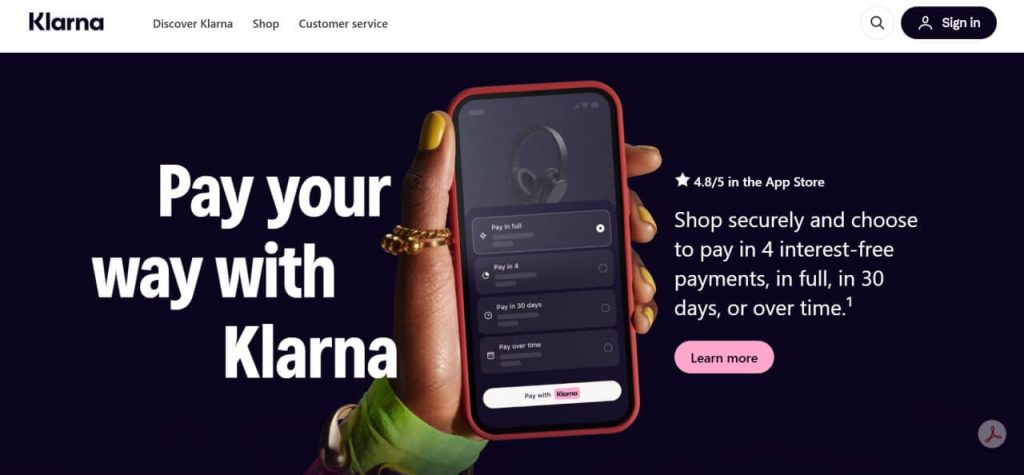
Klarna is a payment service provider that operates between your customer and your business, allowing shoppers to pay later or split purchases into installments at checkout while you receive the full order value upfront, minus Klarna’s fee, on a regular payout schedule.
Klarna handles financing, repayment, and customer risk, while merchants receive authorized transactions without managing credit or collections. Operationally, it behaves like a payment gateway, with bulk settlements and refunds flowing through standard payment workflows.
Why merchants use Klarna
The appeal goes beyond offering another payment method. According to recent studies, Klarna changes how customers commit to a purchase, which can directly affect sales performance.
- Higher conversion rates by reducing upfront payment friction: Klarna increases merchant conversion rates by 20-30%.
- Larger average order values as customers are more comfortable spending more: Studies show BNPL can increase average order values, and BNPL results in a higher average order value than when customers use other payment methods.
- Lower purchase hesitation, especially for higher-priced or first-time buys: 64% of merchants report a drop in cart abandonment rates after implementing Klarna.
- No credit risk or repayment management on your side: Klarna assumes the credit risk and handles all payment collection, protecting you from customer defaults.
- Faster cash flow, since you’re paid upfront even when customers pay over time – Merchants saw an average 27% boost in revenue after Klarna integration, driven by higher conversions and customer loyalty.
For many businesses, Klarna turns flexible payments into a growth lever, so long as the increased sales outweigh the processing fees and settlement structure.
Technical requirements for Klarna integration
Before integrating Klarna, make sure your setup meets the following requirements:
- Business eligibility: Your business must operate in a country supported by Klarna and pass merchant verification, which includes providing standard business documentation during onboarding.
- Secure checkout environment: Your ecommerce store must use HTTPS with a valid SSL certificate. Klarna requires a secure checkout to process payments, which most modern platforms support by default.
- Required customer data: Your checkout must collect customer email addresses and shipping details, as Klarna uses this information for payment authorization and customer communication.
- Transaction identification: Klarna transactions must be clearly identifiable in your systems, including the gross sale amount, fees, refunds, and applicable taxes. This becomes especially important during the first reconciliation cycle, when integration gaps often appear.
And now you’re ready to integrate.
Klarna payment gateway integration
Klarna can be integrated into your checkout in three primary ways. Each option determines how Klarna connects to your payment flow, how much control you have over the experience, and how complex the setup is.
Integrating Klarna through an existing payment gateway
The most common approach is enabling Klarna through a payment gateway you already use, such as Stripe, Adyen, PayPal, or Square. In this setup, Klarna becomes an additional payment method inside the gateway rather than a separate integration.
Activation typically happens directly in the gateway dashboard. Once enabled, Klarna payments follow the same processing, settlement, and payout infrastructure as your other payment methods.
This option minimizes setup time and keeps payment routing centralized. However, gateways usually expose only Klarna’s standard payment options, such as Pay in 4 or Pay in 30 days. More advanced Klarna features or custom payment logic may not be available through the gateway layer.
Native ecommerce platform Klarna integrations
Many ecommerce platforms offer built-in Klarna integrations that connect Klarna directly to your store. Platforms like Shopify, WooCommerce, BigCommerce, and Magento provide native plugins that handle the technical connection.
The setup typically includes:
- Klarna merchant account approval
- API credentials from the Klarna portal
- Selection of supported Klarna payment methods
- Testing before production launch
This approach removes the need for custom development and ensures Klarna appears natively in the checkout experience. Payment authorization and order data flow directly between Klarna and the ecommerce platform, independent of any external payment gateway, and is typically used by larger businesses with dedicated engineering teams and specific product or UX requirements.
Direct Klarna API integration
For businesses with custom storefronts or highly customized checkout flows, Klarna offers direct API integration. This option provides full control over payment presentation, authorization logic, and user experience.
A direct integration requires:
- Custom checkout and payment form development
- Secure authentication and session handling
- Webhook processing for payment status updates
- Ongoing maintenance as Klarna APIs evolve
Once Klarna is integrated, the next consideration is how it charges for those transactions and how that structure affects your financial records.
Testing your Klarna integration before going live
Before going live, testing ensures Klarna payments sync correctly to your accounting system, fees are handled as expected, and payouts reconcile cleanly. Catching issues early prevents reporting errors and manual fixes later.
Step 1: Enable test mode: Use Klarna’s sandbox or test credentials (either direct or via your payment processor) to simulate real payments without affecting live data.
Step 2: Place a full test order: Create a test purchase using Klarna, including taxes and shipping. Confirm the order appears correctly in your ecommerce platform and in your accounting software. Verify amounts, fee categorization, and totals.
Step 3: Test refund scenarios: Issue both a full refund and a partial refund for a test order. Check how refunds are recorded in your accounting system and confirm whether Klarna processing fees are reduced or retained. This step often reveals fee-handling details that impact refund policies and margins.
Step 4: Validate accounting sync timing: If you’re using accounting automation, place a test order and track how long it takes to appear in your accounting software. Confirm that all components sync correctly: sales, fees, taxes, and refunds.
Step 5: Run a test reconciliation: Process multiple test transactions and attempt to reconcile a Klarna payout. If matching payouts to accounting entries requires manual investigation during testing, adjust your categorization rules or integration settings before going live.
Once testing confirms that Klarna payments flow correctly through checkout, refunds, and payouts, the next step is making sure those transactions are recorded accurately in your accounting system.
Klarna fee structure and accounting implications
Understanding Klarna’s fee structure is necessary for accurate financial tracking. The payment gateway typically charges a flat fee per transaction plus a percentage of the sale amount. The exact rates vary by country, payment method, and your sales volume, but in the US, you’re generally looking at around 3.29% plus $0.30 per transaction for standard payment plans.
Different Klarna payment methods carry different fees. “Pay in 4” installments usually have one rate, while “Pay in 30 days” or longer financing options might have different pricing. These fee variations need separate categorization in your accounting software so you can accurately track your true payment processing costs.
When Klarna processes a customer payment, you receive the full sale amount minus their fees. This creates an accounting scenario where your gross sales, fees, and net revenue need proper recording. If you’re manually entering transactions, you’ll record the sale at full price, then record Klarna’s fee as a separate expense. If you’re using automated sync tools, the system should handle this categorization for you.
| Payment method | Typical fee structure | Settlement time | Accounting category |
| Pay in 4 | 3.29% + $0.30 | 1-2 business days | Sales revenue, processing fees |
| Pay in 30 days | 3.29% + $0.30 | 1-2 business days | Sales revenue, processing fees |
| Financing | Varies by term | 1-2 business days | Sales revenue, higher processing fees |
| Pay now | Lower rate (varies) | 1-2 business days | Sales revenue, processing fees |
Refunds add another layer of complexity. When you refund a Klarna payment, the customer gets their money back according to the payment method they chose, but you don’t always get Klarna’s processing fee returned. Your accounting needs to reflect both the revenue reversal and any non-refundable fees that remain as expenses.
Connecting Klarna payments to your accounting software
Once Klarna is enabled at checkout, getting those payments into your accounting system becomes the real challenge. Klarna transactions don’t automatically sync to your accounting software, like QuickBooks or Xero, even when Klarna is enabled through Stripe or another processor. This often forces teams into manual exports, data formatting, and repeated imports.
Accounting complexity increases due to:
- Mixed transaction types (sales, fees, refunds, chargebacks)
- Installment payments that must still be recorded as full revenue upfront
- Klarna fees that are usually not refunded when a sale is refunded
- Payouts that bundle multiple transactions into a single deposit
Without automation, these factors make reconciliation time-consuming and error-prone, especially as transaction volume grows.
How Synder handles Klarna payments
Synder is an accounting automation platform that connects over 30 payment gateways and ecommerce platforms to QuickBooks, Xero, Sage Intacct, NetSuite, or Puzzle, preparing sales data so it’s accurate, categorized, and reconciliation-ready before it reaches your books.
When it comes to Klarna, Synder automatically imports Klarna settlement payouts and converts each payout into a fully detailed sales receipt in your accounting system. Each entry reflects actual revenue, Klarna processing fees, refunds, adjustments, and the final bank deposit amount.
Instead of manual CSV exports and repeated reconciliation work, Synder connects directly to Klarna via API and breaks down every settlement automatically:
- Klarna sales and refunds are posted to revenue (including negative entries for returns)
- Klarna processing fees are recorded as expenses
- Holdbacks, releases, and adjustments are tracked separately and categorized correctly
Because the sales receipt total always matches the actual bank deposit, reconciliation in your accounting software is immediate, with no manual adjustments needed. Each entry includes the Klarna settlement reference, creating a clear audit trail from bank deposit back to the original payout.
For teams with more complex requirements, Smart Rules let you apply custom categorization logic based on product type, location, tax jurisdiction, or any chart-of-accounts structure you need.
This automation is especially valuable for multi-channel businesses. For example, Dermeleve, selling across Shopify, Amazon, wholesale, and Walmart, uses Synder to automate accounting across all payment methods, including Klarna. Their CFO independently manages over 170,000 transactions with 99.5%+ reconciliation accuracy, saving an estimated $60,000+ annually in deferred staffing costs.
Ready to automate your Klarna accounting? Start your free trial to see how Synder handles Klarna payments automatically, or book a demo with our team to discuss your specific integration needs.
Common integration challenges and solutions
Even with the right tools in place, businesses encounter recurring issues when connecting Klarna to their accounting systems. Here’s how to address the most common problems:
| Challenge | Solution |
| Incorrect fee categorization | Set up a separate expense account for Klarna fees instead of mixing them with general expenses. Synder automatically maps Klarna fees to the correct accounts, keeping fee reporting consistent across payment methods. |
| Tax reporting across multiple jurisdictions | Klarna doesn’t split sales and tax automatically, so tax needs to be allocated correctly. Synder’s Smart Rules categorize sales tax by state or jurisdiction, recording both revenue and tax accurately. |
| Payout timing reconciliation | Klarna pays out in lump sums that may cover multiple days of sales. Synder uses clearing accounts to track pending payouts and matches them to bank deposits when funds arrive. |
| Multi-currency transaction tracking | International Klarna sales require accurate currency tracking. Synder captures currency details per transaction and tracks conversions automatically across supported currencies. |
To sum up
Integrating Klarna through a payment gateway centralizes Buy Now, Pay Later alongside your existing payment methods and simplifies checkout management. Whether Klarna is enabled via Stripe, PayPal, Adyen, or another gateway, the integration path determines how payments are processed, settled, and reported.
Once Klarna flows through a gateway, Synder ensures those payments are recorded correctly in accounting by importing settlements, separating sales, fees, refunds, and adjustments, and reconciling payouts automatically. This keeps Klarna activity consistent with the rest of your payment stack as transaction volume grows.
FAQ
Is Klarna a payment gateway?
Yes, Klarna functions as a payment gateway that processes customer payments and transfers funds to merchants. It offers buy now, pay later options alongside traditional payment processing, making it both a payment method and a payment service provider.
How do I integrate Klarna with my online store?
Integration methods vary by platform. Most ecommerce platforms like Shopify and WooCommerce offer native Klarna plugins you can activate in your admin panel. Alternatively, you can integrate through payment processors like Stripe or use Klarna’s direct API for custom implementations. Once integrated, tools like Synder can automatically sync Klarna transaction data to your accounting software.
Can I use Klarna with Stripe?
Yes, Stripe includes Klarna as a payment method you can enable in your Stripe dashboard. This lets you offer Klarna payment options while managing all transactions through your existing Stripe account and workflows.
How are Klarna fees calculated?
Klarna typically charges merchants a percentage of the transaction amount plus a flat fee. In the US, standard rates are around 3.29% + $0.30 per transaction, though rates vary by payment method, country, and sales volume.
What happens to Klarna fees when I issue a refund?
When you refund a Klarna payment, the customer receives their money back, but Klarna typically keeps the original processing fee. This means you bear the cost of the processing fee even on refunded transactions.
How do I track Klarna transactions in QuickBooks?
You can manually export Klarna transaction data and import it into QuickBooks, or use accounting automation software like Synder to automatically sync transactions from your payment processor to QuickBooks with proper categorization.
Does Klarna integration work with Xero?
Yes, Klarna transactions can be recorded in Xero either through manual data import or through automated sync tools that connect your payment platforms to Xero and categorize transactions automatically.