

Walmart charges sellers several types of fees, including referral commissions, Walmart Fulfillment Services (WFS) fees, and various reimbursements or adjustments. This guide explains Walmart fee types, how Synder handles them, and how to ensure accurate bookkeeping.
Key point: Synder syncs Walmart US fees automatically. Walmart Canada fees are not synced and must be recorded manually. See the Walmart Canada Clearing Account Reconciliation Guide for details.
Walmart Fee Types
Walmart groups fees into three main categories in the Payments Report (Walmart Seller Center > Payments > Download > Payments Report). Check the Amount Type column:
- Commission on product (referral fee)
Walmart’s per-item commission, calculated as a percentage of the sale price. Rates vary by category (typically 6%–20%). Applies to every sale. - WFS Inventory Fee (Walmart Fulfillment Services)
Charged for WFS (Walmart’s FBA equivalent). Includes pick/pack/ship and storage fees. Only for WFS-enrolled sellers. - Fee/reimbursement
Catch-all for adjustments, returns, disputes, and promos. Can be positive (reimbursement) or negative (charge).
How Synder Processes Walmart Fees
Walmart US (Per Transaction Sync)
Synder auto-syncs sales, refunds, and fees once settled by Walmart.
- Fees may appear as pending transactions until Walmart settles (up to 14 days).
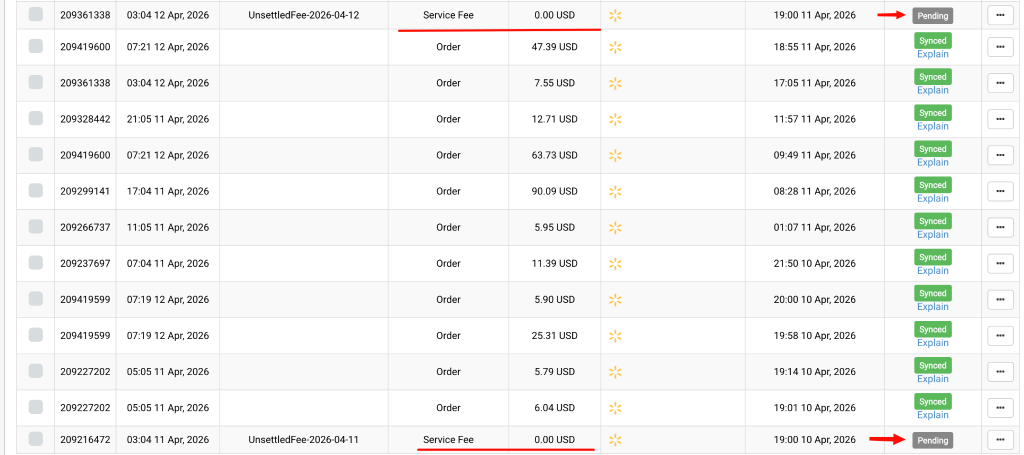
- Post-settlement, they sync as separate expense transactions in your configured Fee Account.
Set the Fee Account:
- Go to Synder > Settings > select Walmart integration.
- Under Fees, choose the expense account (e.g., “Walmart Fees”).
- Save.
Walmart US (Daily Summary Sync)
Fees depend on settlement:
- Unsettled fees leave summaries in Partially fetched status since individual transactions remain under a pending status, pre-settlement.

- Post-settlement, Synder fetches and includes them in the daily journal.
Walmart Canada
No auto-sync. Manual process:
- Download the Payments Report from Seller Center.
- Filter Amount Type for: Commission on product, Fee/reimbursement, WFS Inventory Fee.
- Sum amounts for the period.
- Journal entry: Debit Walmart fees expense; credit Walmart clearing account.
See full steps in the Walmart Canada Reconciliation Guide.
Common Questions
- Why no fees in books?
Check Fee Account mapping (unconfigured = netted against income). Per Transaction shows individuals; Daily Summary bundles them. - Clearing account won’t reconcile?
Walmart is sales-only—no auto-payouts. Record manually as bank transfers. See Walmart USA Clearing Account Reconciliation Guide. - Marketplace facilitator taxes = fees?
No—taxes are separate (Walmart collects/remits). See How Taxes Withheld by Walmart Are Processed. - WFS fees synced differently?
Synced like others under Fee Account. For separation, use Smart Rules/manual adjustments—no auto-splitting. - Fee type breakdown in Synder?
Synder syncs totals only. Use Walmart’s Payments Report for details.
Related Articles
Reach out to Synder Team via online support chat or email with any questions you have – we are always happy to help you!
