
Ecommerce accounting is bookkeeping for a business selling across several online channels, and it starts with platform deposits instead of a cash total. In a shop, the day’s till total equals the day’s deposit. A Shopify payout, an Amazon settlement, and a Stripe transfer never do, because the platform took its cut first.
Rebuilding gross sales out of those deposits is the real work, and it grows with the business. U.S. retail ecommerce sales reached $326.7 billion in Q1 2026, 16.9% of all retail sales, as the U.S. Census Bureau reported in May 2026, and sellers chasing that growth add channels faster than accounting capacity. Each new channel brings its own fees and payout schedule.
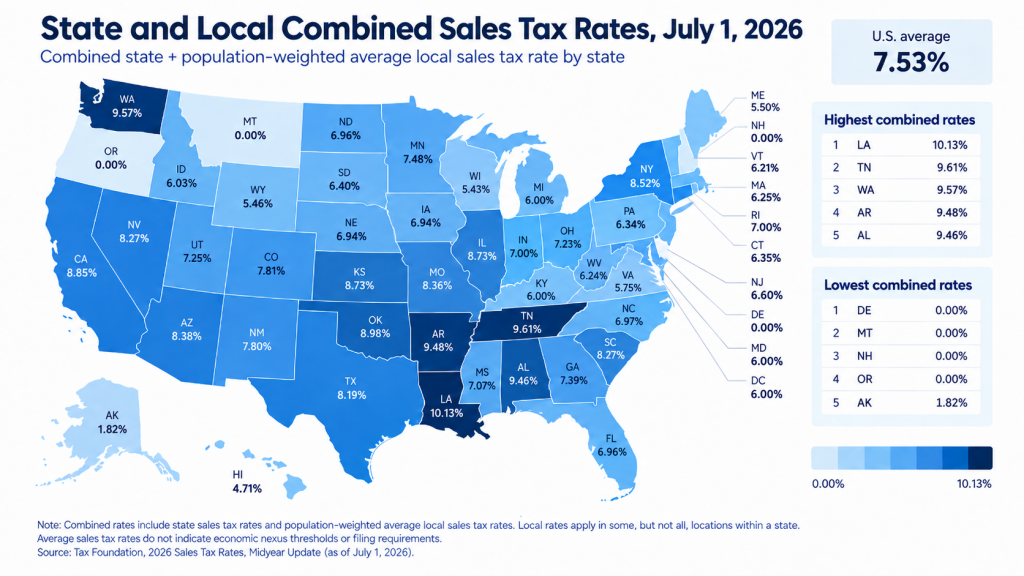
Sales tax gets calculated on those same rebuilt numbers. According to the Tax Foundation, as of July 2026, 45 states charge a state-level sales tax, and 38 allow local add-ons, averaging 7.53% combined and reaching 10.13% in Louisiana. What you owe comes off gross sales, not off the deposit.
This ecommerce accounting guide follows that order: get the books set up, track fees and COGS by channel, then read the margins built on them.
TL;DR
- Ecommerce accounting separates gross sales, marketplace fees, processor fees, refunds, inventory, and sales tax payable into their own accounts.
- Channel-specific clearing accounts keep each platform’s payouts traceable, because every channel posts to the general ledger differently.
- Automated syncing handles import and categorization, and reconciliation tools match clearing-account lines against the platform’s own records. Reviewing whatever gets flagged as a discrepancy is the human step.
- Accrual accounting is required once you carry inventory. Cash accounting shows only what moved through the bank.
- The balance sheet, income statement, and statement of cash flows answer different questions about financial health.
- Gross margin, contribution margin, CAC, AOV, inventory turnover, and ROAS depend on accounting inputs. Wrong COGS or uncategorized fees distort them.
What is ecommerce accounting and why it matters for business owners?
Ecommerce accounting separates each online transaction into the financial entries that belong in the books: gross sales, marketplace and payment processing fees, refunds, chargebacks, sales tax, inventory and cost of goods sold, and transfers to the bank. Each entry is recorded in the general ledger, which becomes the source for the business’s financial statements and management reporting.
When you book the deposit instead of its components, revenue, fee expense, gross margin, and sales tax liability go wrong together, and they stay wrong in the same direction every month until someone rebuilds the entries. That is why accounting for ecommerce is treated as its own discipline.
Bookkeeping vs. accounting: what’s the difference?
Bookkeeping is the daily work of recording transactions and reconciling them to bank statements and platform payouts. Accounting builds on that data: financial reporting, tax compliance, analysis, and forecasting. Clean bookkeeping is the prerequisite. An owner who cannot trust the bookkeeping cannot trust a single number in the reports built on top of it.
How ecommerce accounting differs from traditional business accounting
Ecommerce accounting differs from traditional business accounting in six places: sales channels, revenue recognition, fees, inventory, sales tax, and cash timing. The table below shows what each difference costs an owner who ignores it.
| Aspect | Ecommerce accounting | Traditional business accounting | What it costs you if you get it wrong |
| Sales channels | Multiple channels, each with its own report format | One or two stable channels | No reliable per-channel margin |
| Revenue recognition | Gross sales must be rebuilt from net payouts | Till total equals deposit | Revenue understated by the full value of fees |
| Fees | Referral, fulfillment, processing, and chargeback fees across platforms | One merchant account fee line | Expenses buried inside revenue |
| Inventory | SKU-level across warehouses, FBA, and dropship | Stable stock in one location | COGS and gross margin both wrong |
| Sales tax | Multistate nexus, marketplace facilitator rules | One jurisdiction | Penalties, back taxes, and interest |
| Cash timing | Payout lags, rolling reserves, 14-day settlements | Same-day settlement | Cash-flow forecasts that miss by weeks |
| Why this matters now: ecommerce sales grew 12.2% year over year in Q2 2026 while total retail grew 6.7% (U.S. Census Bureau). Channel count, fee complexity, and tax exposure scale with that growth, and accounting in ecommerce is the only system that tells an owner whether the growth is profitable. |
How to set up ecommerce accounting from scratch
Setting up ecommerce accounting takes eight steps, in order: separate the bank account, pick the method, choose software, build the chart of accounts, register for tax, connect inventory, organize documents, and schedule reviews. Here’s how to do accounting for ecommerce business owners starting from zero.
Step #1. Set up a business bank account
Open a dedicated business bank account to keep personal and business finances separate. This simplifies accounting, tax preparation, and financial management.
Step #2. Choose your accounting method
Choose cash or accrual accounting before you configure anything else, because the choice determines how software records every transaction afterward. If you hold inventory, accrual is effectively the answer. If you sell services or digital goods with no stock, cash accounting may be enough. The full comparison is below, including a decision table by business profile.
Step #3. Choose and set up accounting software
Evaluate accounting software against four criteria instead of feature lists: how many sales channels it connects to natively, whether it records order-level or summary-level data, how it handles multistate sales tax, and whether it supports the inventory method you need. QuickBooks Online, Xero, Sage Intacct, and NetSuite serve as the general ledger; the difference for online sellers is what reaches that ledger and in what shape. Those four criteria describe the accounting ecommerce sellers need, instead of the feature list a vendor leads with.
Your books don’t import marketplace data on their own, so multichannel sellers add a sync layer between the sales platforms and the ledger. Tools such as Synder connect 30+ sales and payment platforms and post categorized transactions into seven accounting destinations: QuickBooks Online, QuickBooks Desktop, Xero, Sage Intacct, NetSuite, Intuit Enterprise Suite, and Puzzle.
The effect shows up in time, cost, and accuracy. Dermeleve sells through Shopify, Amazon, wholesale, and Stripe, syncs 170k+ transactions automatically, holds 99.5%+ reconciliation accuracy across all four channels, and defers $60,000+ a year in accounting staffing costs.
Synder has allowed me to remain independent in my role and accomplish more things in less time. Before, I would have had to hire additional staff at a cost of $5,000-$6,000 a month to help me operate the accounting department. By cutting out data entry, we’re saving on labor costs while improving efficiency by removing the errors.
Andy Pozniak, CFO at Dermeleve
Step #4. Establish your chart of accounts
A chart of accounts is the list of every account that makes up the financial records of the business. Create one before you record a single transaction.
This should include categories for assets, liabilities, equity, income, and expenses tailored to the specific needs of your ecommerce business.
A workable ecommerce chart of accounts includes, at minimum:
| Account type | Accounts to create |
| Assets | Business checking account; inventory asset account; one payment processor clearing account per channel (Shopify, Amazon, Stripe, PayPal, eBay) |
| Liabilities | Sales tax payable account; gift card liability; accounts payable |
| Income | Gross sales by channel; shipping income; discounts and refunds (contra-revenue) |
| COGS | Product cost; inbound freight; fulfillment and shipping cost |
| Expenses | Marketplace fees; payment processing fees; advertising; software |
Set an opening balance for each account on the date you go live, so the first reconciliation has something to reconcile against. The channel-specific clearing account is the part sellers skip and later regret. Each platform’s deposits post to its own clearing account, so any balance left there is an unreconciled amount you can trace to one channel.
Step #5. Understand ecommerce tax obligations
Keep up to date with the tax obligations specific to ecommerce businesses, including income tax, sales tax, and any other relevant taxes.
Understand the sales tax requirements in the jurisdictions you operate in and set up your ecommerce platform to collect the correct amount of sales tax from customers.
Consider consulting with a tax professional or accountant specializing in ecommerce to ensure compliance and optimize your tax situation.
→ Learn how Synder simplifies tracking taxes and sales by countries and states.
Step #6. Implement an inventory management system
An inventory management system is a must-have if your business involves selling physical goods.
This system should track product quantities, sales, returns, and reorder levels and, ideally, integrate with your accounting software for real-time financial insights.
Step #7. Organize your receipts and invoices
Develop a system for organizing and storing all business-related receipts and invoices.
This could involve digital storage solutions that integrate with your accounting software, ensuring that all financial documents are easily accessible and properly categorized.
Step #8. Schedule regular financial reviews
Establish a routine for reviewing your financial statements, including profit and loss statements, balance sheets, and cash flow statements. Regular reviews keep you informed about your business’s financial health and support data-driven decisions.
Cash vs accrual accounting for ecommerce
The accounting method you choose determines when sales and expenses appear in your books, which can significantly affect your reported profit from month to month. Ecommerce businesses typically use one of three methods: cash, accrual, or hybrid accounting. Here’s how each handles sales, payouts, expenses, and inventory.
Cash-basis accounting
Cash-basis accounting records revenue when money reaches the bank account and expenses when they’re paid. Accrual-basis accounting records revenue when the order ships and expenses when they’re incurred, regardless of payout timing. For accounting for ecommerce sellers, the difference shows up immediately in the numbers.
Take a Black Friday example. You sell $80,000 on November 27. Shopify pays out $77,600 on December 2; Amazon settles its share on December 9. Under cash accounting, part of November’s revenue is recorded in December, and your November P&L understates the month. Under accrual accounting, the $80,000 is November revenue, the fees are November expenses, and the outstanding payout is a receivable on the balance sheet.
Accrual accounting
Accrual accounting also introduces two accounts cash accounting does not use. An accrued expense records a cost you’ve incurred but not yet paid, such as December fulfillment billed in January. Deferred revenue records cash you’ve collected but not yet earned, which is what an annual subscription or an unshipped pre-order creates. Both appear on the balance sheet alongside accounts receivable and accounts payable.
Inventory works the same way. Buy $30,000 of stock in September and sell half in October: cash accounting shows a $30,000 September expense and an unnaturally profitable October, while accrual accounting moves $15,000 to COGS in October and leaves $15,000 on the balance sheet as an inventory asset.
The hybrid method (modified cash accounting)
The hybrid method combines elements of both cash and accrual accounting. It allows businesses to track cash flow (like cash accounting) while also accounting for accounts receivable, payable, and inventory (like accrual accounting). It’s customizable, but not always accepted by tax authorities or for external financial reporting, so confirm acceptance before adopting it.
Which accounting method fits your business?
The method that fits depends on three things: whether you hold inventory, how many channels you sell on, and who reads your financials.
| Business profile | Recommended method | Why |
| Digital products or services, one channel, no inventory | Cash | Deposits and revenue align closely; simplest to maintain |
| Physical products, any channel, holding stock | Accrual | IRS generally requires accrual for inventory; COGS matches revenue |
| Multichannel seller, 2+ platforms, payout lags | Accrual | Revenue is recorded in the period earned, not the period paid out |
| Subscription or SaaS billing through Stripe | Accrual | ASC 606 requires revenue recognized across the service period |
| Raising capital, applying for credit, or preparing for audit | Accrual | GAAP-compliant books are a due-diligence requirement |
| Inventory-light seller who needs cash visibility | Hybrid | Tracks inventory on accrual, everything else on cash |
| Gross receipts also matter. Accounting for ecommerce companies averaging over the IRS small-business threshold must use accrual regardless of preference. Confirm your current-year threshold with a CPA before switching methods, since changing method requires filing with the IRS. |
Key components of ecommerce accounting
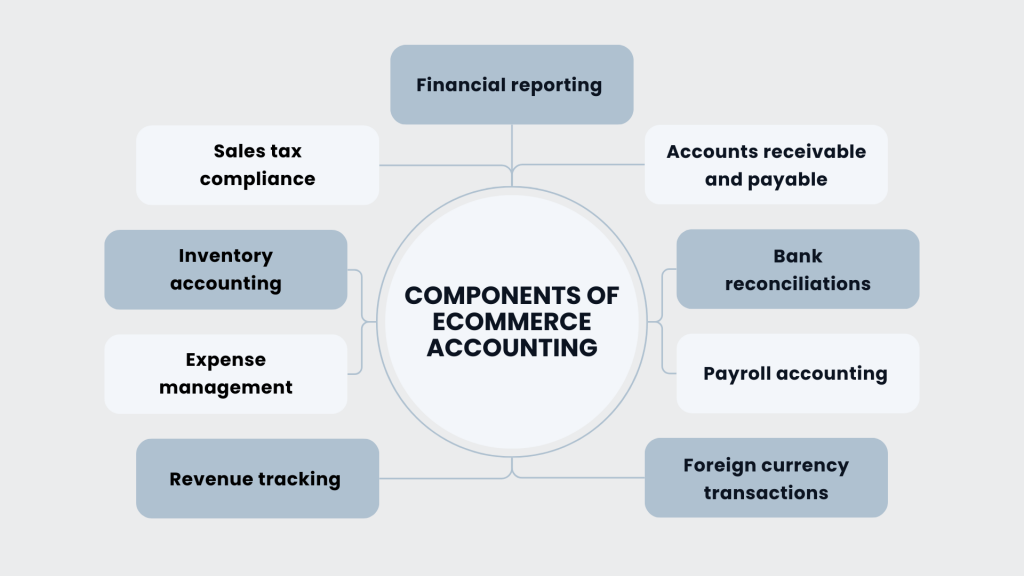
Ecommerce accounting is made up of seven components: platform fee tracking, inventory accounting, COGS calculation, sales tax compliance, payout reconciliation, data syncing, and the ledger work covering revenue, AR/AP, payroll, and foreign currency. Each component produces a number the financial statements depend on.
1. Tracking platform fees, refunds, and chargebacks across channels
Tracking platform fees across channels involves giving each platform’s fees their own accounts, so a charge from Amazon is never recorded on the same line as one from Stripe. This is difficult because no two platforms report fees the same way. Amazon bundles referral fees, fulfillment fees, storage, and advertising into a single 14-day settlement. Shopify itemizes transaction fees per payout. Stripe posts each fee as its own balance transaction. Booking them as one “merchant fees” expense makes per-channel margin impossible to calculate.
The fix is structural: one fee sub-account per platform, grouped under a parent expense account. Marketplace fees, payment processing fees, and fulfillment fees get their own line, per channel.
Refunds and chargebacks need separate treatment. A refund reverses a sale you agreed to reverse and reduces revenue. A chargeback is a disputed payment that reverses the sale and adds a dispute fee, so it needs a contra-revenue entry plus an expense entry. Booking them together hides how much disputes are costing you.
Amazon’s referral fee ranges from 8% to 15% of the sale price depending on category, with a separate FBA fulfillment fee set by size, weight, and price band. Worked example, using a 15% category and a small standard-size item:
| Line | Amount |
| Gross sale | $50.00 |
| Referral fee (15%) | −$7.50 |
| FBA fulfillment fee | −$3.22 |
| Net to seller | $39.28 |
Booked correctly, that single order produces $50.00 in gross sales and $10.72 in categorized fee expense. Booked as a $39.28 deposit, revenue is understated by 21%, and the fee expense disappears entirely.
What’s actually inside a platform deposit
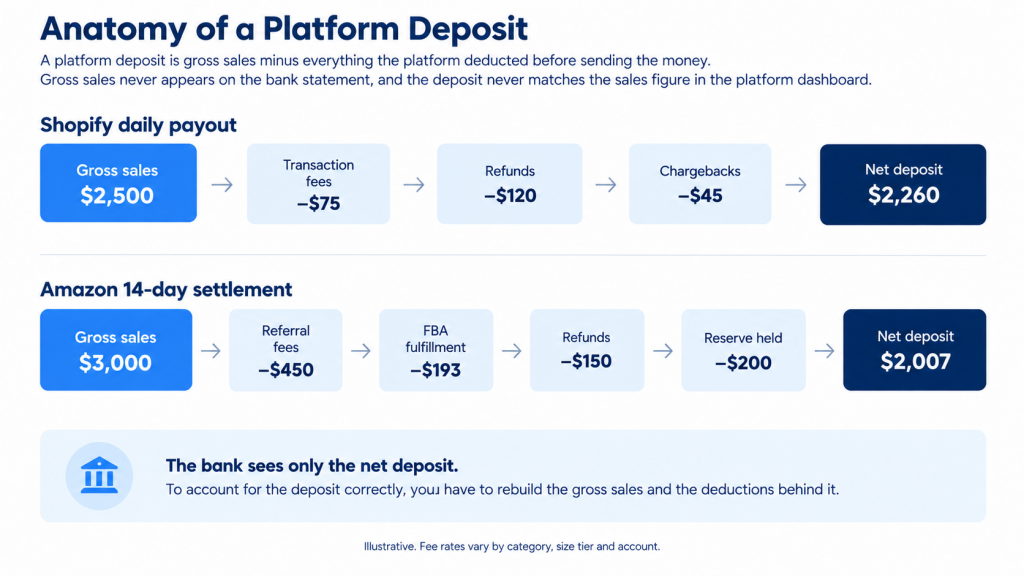
A platform deposit is gross sales minus everything the platform deducted before sending the money: transaction or referral fees, fulfillment fees, refunds, chargebacks, and any reserve held back. Gross sales never appears on the bank statement, and the deposit never matches the sales figure in the platform dashboard.
Shopify itemizes its deductions on a short payout cycle. Amazon bundles a 14-day settlement into a single wire. Illustrative breakdowns of both:
| Shopify daily payout | Amount |
| Gross sales | $2,500 |
| Transaction fees | −$75 |
| Refunds | −$120 |
| Chargebacks | −$45 |
| Net deposit | $2,260 |
| Amazon 14-day settlement | Amount |
| Gross sales (60 orders at $50) | $3,000 |
| Referral fees (15% category) | −$450 |
| FBA fulfillment ($3.22 per unit) | −$193 |
| Refunds | −$150 |
| Reserve held by Amazon | −$200 |
| Net deposit | $2,007 |
eBay, Etsy, Walmart, Stripe, Square, and PayPal use some combination of those two patterns, so once you can rebuild these two deposits, the same method covers the rest.
2. Inventory accounting and the inventory asset account
Inventory accounting is the practice of carrying unsold stock as an asset on the balance sheet and moving its cost into COGS in the period the item sells. That single rule decides both your balance sheet and your gross margin, and it’s why businesses carrying inventory are held to accrual rules.
Multichannel sellers hold the same SKU in several places at once: your own warehouse, an Amazon FBA facility, a 3PL, and sometimes a supplier’s stock under dropship terms. FBA stock remains your asset while Amazon stores it. Count quarterly, reconcile the physical count to the inventory asset account, and post an inventory shrinkage adjustment for the difference.
3. Calculating and tracking COGS for multichannel sellers
The formula for cost of goods sold, the direct cost of the products you sold in a period, is: beginning inventory + purchases − ending inventory = COGS. Track it at SKU level, so the same product carries one cost basis, whichever platform sold it. Fulfillment and inbound freight belong in COGS; advertising and software do not.
FIFO and LIFO change the answer. Say you buy 100 units at $8, then 100 more at $10, then sell 120:
- FIFO (first-in, first-out): (100 × $8) + (20 × $10) = $1,000 COGS, $800 ending inventory.
- LIFO (last-in, first-out): (100 × $10) + (20 × $8) = $1,160 COGS, $640 ending inventory.
Same 120 units, $160 difference in gross profit. FIFO is permitted under both US GAAP and IFRS; LIFO is permitted under US GAAP only, so sellers with international reporting obligations generally use FIFO.
Multichannel selling is what makes the SKU-level rule necessary. The same product moves through Shopify, Amazon, and eBay, and each channel reports the sale in its own format, so the cost has to be attached to the SKU first and allocated to whichever channel sold the unit second. Accounting in ecommerce breaks down the moment one product carries different assumed costs on different platforms.
4. Sales tax compliance across multiple states
Multistate sales tax compliance requires registering, collecting, and remitting in every state where your sales cross that state’s economic nexus threshold. The exposure is real: sales taxes account for 24% of combined state and local tax collections (Tax Foundation, 2026), which is why states pursue remote sellers so persistently after South Dakota v. Wayfair.
Economic nexus is the rule that creates the obligation. Once your sales into a state cross that state’s threshold, you must register, collect, and remit there, with no physical presence required. The $100,000 figure comes from the South Dakota statute the Supreme Court upheld in 2018. Thresholds differ by state. Some pair the dollar figure with a transaction count, and several have dropped the transaction test, so check the rule in each state you sell into.
Marketplace facilitator laws change the picture again. When Amazon, eBay, or Walmart collects and remits sales tax on your behalf, that tax is not your liability, but those sales can still count toward your nexus threshold, so check each state’s rule. Book marketplace-collected tax to a separate account from tax you collect yourself on Shopify, or your sales tax payable balance will never tie out.
→ Learn how to manage sales tax when selling on Amazon with ease.
5. Reconciling bank deposits with platform sales data
Reconciliation consists of matching every line in a channel’s clearing account to that platform’s own records, so the clearing balance returns to zero. Each platform requires its own approach: Amazon settlement reports cover a 14-day window and must be matched against the single wire that follows; Shopify payout reports itemize each daily deposit; Stripe batches balance transactions per payout, so the payout ID is the matching key.
Reconcile at transaction level instead of totals. A deposit that matches in total can still contain a misclassified refund and a missing fee that cancel each other out. Anything that doesn’t tie 100% is worth flagging for review while the source records are still accessible.
Reconciliation tools automate the match itself, pulling the platform’s records over API and flagging only the lines that don’t tie, so review covers exceptions instead of every transaction.
For a detailed guide to managing reconciliation across multiple sales channels, see our Multichannel Ecommerce Accounting Guide.
6. Syncing sales data with accounting software
Syncing sales data involves a tool that reads each platform’s API, categorizes sales, fees, refunds, discounts, and taxes, and posts them into the general ledger on a set schedule. Manual entry costs more hours as order volume climbs, and CSV exports break whenever a platform changes its report format.
Evaluate a sync tool on three things: which platforms it connects to natively, whether it posts order-level detail or period summaries, and whether it writes to a clearing account you can reconcile. Automation is where accounting, ecommerce operations, and tax compliance meet.
Synder Sync is one example: Per Transaction mode posts each sale with customer, SKU, and tax detail, and Summary Sync mode posts one itemized entry per platform per period, with Smart Rules categorizing transactions by product, class, or location as they sync.
7. Revenue tracking, AR/AP, payroll, and foreign currency
Revenue tracking, accounts receivable and payable, payroll, and foreign currency are the four ledger tasks in ecommerce business accounting that carry over from any other business.
- Revenue tracking: gross sales recorded per channel, so channel performance is comparable.
- Accounts receivable and payable: invoicing, credit terms, and supplier payment schedules.
- Payroll: wages, deductions, and compliance, including remote employees and contractors.
- Foreign currency: exchange rates tracked and currency gains or losses recorded, since platform conversion rates can differ from your bank’s.
How to tell if your ecommerce business is actually profitable
You find out whether an ecommerce business is profitable by running a profitability waterfall per channel, from gross sales down to net profit. Revenue growth tells you nothing on its own, because marketplace fees, processing fees, COGS, and fulfillment all come out before anything reaches the bottom line.
| Step | What comes out |
| Gross sales | Starting figure, before any deduction |
| Less returns and refunds | Net sales |
| Less marketplace and processing fees | Net revenue |
| Less COGS | Gross profit |
| Less fulfillment and shipping | Contribution margin |
| Less advertising | Channel contribution |
| Less overhead | Net profit |
Run this separately for Shopify, Amazon, and eBay, and channels that look identical at the revenue line can separate sharply by the time you reach contribution margin. Amazon’s fee load and FBA costs can turn a high-volume channel into your least profitable one while your blended P&L shows healthy margins.
The prerequisite is the accounting work above: correctly categorized fees, SKU-level COGS, and reconciled payouts. Without those three, the waterfall produces a number that looks precise and isn’t.
Best practices for multichannel ecommerce accounting in 2026
Multichannel ecommerce accounting comes down to eight practices: separate clearing accounts per channel, payout-level reconciliation, per-platform fee splits, sales tax tracked by collection source, business and personal finances kept apart, SKU-level inventory, year-round tax planning, and automated data entry with human review. Accounting complexity scales with every channel you add, so each practice matters more as the channel count grows. Two platforms mean two fee structures, two payout schedules, and two sets of tax rules.
For a full breakdown of multichannel reconciliation, fee tracking, and automation, see our Multichannel Ecommerce Accounting Guide.
These eight practices apply to any seller running more than one channel.
Tip #1. Give every channel its own clearing account
Shopify, Amazon, eBay, Stripe, and PayPal get separate clearing accounts. When a balance is left over, you know which channel produced it without opening five reports.
Tip #2. Reconcile payouts, not months
Work from the source documents: the Shopify Payments payout report, the Amazon settlement report, the Stripe balance transaction list, and the PayPal transaction report. Match each one as it arrives instead of waiting for month-end. Platform reports stay accessible for a limited window, and a discrepancy is easier to trace inside the settlement window than after the books have closed.
Tip #3. Split fees by platform and fee type
Amazon referral fees, Amazon FBA fees, Shopify transaction fees, and Stripe processing fees belong in separate accounts. A single “merchant fees” line makes per-channel margin analysis impossible.
Tip #4. Track sales tax by collection source
Separate tax you collect on Shopify from tax Amazon and eBay remit under marketplace facilitator rules. Both count toward nexus thresholds; only one is your liability.
Tip #5. Keep business and personal finances separate
Open a separate bank account for your business and avoid using business funds for personal expenses. Keeping finances separate simplifies accounting, tax preparation, and legal compliance.
Tip #6. Maintain SKU-level inventory across channels
The same SKU selling on three platforms needs one cost basis. Pick FIFO or LIFO, apply it consistently, and reconcile physical counts to book inventory quarterly.
Tip #7. Plan for taxes year-round
Engage in tax planning throughout the year instead of treating taxes as an annual event. This includes setting aside money for tax liabilities, making estimated tax payments if required, and taking advantage of tax deductions and credits applicable to your business.
Tip #8. Automate the data entry, keep the review
Automation handles import, categorization, and the line-by-line match between a clearing account and the platform’s records, flagging anything that doesn’t tie. What it doesn’t do is decide why a line failed to match, or catch a new fee type that nobody has mapped yet. Both need a person.
Healthy Meals Direct, a Long Island meal-prep business selling through Shopify and PayPal into QuickBooks Online, applied this pattern across 30+ locations and 100k+ transactions. Daily reconciliation dropped from 3–4 hours to 30–45 minutes, saving over 70 hours a month.
The team is thrilled with the time savings and the clarity Synder provides.
Victoria Martinez, Customer Service Manager
Common ecommerce bookkeeping mistakes and how to avoid them
Six recurring errors drive the cleanup work in accounting for small ecommerce business owners.
- Leaving clearing account balances unreconciled. A clearing balance that never returns to zero means a payout, fee, or refund is unaccounted for. Fix: reconcile each channel’s clearing account to zero every month.
- Booking the net payout as sales revenue. A $2,260 Shopify deposit recorded as $2,260 in sales understates revenue and erases every fee, refund, and chargeback inside it. Fix: post gross sales and record each deduction as its own line.
- Double-counting bank feed transactions. A synced deposit plus the same deposit from the bank feed doubles your revenue. Fix: route platform data to a clearing account and let the bank feed match against it.
- Treating marketplace facilitator tax as your liability. Tax Amazon already remitted does not belong in your sales tax payable. Fix: separate accounts for collected-by-you and collected-by-marketplace.
- Recording gift card sales as revenue. A gift card is a liability until redeemed. Fix: book the sale to a gift card liability account and recognize revenue on redemption.
- Never adjusting for inventory shrinkage. Book inventory that exceeds physical count inflates assets and understates COGS. Fix: count quarterly and post a shrinkage adjustment.
Ecommerce accounting checklist for business owners
An ecommerce accounting checklist splits into two layers: the operational tasks your bookkeeper or accounting software handles, and the review tasks only you can do. The five owner reviews below catch problems while they’re still cheap to fix.
Daily tasks
Daily tasks keep the ledger current so nothing has to be reconstructed later.
✔️ Record transactions
Recording transactions daily captures sales, expenses, refunds, and every other financial movement. This task involves categorizing each transaction in your accounting software, ensuring that income and expenditures are tracked in real time.
✔️ Monitor cash flow
Monitoring cash flow involves reviewing the amounts of cash that come in and go out of the business daily. This task is key to ensuring that the business has enough cash on hand to cover short-term obligations, such as paying suppliers or purchasing inventory.
✔️ Owner review: scan yesterday’s gross sales by channel
Scanning yesterday’s gross sales by channel takes two minutes in your sales dashboard. A channel that moves sharply without a campaign behind it points to a pricing, listing, or integration problem worth checking today.
Weekly tasks
Weekly tasks catch discrepancies while the source records are still accessible.
✔️ Review inventory levels
Regular checks help prevent overstocking or stockouts. This task includes assessing which products are selling quickly and which aren’t, allowing for timely reorder decisions or promotions to clear slow-moving stock.
✔️ Process payroll (if needed)
For businesses with employees or contractors, processing payroll involves calculating wages, deductions, and taxes and then making payments. This task must be done accurately and on time to comply with labor laws and maintain staff morale.
✔️ Reconcile transactions
Reconciliation involves matching transactions recorded in your accounting system against bank statements to ensure accuracy. This helps identify discrepancies early, preventing financial errors and potential fraud.
✔️ Review and pay bills
Managing accounts payable involves reviewing all vendor invoices and bills, ensuring they’re accurate, and that you pay them before their due dates.
✔️ Owner review: check each channel’s clearing balance
Any clearing account that isn’t near zero has an unmatched payout or fee behind it. Amazon settles on a 14-day cycle, so a weekly check catches the gap inside the window the source records cover.
Monthly tasks
Monthly tasks close the period and produce the statements you make decisions from.
✔️ Close monthly books
Closing the monthly books finalizes every financial activity for the month and confirms that all transactions are recorded accurately. The process provides a snapshot of the business’s financial status at month-end.
✔️ Review profit and loss statement
Analyzing the profit and loss statement helps you understand the business’s financial performance over the month, showing revenue, costs, and expenses. The review is critical for identifying trends, managing budgets, and strategizing for growth.
✔️ Reconcile bank accounts
Monthly bank reconciliation ensures all cash transactions are accurately recorded in the accounting system. This is a more thorough check than the weekly transaction reconciliation.
✔️ Manage accounts receivable and payable
Managing accounts receivable includes following up on outstanding customer invoices to ensure timely payments. Managing accounts payable includes scheduling payments for upcoming bills, helping manage cash flow effectively. Run an accounts payable aging report each month so overdue supplier balances are visible before they affect your terms.
✔️ Calculate and record depreciation
For businesses with physical assets, calculating monthly depreciation is necessary for accurate financial reporting. This task involves spreading the cost of an asset over its useful life, affecting profit and loss statements.
✔️ Owner review: run the profitability waterfall per channel
Running the waterfall covers gross sales down to contribution margin, one channel at a time. A blended P&L hides this number, which is why it takes an owner-level review to produce.
Quarterly tasks
Quarterly tasks cover tax filings and the reviews that need a full quarter of data.
✔️ Prepare/Review financial statements
Quarterly financial statements, including the balance sheet, income statement, and cash flow statement, offer a comprehensive view of the business’s financial health.
✔️ Submit sales tax
Calculating, reporting, and submitting ecommerce sales tax involves understanding the different rates and rules across jurisdictions where the business operates.
✔️ Review budget vs. actuals
Comparing actual financial performance against budgeted figures helps identify variances and adjust strategies or budgets accordingly.
✔️ Evaluate marketing spend and ROI
Evaluating marketing spend against return shows which campaigns earned their budget. This evaluation guides future marketing budget allocations and strategy adjustments.
✔️ Owner review: check nexus thresholds by state
Sales into a new state may have crossed a registration threshold this quarter. Catching it now costs a registration; catching it in two years costs back taxes, penalties, and interest.
Annual tasks
Annual tasks close the year, file taxes, and set the baseline for the next one.
✔️ Close year-end books
Finalizing the year’s financial records prepares the business for tax filing and provides a clear picture of the year’s financial performance.
✔️ Prepare tax documents
Gathering and preparing all necessary documents for tax purposes, such as receipts, invoices, and financial statements, is essential for accurate tax filing.
✔️ File business taxes
Completing and submitting annual tax returns by the deadline is a must for legal compliance and avoiding penalties.
✔️ Conduct inventory audit
A thorough count and inventory valuation at year-end are important for accurate financial reporting and planning for the new year.
✔️ Owner review: decide which channels to keep
Full-year contribution margin by channel answers a question no monthly report can: which platforms earned their place in next year’s plan.
Financial statements every ecommerce seller should understand
Three statements tell an ecommerce owner what the business is worth, what it earned, and whether it can pay its bills: the balance sheet, the income statement, and the statement of cash flows. Each answers a different question, and none substitutes for the others.
Balance sheet
The balance sheet provides a snapshot of an ecommerce business’s financial position at a specific point in time. It lists the company’s assets, liabilities, and equity, offering insights into the business’s net worth and financial health.
- Assets: Include current assets like cash, inventory, and accounts receivable, as well as long-term assets like property and equipment.
- Liabilities: Comprise both current liabilities, such as accounts payable and short-term loans, and long-term liabilities like long-term debt.
- Equity: Represents the owner’s or shareholders’ equity in the business.
What it tells you as a business owner: how much capital is locked in unsold inventory, how large a sales tax liability you’re holding on behalf of states, and whether outstanding platform payouts are large enough to matter. A rising inventory asset alongside flat sales is the clearest early signal of an overbuying problem.
Income statement (P&L statement)
The income statement, or profit and loss statement, shows the company’s revenues, expenses, and profits over a specific period (e.g., monthly, quarterly, annually). It provides a clear view of the business’s operational efficiency and profitability by detailing how revenue is transformed into net income.
- Revenue: Includes all income from sales, minus returns or discounts.
- Cost of goods sold (COGS): Represents the direct costs associated with the production or purchase of the goods sold.
- Operating expenses: Encompasses selling, general, and administrative expenses, including marketing, rent, salaries, and other overhead costs.
- Net income: The bottom line, calculated as Revenue – COGS – Operating Expenses – Taxes.
What it tells you as a business owner: whether growth is producing profit. Read it with fees broken out by platform, and it also shows which channel’s fee structure is eating the margin you thought you had.
Cash flow statement
The cash flow statement provides a detailed account of the cash inflows and outflows from operating, investing, and financing activities over a period. It’s crucial for understanding the liquidity and cash management of the business.
- Operating activities: Reflects cash generated or used in the business’s core operations, adjusting net income for non-cash items and changes in working capital.
- Investing activities: Involves cash used for or generated from the purchase or sale of assets, like equipment or investment securities.
- Financing activities: Includes cash inflows from loans or equity investments and outflows for loan repayments, dividends, or buybacks.
What it tells you as a business owner: whether you can fund the next inventory purchase. A profitable business can still run short of cash, because inventory is paid for upfront while Amazon settles on a 14-day cycle and card processors hold rolling reserves.
Key financial metrics for ecommerce businesses
Eight metrics tell an ecommerce owner how the business is performing: gross margin, contribution margin, net profit margin, CAC, CLV, AOV, inventory turnover, and ROAS. Every one of them is an accounting output. Gross margin depends on COGS accuracy, CAC depends on correctly categorized ad spend, and inventory turnover depends on a reconciled inventory asset. When ecommerce and accounting data disagree, fix the ledger before you question the dashboard.
1. Gross margin
Understanding gross margin helps ecommerce businesses evaluate their pricing strategies, cost efficiency, and profitability of specific products or categories.
Gross margin represents the difference between revenue and the cost of goods sold (COGS) divided by revenue. It’s expressed as a percentage and indicates how much profit a company makes on each dollar of sales before other expenses are deducted.
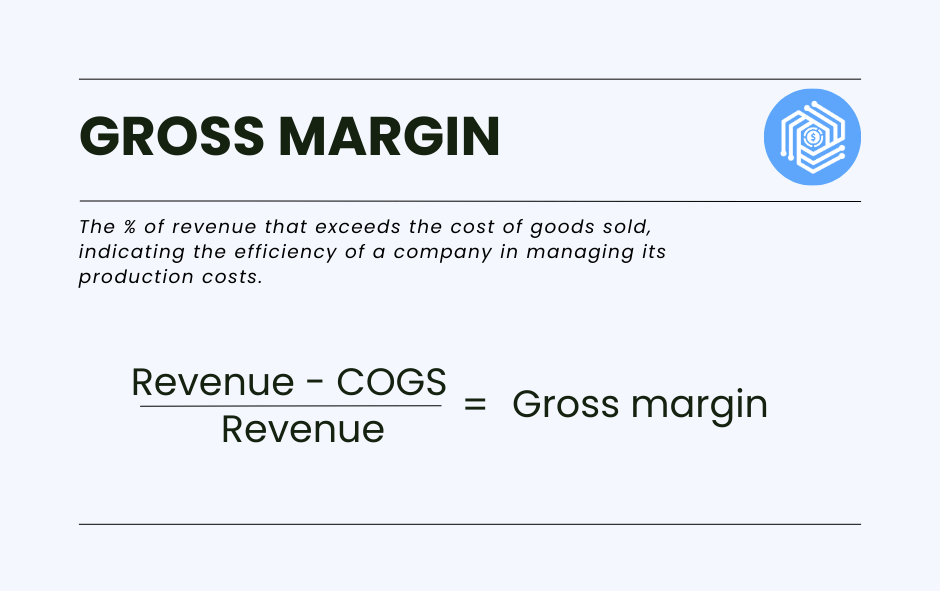
Accounting input: gross sales and COGS. If marketplace fees are buried inside revenue, gross margin is overstated.
2. Contribution margin
Contribution margin subtracts all variable costs per order, including platform fees, payment processing, and fulfillment, from net revenue. It answers whether an additional order actually adds money to the business.
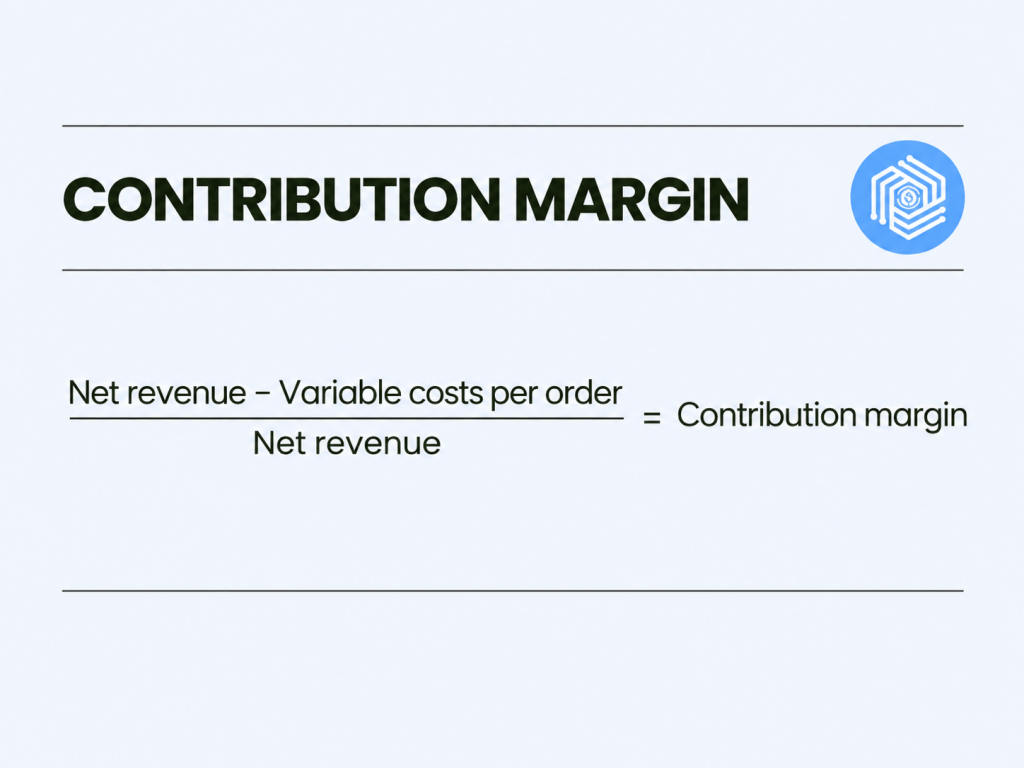
Accounting input: categorized fee accounts by platform, plus shipping and fulfillment costs in COGS.
3. Net profit margin
This metric provides a comprehensive view of a business’s overall profitability and efficiency in managing its expenses.
Net profit margin measures the amount of net income generated as a percentage of revenue. It takes into account not just COGS, but all expenses, including operating expenses, interest, taxes, and other costs.
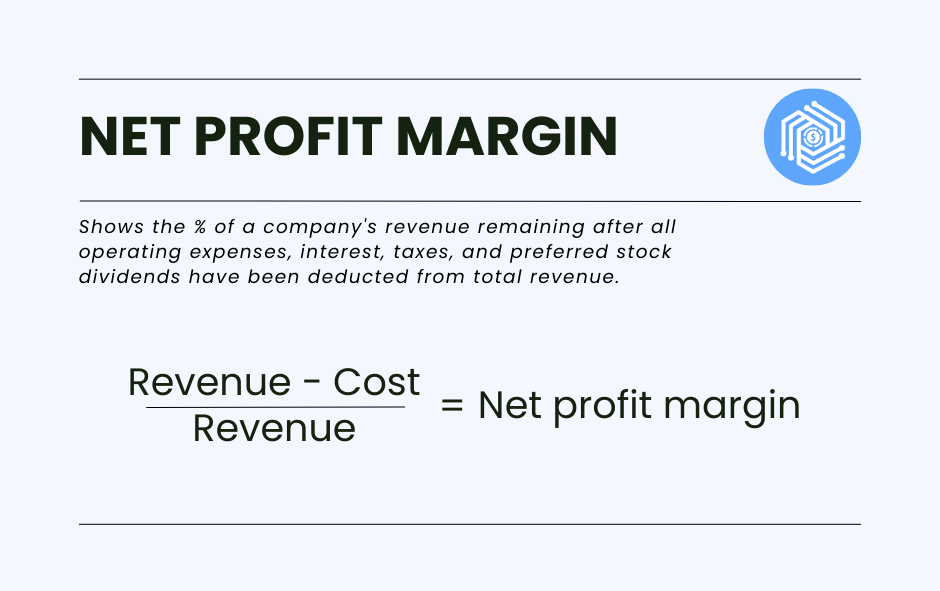
Accounting input: a complete expense ledger. Uncategorized transactions in a suspense account distort this directly.
4. Customer acquisition cost (CAC)
For ecommerce businesses, understanding CAC is essential for evaluating the effectiveness of marketing strategies and determining the sustainability of growth.
CAC is the total cost of acquiring a new customer, including all marketing and sales expenses. It’s calculated by dividing the total acquisition costs by the number of new customers acquired over a specific period.
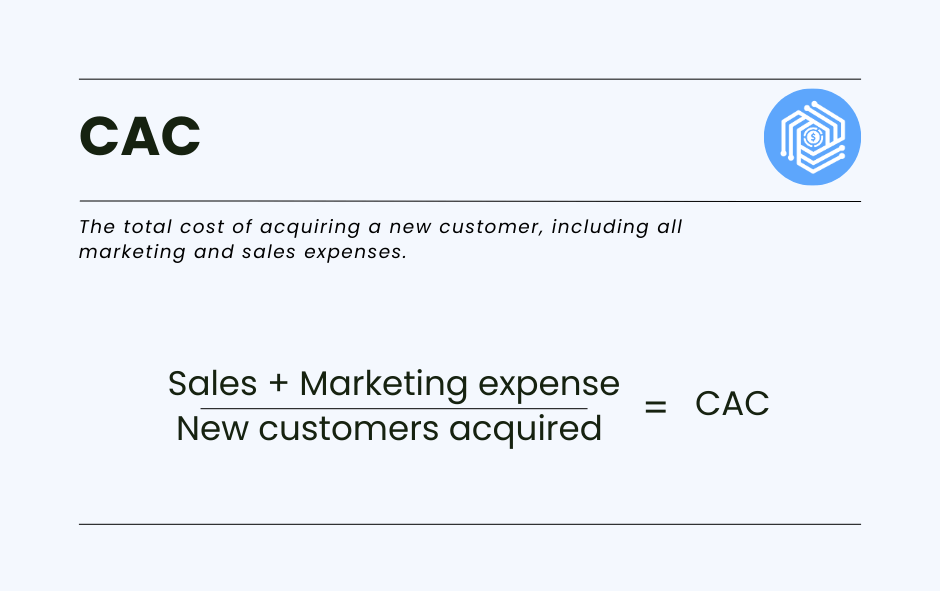
Accounting input: advertising expense by channel. Amazon advertising charges deducted inside a settlement are easy to miss and understate CAC.
5. Customer lifetime value (CLV)
CLV helps businesses understand the long-term value of customers and guides decisions on customer retention and marketing spend.
CLV is the total amount of money a customer is expected to spend on your business during their lifetime. It’s calculated by multiplying the average purchase value by the average number of purchases over a customer’s lifetime.
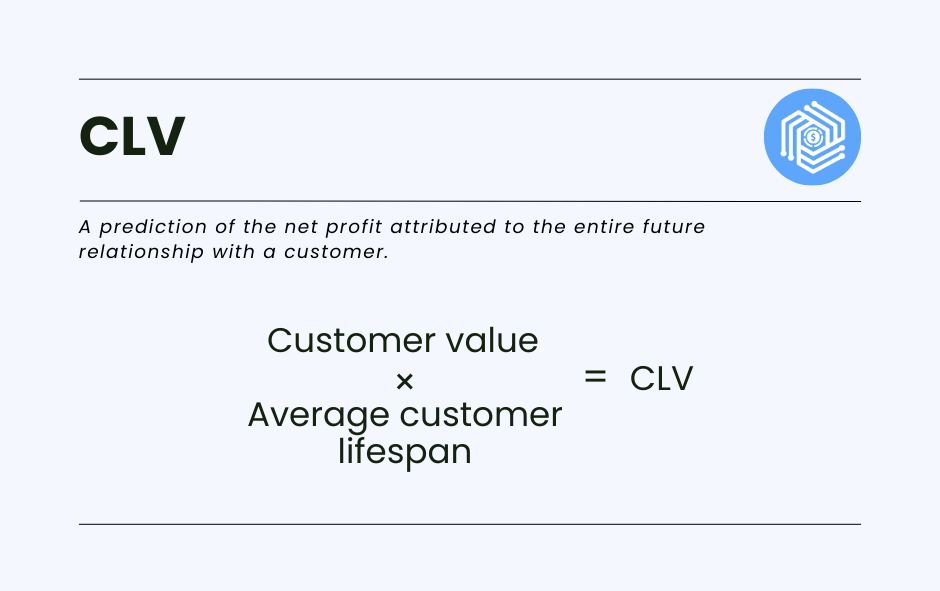
Accounting input: customer-level sales data, which requires order-level sync instead of daily summaries.
6. Conversion rate
Monitoring the conversion rate helps ecommerce businesses gauge the effectiveness of their website and marketing efforts in generating sales.
The conversion rate is the percentage of visitors to your ecommerce site who make a purchase. It’s calculated by dividing the number of conversions by the total number of visitors and multiplying by 100.
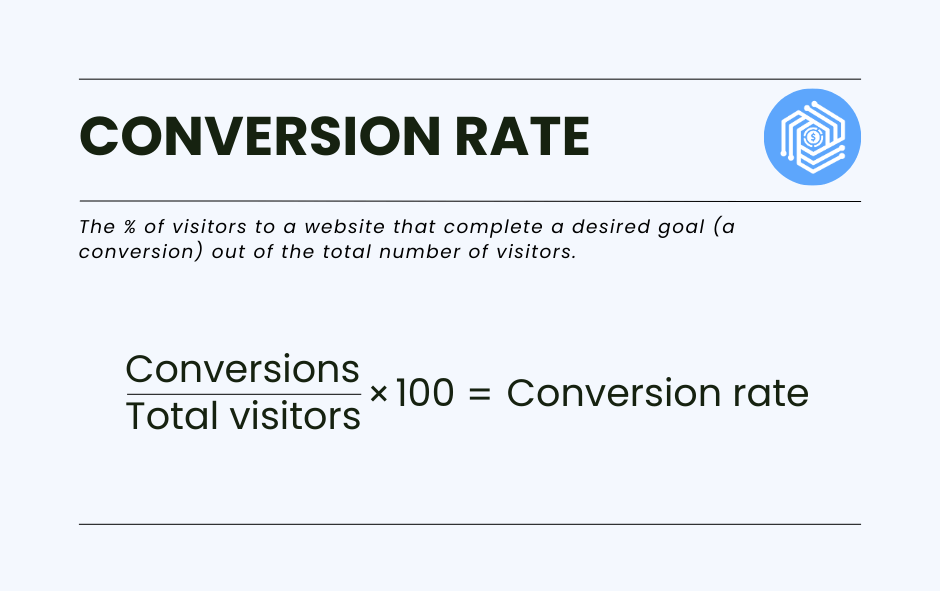
Accounting input: customer-level sales data, which requires order-level sync instead of daily summaries.
7. Average order value (AOV)
AOV is a key metric for understanding purchasing behavior and identifying strategies to increase revenue, such as upselling or cross-selling.
AOV tracks the average dollar amount spent each time a customer places an order on a website. It’s calculated by dividing total revenue by the number of orders.
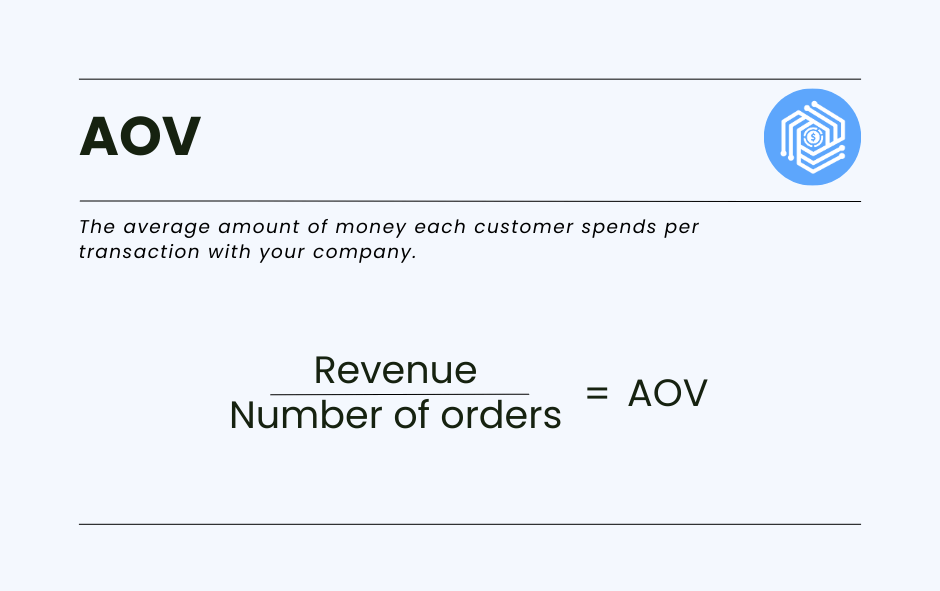
Accounting input: gross sales and order count per channel. Calculate it on gross, not on net payouts.
8. Inventory turnover ratio
High inventory turnover indicates efficient inventory management and sales performance, while low turnover may suggest overstocking or weak sales.
Inventory turnover ratio measures how often a business sells and replaces its inventory over a certain period. It’s calculated by dividing COGS by average inventory during the period.
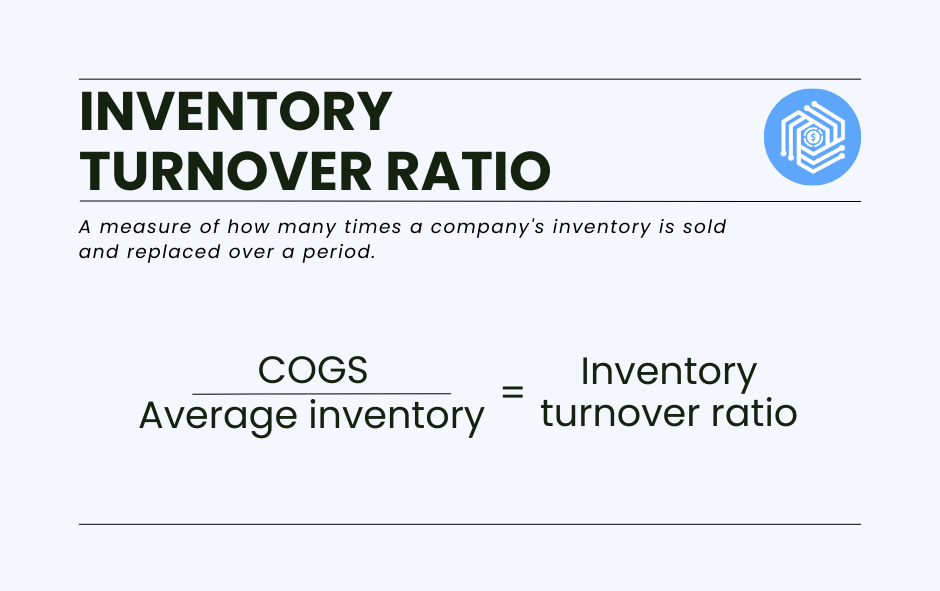
Accounting input: COGS and the inventory asset account. A count that was never reconciled to the books makes this ratio meaningless.
9. Return on advertising spend (ROAS)
ROAS helps ecommerce businesses evaluate which advertising strategies are most profitable and make informed decisions on marketing investments.
ROAS measures the effectiveness of advertising campaigns by comparing the revenue generated from advertising to the cost of the advertising. It’s calculated by dividing the revenue attributed to advertising by the cost of the advertising.
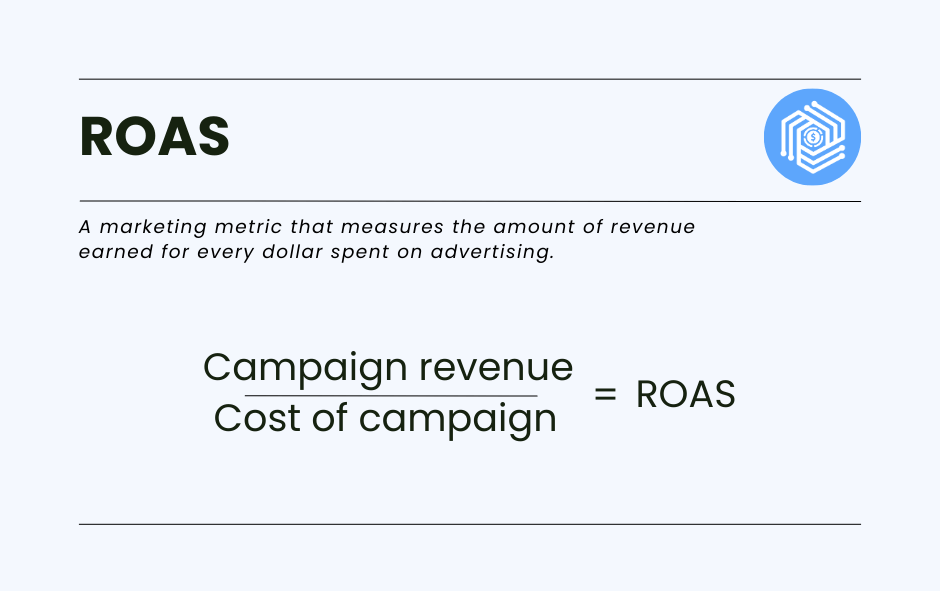
Accounting input: attributed revenue and total ad spend, including platform advertising billed inside settlements.
When to hire an ecommerce accountant
Hire an ecommerce accountant when the accounting decisions start carrying financial risk you can’t evaluate yourself. Software handles recording; a professional handles judgment calls on method, nexus, and inventory valuation, and those calls are expensive to reverse after a filing.
Signs you’re at that point:
- Revenue past the point where you can hold the numbers in your head
- Sales tax registrations in more than one state, where thresholds start from the $100,000 Wayfair benchmark
- An audit, a funding round, or a credit application ahead
- A month-end close that keeps overrunning your reporting deadline
- A cash-to-accrual transition on the table
What to look for:
- Ecommerce specialization, not general small-business practice
- Hands-on familiarity with your platforms (Shopify, Amazon, eBay, Stripe)
- Working knowledge of your general ledger (QuickBooks Online, Xero, NetSuite, Sage Intacct)
- Multistate sales tax and inventory accounting experience
Ask any candidate how they’d handle a specific scenario from your business: an Amazon settlement covering two accounting periods, or a state where you crossed the threshold nine months ago. The answer tells you more than a credential list.
| Synder maintains a free accountant directory of firms that specialize in ecommerce clients, searchable by platform and accounting software. |
FAQ
The five questions below cover software choice, peak-season preparation, shared ownership, and when to bring in a CPA.
Which accounting software is best for ecommerce?
The best accounting software for ecommerce pairs a general ledger with a tool that prepares platform data before it reaches that ledger. QuickBooks Online, Xero, Sage Intacct, and NetSuite handle the core accounting; none of them imports Amazon settlements or Shopify payouts in usable form on its own. Evaluate the combination against three variables: how many channels you sell on, monthly transaction volume, and how many states you have tax obligations in. Single-channel sellers with low order volume can run the general ledger alone.
What are the benefits of specialized ecommerce accounting versus general-purpose software?
Specialized ecommerce accounting adds three capabilities general-purpose software lacks: it imports order-level sales data from each channel, maps marketplace and processing fees to dedicated accounts, and matches platform payouts to bank deposits. General-purpose software records transactions you give it; it doesn’t retrieve them from Shopify, Amazon, or Stripe, and it doesn’t decompose a net payout into gross sales, fees, and refunds. The need arises once you run more than one channel, because reconciling several payout formats by hand is where the accounting for ecommerce businesses on multiple channels breaks down.
How should an ecommerce business prepare its accounting for peak seasons like Black Friday?
Peak-period transaction volume is the point at which manual accounting for ecommerce sales falls behind, so Black Friday preparation takes three passes. Before: verify every integration syncs, clean the chart of accounts, reset each SKU’s inventory reorder point, and check accounts payable against reorder commitments. During: reconcile payouts daily, post collected tax to sales tax payable as it arrives, and build the payment processor reserve into your cash-flow forecast. After: reconcile January returns against their original orders, since a refund booked in January against a November sale affects both periods.
How should co-owners manage shared accounts and payout reconciliation?
Co-owners should run one business bank account, one accounting file, and separate expense lines per owner. Each owner’s ad spend belongs on its own expense line so channel-level CAC stays accurate, and platform access should go by role instead of a shared login. Record every owner contribution and owner distribution in that owner’s capital account, so equity is traceable at year-end. Payout reconciliation is unaffected by ownership structure: each channel still needs its own channel-specific clearing account reconciled to zero.
What is a CPA in ecommerce and when do I need one?
A CPA in ecommerce is a Certified Public Accountant licensed by a state board who specializes in online sellers, meaning multichannel revenue, inventory accounting, and multistate sales tax. Unlike a bookkeeper, a CPA can represent you before the IRS, perform or prepare you for a financial statement audit, and advise on entity structure. Bring one in when sales tax nexus extends to multiple states, you’re preparing for an audit or funding round, or transitioning from cash to accrual accounting.
Wrapping it up
Accurate ecommerce accounting comes down to three habits: post gross sales instead of net payouts, categorize every fee by platform, and reconcile each channel’s clearing account to zero. Once those hold, your margins, metrics, and tax position rest on numbers you can defend.
| Book a Synder demo to see how Synder Sync posts categorized sales, fees, refunds, and taxes from 30+ platforms into seven accounting destinations, including QuickBooks Online, Xero, Sage Intacct, NetSuite, Intuit Enterprise Suite, and Puzzle. |