

This guide shows how to use the Waterfall reports in Synder Revenue Recognition (RevRec) and — most importantly — how the date filter works, since this is the main part that tends to confuse users.
Use these reports if you:
- Have Synder RevRec enabled
- Need to forecast how previously booked invoices and subscriptions will recognize across future months
- Need to track the burndown of deferred revenue over time
- Are preparing audit, board, or month-close reporting
These reports will not work for you if you:
- Don’t have RevRec enabled (Waterfalls are part of the RevRec module)
- Are looking for a transaction-level posting view — use the Debits & Credits Report for that
- Need a balance-at-a-point-in-time check — use the Deferred Revenue Reconciliation Report instead
The two Waterfall reports
Synder offers two Waterfalls in Revenue Recognition → Reports:
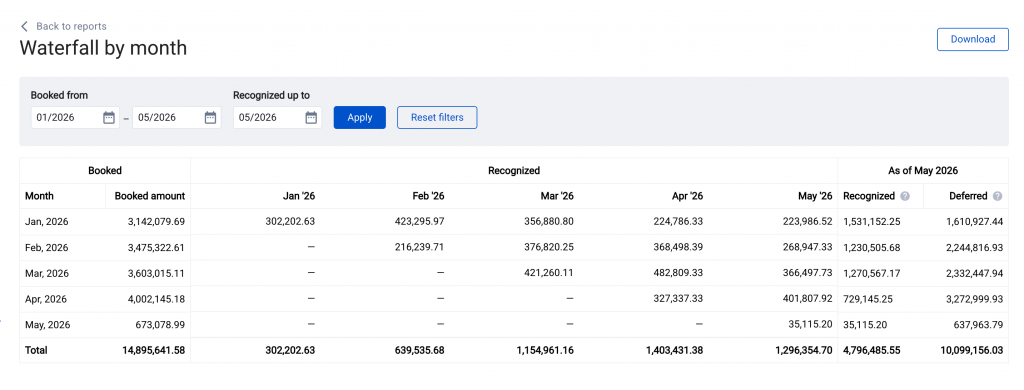
- Waterfall by Month — one consolidated recognition curve for the whole organization. Used for forecasting and board reporting.
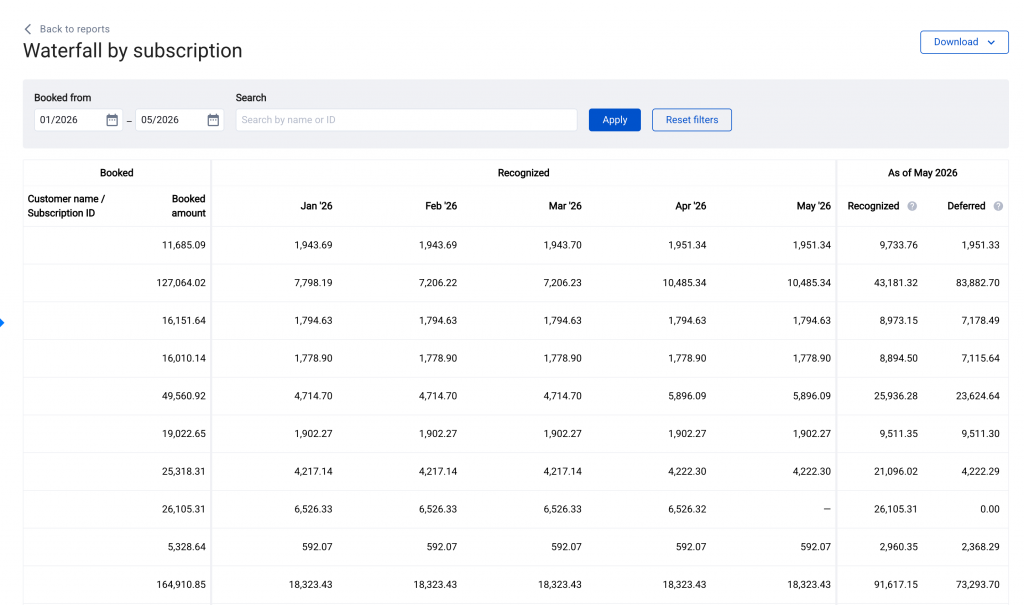
- Waterfall by Subscription — the same curve, broken out per subscription/contract. Used for drilling into which contracts drive each month’s revenue.
How to run the report
- Go to Revenue Recognition → Reports.
- Choose Waterfall by Month or Waterfall by Subscription.
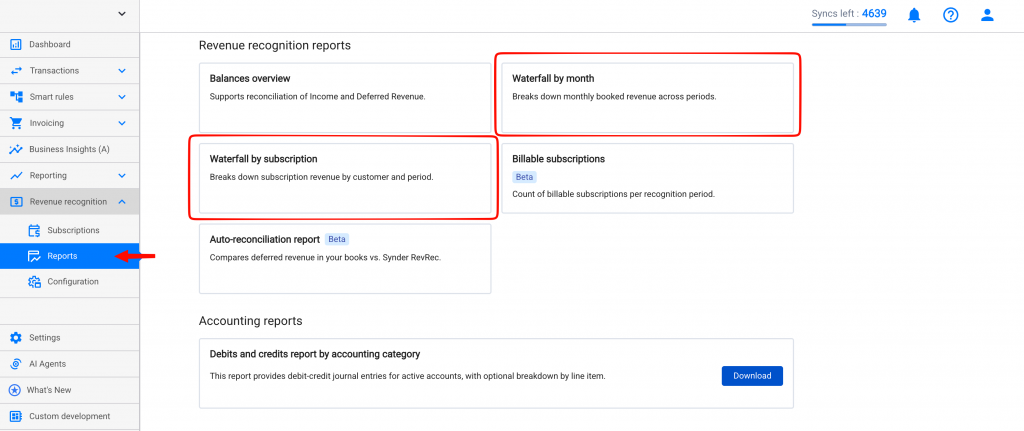
Note: you also have the ability to download the report to view a bigger dataset.
How the date filter works
The start date is the key cutoff: the Waterfall by subscription/customer cuts off recognized revenue before the selected start date. In other words, once you set a start date, older recognition is excluded.
At the same time, the report can still show subscriptions and recognition schedules that continue beyond your selected end date. This is why users sometimes choose a window such as Jan 2025 → Dec 2025 and still see later subscriptions or an As of label beyond that range.
What does that mean in practice
- The start date removes earlier history. Revenue recognized before that point is cut out of the Waterfall.
- The end date does not behave like a hard row filter. Subscriptions can still appear if their schedules continue past the selected window.
- This is expected behavior for this report. The Waterfall is meant to show how recognition unfolds over time, not just a flat slice of subscriptions that started inside the visible range.
If you need a cleaner period-specific view
- Use Waterfall by Subscription and sort / review subscriptions manually.
- Download the CSV and filter it further in Excel or Google Sheets.
- If you need a strict balance-at-a-date validation, use the Deferred Revenue Reconciliation Report.
How to read the report
- Subscription / Contract (Subscription view only) — the source document from which the recognition schedule comes from.
- Booked amount — the total value associated with that subscription’s or month’s recognition schedule in the Waterfall.
- Monthly columns — the amount recognized in each month.
- Totals — let you compare how much revenue is being recognized across periods.
- As of section — helps explain what remains deferred beyond the currently recognized portion.
Examples of usage
1. Forecasting next-quarter revenue
Run Waterfall by Month for the next quarter to see how existing schedules will recognize over those months. This is useful for forecasting and board reporting.
2. Investigating a spike in recognized revenue
If one month looks unusually high, open Waterfall by Subscription and review which subscriptions are contributing the largest values in that month.
3. Explaining why later subscriptions still appear
If a customer asks why 2026 subscriptions still show up in a 2025-focused report, the answer is that the Waterfall keeps the recognition schedule tail and is not limited to showing only subscriptions that got booked and recognized in the visible end date.
4. Reviewing deferred revenue movement over time
Use the Waterfall to see how already-booked subscriptions unwind into recognized revenue month by month and what remains deferred after the visible recognized portion.
Common questions
Why are subscriptions from outside my date range showing up?
Because the Waterfall is not a simple row filter by subscription start date. The report cuts off earlier recognition before the selected start date, but later schedules can still appear beyond the selected end date.
Why does the report show an “As of” date later than my filter end date?
Because the report is still reflecting the remaining recognition schedule / deferred tail beyond the visible window, rather than stopping strictly at the last month in your selected range.
Why do I see negative values in some months?
Refunds, credit memos, or canceled subscriptions can reverse previously recognized revenue. Use Waterfall by Subscription to identify which subscription is driving the negative amount.
My report is empty or incomplete for a large date range.
Use Download instead of only relying on the in-app view. Large windows are better reviewed in the exported file.
Where do I check individual document-level postings?
Use the Debits & Credits Report for the GL-level breakdown of a specific period.
Plan availability
Waterfall reports are part of the Revenue Recognition module, which is available on a Pro Plan.
If you don’t see Revenue Recognition in the left-hand menu, contact [email protected] to confirm RevRec eligibility for your subscription.
