

The Activity log provides a transparent, timestamped record of key actions in your Synder organization—who did what and when. It’s designed for faster troubleshooting and full accountability of account changes.
Who Can Use It
Available to all users in the organization. Everyone sees the same log.
How to Access
- Log in to your Synder account.
- Click the person icon in the top right corner.
- Select Activity log.
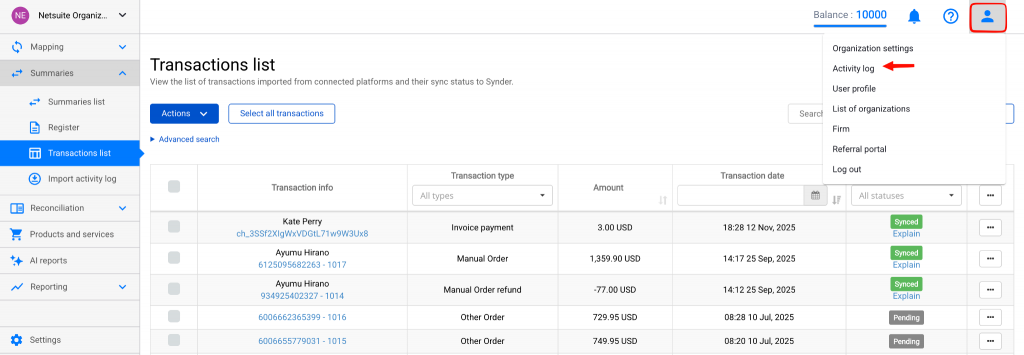
Reading the Table
Each row represents one event with these columns:
| Column | Description |
| Timestamp | Event time in UTC (HH:mm MMM dd, yyyy). Newest first. |
| Initiator | Who triggered it: user email, “System” (automatic), or “Support”. |
| Action | What happened (Connected, Disconnected, Added, Deleted). |
| Type | Area affected: Integration, User, or User management. |
| Details | Plain-language description (e.g., “Connected My flowers (Stripe)”). |
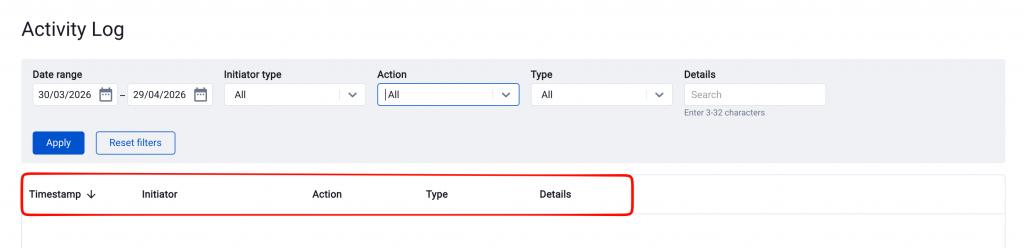
Default view: Last 30 days, 100 rows per page.
Filtering and Search
Filter bar at the top:
- Date range — start/end dates
- Initiator type — User email, System, or Support
- Action — single action (e.g., Disconnected)
- Type — Integration, User, or User management
- Details — free-text search (3+ chars, case-insensitive)
Click Apply filters or Reset filters.
What’s Tracked
List of currently available integration events:
- Integration connection status changes
- Updates to your integration timezone adjustments
- User Management
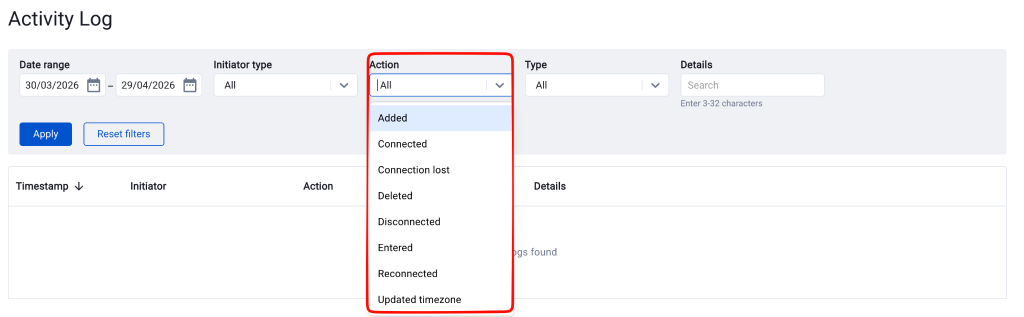
Note: Only successful events are recorded.
Common Use Cases
- “Who disconnected Stripe?” → Action=Disconnected, Type=Integration
- “When was Jane added?” → Type=User management, Action=Added, search “[email protected]”
- “Platform connection lost overnight?” → Action=Connection lost
- “Recent organization access?” → Action=Entered organization
FAQ
What time zone are timestamps in?
All Activity log timestamps are in UTC, consistent for everyone regardless of location. Apply your local offset (e.g., 14:02 UTC = 06:02 Pacific Time).
Why do I see “Support” as the initiator?
A Synder Support team member performed the action while assisting (usually on a ticket). All grouped under “Support”—no individual names shown, easy to distinguish from your team.
Why do I see “System” as the initiator?
“System” marks automatic events without user input. Common: Connection lost from platform revocation or token expiration.
Can I undo an action from the Activity log?
No—it’s a read-only audit trail. Reverse via the relevant Synder area; new entry will log it.
Can I see Smart Rule or settings changes here?
Not yet—this version covers integrations, user access, and management. Smart Rules, Mappings, Summary/Per-Transaction/RevRec Settings planned next.
Can I export the Activity log?
Not in this version—browse/filter on-page. Request export via support for future priority.
Reach out to Synder Team via online support chat or email with any questions you have – we are always happy to help you!
