

This guide explains why a summary in Summary Sync can stay on the Not Ready status (previously called Pending) on the Summaries List page, the most common reasons it happens, and what you can do to move it to Ready to Sync.
Use this guide if you:
- see a summary stuck on Not Ready in the Summaries List
- are waiting for a summary to become Ready to Sync so you can post it to your books
- want to know which platform or accounting conditions can hold a summary back
What “Not Ready” means in Summary Sync
A summary on the Not Ready status is a summary that Synder has started building but cannot finalize yet. Synder is still missing data, waiting on an external system, or waiting for a related accounting object to be ready. As soon as the missing piece is in place, the status automatically changes to Ready to Sync and the summary becomes available for synchronization.
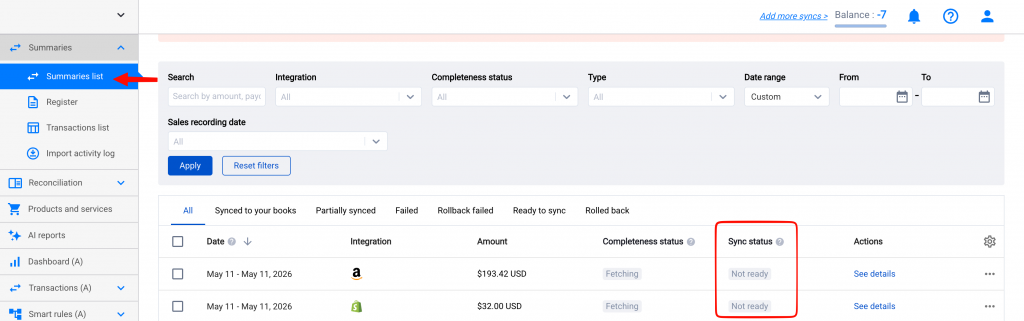
You can review the completeness status of every summary on the Summaries List page in Synder.
Common reasons a summary stays on Not Ready
1. The current summary period is still open
Any summary covering today’s date will stay on Not Ready and only finalize the next day. This is expected: Synder needs the full period to close before it can lock the totals. For example, a daily summary for today will move to Ready to Sync sometime after midnight (in your configured timezone) once the day has ended and Synder finishes aggregating.
2. Per Payout mode is waiting for the payout to hit
If your Summary Sync is configured to aggregate per payout instead of daily, a summary will stay on Not Ready until the payout it is tied to actually arrives at the bank. Synder builds the summary as soon as the payout is opened, but it holds the status on Not Ready until the payout is closed and the final amounts (sales, fees, refunds, adjustments) are confirmed by the processor.
This is normal behavior in Per Payout mode and means the summary will only become Ready to Sync once the payout has fully landed. Learn more in Summary Sync: Aggregating Data by Day, Payout, Month, or Custom Periods.
How to check what is holding a summary back
- Open the Summaries List page in Synder.
- Click on the summary marked Not Ready.
- Click See details to expand the breakdown of transactions and any related accounting objects.
- Check the Alerts & Info section for the exact reason why the summary is not yet ready. Alternatively, review which transactions are still being processed on the Linked Transaction tab
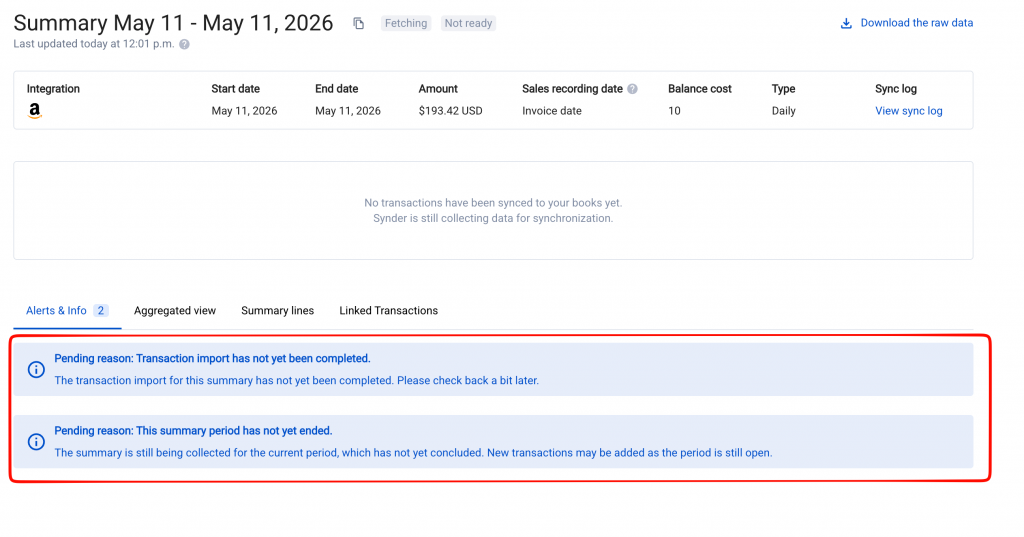
In most cases, no manual action is needed — the summary will resolve itself once the payment processor or your accounting platform catches up.
When to reach out to support
A summary that stays on Not Ready for more than a couple of days, with no pending payouts, no draft invoices, and no unverified transactions on the processor side, is worth flagging. Contact the Synder team via in-app chat or email and include the summary date, the platform, and a screenshot of the Summaries List entry so we can investigate.
Related guides
- How Is Data Collected for Summaries
- Summary Sync: Aggregating Data by Day, Payout, Month, or Custom Periods
- Summary Sync Transaction Reconciliation: How to Verify Your Data Before You Sync
- Summary Sync for E-commerce: Things You Need to Know
