

This guide explains what to do if you see the banner “There’s been a problem with proper forming of some of your E-commerce summaries” in Synder.
It helps you understand why this appears and what steps to take.
Use this guide if:
- You see the banner about E-commerce summaries
- A new mapping line called “Unsupported Gateway Sales (Ecommerce!)” appears
- Payments are syncing but not classified under a specific e-commerce platform
- You have an E-commerce platform and payment gateway/s connected in your Synder organization
What this banner means and what you should do
This flag doesn’t indicate any sync failure. Synder received the payment successfully but could not determine which e-commerce platform it belongs to.
To prevent incorrect accounting, Synder places the transaction into a temporary unmapped category.
This usually occurs when:
- The gateway does not pass sufficient order metadata
- Multiple e-commerce platforms are connected
- Transaction identifiers are inconsistent
When this happens, you will see the following banner:

In your Mappings list, you will see a new unmapped line – Unsupported Gateway Sales (Ecommerce!)
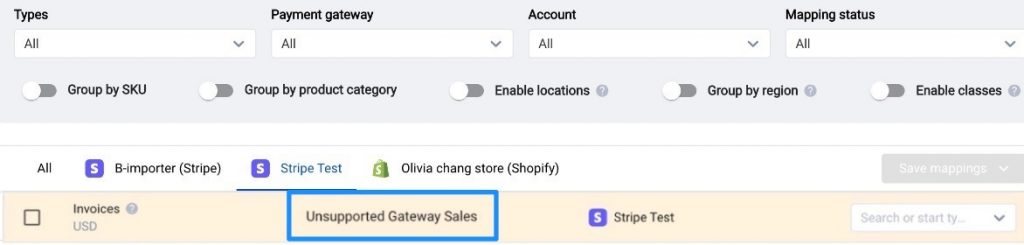
In such an instance, please follow the instructions in the warning banner and contact our support specialists. They will investigate and help resolve the classification.
FAQ
- Does the banner indicate that synchronization is disrupted?
No. Synchronization continues if the new mapping line “Unsupported Gateway Sales (Ecommerce!)” is mapped to an account.
To prevent incorrectly synced data, follow the provided instructions and contact Support. They will review and resolve the issue.
- Can Synder correct missing references between payment and e-commerce systems?
No. If references between the payment system and the e-commerce platform are missing, Synder cannot correct the issue. Review and adjust the integration settings on the e-commerce or payment platform to prevent recurrence.
- Do I need to map the new line “Unsupported Gateway Sales (Ecommerce!)” to any account?
Do not map the new line to avoid incorrect categorization.
Wait for further instructions from Support. They will provide guidance after completing their investigation.
Reach out to Synder Team via online support chat or email with any questions you have – we are always happy to help you!
