

- What is a RevRec credit?
- How many credits does your plan include?
- Add-on packs for higher volumes
- When do credits reset?
- Why does your balance go negative?
- What happens at renewal when your balance is negative?
- Where to check your credit balance
- Historical data and when billing starts
- FAQ
RevRec has its own credit balance that is separate from your regular Synder sync credits. This guide explains how RevRec credits work, when they reset, and what happens if you go over your limit. New to the feature? Start with Synder RevRec: Getting Started.
What is a RevRec credit?
One RevRec credit = one active subscription event processed by RevRec in a monthly billing period.
Every month, RevRec processes each of your active subscriptions and generates the corresponding revenue recognition entries. Each subscription event counts as 1 credit for that month — regardless of how many recognition entries, refunds, or adjustments that subscription had.
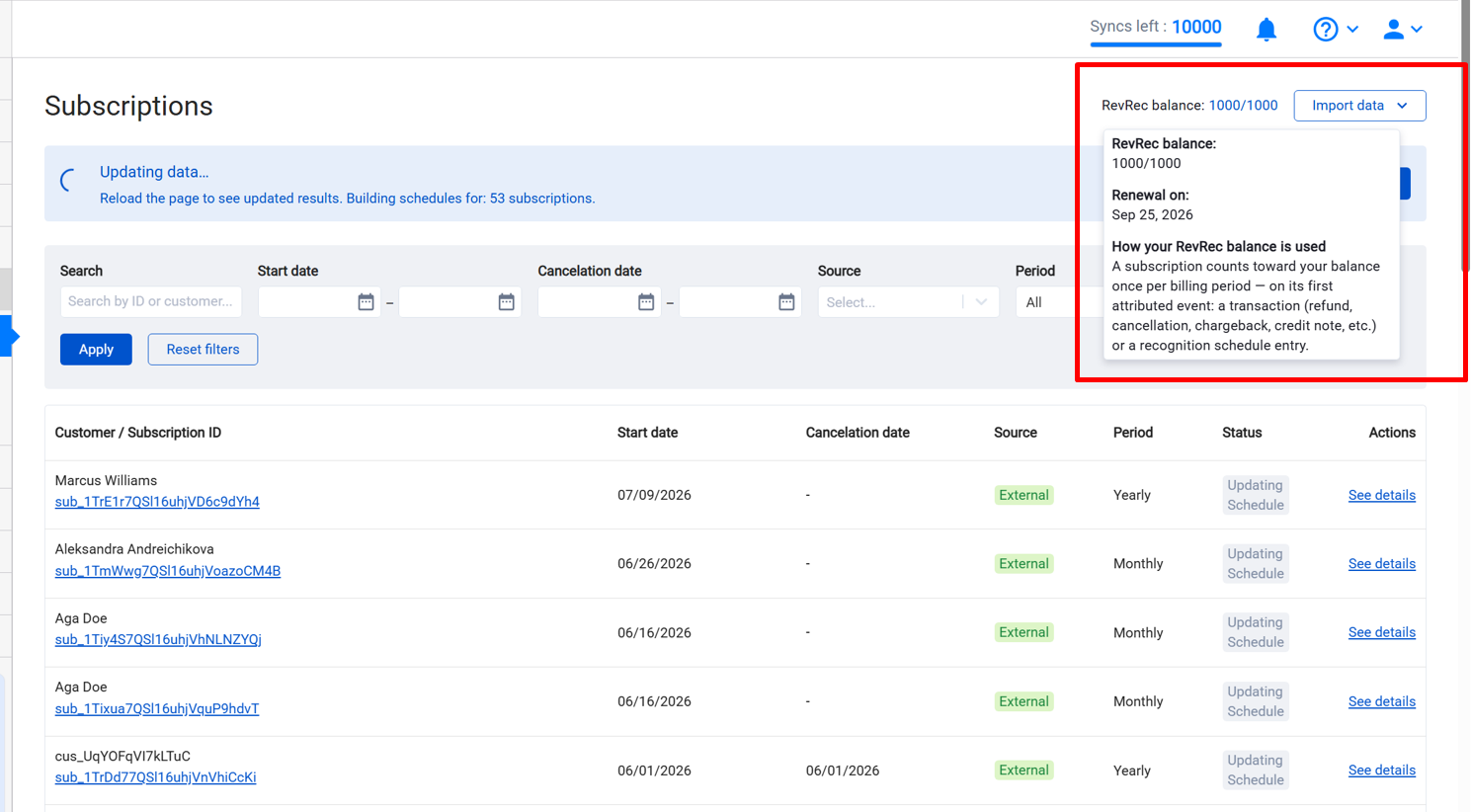
A subscription counts toward your balance once per billing period, on its first attributed event — that can be a transaction (refund, cancellation, chargeback, credit note, and so on) or a recognition schedule entry. Only entries that have actually been processed count; future-dated recognition does not consume a credit until the date it applies to arrives.
For example: a subscription that had 5 refunds and 1 recognition entry in the same month still counts as 2 credits, not 6.
How many RevRec credits does your plan include?
Every eligible plan includes a set number of RevRec credits per month at no extra charge:
| Plan | Included RevRec credits / month |
| Pro | 1,000 |
| Pro Max | 2,000 |
| Premium | 5,000 |
If your active subscription count stays within this limit, RevRec costs nothing extra. For example, on Pro with 800 active subscriptions, you use 800 of your 1,000 included credits — no additional charge.
RevRec is available on Pro, Pro Max, and Premium plans only.
Add-on packs for higher volumes
If your active subscription count exceeds your plan’s included limit, you can buy extra credits as an add-on pack. Add-on packs are sold in fixed blocks, and the price is per subscription, per month — the more volume you need, the lower the per-subscription rate. The smallest pack starts at $35/month (500 Balance).
Here is a rough idea of how the pricing scales — your exact rate and pack sizes always appear in-app:
| Extra volume you need | Approx. price per balance |
| Lower volumes | around $0.07 |
| Higher volumes | around $0.05 |
| Very high volumes | around $0.03 |
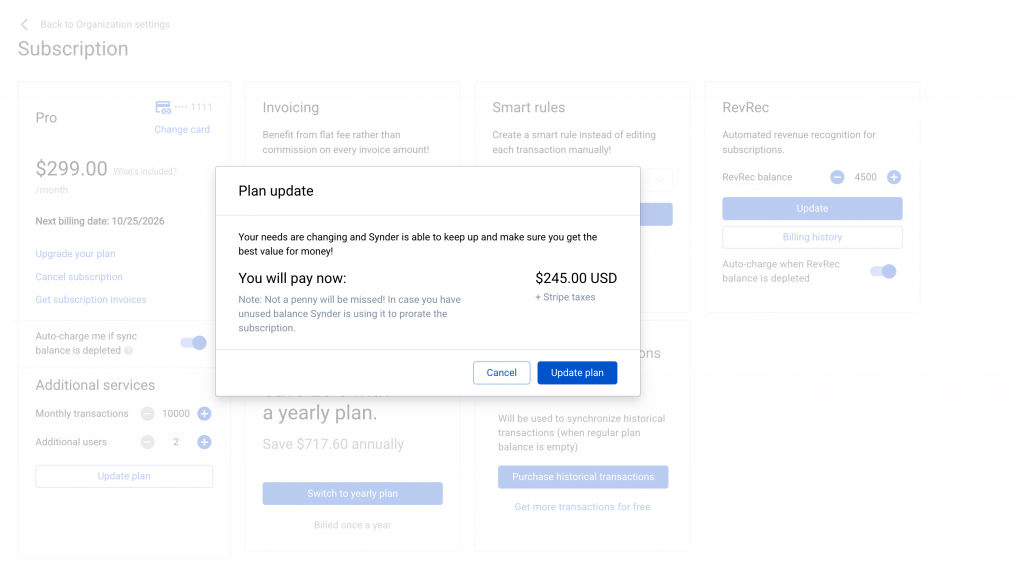
You do not need to calculate anything yourself. When you open the Manage Subscription page, Synder shows the exact pack sizes available to you and the precise monthly price for each — you just pick the one that fits your volume.
How to manage your add-on pack
You adjust your add-on pack yourself using the + / − control on the Manage Subscription page.
The pack cannot be set below the number of credits your plan already includes, and the maximum you can select is 200,000 credits per month.
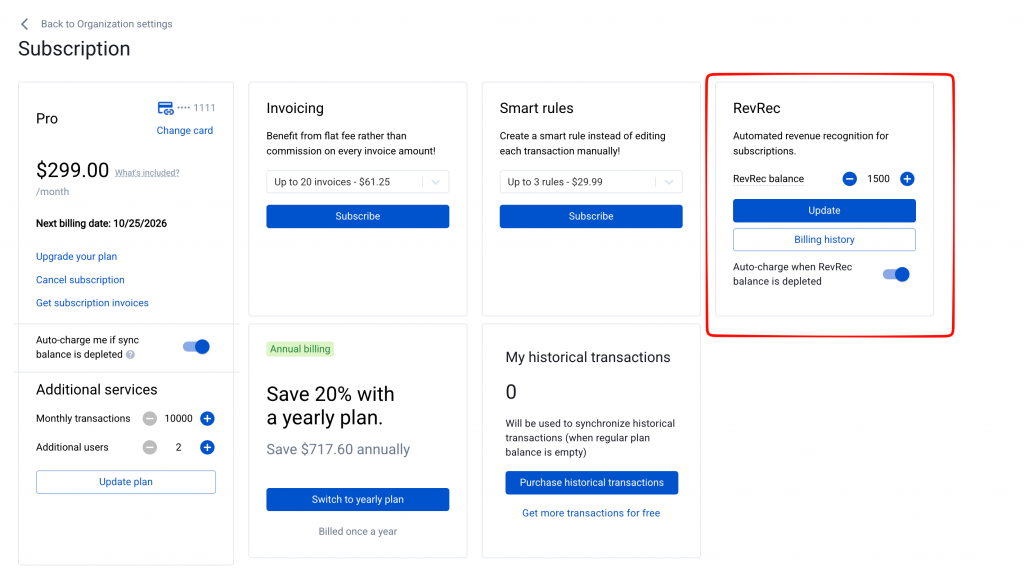
Example: you are on Pro (1,000 included), you already used your entire balance and have 150 extra subscription events to sync for this month. You are 150 over your limit, so you add the smallest pack (500 balance) and pay $35/month extra.
Currency and billing cycle
Your add-on pack is billed in the same currency and on the same cycle as your main Synder plan. On a monthly plan, the pack is charged monthly. On a yearly plan, the per-subscription price shown in-app is the annual rate divided by 12, so the figure you see stays comparable to the monthly view.
When do RevRec credits reset?
Credits reset every month on your credit renewal date — the same day of the month you originally subscribed to Synder (your anniversary day).
This applies regardless of whether you are on a monthly or yearly Synder plan. Even on a yearly plan, RevRec credits reset every month on that anniversary day.
Example: subscribed on March 15 → credits reset on April 15, May 15, June 15, and so on.
Unused credits do not carry over. If you end a period with credits remaining, they reset to your plan cap — they do not accumulate. However, if your balance went negative (you processed more subscriptions than your cap), that deficit does carry forward into the next period.
Why does your balance go negative?
Your balance goes negative when your active subscription count exceeds your credit cap during a month. RevRec does not pause — it keeps processing all your subscriptions normally.
Think of it like an overdraft: RevRec continues running, but the system registers that you have used more credits than your current cap covers. This is resolved at your next renewal date.
What happens at renewal when your balance is negative?
When your credit renewal date arrives and your balance is negative, Synder automatically upgrades your add-on pack to one that covers your actual usage. Here is how it works:
- Your active subscriptions exceed your credit cap → balance goes negative, RevRec keeps running.
- At your next renewal date, if the balance is still negative, Synder automatically upgrades your pack to cover your actual usage.
- You receive a Stripe charge for the new pack, and your balance resets to the new cap.
Note on timing: the pack adjustment fires at your renewal date — not mid-month. If your balance goes negative on the 10th, RevRec keeps running until your renewal date, when the upgrade is applied.
Questions about auto-upgrades?
Auto-upgrade is there to make sure your revenue keeps being recognized on time, without any interruption to RevRec when your usage grows. If you have questions about how auto-upgrades work on your RevRec plan, reach out to our team and we will be happy to walk you through it.
Where to check your credit balance
Your current credit balance is shown on the RevRec subscriptions page inside Synder. This is the single source of truth for how many credits you have remaining in the current period.
Historical data and when billing starts
When you first enable RevRec, two dates are set:
- Enabled date — the day your Synder specialist activated RevRec for your account.
- Counting-start date (shown in Synder as Usage counts from) — the first day of the calendar month after the enabled date. This is the date RevRec starts deducting credits from your balance. Nothing is deducted before it.
Example: RevRec enabled on August 25 → Usage counts from September 1. From September 1 onward, your active subscriptions consume credits each month; activity before that date never touches your balance.
Both dates are visible on your RevRec settings page inside Synder.
What about historical data?
Most customers import historical subscription data when they first enable RevRec — months or years of past revenue recognition. Because this data is attributed to months before your counting-start date, none of it consumes credits from your balance.
Historical data is billed separately as a one-time charge — not through your monthly credit balance. Your Synder specialist handles this before enabling RevRec for your account. The charge is based on your active subscription count at the time of enablement and the number of months being imported:
| Active subscriptions | Price per historical month |
| Under 500 | $49 |
| 500 – 2,000 | $99 |
| 2,000 – 10,000 | $199 |
| 10,000+ | $399 |
A volume discount applies to the total: 10% off for 12–23 months imported, 20% off for 24 months or more.
Your Synder specialist will confirm the exact amount before any charge is made.
FAQ
Does RevRec billing affect my regular Synder sync credits?
No. RevRec credits and Synder sync credits are completely separate balances. Using RevRec does not consume your sync credits, and vice versa.
I have 950 active subscriptions on Pro. Do I pay anything extra?
No. Pro includes 1,000 credits per month. 950 active subscriptions = 950 credits used, which is within your limit. No extra charge.
My subscription count jumped this month. Will I be charged immediately?
Not immediately. Your balance will go negative if you exceed your cap, but RevRec keeps running and the pack adjustment happens at your next renewal date — not mid-month.
Why didn’t my unused credits carry over to next month?
Credits reset to your plan cap at renewal — they don’t accumulate. If you consistently have leftover credits, you may be on a larger pack than you need and could consider downsizing.
What if my active subscription count drops?
You can downgrade to a smaller add-on pack on the Manage Subscription page, the same way you manage your Synder sync volume packages.
I’m on a yearly Synder plan. When do my RevRec credits reset?
Monthly — on the same day of the month you originally subscribed. Even on a yearly plan, RevRec credits refresh every month, not once a year.
