

If your business participates in the eBay Seller Capital financing program, Synder handles the loan repayment flow automatically. When eBay deducts a loan repayment from your payout, Synder syncs it as an expense.
Synder creates the following transaction type from eBay Seller Capital activity:
- Loan repayment — a repayment deducted from your payout → synced as an expense
To make sure these transactions land in the right account in your books, follow the steps below.
Step 1: Set up the Lending liability account in Fees settings
Synder has a dedicated Lending liability field in your eBay integration settings. Set it once, and Synder will automatically route all Loan repayment transactions to that account.
- Go to Synder → Settings → select your eBay integration.
- In the left menu, click the Fees tab.
- Find the Lending liability field.
- Select the account where Synder should post lending transactions — typically a Loan Payable or Other Current Liability account.
- Click Update.
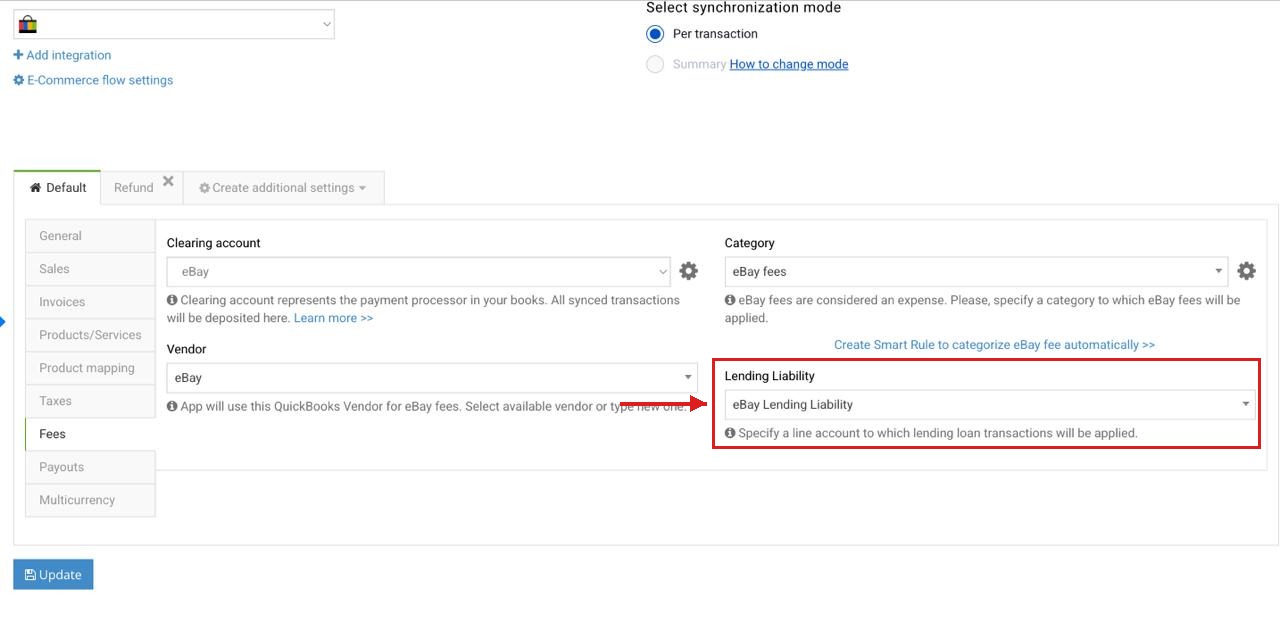
Step 2: Record the initial loan in your books manually
When eBay deposits the loan into your account, Synder does not create a separate transaction for it. You need to manually record the initial loan amount in your accounting platform. Use the same account you set up in Step 1. That way, as Synder syncs each repayment, your outstanding loan balance decreases automatically — making it easy to track how much you have left to pay off.
Step 3: Sync Loan repayment transactions
Once your settings are in place, sync your eBay Seller Capital transactions:
- Go to Platform transactions and look for the Loan repayment transaction type.
Note: If you don’t see them, use the manual import option in the top-right corner of the Platform Transactions tab. - Select the transactions and sync them to the books: Actions → Sync.
- Check that the created expenses are correctly categorized in the books.
Summary Sync users
On Summary Sync, eBay Seller Capital loan repayments appear as a separate Loans group in your daily summary mapping table. Map this group to the appropriate liability account — the same account where you recorded your initial loan. This keeps your outstanding balance accurate as Synder syncs each repayment.
That’s it! Now you know how to handle eBay Seller Capital loan repayments in Synder.
Reach out to the Synder Team via online support chat, phone, or email with any questions you have – we’re always happy to help you!
